


Chapter 12:
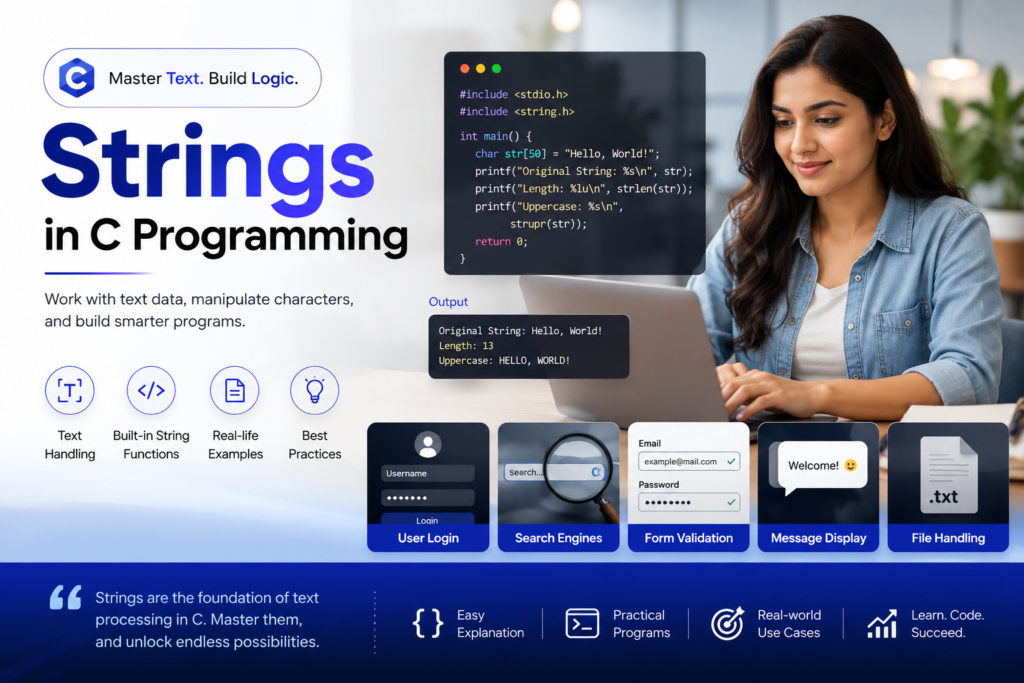
Strings
Author: Er. Mujtaba Ansari
Imagine a program that needs to store your name, email address, phone number, or even a complete message. How would you handle all this text data in C? This is where Strings come into play.
💡 Real-Life Benefits of Strings in C
Strings are an essential part of programming because they allow programs to store, process, compare, search, and manipulate text-based data.
- 🔐 Login Systems — Handle usernames, passwords, and authentication-related text.
- 👤 User Information — Store names, usernames, addresses, and other personal details.
- 💬 Chat & Messaging Apps — Store and process messages and conversations.
- 🛒 E-Commerce Applications — Manage product names, categories, customer details, and search queries.
- 📱 Contact Applications — Manage contact names, phone numbers, and other text information.
- 📧 Email Applications — Process email addresses, subjects, and message content.
- 🌐Web & Software Applications — Handle user input, commands, labels, and text data.
- 📄 File Handling — Read, write, and process text stored in files.
- 🔎 Search Systems — Find specific words, characters, or patterns within text.
📚 C Programming Complete Course Structure
🧑💻 Chapter 1: C Programming Fundamentals
📜 Chapter 2: History and Evolution of C Language
⚙️ Chapter 3: Installing a C Compiler
💻 Chapter 4: Writing Your First C Program
🏗️ Chapter 5: Structure of a C Program
📦 Chapter 6: Variables and Data Types
🔢 Chapter 7: Operators in C
⌨️ Chapter 8: Input and Output Functions
🔀 Chapter 9: Decision Making and Branching – Conditional Statements
🔄 Chapter 10: Decision Making and Loops in C Programming
📊 Chapter 11: Arrays
🔤 Chapter 12: Strings – Current Chapter
🛠️ Chapter 13: Functions
👉 Chapter 14: Pointers
🏛️ Chapter 15: Structures and Unions
📁 Chapter 16: File Handling
Strings in C Programming: Declaration, Initialization, Input, Functions & Examples
Introduction:
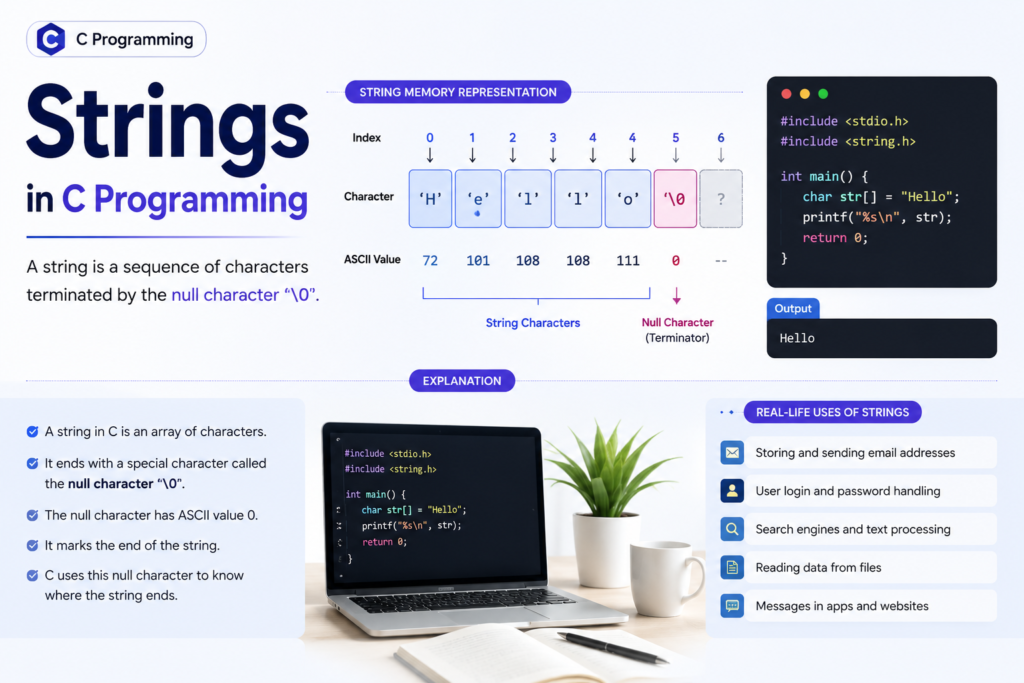
In C programming, a string is a sequence of characters used to represent text, such as a name, sentence, message, or word.
Unlike some modern programming languages, C does not have a separate built-in string data type. Instead, strings are stored as arrays of characters (char) and are terminated by a special null character '\0'.
For example:
char name[] = "Mujtaba";Internally, C stores this string approximately as:
M u j t a b a \0The '\0' tells C where the string ends.
What is a String in C?
A string is a sequence or collection of characters terminated by the null character '\0'.
Example
char city[] = "Delhi";It is stored as:
'D' 'e' 'l' 'h' 'i' '\0'Therefore, although "Delhi" contains 5 visible characters, the array requires 6 characters of storage because of the terminating '\0'.
For example:
char c[] = "C String";The string looks like this in memory:
C S t r i n g \0The '\0' marks the end of the string.
It is important to understand that '\0' is not the same as the character '0'.
'\0'→ Null character'0'→ Character zero
When we initialize a character array using a string literal enclosed in double quotation marks, the compiler automatically adds the null character at the end.
For example:
char city[] = "Delhi";is stored conceptually as:
D e l h i \0Therefore, the array requires 6 characters of storage, not 5.
String Declaration in C
A string is generally declared using a char array.
Syntax
char string_name[size];Example
char name[20];This creates a character array capable of storing a string of up to 19 characters plus '\0'.
Another example:
char message[100];Character Array and String
A string in C is generally stored inside a character array.
A character array is an array whose elements are of type char.
For example:
char city[10];This creates a character array capable of storing up to 9 characters as a C string, because one position is needed for '\0'.
Basically,
city[0] city[1] city[2] city[3] city[4] ... city[9]Each position stores one character.
For example:
D e l h i \0The remaining positions are unused for the current string.
Character Array vs String
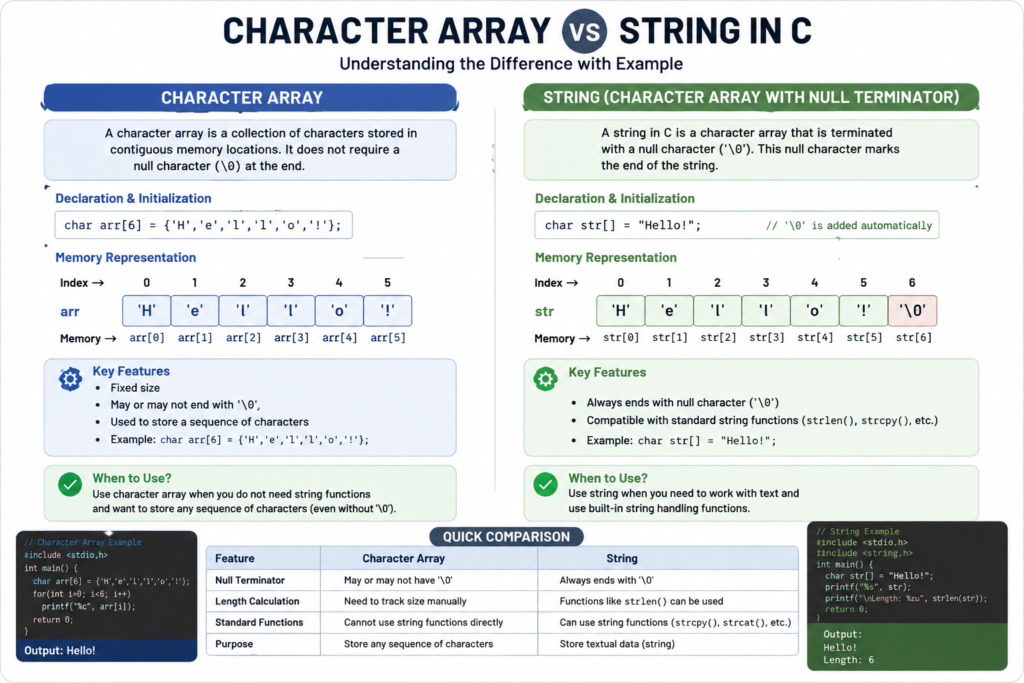
A character array and a string are closely related, but they are not exactly the same.
A character array is simply an array of characters.
A C string is a character sequence that ends with the null character '\0'.
For example:
char a[4] = {'C', 'o', 'd', 'e'};This is a character array, but it is not a valid C string, because there is no space for '\0'.
A proper string would be:
char a[5] = {'C', 'o', 'd', 'e', '\0'};Declaration of a Character Array
The basic syntax for declaring a character array is:
char array_name[size];Example
char city[10];Here:
char→ Data typecity→ Name of the character array10→ Size of the array
The array contains indexes from:
city[0] to city[9]Remember that array indexing starts from 0 in C.
Initializing Strings in C
There are several ways to initialize a string.
Method 1: Using a String Literal
char c[] = "abcd";The compiler automatically adds '\0'.
Conceptually:
a b c d \0Therefore, the array size becomes 5.
Method 2: Specifying the Array Size
char c[50] = "abcd";The array has 50 characters of storage, but the actual string contains only:
a b c d \0The remaining elements are initialized to zero.
Method 3: Initializing Character by Character
char c[] = {'a', 'b', 'c', 'd', '\0'};Here we explicitly add the null character.
Method 4: Specifying Size with Characters
char c[5] = {'a', 'b', 'c', 'd', '\0'};This is also a valid string.
Important Point for YOU
If you initialize a string using a string literal:
char c[] = "abcd";you do not need to manually write '\0'.
The compiler adds it automatically.
Compile-Time Initialization of a Character Array
When we assign the initial value to a character array at the time of declaration, it is called compile-time initialization.
For example:
char city[10] = {'D', 'e', 'l', 'h', 'i' '\0'};We can also write:
char city[10] = "Delhi";The second method is simpler and commonly used.
Example : Write a C program to initialize and display a string.
#include <stdio.h>

int main(void)
{
    char city[10] = "Delhi";

    printf("City: %s\n", city);

    return 0;
}
Output
City: DelhiRun-Time Initialization of a String
Sometimes we do not know the string when writing the program.
For example, a program may ask the user to enter their name.
In that case, the string can be entered at run time.
Example:
char name[50];

printf("Enter your name: ");
scanf("%49s", name);

printf("Name: %s\n", name);
Why don’t we use & with a string in scanf()?
For normal variables, we commonly use:
scanf("%d", &age);But for a character array:
scanf("%49s", name);we don’t use &.
The name of an array already represents the address of its first element in this context.
Important Limitation of %s
scanf("%s", name) reads characters only until whitespace.
For example, if the user enters:
Mujtaba Ansarionly:
Mujtabawill be read.
For strings containing spaces, use fgets().
Using fgets() to Read a Complete String
The old function gets() was commonly used in older C notes:
gets(name);However, gets() is unsafe and was removed from the C standard because it can cause buffer overflow.
Therefore, modern C programs should use:
fgets()Example: Write a C program to input and display a string using fgets().
#include <stdio.h>

int main(void)
{
    char name[50];

    printf("Enter your name: ");
    fgets(name, sizeof(name), stdin);

    printf("Name: %s", name);

    return 0;
}
fgets() is safer because it knows the size of the character array.
Accessing Individual Characters of a String
Because a string is stored in a character array, we can access individual characters using array indexes.
For example:
char city[] = "Delhi";The characters are stored as:
D   e   l   h   i   \0
0   1   2   3   4   5
Therefore:
printf("%c", city[0]);Output:
DSimilarly:
printf("%c", city[4]);Output:
iWe can also access characters using a loop:
#include <stdio.h>

int main(void)
{
    char city[] = "Delhi";
    int i;

    for (i = 0; city[i] != '\0'; i++)
    {
        printf("%c\n", city[i]);
    }

    return 0;
}
Output
D
e
l
h
i
The condition:
city[i] != '\0'means that the loop continues until the end of the string.
String Functions in C
C provides several useful functions for working with strings.
Most commonly used string functions are available through:
#include <string.h>Some important functions are:
| Function | Purpose |
|---|---|
strcat() | Concatenates two strings |
strcpy() | Copies one string into another |
strlen() | Finds the length of a string |
strcmp() | Compares two strings |
strcat() – Concatenating Two Strings
The strcat() function is used to concatenate, or join, two strings.
In simple words, it appends one string to the end of another string.
Syntax
strcat(destination, source);For example:
strcat(x, y);Here:
x→ Destination stringy→ Source string
If:
x = "Hello "
y = "World"after:
strcat(x, y);x becomes:
Hello WorldNote:
The destination array must have enough space to store the combined string and the terminating '\0'.
Practice Program : Concatenate Two Strings
#include <stdio.h>
#include <string.h>

int main(void)
{
    char x[30];
    char y[20];

    printf("Enter first string: ");
    fgets(x, sizeof(x), stdin);

    printf("Enter second string: ");
    fgets(y, sizeof(y), stdin);

    strcat(x, y);

    printf("\nAfter concatenation: %s", x);

    return 0;
}
Output
Enter first string: Hello
Enter second string: World

After concatenation: Hello
World
Note
Because fgets() can store the newline character when there is room, real programs often remove that newline before using functions such as strcat().
A simple helper can be used:
x[strcspn(x, "\n")] = '\0';
y[strcspn(y, "\n")] = '\0';
For example: Write a C program to concatenate two strings using strcat().
#include <stdio.h>
#include <string.h>

int main(void)
{
    char x[30];
    char y[20];

    printf("Enter first string: ");
    fgets(x, sizeof(x), stdin);

    printf("Enter second string: ");
    fgets(y, sizeof(y), stdin);

    x[strcspn(x, "\n")] = '\0';
    y[strcspn(y, "\n")] = '\0';

    strcat(x, y);

    printf("After concatenation: %s\n", x);

    return 0;
}
Output:
Enter first string: Hello
Enter second string: World
After concatenation: HelloWorld
strcpy() – Copying a String
The strcpy() function is used to copy one string into another string.
Syntax
strcpy(destination, source);For example:
strcpy(y, x);This copies the contents of x into y.
Suppose:
x = "New"
y = "Mumbai"
After:
strcpy(y, x);we get:
y = "New"The original contents of y are replaced.
Important Point for YOU
The destination array must be large enough to hold the source string, including the terminating '\0'.
Practice Program: Copy One String into Another
#include <stdio.h>
#include <string.h>

int main(void)
{
    char x[20];
    char y[20];

    printf("Enter a string: ");
    fgets(x, sizeof(x), stdin);

    x[strcspn(x, "\n")] = '\0';

    printf("Before copying:\n");
    printf("String 1 = %s\n", x);
    printf("String 2 = %s\n", y);

    strcpy(y, x);

    printf("\nAfter copying:\n");
    printf("String 1 = %s\n", x);
    printf("String 2 = %s\n", y);

    return 0;
}
Output
Enter a string: New

Before copying:
String 1 = New
String 2 =

After copying:
String 1 = New
String 2 = New
Accessing Characters Using Indexes
We can access individual characters of a string using their indexes.
For example:
char x[] = "Mumbai";The indexes are:
M   u   m   b   a   i   \0
0   1   2   3   4   5    6
Therefore:
printf("%c", x[4]);Output:
aAnd:
printf("%c", x[5]);Output:
iRemember:
x[4]means the character at index 4, not the fifth character by counting from 1.
strlen() – Finding the Length of a String
The strlen() function is used to find the length of a string.
Syntax
strlen(string);Example:
int length;

length = strlen("Future");
The string is:
F   u   t   u   r   e   \0
0   1   2   3   4   5    6
The length is:
6The null character '\0' is not included in the length returned by strlen().
Example: Write a C program to find the length of a string using strlen().
#include <stdio.h>
#include <string.h>

int main(void)
{
    char x[] = "Future";

    printf("Length = %zu\n", strlen(x));

    return 0;
}
Output
Length = 6 strcmp() – Comparing Two Strings
The strcmp() function is used to compare two strings.
Syntax
strcmp(string1, string2);The function returns:
0→ Both strings are equal- A value less than
0→ First string is smaller according to the comparison - A value greater than
0→ First string is greater according to the comparison
For checking equality, the most important condition is:
strcmp(x, y) == 0Example: Write a C program to compare two strings using strcmp().
int result;

result = strcmp(x, y);

if (result == 0)
{
    printf("Strings are equal");
}
else
{
    printf("Strings are not equal");
}
Output Explanation:
strcmp() compares the two strings. If the strings are the same, it returns 0 and displays “Strings are equal”. Otherwise, it displays “Strings are not equal”.
Important Correction
It is better not to describe the return value as specifically being the ASCII difference of the first mismatching characters. The C standard guarantees only whether the result is less than, equal to, or greater than zero.
Practice Program: Compare Two Strings
#include <stdio.h>
#include <string.h>

int main(void)
{
    char x[50];
    char y[50];

    printf("Enter first string: ");
    fgets(x, sizeof(x), stdin);

    printf("Enter second string: ");
    fgets(y, sizeof(y), stdin);

    x[strcspn(x, "\n")] = '\0';
    y[strcspn(y, "\n")] = '\0';

    if (strcmp(x, y) == 0)
    {
        printf("Strings are equal.\n");
    }
    else
    {
        printf("Strings are not equal.\n");
    }

    return 0;
}
Reversing a String
Reversing a string means arranging its characters in the opposite order.
For example:
Original:  Future
Reversed:  erutuF
We can reverse a string by using two indexes:
i→ Starts from the beginningj→ Starts from the end
For:
Futurethe indexes are:
F   u   t   u   r   e
0   1   2   3   4   5
So:
i = 0
j = 5
We swap (Exchange):
F ↔ e
u ↔ r
t ↔ u
until the two indexes meet.
Palindrome String
A palindrome is a string that reads the same forward and backward.
Examples:
madam
level
radar
For example:
Original:  madam
Reverse:   madam
Because both are the same, madam is a palindrome.
Practice Program: Reverse a String and Check for Palindrome
#include <stdio.h>
#include <string.h>

int main(void)
{
    char x[100];
    char y[100];
    char temp;
    size_t i, j, length;

    printf("Enter the string: ");
    fgets(x, sizeof(x), stdin);

    x[strcspn(x, "\n")] = '\0';

    strcpy(y, x);

    length = strlen(y);

    if (length > 0)
    {
        i = 0;
        j = length - 1;

        while (i < j)
        {
            temp = y[i];
            y[i] = y[j];
            y[j] = temp;

            i++;
            j--;
        }
    }

    printf("Original string: %s\n", x);
    printf("Reversed string: %s\n", y);

    if (strcmp(x, y) == 0)
    {
        printf("Palindrome string\n");
    }
    else
    {
        printf("Not a palindrome string\n");
    }

    return 0;
}
Example
Input:
madamOutput:
Original string: madam
Reversed string: madam
Palindrome string
For:
FutureOutput:
Original string: Future
Reversed string: erutuF
Not a palindrome string
How the Reversal Works
For a string with indexes:
0 1 2 3 4 5the two pointers move like this:
i →           ← j
0               5

  i →       ← j
  1           4

      i   j
      2   3
The swapping stops when i becomes greater than or equal to j.
Counting Uppercase Letters, Lowercase Letters and Digits
A string can contain different types of characters, such as:
- Uppercase letters:
A-Z - Lowercase letters:
a-z - Digits:
0-9
For example:
Hello123contains:
- Uppercase letters → 1
- Lowercase letters → 4
- Digits → 3
We can examine each character using a loop.
Practice Program: Count Uppercase, Lowercase and Digits
#include <stdio.h>
#include <ctype.h>

int main(void)
{
    char x[100];
    int i;
    int upper = 0;
    int lower = 0;
    int digit = 0;

    printf("Enter the string: ");
    fgets(x, sizeof(x), stdin);

    for (i = 0; x[i] != '\0'; i++)
    {
        if (isupper((unsigned char)x[i]))
        {
            upper++;
        }
        else if (islower((unsigned char)x[i]))
        {
            lower++;
        }
        else if (isdigit((unsigned char)x[i]))
        {
            digit++;
        }
    }

    printf("Total uppercase letters = %d\n", upper);
    printf("Total lowercase letters = %d\n", lower);
    printf("Total digits = %d\n", digit);

    return 0;
}
Example
Input:
Hello123WORLDOutput:
Total uppercase letters = 6
Total lowercase letters = 4
Total digits = 3
Why Use ctype.h?
The <ctype.h> header provides useful functions such as:
isupper()
islower()
isdigit()
These functions make character checking easier and clearer.
Converting Uppercase to Lowercase and Lowercase to Uppercase
We can also convert characters between uppercase and lowercase.
For example:
Hello Worldcan become:
hELLO wORLDWe can use functions from <ctype.h>:
toupper()
tolower()
This is safer and clearer than manually adding or subtracting 32 from ASCII values.
Practice Program: Convert Uppercase to Lowercase and Lowercase to Uppercase
#include <stdio.h>
#include <ctype.h>

int main(void)
{
    char x[100];
    int i;

    printf("Enter the string: ");
    fgets(x, sizeof(x), stdin);

    printf("Original string: %s", x);

    for (i = 0; x[i] != '\0'; i++)
    {
        if (isupper((unsigned char)x[i]))
        {
            x[i] = (char)tolower((unsigned char)x[i]);
        }
        else if (islower((unsigned char)x[i]))
        {
            x[i] = (char)toupper((unsigned char)x[i]);
        }
    }

    printf("Modified string: %s", x);

    return 0;
}
Output
Enter the string: Hello World
Original string: Hello World
Modified string: hELLO wORLD
Counting Vowels in a String
The vowels in the English alphabet are:
A, E, I, O, Uand their lowercase forms:
a, e, i, o, uWe can check every character in a string and count how many vowels it contains.
A switch statement is a good way to perform this task.
Practice Program: Count Total Vowels in a String
#include <stdio.h>

int main(void)
{
    char x[100];
    int i;
    int vowels = 0;

    printf("Enter the string: ");
    fgets(x, sizeof(x), stdin);

    for (i = 0; x[i] != '\0'; i++)
    {
        switch (x[i])
        {
            case 'A':
            case 'a':
            case 'E':
            case 'e':
            case 'I':
            case 'i':
            case 'O':
            case 'o':
            case 'U':
            case 'u':
                vowels++;
                break;
        }
    }

    printf("Total vowels present = %d\n", vowels);

    return 0;
}
Output
Enter the string: Programming
Total vowels present = 3
Common Mistakes While Working with Strings
Beginners often make a few common mistakes when working with strings in C.
Mistake 1: Forgetting '\0'
A C string must end with a null character.
Incorrect:
char x[4] = {'C', 'o', 'd', 'e'};Correct:
char x[5] = {'C', 'o', 'd', 'e', '\0'};Mistake 2: Using & with a Character Array in scanf()
Incorrect:
scanf("%s", &name);Correct:
scanf("%49s", name);Mistake 3: Using gets()
Avoid:
gets(name);gets() is unsafe and has been removed from modern C standards.
Use:
fgets(name, sizeof(name), stdin);Mistake 4: Comparing Strings Using ==
This is not the correct way to compare the contents of two C strings:
if (x == y)Use:
if (strcmp(x, y) == 0)Mistake 5: Insufficient Array Size
Suppose:
char name[5] = "Mujtaba";This is not large enough.
A string requires space for all its characters plus one extra position for '\0'.
Character Array vs String – Quick Difference
| Character Array | String |
|---|---|
| Array of characters | Sequence of characters ending with '\0' |
May or may not contain '\0' | Must contain '\0' |
| Can store individual characters | Used to represent text |
Example: {'A','B','C'} | Example: "ABC" |
Important String Functions – For Quick Revision
| Function | Purpose | Example |
|---|---|---|
strcat() | Joins two strings | strcat(x, y) |
strcpy() | Copies one string to another | strcpy(y, x) |
strlen() | Finds string length | strlen(x) |
strcmp() | Compares two strings | strcmp(x, y) |
Remember to include:
#include <string.h>when using these standard string functions.
Real-Life Applications of Strings
Strings are used almost everywhere in software applications.
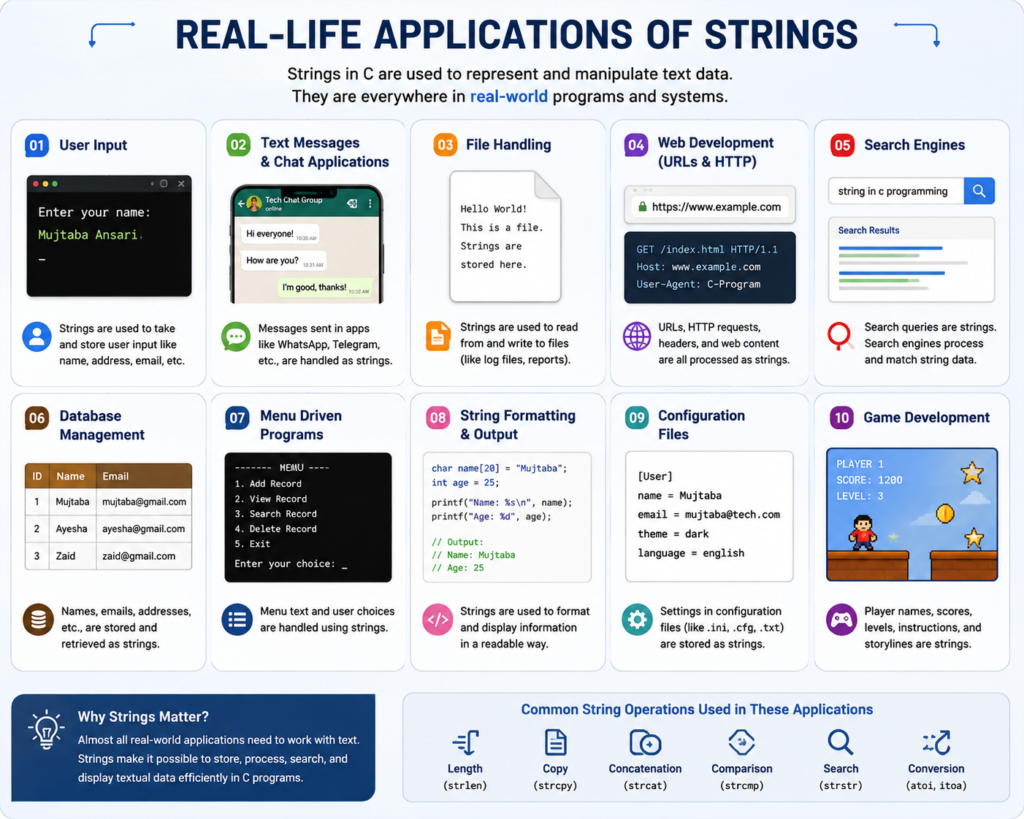
1. Login Systems
Usernames and other text-based information are handled using strings.
Username: admin1232. Contact Applications
Names, addresses, and other text information are stored as strings.
3. Messaging Applications
Messages such as:
Hello, how are you?are strings.
4. Search Features
When you search for a product or article, the search query is usually text data.
5. E-Commerce Applications
Product names, categories, descriptions, and search keywords involve strings.
6. File Processing
Text files contain characters and strings that programs can read and process.
7. Password and Authentication Systems
Text-based credentials and identifiers are processed using character data.
8. User Input
Names, cities, commands, messages, and many other forms of user input are represented as strings.
Very Important Key Points to Remember
Let’s quickly revise the most important concepts:
- A string in C is a sequence of characters ending with
'\0'. - Strings are stored using character arrays.
- Array indexing starts from
0. - A string requires one extra character of storage for
'\0'. - The null character marks the end of a C string.
- String literals are written inside double quotation marks.
- Individual characters are written inside single quotation marks.
strlen()returns the number of characters before'\0'.strcat()joins one string to another.-
strcpy()copies one string into another. strcmp()compares two strings.fgets()is the safer modern choice for reading a line of text.gets()should not be used.<string.h>provides many standard string functions.<ctype.h>provides useful functions for character classification and conversion.
Practice Programs Covered Complete Strings Chapter
To strengthen your understanding of Strings in C Programming, practice these programs yourself:
Basic String Programs
- Declare and initialize a character array.
- Read and display a string.
- Display every character of a string.
- Find the length of a string.
String Function Programs
- Concatenate two strings using
strcat(). - Copy one string into another using
strcpy(). - Compare two strings using
strcmp().
String Logic Programs
- Reverse a string.
- Check whether a string is a palindrome.
- Count uppercase letters.
- Count lowercase letters.
- Count digits.
- Convert uppercase letters to lowercase and lowercase letters to uppercase.
- Count the total vowels in a string.
These programs will help you move from basic string concepts to practical problem-solving.
Frequently Asked Questions (FAQs)
1. What is a string in C programming?
A string in C is a sequence of characters stored in a character array and terminated with a null character ('\0').
2. How do you declare a string in C?
A string can be declared using a character array, for example:
char name[50];3. How do you initialize a string in C?
You can initialize a string like this:
char name[] = "Future";4. What is the use of the null character ('\0') in C strings?
The null character marks the end of a string. C uses it to know where the string ends.
5. How do you take a string as input in C?
You can use fgets() to safely read a string:
fgets(name, sizeof(name), stdin);6. What is the use of strlen() in C?
strlen() is used to find the length of a string, excluding the null character ('\0').
7. What is the use of strcpy() in C?
strcpy() copies the contents of one string into another string.
8. What is the use of strcat() in C?
strcat() joins or concatenates two strings into a single string.
9. What is the use of strcmp() in C?
strcmp() compares two strings. It returns 0 when both strings are equal.
10. What is the difference between a character array and a string in C?
A character array can store characters, while a C string is a character array that ends with a null character ('\0').
11. Does C have a string data type?
No. C uses character arrays to represent strings.
12. What is '\0' in C?
'\0' is the null character that marks the end of a C string.
13. How do you declare a string in C?
char name[50];14. How do you initialize a string?
char name[] = "Mujtaba";15. Which function is used to find string length?
strlen()16. Which function is used to compare strings?
strcmp()17. Which function is used to copy strings?
strcpy()18. Which function is used to join strings?
strcat()19. How can you input a string containing spaces?
Use:
fgets()20. What is the difference between scanf() and fgets() for string input in C?
scanf() typically reads a string only up to the first whitespace, while fgets() can read an entire line, including spaces, and allows you to limit the number of characters read.
⭐ Most Important for Exams & Interviews
- What is a string in C?
- How is a string different from a character array in C?
- What is the purpose of the null character
'\0'? - How do you declare and initialize a string in C?
- How are strings stored in memory in C?
- How do you take string input using
scanf()? - What is the difference between
scanf()andfgets()? - How do you print a string in C?
- What is the use of the
%sformat specifier? - What is the
strlen()function and how does it work? - What is the difference between
strlen()andsizeof()for strings? - What is the use of the
strcpy()function? - What is the use of the
strcat()function? - How does the
strcmp()function compare two strings? - Why can’t strings be compared using
==in C? - How do you reverse a string in C?
- How do you check whether a string is a palindrome?
- How do you count vowels, consonants, digits, and spaces in a string?
- What is an array of strings in C?
- What are the commonly used string-handling functions in C?

Mujtaba Ansari is a Software Engineer, Founder & CEO of The Tech Earth. He writes about technology, AI, software, cybersecurity, blogging, Health tech, Agri Tech and digital trends to help readers stay updated with the latest innovations.
Was this article helpful?
Your feedback helps us improve The Tech Earth.
Helpful: 0 Not helpful: 0