

Chapter 11:
Arrays
Author: Er. Mujtaba Ansari
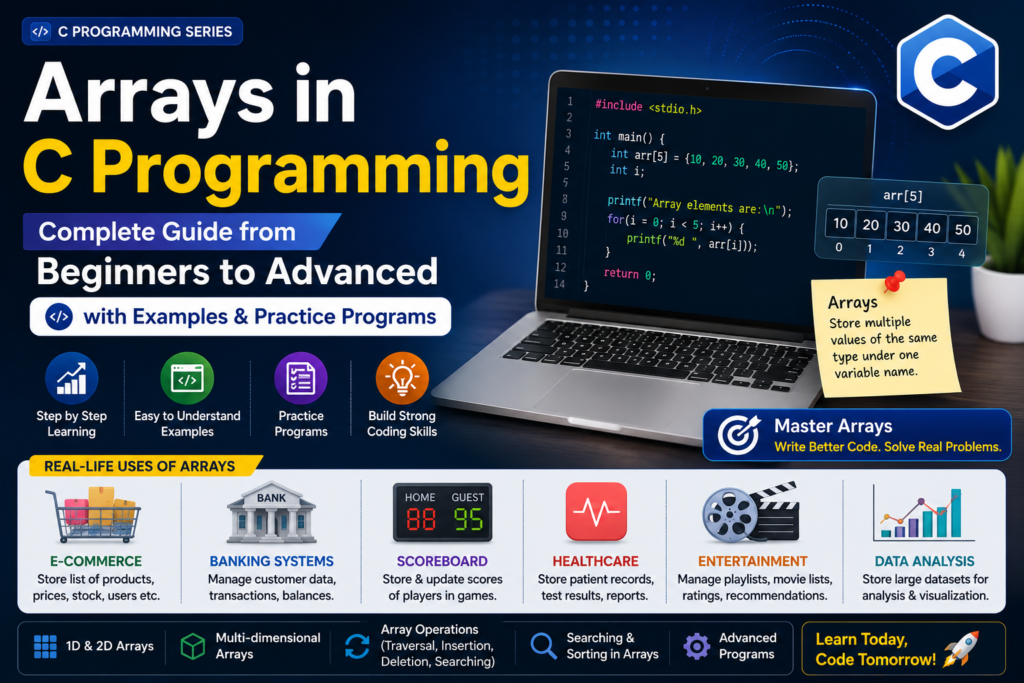
Arrays in C Programming allow you to store and manage multiple values under a single name, making data handling easier and more organized. They are useful for reducing repetitive code, performing calculations efficiently, and processing large amounts of data.
In real life, Arrays are commonly used to store student marks, employee salaries, product prices, customer data, sales records, and other large datasets. In this chapter, you will learn Arrays from Beginner to Advanced level with practical examples and practice programs.
📚 C Programming Complete Course Structure

🧑💻 Chapter 1: C Programming Fundamentals
📜 Chapter 2: History and Evolution of C Language
⚙️ Chapter 3: Installing a C Compiler
💻 Chapter 4: Writing Your First C Program
🏗️ Chapter 5: Structure of a C Program
📦 Chapter 6: Variables and Data Types
🔢 Chapter 7: Operators in C
⌨️ Chapter 8: Input and Output Functions
🔀 Chapter 9: Decision Making and Branching – Conditional Statements
🔄 Chapter 10: Decision Making and Loops in C Programming
📊 Chapter 11: Arrays – Current Chapter
🔤 Chapter 12: Strings
🛠️ Chapter 13: Functions
👉 Chapter 14: Pointers
🏛️ Chapter 15: Structures and Unions
📁 Chapter 16: File Handling


Arrays in C Programming: Complete Guide from Beginners to Advanced
Arrays are extremely useful when working with student marks, product prices, employee salaries, customer records, sales data, scores, and large datasets. They also form an important foundation for learning strings, matrices, searching, sorting, data structures, and algorithms.
What Is an Array in C?
An array is a collection of multiple values of the same data type stored under one variable name.
For example, suppose you want to store the marks of five students.
Without an array, you might write:
int mark1 = 85;
int mark2 = 78;
int mark3 = 92;
int mark4 = 88;
int mark5 = 76;
This works, but it becomes difficult to manage when the number of values becomes large.
With an array, the same data can be stored using one variable:
int marks[5] = {85, 78, 92, 88, 76};Now all five values are stored in the marks array.
Another Simple Definition:
- An array is a derived data type in C.
- An array is a collection of elements of the same data type stored under a single name.
- It is a homogeneous collection, which means all elements in an array have the same data type.
- Array elements are stored in contiguous memory locations.
- Each element can be accessed using its index number.
Example:
int numbers[5] = {10, 20, 30, 40, 50};Here, numbers is an integer array that can store 5 integer values.
Why Do We Need Arrays?
Imagine a school has the marks of 1,000 students.
Creating 1,000 separate variables would be difficult:
int mark1;
int mark2;
int mark3;
...
int mark1000;
Using an array, we can simply write:
int marks[1000];This makes the program much shorter and easier to manage.
Main Benefits of Arrays
- Store multiple values using one variable name.
- Reduce repetitive code.
- Make data easier to organize.
- Make it easier to process large amounts of data.
- Work efficiently with loops.
- Useful for searching and sorting.
- Help in creating matrices and tables.
- Provide the foundation for many advanced data structures.
Real-Life Uses of Arrays
Arrays are not limited to textbook programs. They are used in many real-world applications.
E-Commerce
Arrays can be used to store:
- Product prices
- Product IDs
- Stock quantities
- Product ratings
- Customer-related data
Banking Systems
Arrays can help manage:
- Account balances
- Transaction records
- Customer information
- Account numbers
Games
Arrays can store:
- Player scores
- Game levels
- High scores
- Positions of game objects
Healthcare
Arrays can be used for:
- Test results
- Numerical patient data
- Measurements
- Medical datasets
Data Analysis
Large collections of numerical data can be stored and processed using arrays.
In short:
Real-World Data
      ↓
   Array
      ↓
Store → Process → Search → Sort → Analyze
How Does an Array Work?
Suppose we create:
int marks[5] = {87, 78, 91, 80, 76};The array contains five elements.
An array uses an index to identify each element.
In C, array indexing starts from 0, not 1.
Array:     marks

Index:       0     1     2     3     4
             ↓     ↓     ↓     ↓     ↓
Value:      87    78    91    80    76
Therefore:
marks[0] = 87
marks[1] = 78
marks[2] = 91
marks[3] = 80
marks[4] = 76
Important Point for YOU:
For an array of size 5:
int marks[5];valid indexes are:
0 1 2 3 4The last index is:
size - 1So:
5 - 1 = 4Array Indexing in C
Indexing is one of the most important concepts in arrays.
Consider:
int numbers[5] = {10, 20, 30, 40, 50};You can access individual values using:
printf("%d", numbers[0]);Output:
10Similarly:
printf("%d", numbers[3]);Output:
40Always Remember:
First element → index 0
Second element → index 1
Third element → index 2
...
Last element → index size - 1
Declaration of an Array
The basic syntax for declaring an array is:
data_type array_name[size];Example
int marks[5];Here:
int→ data typemarks→ array name5→ number of elements
Another example:
float prices[10];This creates an array capable of storing 10 float values.
Initialization of an Array
We can assign values to an array when declaring it.
Example
int numbers[5] = {10, 20, 30, 40, 50};The values are stored as:
Index       Value

  0          10
  1          20
  2          30
  3          40
  4          50
We can also allow the compiler to determine the size:
int numbers[] = {10, 20, 30, 40, 50};Here, the compiler determines that the array contains five elements.
Accessing Array Elements
Array elements are accessed using:
array_name[index]Example:
int numbers[5] = {10, 20, 30, 40, 50};

printf("%d", numbers[2]);
Output:
30Because:
numbers[2] → 30Changing an Array Element
Array elements can also be modified.
int numbers[5] = {10, 20, 30, 40, 50};

numbers[2] = 100;
Now the array becomes:
10 20 100 40 50Traversing an Array Using a Loop
Traversal means visiting each element of an array one by one.
A for loop is commonly used for this.
#include <stdio.h>

int main(void) {

    int numbers[5] = {10, 20, 30, 40, 50};

    for (int i = 0; i < 5; i++) {
        printf("%d ", numbers[i]);
    }

    return 0;
}
Output
10 20 30 40 50How It Works
The loop starts with:
i = 0Then:
numbers[0] → 10
numbers[1] → 20
numbers[2] → 30
numbers[3] → 40
numbers[4] → 50
This is why arrays and loops are closely connected.
A Complete Array Example
#include <stdio.h>

int main(void) {

    int arr[5] = {10, 20, 30, 40, 50};

    printf("Array elements are:\n");

    for (int i = 0; i < 5; i++) {
        printf("%d ", arr[i]);
    }

    return 0;
}
Output
Array elements are:
10 20 30 40 50
Types of Arrays in C
Arrays can be classified according to their dimensions.
The commonly used types are:
- One-Dimensional Array
- Two-Dimensional Array
- Multidimensional Array
1. One-Dimensional Array
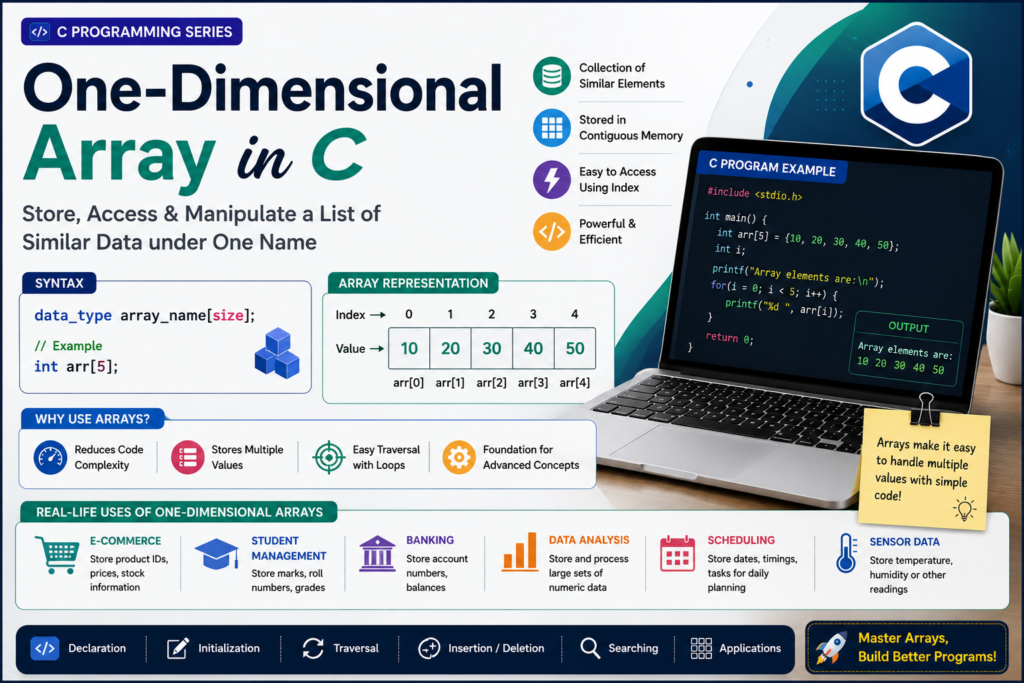
A one-dimensional array stores elements in a single sequence or row.
Example
int numbers[5] = {10, 20, 30, 40, 50};Visual representation:
        One-Dimensional Array

Index     0     1     2     3     4
          ↓     ↓     ↓     ↓     ↓
Value    10    20    30    40    50
Real-Life Example
Student marks can be stored as:
int marks[5] = {85, 78, 92, 88, 76};Program to Enter and Display Marks of 3 Subjects
Question: Write a program to enter and display the marks of a student in 3 subjects and also display the total and average marks.
#include <stdio.h>

int main(void)
{
    int M[3], i, total = 0;
    float avg;

    printf("INPUT DETAILS\n");

    for (i = 0; i < 3; i++)
    {
        printf("Enter marks in subject %d: ", i + 1);
        scanf("%d", &M[i]);
    }

    printf("\nOUTPUT DETAILS\n");

    for (i = 0; i < 3; i++)
    {
        printf("Subject [%d] = %d\n", i + 1, M[i]);
        total = total + M[i];
    }

    avg = total / 3.0f;

    printf("Total = %d\n", total);
    printf("Average = %.2f\n", avg);

    return 0;
}
Example Output:
INPUT DETAILS
Enter marks in subject 1: 80
Enter marks in subject 2: 75
Enter marks in subject 3: 90

OUTPUT DETAILS
Subject [1] = 80
Subject [2] = 75
Subject [3] = 90
Total = 245
Average = 81.67
Program to Find the Largest Element in an Array
Question: Write a program to find the largest element from the given array list.
#include <stdio.h>

int main(void)
{
    int A[20], N, i, L;

    printf("Enter the array length: ");
    scanf("%d", &N);

    printf("Enter the array elements:\n");

    for (i = 0; i < N; i++)
    {
        scanf("%d", &A[i]);
    }

    L = A[0];

    for (i = 1; i < N; i++)
    {
        if (A[i] > L)
        {
            L = A[i];
        }
    }

    printf("Largest element = %d\n", L);

    return 0;
}
Example Output:
Enter the array length: 5
Enter the array elements:
10 25 7 45 30

Largest element = 45
Explanation:
The first element is initially considered the largest. The program then compares it with each remaining element. If a larger element is found, it is stored in L.
Program to Reverse an Array Using a Third Variable
Question: Write a program to reverse the given array list using a third variable.
#include <stdio.h>

int main(void)
{
    int A[20], N, i, j, temp;

    printf("Enter the array length: ");
    scanf("%d", &N);

    printf("Enter the array elements:\n");

    for (i = 0; i < N; i++)
    {
        scanf("%d", &A[i]);
    }

    for (i = 0, j = N - 1; i < j; i++, j--)
    {
        temp = A[i];
        A[i] = A[j];
        A[j] = temp;
    }

    printf("Reversed list:\n");

    for (i = 0; i < N; i++)
    {
        printf("%5d", A[i]);
    }

    return 0;
}
Example Output:
Enter the array length: 5
Enter the array elements:
10 20 30 40 50

Reversed list:
   50   40   30   20   10
Explanation:
The program uses a third variable temp to swap the first and last elements, then the second and second-last elements, and so on until the array is reversed.
2. Two-Dimensional Array
A two-dimensional array stores data in rows and columns.
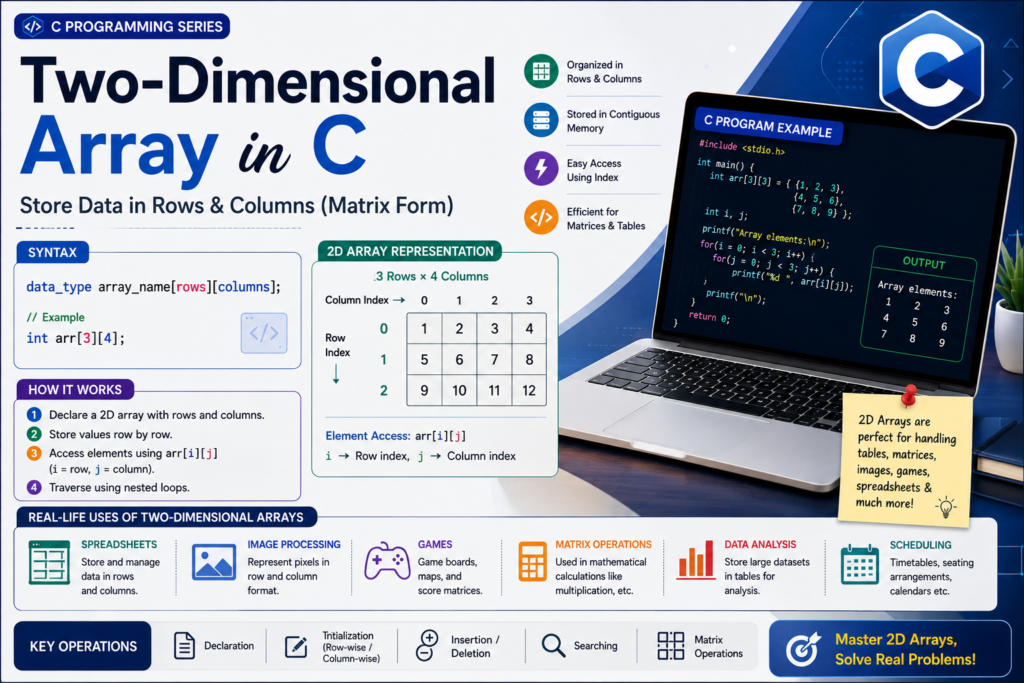
It is commonly used to represent:
- Tables
- Matrices
- Grids
- Marksheets
- Game boards
Example
int matrix[2][3] = {
    {10, 20, 30},
    {40, 50, 60}
};
It can be visualized as:
          Column
           0    1    2
        ┌────┬────┬────┐
Row 0   │ 10 │ 20 │ 30 │
        ├────┼────┼────┤
Row 1   │ 40 │ 50 │ 60 │
        └────┴────┴────┘
To access 50:
matrix[1][1]Because:
row = 1
column = 1
Two-Dimensional Array – Important Programs in C
These programs are examples of Two-Dimensional Arrays (2D Arrays) and are useful for understanding matrices, rows, columns, diagonals, transpose, and matrix operations.
Program to Print the Lower Triangle of a 3×3 Matrix
Question: Write a program to print the lower half or lower triangle of a 3×3 matrix.
#include <stdio.h>

int main(void)
{
    int A[3][3], i, j;

    printf("Enter the elements of the matrix:\n");

    for (i = 0; i < 3; i++)
    {
        for (j = 0; j < 3; j++)
        {
            scanf("%d", &A[i][j]);
        }
    }

    printf("\nLower triangle of the matrix:\n");

    for (i = 0; i < 3; i++)
    {
        for (j = 0; j < 3; j++)
        {
            if (j <= i)
                printf("%5d", A[i][j]);
            else
                printf("%5s", "");
        }

        printf("\n");
    }

    return 0;
}
Example
For the following matrix:
1 2 3
4 5 6
7 8 9
The lower triangle is:
1
4 5
7 8 9
Logic
The lower triangle contains elements where:
j <= iProgram to Print the Upper Triangle of a 3×3 Matrix
Question: Write a program to print the upper half or upper triangle of a 3×3 matrix.
#include <stdio.h>

int main(void)
{
    int A[3][3], i, j;

    printf("Enter the elements of the matrix:\n");

    for (i = 0; i < 3; i++)
    {
        for (j = 0; j < 3; j++)
        {
            scanf("%d", &A[i][j]);
        }
    }

    printf("\nUpper triangle of the matrix:\n");

    for (i = 0; i < 3; i++)
    {
        for (j = 0; j < 3; j++)
        {
            if (j >= i)
                printf("%5d", A[i][j]);
            else
                printf("%5s", "");
        }

        printf("\n");
    }

    return 0;
}
Example
Input matrix:
1 2 3
4 5 6
7 8 9
Output:
1 2 3
  5 6
    9
Logic
The upper triangle contains elements where:
j >= iProgram to Print the Principal or Main Diagonal
Question: Write a program to print the principal or main diagonal of a 3×3 matrix.
#include <stdio.h>

int main(void)
{
    int A[3][3], i, j;

    printf("Enter the elements of the matrix:\n");

    for (i = 0; i < 3; i++)
    {
        for (j = 0; j < 3; j++)
        {
            scanf("%d", &A[i][j]);
        }
    }

    printf("\nPrincipal diagonal of the matrix:\n");

    for (i = 0; i < 3; i++)
    {
        for (j = 0; j < 3; j++)
        {
            if (i == j)
                printf("%5d", A[i][j]);
            else
                printf("%5s", "");
        }

        printf("\n");
    }

    return 0;
}
Example
Input:
1 2 3
4 5 6
7 8 9
Principal diagonal elements:
1
5
9
Logic
For the principal diagonal:
i == jThe row index and column index are the same.
Program to Print the Secondary Diagonal
Question: Write a program to print the secondary or alternate diagonal of a 3×3 matrix.
#include <stdio.h>

int main(void)
{
    int A[3][3], i, j;

    printf("Enter the elements of the matrix:\n");

    for (i = 0; i < 3; i++)
    {
        for (j = 0; j < 3; j++)
        {
            scanf("%d", &A[i][j]);
        }
    }

    printf("\nSecondary diagonal of the matrix:\n");

    for (i = 0; i < 3; i++)
    {
        for (j = 0; j < 3; j++)
        {
            if (i + j == 2)
                printf("%5d", A[i][j]);
            else
                printf("%5s", "");
        }

        printf("\n");
    }

    return 0;
}
Example
Input:
1 2 3
4 5 6
7 8 9
Secondary diagonal elements:
3
5
7
Logic
For a 3×3 matrix, the secondary diagonal follows:
i + j == 2Because:
0 + 2 = 2
1 + 1 = 2
2 + 0 = 2
Program to Find the Transpose of a 3×4 Matrix
Question: Write a program to print the transpose of a 3×4 matrix.
#include <stdio.h>

int main(void)
{
    int A[3][4], i, j;

    printf("Enter the elements of the matrix:\n");

    for (i = 0; i < 3; i++)
    {
        for (j = 0; j < 4; j++)
        {
            scanf("%d", &A[i][j]);
        }
    }

    printf("\nTranspose of the matrix:\n");

    for (j = 0; j < 4; j++)
    {
        for (i = 0; i < 3; i++)
        {
            printf("%5d", A[i][j]);
        }

        printf("\n");
    }

    return 0;
}
Example
Original 3×4 matrix:
1  2  3  4
5  6  7  8
9 10 11 12
Transpose:
1  5  9
2  6 10
3  7 11
4  8 12
Important Point
A 3×4 matrix becomes a 4×3 matrix after transposition.
Program to Find Row Sum and Column Sum of a 3×4 Matrix
Question: Write a program to print a 3×4 matrix along with its row sums and column sums.
#include <stdio.h>

int main(void)
{
    int A[3][4];
    int Rs[3] = {0};
    int Cs[4] = {0};
    int i, j;

    printf("Enter the elements of the matrix:\n");

    for (i = 0; i < 3; i++)
    {
        for (j = 0; j < 4; j++)
        {
            scanf("%d", &A[i][j]);
        }
    }

    /* Calculate row sums */
    for (i = 0; i < 3; i++)
    {
        for (j = 0; j < 4; j++)
        {
            Rs[i] = Rs[i] + A[i][j];
        }
    }

    /* Calculate column sums */
    for (j = 0; j < 4; j++)
    {
        for (i = 0; i < 3; i++)
        {
            Cs[j] = Cs[j] + A[i][j];
        }
    }

    printf("\nMatrix with Row Sums:\n");

    for (i = 0; i < 3; i++)
    {
        for (j = 0; j < 4; j++)
        {
            printf("%5d", A[i][j]);
        }

        printf("   = %d\n", Rs[i]);
    }

    printf("\nColumn Sums:\n");

    for (j = 0; j < 4; j++)
    {
        printf("%5d", Cs[j]);
    }

    printf("\n");

    return 0;
}
Example
Input:
1  2  3  4
5  6  7  8
9 10 11 12
Output:
    1    2    3    4   = 10
    5    6    7    8   = 26
    9   10   11   12   = 42

Column Sums:
   15   18   21   24
Important Formula
Row sum:
Rs[i] = Rs[i] + A[i][j];Column sum:
Cs[j] = Cs[j] + A[i][j];Program to Add Two Matrices
Question: Write a program to add two matrices.
#include <stdio.h>

int main(void)
{
    int A[5][5], B[5][5], C[5][5];
    int i, j, m, n, p, q;

    printf("Enter the number of rows and columns of Matrix A: ");
    scanf("%d %d", &m, &n);

    printf("Enter the number of rows and columns of Matrix B: ");
    scanf("%d %d", &p, &q);

    if (m != p || n != q)
    {
        printf("Matrices cannot be added.\n");
        return 0;
    }

    printf("\nEnter the elements of Matrix A:\n");

    for (i = 0; i < m; i++)
    {
        for (j = 0; j < n; j++)
        {
            scanf("%d", &A[i][j]);
        }
    }

    printf("\nEnter the elements of Matrix B:\n");

    for (i = 0; i < p; i++)
    {
        for (j = 0; j < q; j++)
        {
            scanf("%d", &B[i][j]);
        }
    }

    printf("\nResultant Matrix:\n");

    for (i = 0; i < m; i++)
    {
        for (j = 0; j < n; j++)
        {
            C[i][j] = A[i][j] + B[i][j];
            printf("%5d", C[i][j]);
        }

        printf("\n");
    }

    return 0;
}
Important Rule
Two matrices can be added only when they have the same number of rows and columns.
For example:
2×3 + 2×3 = PossibleBut:
2×3 + 3×2 = Not PossibleProgram to Multiply Two Matrices
Question: Write a program to multiply two matrices.
#include <stdio.h>

int main(void)
{
    int A[5][5], B[5][5], C[5][5];
    int i, j, k;
    int m, n, p, q;

    printf("Enter the number of rows and columns of Matrix A: ");
    scanf("%d %d", &m, &n);

    printf("Enter the number of rows and columns of Matrix B: ");
    scanf("%d %d", &p, &q);

    if (n != p)
    {
        printf("Matrices cannot be multiplied.\n");
        return 0;
    }

    printf("\nEnter the elements of Matrix A:\n");

    for (i = 0; i < m; i++)
    {
        for (j = 0; j < n; j++)
        {
            scanf("%d", &A[i][j]);
        }
    }

    printf("\nEnter the elements of Matrix B:\n");

    for (i = 0; i < p; i++)
    {
        for (j = 0; j < q; j++)
        {
            scanf("%d", &B[i][j]);
        }
    }

    /* Calculate resultant matrix */
    for (i = 0; i < m; i++)
    {
        for (j = 0; j < q; j++)
        {
            C[i][j] = 0;

            for (k = 0; k < n; k++)
            {
                C[i][j] = C[i][j] + A[i][k] * B[k][j];
            }
        }
    }

    printf("\nResultant Matrix:\n");

    for (i = 0; i < m; i++)
    {
        for (j = 0; j < q; j++)
        {
            printf("%5d", C[i][j]);
        }

        printf("\n");
    }

    return 0;
}
Important Rule
If:
Matrix A = m × n
Matrix B = p × q
then multiplication is possible only when:
n = pThe resultant matrix will have the size:
m × qExample
If:
A = 2×3
B = 3×2
then:
A × B = 2×23. Multi-dimensional Arrays
An array with more than two dimensions is called a multidimensional array.
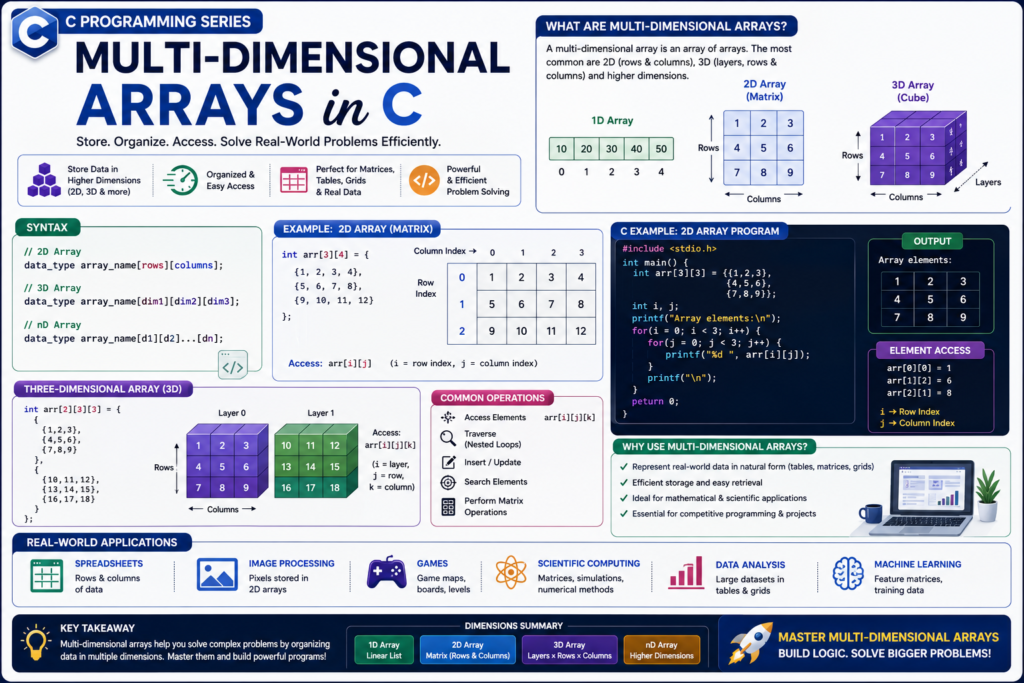
For example:
int data[2][3][4];This represents a 3-dimensional array.
Multidimensional arrays are useful for complex datasets, simulations, scientific calculations, and other applications where data has more than two dimensions.
Program to Enter and Display Elements of a 3D Array
Question: Write a C program to enter and display the elements of a 3D array.
#include <stdio.h>

int main(void)
{
    int A[2][2][2];
    int i, j, k;

    printf("Enter 8 elements:\n");

    for (i = 0; i < 2; i++)
    {
        for (j = 0; j < 2; j++)
        {
            for (k = 0; k < 2; k++)
            {
                scanf("%d", &A[i][j][k]);
            }
        }
    }

    printf("\nElements of the 3D array:\n");

    for (i = 0; i < 2; i++)
    {
        printf("Block %d:\n", i + 1);

        for (j = 0; j < 2; j++)
        {
            for (k = 0; k < 2; k++)
            {
                printf("%5d", A[i][j][k]);
            }

            printf("\n");
        }

        printf("\n");
    }

    return 0;
}
Example
Input:
1 2 3 4 5 6 7 8Output:
Elements of the 3D array:

Block 1:
    1    2
    3    4

Block 2:
    5    6
    7    8
Explanation
A 3D array uses three indexes:
A[i][j][k]Here:
i→ Blockj→ Rowk→ Column
Program to Find the Sum of All Elements of a 3D Array
Question: Write a C program to find the sum of all elements of a 3D array.
#include <stdio.h>

int main(void)
{
    int A[2][2][2];
    int i, j, k;
    int sum = 0;

    printf("Enter 8 elements:\n");

    for (i = 0; i < 2; i++)
    {
        for (j = 0; j < 2; j++)
        {
            for (k = 0; k < 2; k++)
            {
                scanf("%d", &A[i][j][k]);
                sum = sum + A[i][j][k];
            }
        }
    }

    printf("\nSum of all elements = %d\n", sum);

    return 0;
}
Example
Input:
1 2 3 4 5 6 7 8Calculation:
Sum = 1 + 2 + 3 + 4 + 5 + 6 + 7 + 8
    = 36
Output:
Sum of all elements = 36Note: Multidimensional Arrays
A Multidimensional Array has more than one dimension:
2D Array → A[i][j]
3D Array → A[i][j][k]
4D Array → A[i][j][k][l]
Character Arrays and Strings
In C, strings are stored using character arrays.
Example:
char name[] = "Mujtaba";Internally, the string is stored as characters followed by the null character:
M u j t a b a \0The \0 marks the end of the string.
Example:
#include <stdio.h>

int main(void) {

    char name[] = "Mujtaba";

    printf("%s", name);

    return 0;
}
Output:
MujtabaStrings and character arrays will become especially important when learning Strings in C.
Taking Array Input from the User
We can use a loop to take multiple values from the user.
#include <stdio.h>

int main(void) {

    int numbers[5];

    printf("Enter 5 numbers:\n");

    for (int i = 0; i < 5; i++) {
        scanf("%d", &numbers[i]);
    }

    printf("Array elements are:\n");

    for (int i = 0; i < 5; i++) {
        printf("%d ", numbers[i]);
    }

    return 0;
}
Input
10
20
30
40
50
Output
Array elements are:
10 20 30 40 50
Searching in an Array
Searching means finding whether a particular value exists in an array.
One of the simplest methods is Linear Search.
Example
#include <stdio.h>

int main(void) {

    int numbers[5] = {10, 20, 30, 40, 50};
    int search, found = 0;

    printf("Enter the number to search: ");
    scanf("%d", &search);

    for (int i = 0; i < 5; i++) {

        if (numbers[i] == search) {
            found = 1;
            break;
        }
    }

    if (found) {
        printf("Number found.");
    } else {
        printf("Number not found.");
    }

    return 0;
}
Example
Input:
30Output:
Number found.Sorting an Array
Sorting means arranging array elements in a particular order.
For example:
Before:
50 20 40 10 30
After ascending sorting:
10 20 30 40 50A simple sorting technique for beginners is Bubble Sort.
#include <stdio.h>

int main(void) {

    int numbers[5] = {50, 20, 40, 10, 30};

    for (int i = 0; i < 5 - 1; i++) {

        for (int j = 0; j < 5 - i - 1; j++) {

            if (numbers[j] > numbers[j + 1]) {

                int temp = numbers[j];
                numbers[j] = numbers[j + 1];
                numbers[j + 1] = temp;
            }
        }
    }

    printf("Sorted array:\n");

    for (int i = 0; i < 5; i++) {
        printf("%d ", numbers[i]);
    }

    return 0;
}
Output
Sorted array:
10 20 30 40 50
Array Operations
Once you understand arrays, several important operations can be performed on them.
Common Array Operations
             ARRAY
               │
      ┌────────┼────────┐
      ↓        ↓        ↓
 Traversal  Searching  Sorting
      │        │        │
      ↓        ↓        ↓
  Visit all  Find a   Arrange
  elements   value    elements
Other operations include:
- Insertion
- Deletion
- Updating
- Copying
- Merging
- Reversing
Reversing an Array
Example:
Original:
10 20 30 40 50

Reversed:
50 40 30 20 10
Program:
#include <stdio.h>

int main(void) {

    int numbers[5] = {10, 20, 30, 40, 50};

    printf("Reversed array:\n");

    for (int i = 4; i >= 0; i--) {
        printf("%d ", numbers[i]);
    }

    return 0;
}
Output:
50 40 30 20 10Important Rules of Arrays in C
Keep these points in mind:
1. Array indexing starts from 0
For:
int arr[5];indexes are:
0 1 2 3 42. Array elements have the same data type
For example:
int arr[5];stores integer values.
3. Array size represents the number of elements
int arr[10];can store 10 integers.
4. Do not access an invalid index
For:
int arr[5];this is valid:
arr[4]but this is invalid:
arr[5]The valid indexes end at 4.
5. Array indexing is zero-based
This is one of the most important things to remember as a beginner.
Common Mistakes While Using Arrays
Mistake 1: Using an invalid index
Incorrect:
int arr[5];

arr[5] = 100;
The valid indexes are only:
0 to 4Mistake 2: Forgetting that indexing starts from 0
Incorrect assumption:
First element = arr[1]Correct:
First element = arr[0]Mistake 3: Loop condition goes beyond the array
Incorrect:
for (int i = 0; i <= 5; i++) {
    printf("%d ", arr[i]);
}
For an array of size 5, use:
for (int i = 0; i < 5; i++) {
    printf("%d ", arr[i]);
}
Array and Loop Relationship
Arrays and loops are often used together.
Suppose:
int arr[5] = {10, 20, 30, 40, 50};A loop allows us to process every element:
for (int i = 0; i < 5; i++) {
    printf("%d ", arr[i]);
}
Think of it like this:
i = 0 → arr[0] → 10
i = 1 → arr[1] → 20
i = 2 → arr[2] → 30
i = 3 → arr[3] → 40
i = 4 → arr[4] → 50
This is one of the most important patterns to understand before moving to advanced array programs.
Array vs Normal Variable
| Feature | Normal Variable | Array |
|---|---|---|
| Stores | One value | Multiple values |
| Data type | One type | Same type for elements |
| Example | int age | int ages[10] |
| Access | Variable name | Index |
| Useful for | Single data | Collection of related data |
Example:
int age = 25;stores one value.
Whereas:
int ages[5] = {20, 21, 22, 23, 24};stores five values.
Array Size and Number of Elements
Consider:
int arr[5] = {10, 20, 30, 40, 50};The array contains:
5 elementsIndexes:
0 1 2 3 4The relationship is:
Last Index = Number of Elements - 1Therefore:
5 - 1 = 4Advanced Notes For You: Memory and Arrays
Array elements are stored in contiguous memory locations.
For example:
int arr[4] = {10, 20, 30, 40};Conceptually:
Memory

┌────────┬────────┬────────┬────────┐
│  arr[0]│  arr[1]│  arr[2]│  arr[3]│
│   10   │   20   │   30   │   40   │
└────────┴────────┴────────┴────────┘
     ↓        ↓        ↓        ↓
  nearby   nearby   nearby   nearby
 addresses in memory
Because array elements are stored consecutively, accessing an element using its index is efficient.
This concept becomes especially important when you learn Pointers in C.
Arrays and Functions
Arrays can also be passed to functions.
Example:
#include <stdio.h>

void printArray(int arr[], int size) {

    for (int i = 0; i < size; i++) {
        printf("%d ", arr[i]);
    }
}

int main(void) {

    int numbers[5] = {10, 20, 30, 40, 50};

    printArray(numbers, 5);

    return 0;
}Output:
10 20 30 40 50This becomes useful when programs become larger and you want to divide your code into separate functions.
Important Practice Programs on Arrays
After learning the basics, practice these programs:
Basic Programs
- Declare and initialize an array.
- Print all array elements.
- Take array input from the user.
- Find the sum of array elements.
- Find the average of array elements.
- Find the largest element.
- Find the smallest element.
- Count even and odd elements.
- Count positive and negative elements.
- Reverse an array.
Searching Programs
- Linear search.
- Find the position of an element.
- Count occurrences of an element.
- Find duplicate elements.
Sorting Programs
- Sort an array in ascending order.
- Sort an array in descending order.
- Implement Bubble Sort.
- Implement Selection Sort.
2D Array Programs
- Print a matrix.
- Add two matrices.
- Subtract two matrices.
- Multiply two matrices.
- Find the transpose of a matrix.
- Find the sum of matrix elements.
- Find diagonal elements.
Advanced Practice
- Pass an array to a function.
- Search an array using a function.
- Sort an array using a function.
- Work with character arrays.
- Practice multidimensional arrays.
Quic Revision for You Specially:
What is an Array?
An array stores multiple values of the same data type under one variable name.
Array Indexing
Starts from 0One-Dimensional Array
int arr[5];Two-Dimensional Array
int matrix[2][3];Access an Element
arr[index]Traverse an Array
for (int i = 0; i < size; i++) {
    printf("%d ", arr[i]);
}
Important Operations
Traversal
Searching
Sorting
Insertion
Deletion
Updating
Reversing
NOTE:
Array = Multiple related values
Index = Position of an element
Loop = Process elements repeatedly
Frequently Asked Questions (FAQs)
What is an array in C?
An array is a collection of elements of the same data type stored under a single variable name.
Why are arrays used in C?
Arrays are used to store and process multiple related values efficiently.
Does array indexing start from 0 in C?
Yes. The first element is stored at index 0.
What is a one-dimensional array?
A one-dimensional array stores elements in a single sequence.
Example:
int numbers[5];What is a two-dimensional array?
A two-dimensional array stores data in rows and columns.
Example:
int matrix[3][3];Can an array store different data types?
No. The elements of a normal C array have the same data type.
For example:
int arr[5];stores integers.
How do you access an array element?
Use the array name with its index:
arr[0]What is array traversal?
Array traversal means visiting or processing each array element one by one, usually with a loop.
What happens if we access an invalid array index?
Accessing an element outside the valid range causes undefined behavior in C. It can produce incorrect results or other unexpected behavior.
What is the last index of an array of size 10?
The last valid index is:
9because:
10 - 1 = 9Can arrays be passed to functions?
Yes. Arrays can be passed to functions, which is very useful for creating modular C programs.

Mujtaba Ansari is a Software Engineer, Founder & CEO of The Tech Earth. He writes about technology, AI, software, cybersecurity, blogging, Health tech, Agri Tech and digital trends to help readers stay updated with the latest innovations.