


Chapter 9:
C Programming में Conditional Statements: Decision Making और Branching
Author: Er. Mujtaba Ansari
इस Article में आप C Programming के Conditional Statements को बहुत ही आसान भाषा में समझेंगे। यहाँ आप if, else, else if, nested if और switch को सरल उदाहरणों के साथ सीखेंगे।
इस article को पढ़ने के बाद आप यह समझ पाएंगे कि C Program में अलग-अलग परिस्थितियों के अनुसार सही निर्णय कैसे लिया जाता है और अधिक बेहतर व flexible programs कैसे बनाए जाते हैं।
ये concepts केवल C Programming के लिए ही नहीं, बल्कि C++, Java, Python जैसी दूसरी programming languages को समझने में भी आपकी मदद करेंगे। इसलिए इस लेख को ध्यान से पढ़ें और Programming में Decision Making की मजबूत नींव तैयार करें।
📚 C Programming का पूरा Course Structure
🧑💻 Chapter 1: C Programming की मूल बातें
📜 Chapter 2: C Language का इतिहास और विकास
⚙️ Chapter 3: C Compiler Install करना
💻 Chapter 4: अपना पहला C Program लिखना
🏗️ Chapter 5: C Program का Structure
📦 Chapter 6: Variables और Data Types
🔢 Chapter 7: C में Operators
⌨️ Chapter 8: Input और Output Functions
🔀 Chapter 9: C में Decision Making और Branching – Conditional Statements (Current Chapter)
🔄 Chapter 10: C में Loops
📊 Chapter 11: C में Arrays
🔤 Chapter 12: C में Strings
🛠️ Chapter 13: C में Functions
👉 Chapter 14: C में Pointers
🏛️ Chapter 15: Structures और Unions
📁 Chapter 16: C में File Handling
Decision-Making Process के 7 आसान Steps
- फैसला क्या लेना है, यह तय करें
- जरूरी जानकारी इकट्ठा करें
- सभी विकल्पों को पहचानें
- विकल्पों को अच्छी तरह समझें और जांचें
- सबसे सही विकल्प चुनें
- चुने गए विकल्प पर काम करें
- अपने फैसले की समीक्षा करें
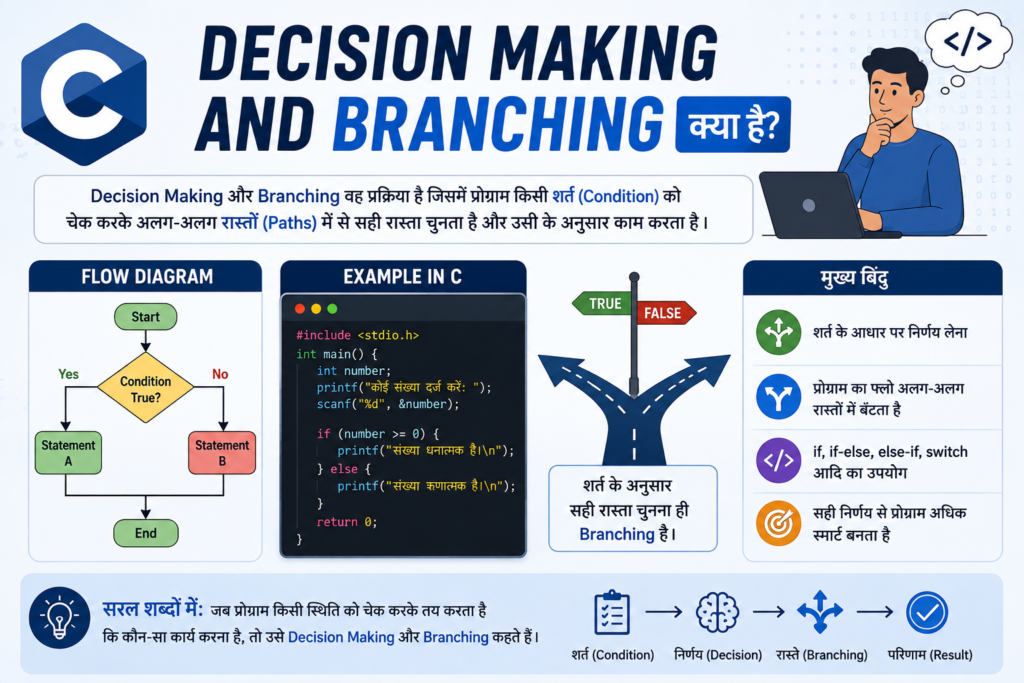
Decision Making and Branching क्या है?
Decision Making and Branching- C Programming में एक ऐसी प्रक्रिया है, जिसमें program किसी condition को check करके फैसला करता है कि आगे कौन-सा code चलाना है।
Decision Making and Branching का मतलब है कि Program किसी condition को check करके यह तय करता है कि कौन-सा code चलाना है।
Program में एक condition के आधार पर अलग-अलग रास्ते हो सकते हैं।
उदाहरण:
अगर Marks >= 40
        ↓
      Pass
और अगर:
अगर Marks < 40
        ↓
      Fail
इस तरह Program condition के अनुसार अपना रास्ता चुनता है। इसी को Decision Making and Branching कहा जाता है।
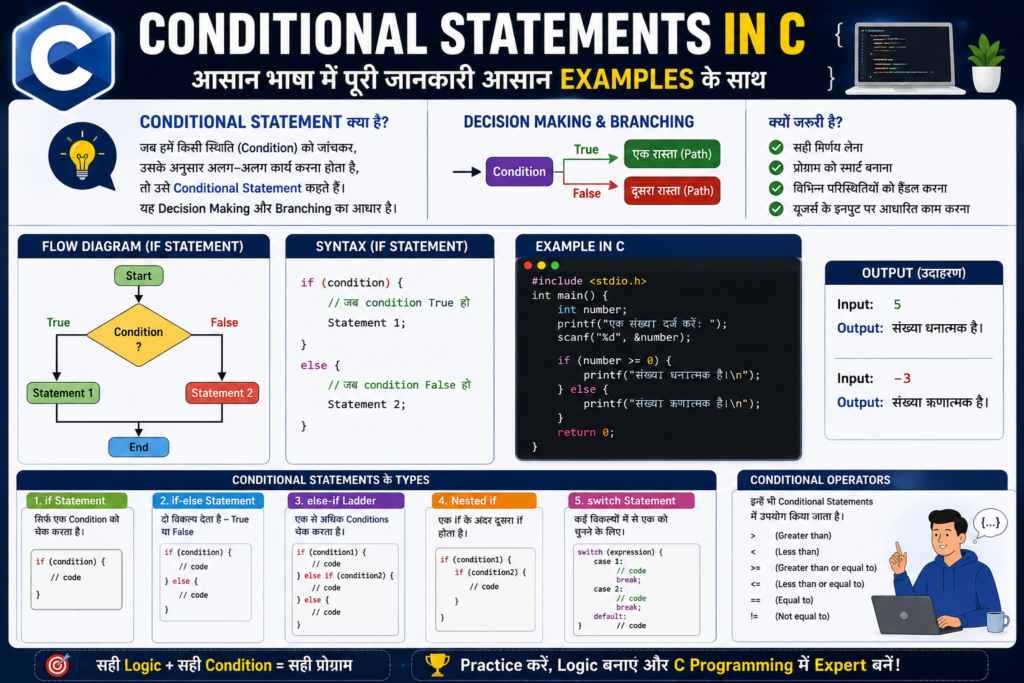
Conditional Statements in C: आसान भाषा में पूरी जानकारी आसान Examples के साथ
Conditional Statements C Programming का एक बहुत ही important concept है। इसकी मदद से program किसी condition को check करके decision लेता है।
सरल शब्दों में, Conditional Statement program को बताता है कि अगर condition सही है तो क्या करना है और अगर condition गलत है तो क्या करना है।
उदाहरण के लिए, रोज़मर्रा की जिंदगी में:
अगर बारिश हो रही है → छाता लेकर जाएँ।
अगर बारिश नहीं हो रही है → छाता लेकर जाने की जरूरत नहीं है।
इसी तरह C Program भी किसी condition को check करता है और उसके अनुसार अलग-अलग काम करता है।
इस article में हम if, if-else, else-if, nested if और switch को आसान भाषा और simple examples के साथ समझेंगे।
Conditional Statements क्या हैं?
Conditional Statements ऐसे statements हैं जिनकी मदद से C Program किसी condition को check करके decision लेता है।
Condition का result आमतौर पर:
- True → condition सही है।
- False → condition गलत है।
उदाहरण:
if (age >= 18)
{
    printf("Eligible");
}
अगर age 18 या उससे ज्यादा है, तो condition True होगी और Eligible print होगा।
अगर age 18 से कम है, तो condition False होगी और if के अंदर का code नहीं चलेगा।
Conditional Statements की जरूरत क्यों होती है?
Program को हर situation में एक जैसा काम नहीं करना होता।
उदाहरण के लिए:
- Student Pass है या Fail
- Number Even है या Odd
- व्यक्ति Vote कर सकता है या नहीं
- Password सही है या गलत
- Account में Balance है या नहीं
- User ने कौन-सा option चुना है
इन situations में Program को condition के अनुसार अलग-अलग decision लेना पड़ता है।
इसीलिए Conditional Statements Programming Logic का बहुत important हिस्सा हैं।
C में Conditional Statements के Types
C Programming में मुख्य रूप से ये Conditional Statements इस्तेमाल किए जाते हैं:
ifStatementif-elseStatementelse-ifLadder- Nested
if switchStatement
अब इन सभी को एक-एक करके समझते हैं।
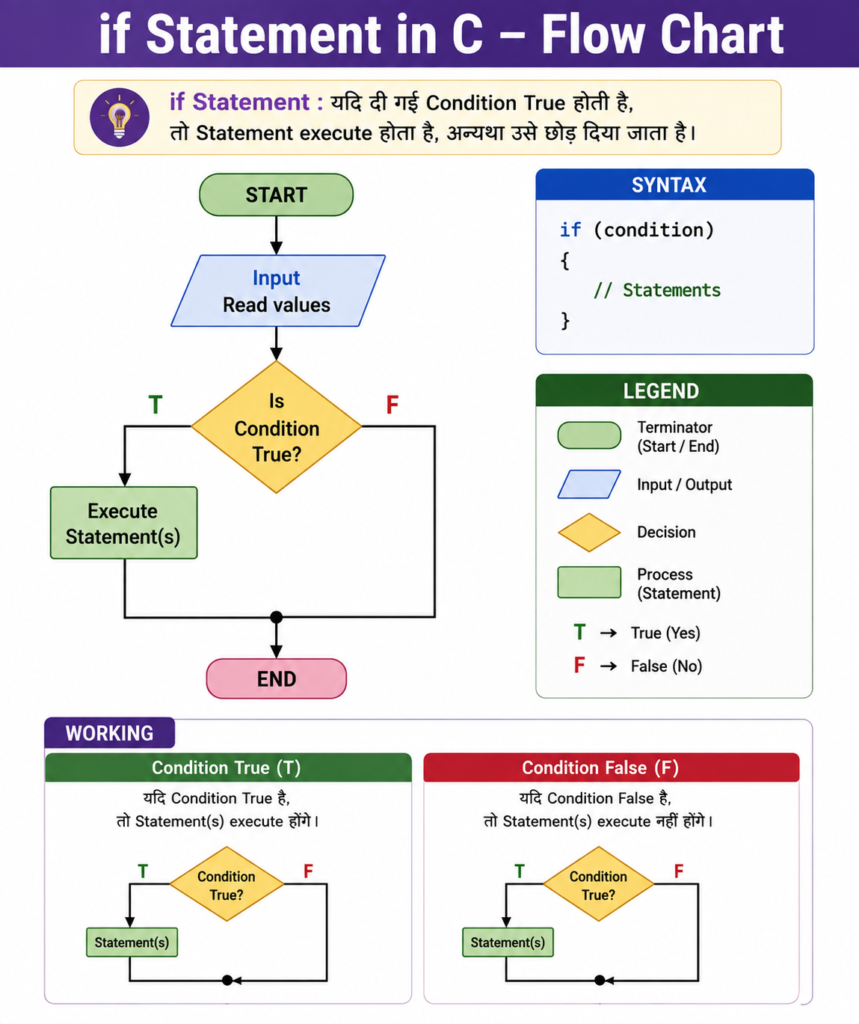
1. if Statement in C
if Statement का इस्तेमाल तब किया जाता है जब हमें एक condition check करनी हो।
अगर condition True है, तो if के अंदर का code चलेगा।
अगर condition False है, तो if के अंदर का code नहीं चलेगा।
Syntax
if (test_expression)
{
    statement_1;
    statement_2;
    // अन्य statements
}
Flow Chart
Example: Write a program if a person can vote.
#include <stdio.h>

int main()
{
    int age = 20;

    if (age >= 18)
    {
        printf("You are eligible to vote.");
    }

    return 0;
}
Output
You are eligible to vote.Explanation
यहाँ:
age >= 18condition है।
age की value 20 है।
क्योंकि 20 >= 18 सही है, इसलिए condition True होगी और message print होगा।
याद रखें
if = अगर condition सही है, तो यह काम करो।
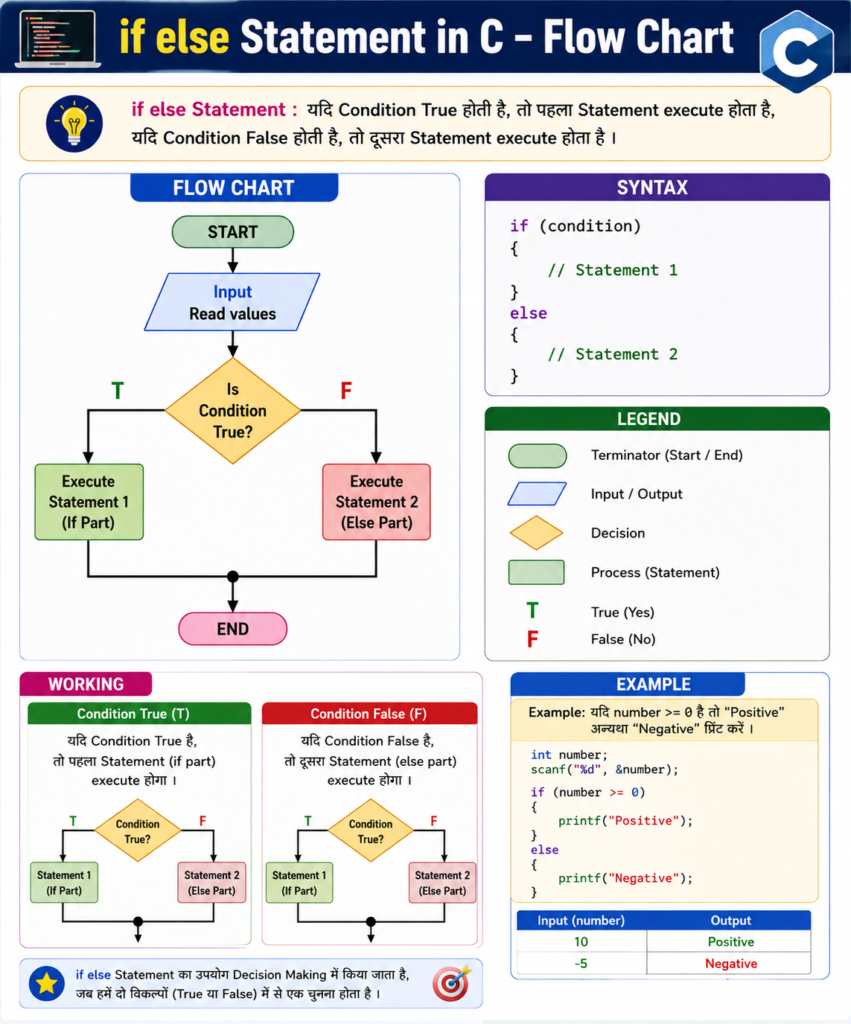
2. if-else Statement in C
कई बार हमें True और False दोनों situations के लिए अलग-अलग code चलाना होता है।
ऐसी स्थिति में if-else का इस्तेमाल किया जाता है।
Syntax
if (condition)
{
    // अगर condition True है
}
else
{
    // अगर condition False है
}
Flow Chart:
Program: Check Whether a Number is Even or Odd
Answer:
#include <stdio.h>

int main()
{
    int N;

    printf("Enter the number: ");
    scanf("%d", &N);

    if (N % 2 == 0)
    {
        printf("Even number");
    }
    else
    {
        printf("Odd number");
    }

    return 0;
}
Explanation:
int N;→ Number store करने के लिए variable बनाया।scanf()→ User से number लिया।N % 2 == 0→ Check किया कि number 2 से पूरी तरह divide हो रहा है या नहीं।- अगर condition True है → Even number
- अगर condition False है → Odd number
Output
Enter the number: 10
Even number
और:
Enter the number: 7
Odd number
Example: Write a program if a person can vote.
#include <stdio.h>

int main()
{
    int age = 16;

    if (age >= 18)
    {
        printf("You are eligible to vote.");
    }
    else
    {
        printf("You are not eligible to vote.");
    }

    return 0;
}
Output
You are not eligible to vote.क्योंकि age = 16 है और 16 >= 18 False है।
इसलिए else वाला code चलेगा।
आसान तरीके से समझें
if → condition सही है तो यह करो।
else → condition गलत है तो यह करो।
if केवल True situation handle करता है, जबकि if-else True और False दोनों situations को handle कर सकता है।
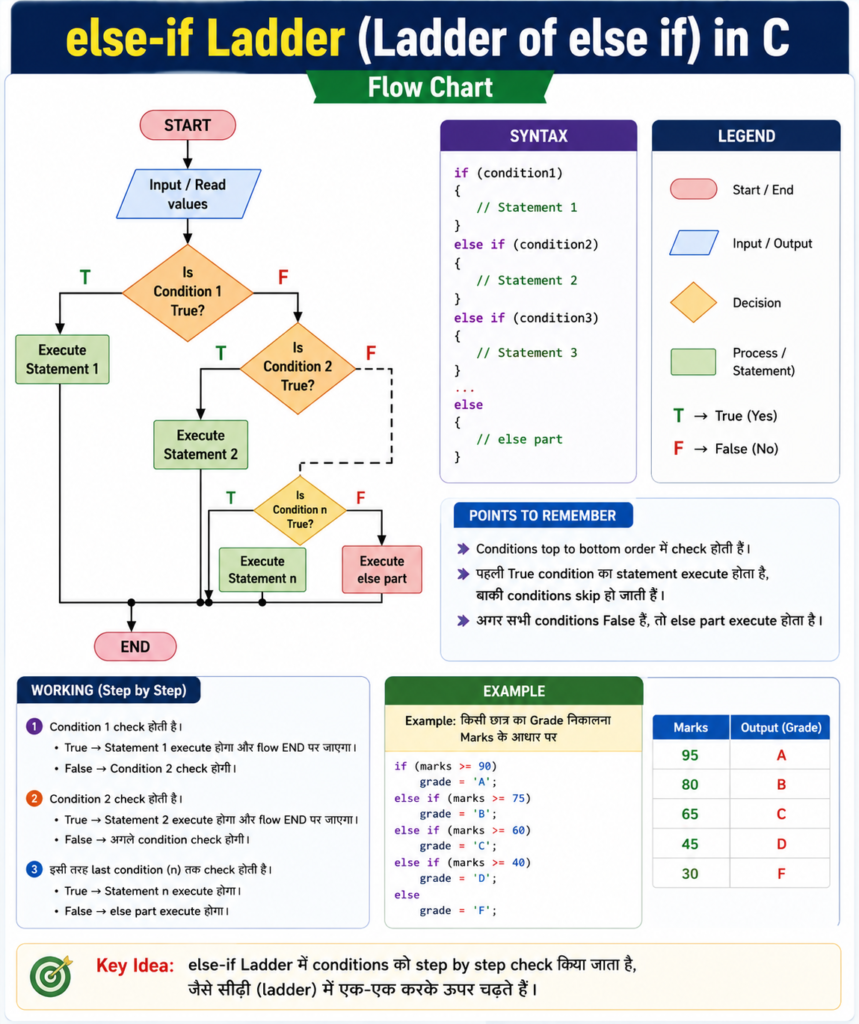
3. else-if Ladder (ladder of else if) in C
जब हमें एक से ज्यादा conditions check करनी हों, तब else-if Ladder का इस्तेमाल किया जाता है।
Program conditions को एक-एक करके check करता है।
जिस condition का result True होता है, उसका code चलता है।
Syntax
if (condition1)
{
    // Code
}
else if (condition2)
{
    // Code
}
else if (condition3)
{
    // Code
}
else
{
    // Code
}
Flow Chart:
Example: Marks के अनुसार Grade
#include <stdio.h>

int main()
{
    int marks = 85;

    if (marks >= 90)
    {
        printf("Grade A+");
    }
    else if (marks >= 80)
    {
        printf("Grade A");
    }
    else if (marks >= 70)
    {
        printf("Grade B");
    }
    else if (marks >= 60)
    {
        printf("Grade C");
    }
    else if (marks >= 40)
    {
        printf("Grade D");
    }
    else
    {
        printf("Fail");
    }

    return 0;
}
Output
Grade Aक्योंकि:
85 >= 90  → False
85 >= 80  → True
इसलिए Grade A print होगा।
आसान भाषा में
else-if = कई conditions में से सही condition ढूँढना।
Question: Write a program to enter the salary and calculate the commission and total amount according to the given conditions.
| Salary | Commission |
|---|---|
>= 20000 | 10% |
>= 15000 && < 20000 | 8% |
>= 10000 && < 15000 | 5% |
< 10000 | Commission not allowed |
Answer:
#include <stdio.h>

int main()
{
    int sal;
    float com, amount;

    printf("Enter the salary: ");
    scanf("%d", &sal);

    if (sal >= 20000)
    {
        com = sal * 10 / 100.0;
    }
    else if (sal >= 15000)
    {
        com = sal * 8 / 100.0;
    }
    else if (sal >= 10000)
    {
        com = sal * 5 / 100.0;
    }
    else
    {
        com = 0;
        printf("Commission is not allowed.\n");
    }

    amount = sal + com;

    printf("Commission = %.2f\n", com);
    printf("Total Amount = %.2f\n", amount);

    return 0;
}
Output
अगर salary 20000 है:
Enter the salary: 20000
Commission = 2000.00
Total Amount = 22000.00
अगर salary 12000 है:
Enter the salary: 12000
Commission = 600.00
Total Amount = 12600.00
Note: else-if में Condition का Order क्यों जरूरी है?
यह beginners के लिए बहुत important point है।
मान लीजिए:
if (marks >= 40)
{
    printf("Pass");
}
else if (marks >= 80)
{
    printf("Grade A");
}
अगर marks 85 हैं, तो पहले ही:
85 >= 40True हो जाएगा।
इसलिए Program else-if तक पहुंचेगा ही नहीं।
इसलिए बड़ी condition को पहले रखना बेहतर है:
if (marks >= 80)
{
    printf("Grade A");
}
else if (marks >= 40)
{
    printf("Pass");
}
else-if Ladder में conditions का सही order बहुत important है।
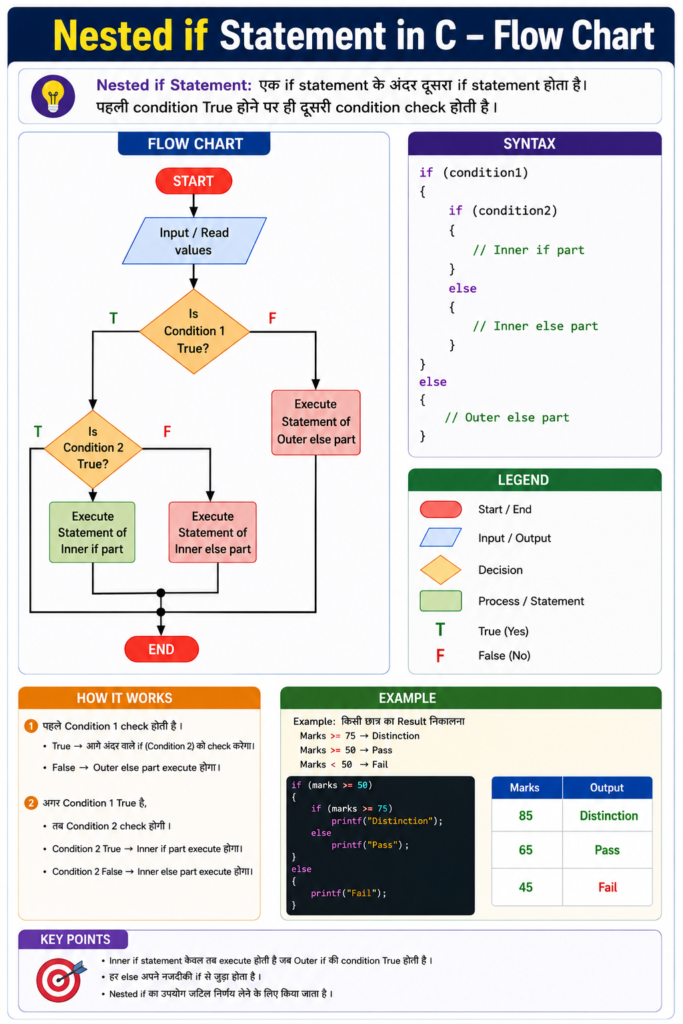
4. Nested if Statement
जब एक if के अंदर दूसरा if लिखा जाता है, तो उसे Nested if कहते हैं।
सरल शब्दों में:
एक
ifके अंदर दूसराif= Nestedif
Syntax
if (condition1)
{
    if (condition2)
    {
        // Code
    }
}
Flow Chart:
Q. Write a program to find and print the nature and values of roots of a quadratic equation.
Answer:
#include <stdio.h>
#include <math.h>

int main()
{
    int a, b, c, d;
    float R1, R2;

    printf("Enter the values of a, b and c: ");
    scanf("%d%d%d", &a, &b, &c);

    if (a != 0)
    {
        d = b * b - 4 * a * c;

        if (d == 0)
        {
            printf("Roots are real and equal.\n");

            R1 = -b / (float)(2 * a);

            printf("Root 1 = Root 2 = %.2f\n", R1);
        }
        else if (d > 0)
        {
            printf("Roots are real and distinct.\n");

            R1 = (-b + sqrt(d)) / (float)(2 * a);
            R2 = (-b - sqrt(d)) / (float)(2 * a);

            printf("Root 1 = %.2f\n", R1);
            printf("Root 2 = %.2f\n", R2);
        }
        else
        {
            printf("Roots are imaginary.\n");
        }
    }
    else
    {
        printf("Not a quadratic equation.\n");
    }

    return 0;
}
आसान Explanation
Quadratic equation का सामान्य रूप होता है:
ax² + bx + c = 0इसके roots की nature पता करने के लिए सबसे पहले Discriminant निकालते हैं:
d = b² - 4acफिर d की value के आधार पर:
d == 0→ Roots real and equald > 0→ Roots real and distinctd < 0→ Roots imaginary
Example Program:
#include <stdio.h>

int main()
{
    int age = 20;
    int hasID = 1;

    if (age >= 18)
    {
        if (hasID == 1)
        {
            printf("Entry Allowed");
        }
    }

    return 0;
}
Output
Entry Allowedयहाँ Program पहले check करता है:
Age 18 या ज्यादा है?अगर हाँ, तो दूसरी condition check होती है:
ID है?अगर दोनों conditions True हैं, तो Entry Allowed होगा।
आसान भाषा में
Nested if = पहले एक condition check करो, फिर उसके अंदर दूसरी condition check करो।
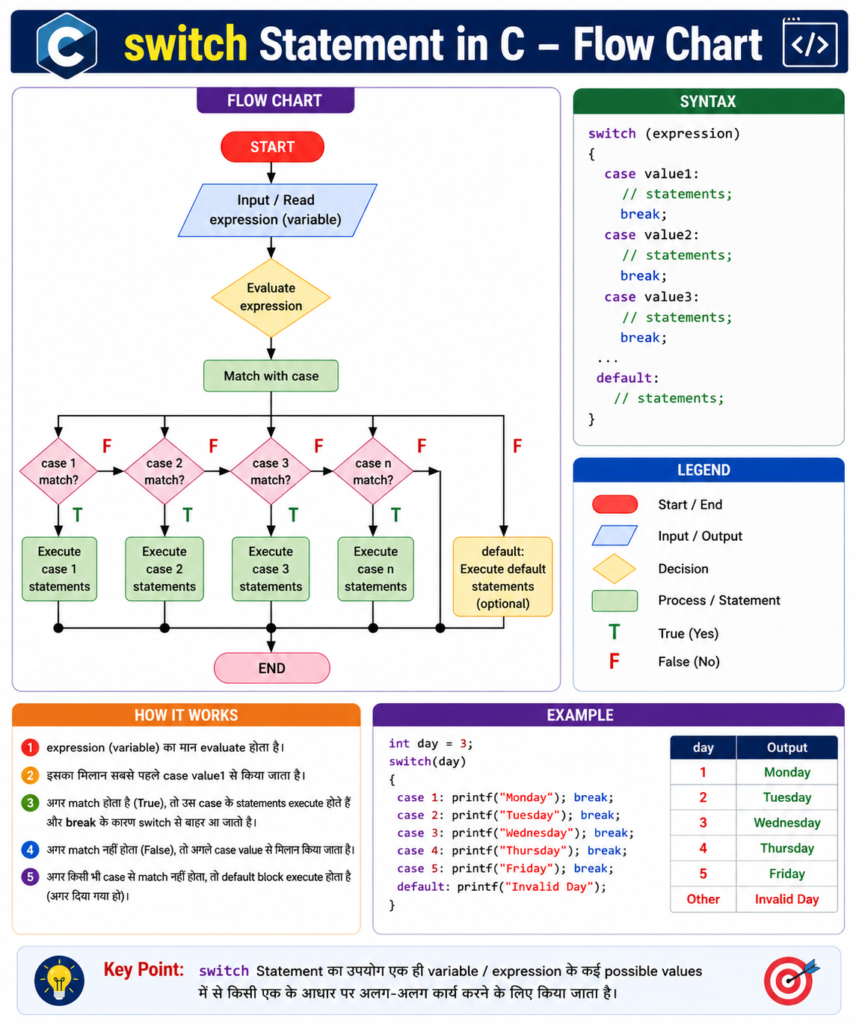
5. switch Statement in C
switch Statement का इस्तेमाल तब किया जाता है जब हमारे पास एक value और उसके कई fixed choices हों।
यह खासकर Menu-based Programs में useful होता है।
Syntax
switch (expression)
{
    case value1:
        // Code
        break;

    case value2:
        // Code
        break;

    default:
        // Code
}
Q. Write a program to enter the weekday number and display its name.
Answer:
#include <stdio.h>

int main()
{
    int day;

    printf("Enter the weekday number (1-7): ");
    scanf("%d", &day);

    switch (day)
    {
        case 1:
            printf("Sunday");
            break;

        case 2:
            printf("Monday");
            break;

        case 3:
            printf("Tuesday");
            break;

        case 4:
            printf("Wednesday");
            break;

        case 5:
            printf("Thursday");
            break;

        case 6:
            printf("Friday");
            break;

        case 7:
            printf("Saturday");
            break;

        default:
            printf("Invalid input");
    }

    return 0;
}
Example Output
Enter the weekday number (1-7): 4
Wednesday
आसान Explanation
यहाँ switch Statement का इस्तेमाल किया गया है।
1→ Sunday2→ Monday3→ Tuesday4→ Wednesday5→ Thursday6→ Friday7→ Saturday- इसके अलावा कोई number → Invalid input
break का इस्तेमाल matching case के बाद switch Statement से बाहर निकलने के लिए किया जाता है।
Example 2nd
#include <stdio.h>

int main()
{
    int choice = 2;

    switch (choice)
    {
        case 1:
            printf("Add");
            break;

        case 2:
            printf("Subtract");
            break;

        case 3:
            printf("Exit");
            break;

        default:
            printf("Invalid Choice");
    }

    return 0;
}
Output
Subtractक्योंकि choice = 2 है, इसलिए case 2 चलेगा।
आसान भाषा में
अगर आपके पास fixed choices हैं:
1 → Add
2 → Subtract
3 → Exit
तो switch का इस्तेमाल करना आसान होता है।
case क्या है?
case में हम switch की possible values लिखते हैं।
जैसे उदाहरण:
switch (choice)
{
    case 1:
        printf("Add");
        break;

    case 2:
        printf("Subtract");
        break;
}
यहाँ 1 और 2 दो possible choices हैं।
break क्या है?
break का इस्तेमाल switch को रोकने के लिए किया जाता है।
जैसे उदाहरण:
case 1:
    printf("One");
    break;
जब case 1 match होगा, One print होगा और break के कारण switch से बाहर निकल जाएगा।
याद रखें
break = यहाँ रुक जाओ।
default क्या है?
अगर switch में कोई भी case match नहीं करता है, तो default चलता है।
switch (choice)
{
    case 1:
        printf("One");
        break;

    case 2:
        printf("Two");
        break;

    default:
        printf("Invalid Choice");
}
अगर choice = 5 है, तो कोई matching case नहीं मिलेगा।
इसलिए:
Invalid Choiceprint होगा।
याद रखें
default = अगर कोई भी case match न हो।
Relational Operators
Conditions को compare करने के लिए Relational Operators का इस्तेमाल किया जाता है।
| Operator | आसान मतलब |
|---|---|
> | से बड़ा |
< | से छोटा |
>= | से बड़ा या बराबर |
<= | से छोटा या बराबर |
== | बराबर |
!= | बराबर नहीं |
Example
if (marks >= 40)
{
    printf("Pass");
}
यहाँ >= check करता है कि marks 40 या उससे ज्यादा हैं या नहीं।
= और == में Difference
यह C Programming में beginners की बहुत common mistake है।
=
= का इस्तेमाल value assign करने के लिए किया जाता है।
age = 18;मतलब:
age में 18 value डालो।
==
== का इस्तेमाल दो values को compare करने के लिए किया जाता है।
if (age == 18)मतलब:
क्या age की value 18 के बराबर है?
याद रखने का सबसे आसान तरीका
=   → Value देना
==  → Value compare करना
Logical Operators
जब हमें एक से ज्यादा conditions को एक साथ check करना हो, तो Logical Operators का इस्तेमाल किया जाता है।
C में तीन main Logical Operators हैं:
| Operator | नाम | आसान मतलब |
|---|---|---|
&& | AND | दोनों conditions सही होनी चाहिए |
| || | OR | अगर कोई एक condition भी सही हो, तो result True होगा। |
! | NOT | Result को उल्टा करता है |
&& AND Example
if (age >= 18 && age <= 60)
{
    printf("Eligible");
}
यहाँ दोनों conditions True होनी चाहिए।
|| OR Example
if (day == 6 || day == 7)
{
    printf("Weekend");
}
यहाँ कोई एक condition True होने पर code चलेगा।
! NOT Example
if (!(age < 18))
{
    printf("Adult");
}
! condition के result को उल्टा कर देता है।
आसान तरीके से
&& → दोनों सही
|| → कोई एक सही
!  → उल्टा
User Input के साथ Conditional Statements
Conditional Statements को scanf() के साथ इस्तेमाल करके ऐसे Programs बनाए जा सकते हैं जिनमें User खुद value enter करता है।
Example: Voting Eligibility
#include <stdio.h>

int main()
{
    int age;

    printf("Enter your age: ");
    scanf("%d", &age);

    if (age >= 18)
    {
        printf("You are eligible to vote.");
    }
    else
    {
        printf("You are not eligible to vote.");
    }

    return 0;
}
Output
Enter your age: 21
You are eligible to vote.
यहाँ User की input के अनुसार Program decision लेता है।
Real-Life में Conditional Statements के Examples
Conditional Statements का इस्तेमाल केवल छोटे Programs में नहीं होता। ये अलग-अलग software और applications में भी उपयोग होते हैं।
Login System
अगर Username और Password सही हैं
→ Login Successful

वरना
→ Invalid Login Details
Shopping Website
अगर Purchase Amount Free Shipping Limit पूरी करता है
→ Free Shipping

वरना
→ Shipping Charges
Student Result
अगर Marks Passing Marks के बराबर या ज्यादा हैं
→ Pass

वरना
→ Fail
Banking Application
अगर Account में पर्याप्त Balance है
→ Transaction Allow

वरना
→ Insufficient Balance
if और if-else में Difference
if | if-else |
|---|---|
| एक condition check करता है | True और False दोनों को handle करता है |
| False होने पर कुछ नहीं करना हो तो useful | False होने पर दूसरा काम करना हो तो useful |
| Simple decision के लिए | Two-way decision के लिए |
if
if (age >= 18)
{
    printf("Eligible");
}
if-else
if (age >= 18)
{
    printf("Eligible");
}
else
{
    printf("Not Eligible");
}
if-else और switch में Difference
| Feature | if-else | switch |
|---|---|---|
| Simple condition | ✅ | ✅ |
| Multiple conditions | ✅ | Limited |
| Range check | ✅ | Suitable नहीं |
| Complex condition | ✅ | ❌ |
| Fixed choices | ✅ | ✅ |
| Menu Program | Possible | बहुत useful |
if-else कब इस्तेमाल करें?
जब आपको conditions जैसे:
marks >= 40या:
age >= 18 && age <= 60check करनी हों।
switch कब इस्तेमाल करें?
जब आपके पास fixed choices हों:
1 → Add
2 → Subtract
3 → Exit
ऐसे cases में switch convenient होता है।
Conditional Statements में Common Mistakes
Mistake 1: = की जगह == भूलना
गलत समझ:
if (age = 18)Comparison के लिए:
if (age == 18)याद रखें:
=  → Assignment
== → Comparison
Mistake 2: switch में break भूलना
case 1:
    printf("One");
    break;
अगर matching case के बाद switch को रोकना है, तो break लगाएँ।
Mistake 3: else-if का गलत Order
अगर आप पहले:
if (marks >= 40)और बाद में:
else if (marks >= 80)लिखते हैं, तो 85 marks पर भी पहला condition True हो जाएगा।
इसलिए बड़ी condition को पहले रखना बेहतर है:
if (marks >= 80)फिर:
else if (marks >= 40)Mistake 4: Braces {} भूलना
Beginners के लिए if और else के साथ {} का इस्तेमाल करना अच्छी practice है।
if (age >= 18)
{
    printf("Eligible");
}
इससे code समझना आसान होता है और mistakes कम होती हैं।
Conditional Statements के Practice Programs
इस topic को अच्छी तरह समझने के लिए इन Programs की practice करें:
- Number Even या Odd check करें।
- Number Positive, Negative या Zero check करें।
- Person Vote करने के योग्य है या नहीं check करें।
- दो numbers में से बड़ा number निकालें।
- तीन numbers में से सबसे बड़ा number निकालें।
- Grade Calculator बनाएँ।
switchसे Simple Calculator बनाएँ।- Leap Year check करें।
- Check करें कि कोई number दूसरे number से पूरी तरह divide होता है या नहीं।
switchकी मदद से Menu-driven Program बनाएँ।
कौन-सा Conditional Statement कब इस्तेमाल करें?
सबसे आसान तरीके से याद रखें:
| Situation | Statement |
|---|---|
| सिर्फ एक condition check करनी है | if |
| True और False दोनों के लिए काम है | if-else |
| कई conditions check करनी हैं | else-if |
एक if के अंदर दूसरा if चाहिए | Nested if |
| एक value की कई fixed choices हैं | switch |
आसान Trick :
एक condition → if
दो रास्ते → if-else
कई conditions → else-if
Condition के अंदर condition → Nested if
Fixed choices → switch
Notes – आपके लिए
सारे chapter को जल्दी revise करने के लिए:
- Decision Making → Condition के आधार पर decision लेना।
- Branching → Condition के अनुसार Program का रास्ता बदलना।
- Conditional Statement → Condition check करके अलग code चलाना।
if→ एक condition check करता है।if-else→ True और False दोनों situations handle करता है।else-if→ कई conditions check करता है।- Nested
if→ एकifके अंदर दूसराif। switch→ कई fixed choices में से एक choice चुनता है।case→switchकी possible value।break→switchको रोकता है।default→ कोईcasematch न होने पर चलता है।- Relational Operators → Values को compare करते हैं।
- Logical Operators → Multiple conditions को जोड़ते हैं।
Frequently Asked Questions (FAQs)
1. Conditional Statements in C क्या हैं?
Conditional Statements का इस्तेमाल C Program में condition check करके decision लेने के लिए किया जाता है। Condition True या False होने के आधार पर अलग-अलग code चल सकता है।
2. C में मुख्य Conditional Statements कौन-कौन से हैं?
मुख्य Statements हैं:
ifif-elseelse-if- Nested
if switch
3. if Statement क्या है?
if किसी condition को check करता है। Condition True होने पर if के अंदर का code चलता है।
4. if और if-else में क्या difference है?
if तब इस्तेमाल होता है जब केवल True condition पर काम करना हो। if-else तब इस्तेमाल होता है जब True और False दोनों situations के लिए अलग-अलग काम करना हो।
5. else-if Ladder क्या है?
else-if Ladder का इस्तेमाल कई conditions को एक-एक करके check करने के लिए किया जाता है।
6. Nested if क्या है?
जब एक if Statement के अंदर दूसरा if Statement लिखा जाता है, उसे Nested if कहते हैं।
7. switch Statement क्या है?
switch का इस्तेमाल तब किया जाता है जब एक value के लिए कई fixed choices हों। यह Menu-based Programs में भी काफी useful है।
8. switch में break क्यों इस्तेमाल किया जाता है?
Matching case का code चलने के बाद switch को रोकने के लिए break का इस्तेमाल किया जाता है।
9. switch में default क्या करता है?
जब कोई भी case match नहीं करता, तब default वाला code चलता है।
10. case क्या है?
case switch के अंदर एक possible value को define करता है।
11. = और == में क्या difference है?
= का इस्तेमाल value assign करने के लिए होता है, जबकि == दो values को compare करने के लिए इस्तेमाल होता है।
12. Relational Operators क्या हैं?
Relational Operators का इस्तेमाल दो values को compare करने के लिए किया जाता है, जैसे >, <, >=, <=, == और !=।
13. Logical Operators क्या हैं?
Logical Operators का इस्तेमाल multiple conditions को combine करने के लिए किया जाता है। मुख्य operators &&, || और ! हैं।
14. && का क्या मतलब है?
&& को AND Operator कहते हैं। इसमें दोनों conditions True होनी चाहिए।
15. || का क्या मतलब है?
|| को OR Operator कहते हैं। इसमें कम से कम एक condition True होने पर condition True हो सकती है।
16. ! का क्या काम है?
! NOT Operator है। यह condition के result को उल्टा कर देता है।
17. if-else या switch, कौन बेहतर है?
यह situation पर depend करता है। Complex conditions और ranges के लिए if-else useful है, जबकि fixed choices और menu-based programs के लिए switch convenient होता है।
18. क्या switch में multiple fixed choices दे सकते हैं?
हाँ। switch का मुख्य use ही एक value के आधार पर कई fixed choices में से सही choice चुनना है।
19. Conditional Statements सीखना क्यों जरूरी है?
क्योंकि ये Programming Logic बनाने में मदद करते हैं। इनकी मदद से Program अलग-अलग inputs और situations के अनुसार अलग-अलग decision ले सकता है।
20. Conditional Statements सीखने के बाद कौन-से Programs practice करने चाहिए?
Even/Odd, Positive/Negative, Voting Eligibility, Largest Number, Grade Calculator, Calculator using switch, Leap Year और Menu-driven Program जैसे छोटे Programs से शुरुआत करनी चाहिए।
इस पोस्ट को अंग्रेज़ी में पढ़ने के लिए क्लिक करें। (Click here to read this post in English.)

मुजतबा अंसारी एक सॉफ्टवेयर इंजीनियर तथा The Tech Earth के संस्थापक (Founder) और CEO हैं। वे तकनीक, आर्टिफिशियल इंटेलिजेंस (AI), सॉफ्टवेयर, साइबर सुरक्षा, ब्लॉगिंग, हेल्थ टेक, एग्री टेक और डिजिटल ट्रेंड्स से जुड़े विषयों पर लेख लिखते हैं। उनका उद्देश्य पाठकों को नई तकनीकों और डिजिटल दुनिया की नवीनतम जानकारियों से अपडेट रखना है।