

Chapter 9:
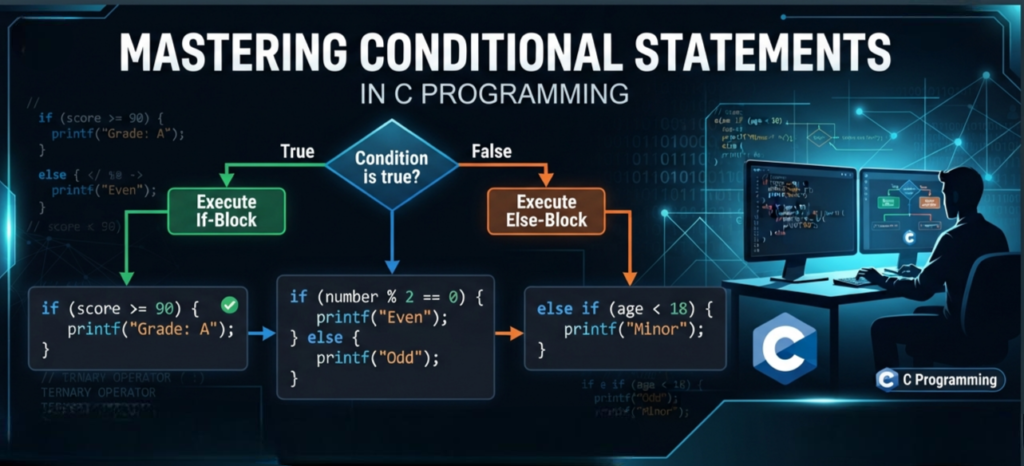
Decision Making and Branching – Conditional Statements
Author: Er. Mujtaba Ansari
Imagine how useful it would be if your C program could make decisions on its own based on different conditions!
With Conditional Statements, you can tell your program what action to take in different situations.

In this article or blog, you will learnif, else, else if,nested if and switch in detail with simple examples.
By the end of this article, you will definitely learn how to write smarter and more flexible C programs. These basic concepts will also help you in other programming languages such as C++, Java, Python, and many more, as their core programming concepts are based on similar fundamentals. So, study this article carefully and build a strong foundation in programming.
📚 C Programming Complete Course Structure
🧑💻 Chapter 1: C Programming Fundamentals
📜 Chapter 2: History and Evolution of C Language
⚙️ Chapter 3: Installing a C Compiler
💻 Chapter 4: Writing Your First C Program
🏗️ Chapter 5: Structure of a C Program
📦 Chapter 6: Variables and Data Types
🔢 Chapter 7: Operators in C
⌨️ Chapter 8: Input and Output Functions
🔀 Chapter 9: Decision Making and Branching – Conditional Statements (Current Chapter)
🔄 Chapter 10: Loops in C
📊 Chapter 11: Arrays
🔤 Chapter 12: Strings
🛠️ Chapter 13: Functions
👉 Chapter 14: Pointers
🏛️ Chapter 15: Structures and Unions
📁 Chapter 16: File Handling
7 Steps of the Decision-Making Process
- Identify the Decision
- Gather Relevant Information
- Identify the Alternatives
- Evaluate the Evidence
- Choose the Best Alternative
- Take Action
- Review the Decision
Conditional Statements in C: Complete Guide with Simple Examples
Conditional Statements are one of the most important concepts in C Programming. They help a program make decisions based on different conditions.
In simple words, Conditional Statements tell a program what to do when a condition is true and what to do when it is false.
For example, in real life, we make decisions based on conditions:
If it is raining → take an umbrella.
Otherwise → do not take an umbrella.
In the same way, a C program can check a condition and decide what action it should perform.
In this article, we will learn if, if-else, else-if, Nested if, and switch statements with simple explanations and easy examples.
What are Conditional Statements in C?
Conditional Statements are used to check a condition and make a decision in a C program.
A condition can have two possible results:
- True → The program executes the related code.
- False → The program skips that code or executes another block of code.
Simple Example
#include <stdio.h>

int main() {
    int age = 20;

    if (age >= 18) {
        printf("You are eligible to vote.");
    }

    return 0;
}
Output
You are eligible to vote.
Here:
age>=18
is the condition.
Because age is 20, the condition is true, so the message is displayed.
Why are Conditional Statements Important in C?
Conditional Statements are important because they allow a program to make decisions.
For example, we can use them to:
- Check whether a student has passed or failed.
- Check whether a number is positive or negative.
- Check whether a person is eligible to vote.
- Check whether a user entered the correct password.
- Display different messages based on user input.
- Create menu-based programs.
- Perform different operations based on different conditions.
Without Conditional Statements, a program would not be able to make decisions based on changing situations.
Types of Conditional Statements in C
The commonly used Conditional Statements in C are:
ifStatementif-elseStatementelse-ifLadder- Nested
ifStatement switchStatement
Let’s understand each one in a simple way.
1. if Statement in C
The if statement is used when we want to check one condition.
If the condition is true, the code inside the if block will execute.
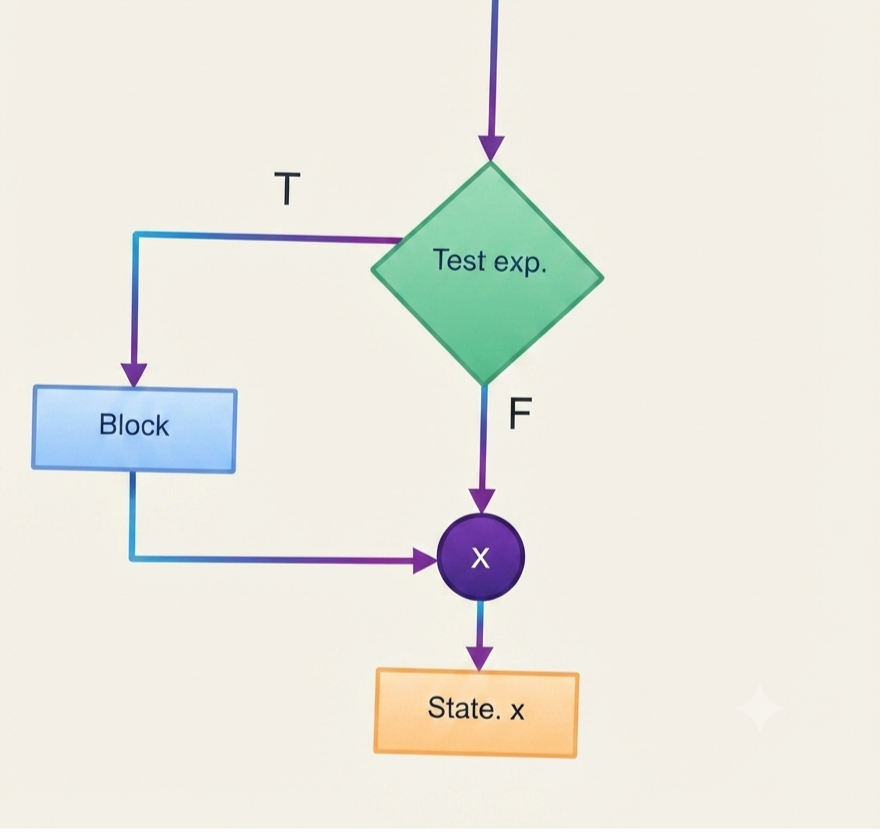
Syntax
if (test_expression)
{
    Block 1;
}

Statement X;
Flow Chart
Example: Write a program if a person can vote.
#include <stdio.h>

int main() {
    int age = 20;

    if (age >= 18) {
        printf("You are eligible to vote.");
    }

    return 0;
}
Output
You are eligible to vote.
Here, the program checks:
age>=18
Since 20 is greater than 18, the condition is true.
Therefore, the printf() statement is executed.
What happens if the condition is false?
Suppose:
int age = 15;
Now:
age >= 18
is false.
So, the code inside the if block will not execute.
2. if-else Statement in C
The if-else statement is used when we want to perform one action if the condition is true and another action if the condition is false.
Syntax
if (test expression)
{
    Block 1;
}
else
{
    Block 2;
}

Statement X;
Simple Explanation:
- Test Expression: The condition that the program checks.
- Block 1: Executes when the test expression is true.
- Block 2: Executes when the test expression is false.
- Statement X: Executes after the
if-elsestatement is completed.
Example
#include <stdio.h>

int main() {
    int age = 16;

    if (age >= 18) {
        printf("You are eligible to vote.");
    }
    else {
        printf("You are not eligible to vote.");
    }

    return 0;
}
Output
You are not eligible to vote.
Here, the condition:
age >= 18
is false because the age is 16.
Therefore, the else block is executed.
Write a Program to Check Whether a Given Number is Even or Odd
#include <stdio.h>

int main()
{
    int N;

    printf("Enter the number: ");
    scanf("%d", &N);

    if (N % 2 == 0)
    {
        printf("Even number");
    }
    else
    {
        printf("Odd number");
    }

    return 0;
}Output:
Enter the number: 10
Even number
Explanation
N % 2 == 0checks whether the number is completely divisible by2.- If the condition is true, the number is Even.
- If the condition is false, the number is Odd.
3. else-if Ladder in C
Sometimes we need to check more than one condition.
In that situation, we can use an else-if ladder.
Syntax
if (condition1) {
    // Code
}
else if (condition2) {
    // Code
}
else if (condition3) {
    // Code
}
else {
    // Code if all conditions are false
}
The program checks the conditions one by one from top to bottom.
When it finds a true condition, it executes that block and skips the remaining conditions.
Write a Program to Enter Salary and Calculate Commission and Total Amount
Question:
Write a program to enter the salary and calculate the commission and total amount according to the following conditions:
| Salary | Commission |
|---|---|
>= 20000 | 10% |
>= 15000 and < 20000 | 8% |
>= 10000 and < 15000 | 5% |
Below 10000 | Commission is not allowed |
Ans:
#include <stdio.h>

int main()
{
    int sal;
    float com, amount;

    printf("Enter the salary: ");
    scanf("%d", &sal);

    if (sal >= 20000)
    {
        com = sal * 10 / 100.0;
    }
    else if (sal >= 15000)
    {
        com = sal * 8 / 100.0;
    }
    else if (sal >= 10000)
    {
        com = sal * 5 / 100.0;
    }
    else
    {
        com = 0;
        printf("Commission is not allowed.\n");
    }

    amount = sal + com;

    printf("Commission = %.2f\n", com);
    printf("Total Amount = %.2f\n", amount);

    return 0;
}Output:
Enter the salary: 20000
Commission = 2000.00
Total Amount = 22000.00
Simple Explanation
- If salary is ₹20,000 or more, commission is 10%.
- If salary is ₹15,000 to below ₹20,000, commission is 8%.
- If salary is ₹10,000 to below ₹15,000, commission is 5%.
- If salary is below ₹10,000, no commission is allowed.
- Finally, Total Amount = Salary + Commission.
Example: Grade Program
#include <stdio.h>

int main() {
    int marks = 85;

    if (marks >= 90) {
        printf("Grade A+");
    }
    else if (marks >= 80) {
        printf("Grade A");
    }
    else if (marks >= 70) {
        printf("Grade B");
    }
    else if (marks >= 60) {
        printf("Grade C");
    }
    else if (marks >= 40) {
        printf("Grade D");
    }
    else {
        printf("Fail");
    }

    return 0;
}
Output
Grade A
Here, the program checks the conditions one by one.
marks >= 90→ Falsemarks >= 80→ True
So, the program prints:
Grade A
After finding the true condition, it does not check the remaining conditions.
4. Nested if Statement in C
When we use one if statement inside another if statement, it is called a Nested if statement.
In simple words:
An if statement inside another if statement is called Nested if.
Syntax
if (condition1) {

    if (condition2) {
        // Code
    }

}
Example
#include <stdio.h>

int main() {
    int age = 20;
    int hasID = 1;

    if (age >= 18) {

        if (hasID == 1) {
            printf("Entry Allowed");
        }

    }

    return 0;
}
Output
Entry Allowed
Here, the program first checks:
age >= 18
If this condition is true, it checks the second condition:
hasID == 1
If both conditions are true, the message is displayed.
(Q.) Write a Program to Find and Print the Nature and Values of the Roots of a Quadratic Equation
Answer:
#include <stdio.h>
#include <math.h>

int main()
{
    int a, b, c, d;
    float R1, R2;

    printf("Enter the values of a, b and c: ");
    scanf("%d %d %d", &a, &b, &c);

    if (a != 0)
    {
        d = b * b - 4 * a * c;

        if (d == 0)
        {
            printf("Roots are real and equal.\n");

            R1 = -b / (float)(2 * a);

            printf("Root 1 = Root 2 = %.2f\n", R1);
        }
        else if (d > 0)
        {
            printf("Roots are real and distinct.\n");

            R1 = (-b + sqrt(d)) / (float)(2 * a);
            R2 = (-b - sqrt(d)) / (float)(2 * a);

            printf("Root 1 = %.2f\n", R1);
            printf("Root 2 = %.2f\n", R2);
        }
        else
        {
            printf("Roots are imaginary.\n");
        }
    }
    else
    {
        printf("Not a quadratic equation.\n");
    }

    return 0;
}
Explanation
A quadratic equation has the general form:
ax² + bx + c = 0
The nature of its roots is determined by the discriminant:
d = b² - 4ac
- If
d == 0→ Roots are real and equal. - If
d > 0→ Roots are real and distinct. - If
d < 0→ Roots are imaginary. - If
a == 0→ It is not a quadratic equation.
Important Corrections Made
else if (d > 0)is used instead of a separateif, so the conditions work correctly.- The root formula has been corrected with proper brackets: R1= (-b+sqrt(d)) / (2*a);
conio.h,clrscr()andgetch()have been removed because they are not required in standard C.printf()formatting and\nhave been corrected.floatis used for root values because roots may contain decimal values.
5. switch Statement in C
The switch statement is useful when we have one value and several possible choices.
It is commonly used in menu-based programs.
Syntax
switch (expression) {

    case value1:
        // Code
        break;

    case value2:
        // Code
        break;

    default:
        // Code
}
Example
#include <stdio.h>

int main() {
    int choice = 2;

    switch (choice) {

        case 1:
            printf("Home");
            break;

        case 2:
            printf("Profile");
            break;

        case 3:
            printf("Settings");
            break;

        default:
            printf("Invalid Choice");
    }

    return 0;
}
Output
Profile
Here, the value of choice is 2.
So, the program finds:
case2:
and displays:
Profile
(Q.) Write a Program to Enter the Weekday Number and Display Its Name
Answer :
#include <stdio.h>

int main()
{
    int day;

    printf("Enter the weekday number (1-7): ");
    scanf("%d", &day);

    switch (day)
    {
        case 1:
            printf("Sunday");
            break;

        case 2:
            printf("Monday");
            break;

        case 3:
            printf("Tuesday");
            break;

        case 4:
            printf("Wednesday");
            break;

        case 5:
            printf("Thursday");
            break;

        case 6:
            printf("Friday");
            break;

        case 7:
            printf("Saturday");
            break;

        default:
            printf("Invalid input");
    }

    return 0;
}Output:
Enter the weekday number (1-7): 4
Wednesday
Simple Explanation
- The user enters a number from 1 to 7.
- The
switchstatement checks the entered number. - Each
caserepresents a day of the week. breakstops theswitchafter the matching case is executed.- If the user enters a number other than
1–7, thedefaultcase displays “Invalid input”.
What is the use of break in switch?
The break statement is used to stop the switch statement after the matching case is executed.
For example:
case 1:
    printf("One");
    break;
After printing One, break takes the program out of the switch.
If we do not use break where it is needed, the program may continue to execute the next cases. This is called fall-through.
What is default in switch?
The default case is executed when none of the cases match the given value.
Example
#include <stdio.h>

int main() {
    int choice = 5;

    switch (choice) {

        case 1:
            printf("Apple");
            break;

        case 2:
            printf("Banana");
            break;

        default:
            printf("Invalid Choice");
    }

    return 0;
}
Output
Invalid Choice
There is no case 5, so the default block is executed.
Relational Operators with Conditional Statements
We often use Relational Operators to compare values in Conditional Statements.
| Operator | Meaning |
|---|---|
> | Greater than |
< | Less than |
>= | Greater than or equal to |
<= | Less than or equal to |
== | Equal to |
!= | Not equal to |
Example
if (marks >= 40) {
    printf("Pass");
}
Here, >= checks whether the marks are 40 or more.
Logical Operators with Conditional Statements
Sometimes we need to check more than one condition at the same time.
For this, we can use Logical Operators.
The three main Logical Operators are:
| Operator | Name | Meaning |
|---|---|---|
&& | AND | Both conditions must be true |
| || | OR | If any one condition is true, the result will be true. |
! | NOT | Reverses the condition |
Example of AND (&&)
if (age >= 18 && age <= 60) {
    printf("Eligible");
}
Here, both conditions must be true.
Example of OR (||)
if (day == 6 || day == 7) {
    printf("Weekend");
}
If either condition is true, the message will be displayed.
Example of NOT (!)
int age = 20;

if (!(age < 18)) {
    printf("You are an adult.");
}
Explanation:
Here, age < 18 is false because the age is 20.
The ! operator reverses the condition, so false becomes true.
Conditional Statements with User Input
We can also use Conditional Statements with scanf() to create interactive programs.
Example
#include <stdio.h>

int main() {
    int age;

    printf("Enter your age: ");
    scanf("%d", &age);

    if (age >= 18) {
        printf("You are eligible to vote.");
    }
    else {
        printf("You are not eligible to vote.");
    }

    return 0;
}
Sample Output
Enter your age: 21
You are eligible to vote.
Here, the user enters their age, and the program checks the condition and displays the appropriate result.
if-else vs switch in C
Both if-else and switch can be used for decision-making, but they are useful in different situations.
| Feature | if-else | switch |
|---|---|---|
| Check conditions | Yes | Limited |
| Check ranges | Yes | Not suitable |
| Complex conditions | Yes | No |
| Fixed choices | Yes | Very useful |
| Menu programs | Possible | Very useful |
Example
For checking:
marks >= 40
if-else is a better choice.
For fixed choices such as:
1 → Add
2 → Subtract
3 → Exit
switch is usually more convenient.
Difference Between if and if-else
The if statement is used when we only want to execute something when a condition is true.
if (age >= 18) {
    printf("Eligible");
}
The if-else statement is used when we want to handle both true and false conditions.
if (age >= 18) {
    printf("Eligible");
}
else {
    printf("Not Eligible");
}
Common Mistakes in Conditional Statements
Beginners often make a few common mistakes while using Conditional Statements.
1. Confusing = and ==
This is one of the most common mistakes.
= is used for assignment.
age = 18;
== is used for comparison.
if (age == 18)
So, always remember:
= → Assign a value
== → Compare two values
2. Forgetting break in switch
When using switch, beginners sometimes forget break.
case 1:
    printf("One");
    break;
Use break when you want to stop after executing the matching case.
3. Using the Wrong Order in else-if
The order of conditions in an else-if ladder is very important.
For example:
if (marks >= 40)
followed by:
elseif (marks >= 80)
is not a good order for grading.
Why?
Because 85 >= 40 is already true, so the program will never reach marks >= 80.
A better order is:
if (marks >= 80)
followed by:
elseif (marks >= 40)
4. Forgetting Braces
For beginners, it is a good practice to use {} with if and else.
if (age >= 18) {
    printf("Eligible");
}
This makes the code easier to understand and helps avoid mistakes.
Real-World Uses of Conditional Statements
Conditional Statements are used in many types of software and applications.
Login System
If username and password are correct
→ Login successful

Otherwise
→ Invalid login details
Shopping Website
If purchase amount meets the free shipping limit
→ Free shipping

Otherwise
→ Shipping charges apply
Student Result
If marks are greater than or equal to passing marks
→ Pass

Otherwise
→ Fail
Banking Application
If account balance is sufficient
→ Allow transaction

Otherwise
→ Show insufficient balance
These examples show why Conditional Statements are important in real programming.
Simple Practice Programs For YOU
After learning Conditional Statements, you should practice some programs such as:
- Check whether a number is Even or Odd.
- Check whether a number is Positive, Negative, or Zero.
- Check whether a person is eligible to vote.
- Find the largest of two numbers.
- Find the largest of three numbers.
- Create a simple Grade Calculator.
- Create a simple Calculator using switch.
- Check whether a year is a Leap Year.
- Check whether a number is divisible by another number.
- Create a simple menu-driven program using
switch.
These programs will help you understand how conditions work in real code.
Conditional Statements in C Programming Language: Quick Summary
Let’s quickly revise what we learned:
if→ Used to check a single condition.if-else→ Used to handle true and false situations.else-if→ Used to check multiple conditions.- Nested
if→ Anifstatement inside anotherif. switch→ Used for multiple fixed choices.case→ Defines a possible value inswitch.break→ Stops the currentswitchexecution.default→ Runs when no case matches.- Relational Operators → Used to compare values.
- Logical Operators → Used to combine conditions.
Frequently Asked Questions (FAQs)
What are Conditional Statements in C?
Conditional Statements are used to make decisions in a C program. They check a condition and execute different code depending on whether the condition is true or false.
What are the main Conditional Statements in C?
The commonly used Conditional Statements are if, if-else, else-if, Nested if, and switch.
What is an if statement in C?
An if statement checks a condition. If the condition is true, the code inside the if block is executed.
What is the difference between if and if-else?
if is used when you only need to execute code when a condition is true. if-else is used when you want to handle both true and false situations.
What is an else-if ladder?
An else-if ladder is used when you need to check multiple conditions one after another.
What is a Nested if statement?
A Nested if statement is an if statement placed inside another if statement.
What is a switch statement in C?
A switch statement is used when you have one value and several fixed choices. It is commonly used for menu-driven programs.
What is the use of break in switch?
break stops the execution of the current switch statement after a matching case has been executed.
What is the difference between = and == in C?
= is an assignment operator, while == is a comparison operator used to check whether two values are equal.
Why should I learn Conditional Statements in C?
Conditional Statements are essential for building programming logic. They help you create programs that can make decisions and respond differently to different inputs or situations.

Mujtaba Ansari is a Software Engineer, Founder & CEO of The Tech Earth. He writes about technology, AI, software, cybersecurity, blogging, Health tech, Agri Tech and digital trends to help readers stay updated with the latest innovations.