

Chapter 10:
Decision Making and Loops in C Programming
Author: Er. Mujtaba Ansari
Want to make your C programs and another programs smarter and more efficient?
Decision-making-and-looping helps your program choose what to do, while loops handle repetitive tasks with ease.
Learn if, switch, for, while, and do-while with simple examples.
By the end of this guide, controlling the flow of a C program will feel easy.
📚 C Programming Complete Course Structure
🧑💻 Chapter 1: C Programming Fundamentals
📜 Chapter 2: History and Evolution of C Language
⚙️ Chapter 3: Installing a C Compiler
💻 Chapter 4: Writing Your First C Program
🏗️ Chapter 5: Structure of a C Program
📦 Chapter 6: Variables and Data Types
🔢 Chapter 7: Operators in C
⌨️ Chapter 8: Input and Output Functions
🔀 Chapter 9: Decision Making and Branching – Conditional Statements
🔄 Chapter 10: Decision Making and Loops in C Programming – Current Chapter
📊 Chapter 11: Arrays
🔤 Chapter 12: Strings
🛠️ Chapter 13: Functions
👉 Chapter 14: Pointers
🏛️ Chapter 15: Structures and Unions
📁 Chapter 16: File Handling
What Are Loops in C?
A loop is a control structure that allows a program to execute the same block of statements repeatedly as long as a specified condition is satisfied.
Suppose you want to print numbers from 1 to 100.
Without a loop, you would have to write:
printf("1");
printf("2");
printf("3");
and continue until 100.
This would make the program unnecessarily long.
With a loop, the same task can be done with just a few lines:
for (int i = 1; i <= 100; i++) {
    printf("%d ", i);
}
This is the main purpose of loops: to reduce repetitive code and make programs shorter, cleaner, and easier to maintain.
C provides three primary looping statements:
whilefordo-while
The C language reference also classifies these as iteration statements.
Why Are Loops Important in C?
Loops are one of the most important concepts in any programming languages.
They are used when the same operation needs to be performed multiple times.
For example, loops can be used to:
- print numbers,
- calculate factorials,
- generate Fibonacci series,
- find prime numbers,
- process arrays,
- print multiplication tables,
- reverse numbers,
- check palindrome numbers,
- check Armstrong numbers,
- print patterns,
- process user input,
- perform repeated calculations.
Simple Example
for (int i = 1; i <= 5; i++) {
    printf("Hello\n");
}
Output:
Hello
Hello
Hello
Hello
Hello
Instead of writing printf() five times, we use a loop.
Types of Loops in C
Loops can be classified into two categories based on when the condition is checked.
1. Entry-Controlled Loops
The condition is checked before the loop body executes.
C has two entry-controlled loops:
whilefor
2. Exit-Controlled Loop
The condition is checked after the loop body executes.
C has one exit-controlled loop:
do-while
This classification is also present in your original notes.
1. Entry-Controlled Loops
An entry-controlled loop is a type of loop in which the condition is checked before the loop body is executed.
The loop body is executed only when the condition is true. The loop continues to execute repeatedly as long as the condition remains true. As soon as the condition becomes false, the loop terminates.
Examples of Entry-Controlled Loops:
- while loop
- for loop
OR
In an entry-controlled loop, the condition is checked before executing the loop body.
If the condition is false at the beginning, the loop body will not execute even once.
For example:
int i = 10;

while (i < 5) {
    printf("%d", i);
}
Here:
10 < 5is false.
Therefore, the loop body executes zero times.
The while loop checks its controlling expression before each iteration.
while Loop in C
A while loop is an entry-controlled loop. In this type of loop, the condition is checked first, and then the loop body is executed only if the condition is satisfied.
The loop body executes repeatedly as long as the condition remains true. The loop terminates as soon as the condition becomes false.
Syntax
Initialization;

while (test condition)
{
    --------------------
    Loop Body
    --------------------
    Updation
    --------------------
}

Statement X;
Note: In a while loop, the condition is checked before the loop body is executed. Therefore, if the test condition is false initially, the loop body will not execute even once.
Flow Chart:
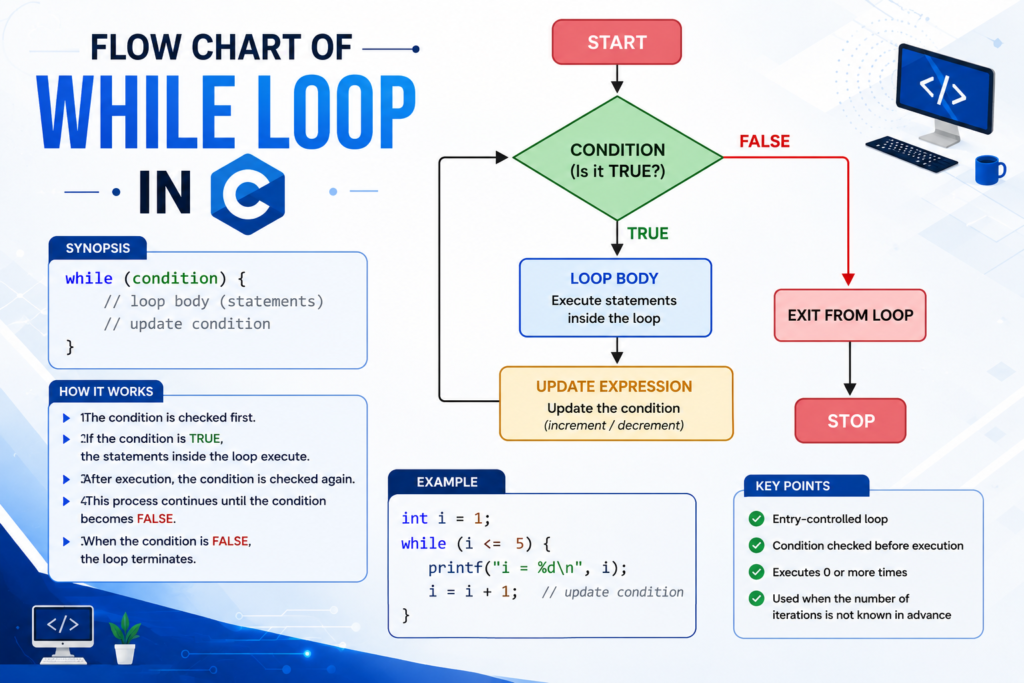
How Does a while Loop Work?
Consider:
int i = 1;

while (i <= 5) {
    printf("%d ", i);
    i++;
}
The execution works like this:
Step 1
i = 1Check:
1 <= 5 → truePrint 1.
Step 2
i = 2Check:
2 <= 5 → truePrint 2.
The process continues until:
i = 6Now:
6 <= 5 → falseThe loop stops.
Program to Print First N Natural Numbers
This is one of the basic while loop programs from your original notes.
Program
#include <stdio.h>

int main(void) {
    int n, i = 1;

    printf("Enter the value of N: ");
    scanf("%d", &n);

    while (i <= n) {
        printf("%d ", i);
        i++;
    }

    return 0;
}
Example Output
For:
N = 5Output:
1 2 3 4 5Explanation
i = 1initializes the counter.i <= nchecks the condition.printf()prints the current value.i++increases the value by 1.- The loop stops when
ibecomes greater thann.
Multiplication Table Using while Loop
We can use a while loop to print the multiplication table of any number.
Program
#include <stdio.h>

int main(void) {
    int n, i = 1;

    printf("Enter the number: ");
    scanf("%d", &n);

    while (i <= 10) {
        printf("%d x %d = %d\n", n, i, n * i);
        i++;
    }

    return 0;
}
Example
For n = 8:
8 x 1 = 8
8 x 2 = 16
8 x 3 = 24
8 x 4 = 32
8 x 5 = 40
8 x 6 = 48
8 x 7 = 56
8 x 8 = 64
8 x 9 = 72
8 x 10 = 80
This is based on the multiplication-table exercise in your notes, with its original syntax corrected.
Nested while Loop
A nested loop means one loop is placed inside another loop.
For example:
while (condition1) {

    while (condition2) {
        // inner loop
    }

}
The outer loop controls one repetition, while the inner loop performs another set of repetitions.
Nested loops are especially useful for:
- multiplication tables,
- patterns,
- matrices,
- two-dimensional data.
Two-Dimensional Multiplication Table
Your original notes include a nested while loop for a multiplication table from 1 to 10.
Here is the corrected version:
#include <stdio.h>

int main(void) {
    int i = 1;

    while (i <= 10) {
        int j = 1;

        while (j <= 10) {
            printf("%5d", i * j);
            j++;
        }

        printf("\n");
        i++;
    }

    return 0;
}
How it works
The outer loop controls:
1 to 10The inner loop also runs:
1 to 10Therefore, the program calculates:
1 × 1
1 × 2
...
10 × 10
Fibonacci Series Using while Loop
The Fibonacci series is:
0 1 1 2 3 5 8 13 21 34 ...In this series, each new term is obtained by adding the previous two terms.
For example:
0 + 1 = 1
1 + 1 = 2
1 + 2 = 3
2 + 3 = 5
Your original notes include Fibonacci as a while loop exercise.
Program: Write a program to print the first N terms of the given Fibonacci series.
#include <stdio.h>

int main(void) {
    int n;
    int i = 3;
    long long a = 0, b = 1, c;

    printf("Enter the number of terms: ");
    scanf("%d", &n);

    if (n <= 0) {
        printf("Please enter a positive number.");
    } else if (n == 1) {
        printf("0");
    } else {
        printf("0 1");

        while (i <= n) {
            c = a + b;
            printf(" %lld", c);

            a = b;
            b = c;
            i++;
        }
    }

    return 0;
}
Example
Input:
7Output:
0 1 1 2 3 5 8for Loop in C
In this type of loop, first of all, the initialization is performed, and then the test condition is checked. The loop body is executed only if the condition is true.
The loop body is executed repeatedly as long as the condition remains true. The loop terminates as soon as the condition becomes false.
Syntax
for (initialization; test condition; updation)
{
    -----------------------
        Loop Body
    -----------------------
}
Flow Chart:
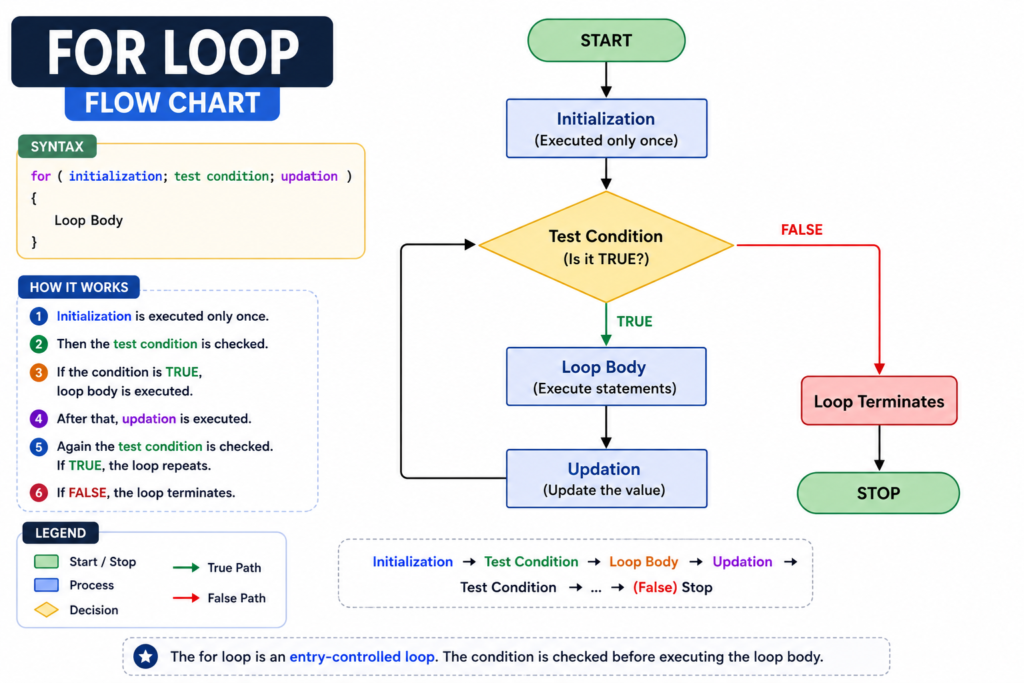
Three Parts of a for Loop
Consider:
for (int i = 1; i <= 5; i++) {
    printf("%d ", i);
}
1. Initialization
int i = 1Runs once at the beginning.
2. Condition
i <= 5Checked before each iteration.
3. Update
i++Runs after each iteration.
Simple Example for Loop
#include <stdio.h>

int main(void) {

    for (int i = 1; i <= 5; i++) {
        printf("%d ", i);
    }

    return 0;
}
Output:
1 2 3 4 5Factorial Using for Loop
The factorial of a positive integer is the product of all positive integers from 1 to that number.
For example:
5! = 5 × 4 × 3 × 2 × 1
   = 120
Your original notes include factorial using a for loop.
Program : Write a program to calculate the factorial of a given number using a for loop.
#include <stdio.h>

int main(void) {
    int n;
    unsigned long long fact = 1;

    printf("Enter a non-negative integer: ");
    scanf("%d", &n);

    if (n < 0) {
        printf("Factorial is not defined for negative numbers.");
        return 0;
    }

    for (int i = 1; i <= n; i++) {
        fact *= i;
    }

    printf("Factorial = %llu", fact);

    return 0;
}
Example
Input:
5Output:
Factorial = 120Important
By mathematical convention:
0! = 1The program also produces 1 for 0.
Prime Number Using for Loop
A prime number is a number greater than 1 that has exactly two positive divisors:
1- the number itself
Examples:
2, 3, 5, 7, 11, 13, 17...Your original notes use a flag and break to determine whether a number is prime.
Program: Write a program to check whether the given number is prime or not.
#include <stdio.h>

int main(void) {
    int n;
    int isPrime = 1;

    printf("Enter the number: ");
    scanf("%d", &n);

    if (n <= 1) {
        isPrime = 0;
    }

    for (int i = 2; i * i <= n && isPrime; i++) {
        if (n % i == 0) {
            isPrime = 0;
        }
    }

    if (isPrime) {
        printf("%d is a prime number.", n);
    } else {
        printf("%d is not a prime number.", n);
    }

    return 0;
}
Example
Input:
17Output:
17 is a prime number.Write a program to print the series of prime numbers in the range 11 to 100.
Ans:
#include <stdio.h>

int main(void)
{
    int N, i, flag;

    for (N = 11; N <= 100; N++)
    {
        flag = 0;

        for (i = 2; i <= N / 2; i++)
        {
            if (N % i == 0)
            {
                flag = 1;
                break;
            }
        }

        if (flag == 0)
        {
            printf("%5d", N);
        }
    }

    return 0;
}
Output
   11   13   17   19   23   29   31   37   41   43
   47   53   59   61   67   71   73   79   83   89
   97
Explanation
- The outer
forloop checks every number from11to100. - For each number,
flagis initialized to0. - The inner
forloop checks whether the number is divisible by any number from2toN/2. - If a divisor is found,
flagbecomes1andbreakstops the inner loop. - If
flagremains0, the number is prime and is printed.
Write a program to find the sum of the given series:
Answer:
#include <stdio.h>
#include <math.h>

int main(void)
{
    int N, x, i;
    int s = 0;

    printf("Enter the value of N and x: ");
    scanf("%d %d", &N, &x);

    for (i = 1; i <= N; i++)
    {
        s = s + (int)pow(x, i);
    }

    printf("Sum = %d", s);

    return 0;
}
Example
Suppose:
N = 3
x = 5
Then:
= 5 + 25 + 125
= 155
Step-by-Step Calculation
When i = 1:
s = 0 + 5¹
  = 5
When i = 2:
s = 5 + 5²
  = 5 + 25
  = 30
When i = 3:
s = 30 + 5³
  = 30 + 125
  = 155
Output
Enter the value of N and x: 3 5
Sum = 155
Write a program to find the sum of the given series:
Answer:
#include <stdio.h>
#include <math.h>

int main(void)
{
    int N, x, i, j, fact;
    float s = 0;

    printf("Enter the value of N and x: ");
    scanf("%d %d", &N, &x);

    for (i = 1; i <= N; i++)
    {
        fact = 1;

        for (j = 1; j <= 2 * i - 1; j++)
        {
            fact = fact * j;
        }

        s = s + pow(-1, i) * pow(x, 2 * i) / fact;
    }

    printf("Sum = %f", s);

    return 0;
}
Example
Suppose:
N = 3
x = 2
Then: =−1.866667
Write a program to find the sum of the following series:
Answer:
#include <stdio.h>

int main(void)
{
    int N, i, j, s = 0, R;

    printf("Enter the value of N: ");
    scanf("%d", &N);

    for (i = 1; i <= N; i++)
    {
        R = 0;

        for (j = 1; j <= i; j++)
        {
            R = R + j;
        }

        s = s + R;
    }

    printf("Result = %d", s);

    return 0;
}
Example
If N = 3:
Output
Enter the value of N: 3
Result = 10
Note: Why Do We Check i * i <= n?
Suppose a number is composite.
If it has a factor larger than its square root, it must also have a corresponding factor smaller than its square root.
Therefore, checking divisors up to the square root is sufficient for determining whether a number is prime.
This makes the program more efficient than checking every number up to n.
Nested for Loop
A for loop inside another for loop is called a nested for loop.
Syntax
for (initialization; condition; update) {

    for (initialization; condition; update) {
        // inner loop
    }

}
Nested loops are commonly used for:
- patterns,
- multiplication tables,
- matrices,
- rows and columns,
- multidimensional data.
Flow Chart:
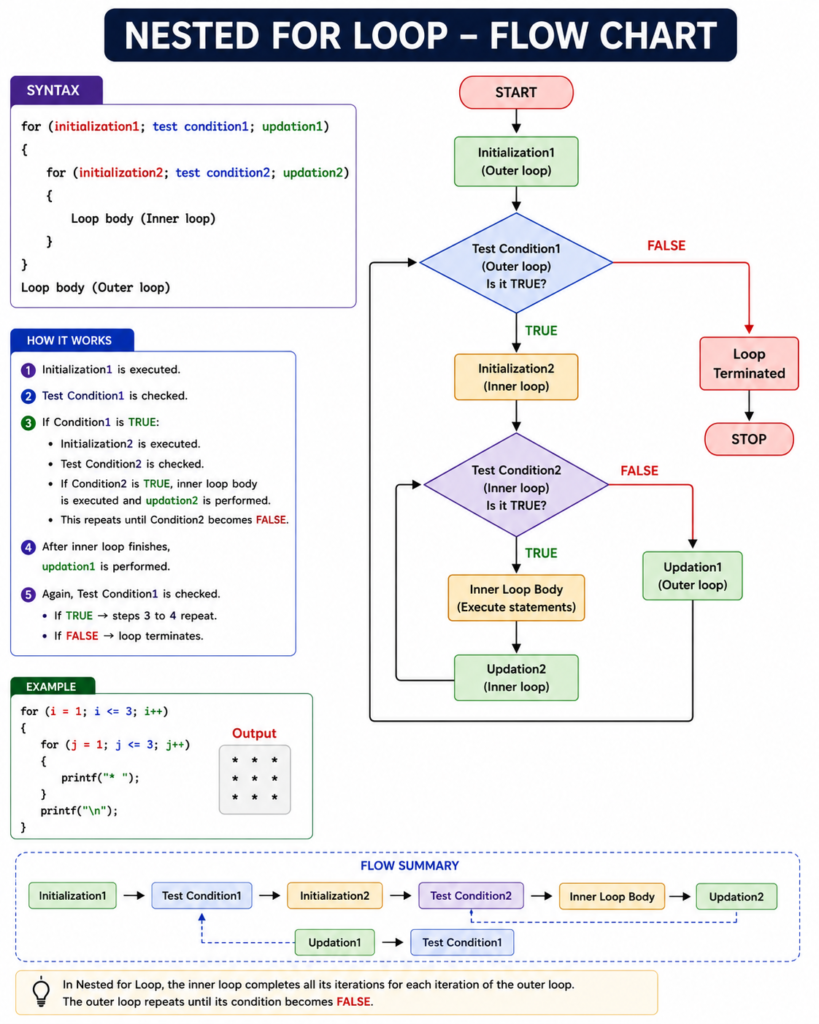
Write a C program to print the following pattern using nested for loops.
1 2 3
1 2 3
1 2 3
Answer:
#include <stdio.h>

int main(void)
{
    int i, j;

    for (i = 1; i <= 3; i++)
    {
        for (j = 1; j <= 3; j++)
        {
            printf("%d ", j);
        }

        printf("\n");
    }

    return 0;
}
Output
1 2 3
1 2 3
1 2 3
How it works
- The outer
forloop controls the rows. - The inner
forloop controls the numbers printed in each row. - For every one iteration of the outer loop, the inner loop runs 3 times.
Exit-Controlled Loop
In an exit-controlled loop, the loop body executes first and the condition is checked afterward.
Therefore, the loop body executes at least once.
The do-while statement is the exit-controlled loop in C. Your original notes describe exactly this behavior.
do-while Loop in C
Syntax
Initialization;

do
{
    ---------------------
    ---------------------
    Loop Body
    ---------------------
    Updation;
    ---------------------
}
while (test condition);

Statement X;
Note: The do-while loop is an exit-controlled loop. The loop body is executed at least once because the condition is checked after the loop body.
Flow Chart:
Example of do-while Loop
#include <stdio.h>

int main(void) {
    int i = 1;

    do {
        printf("%d ", i);
        i++;
    } while (i <= 5);

    return 0;
}
Output:
1 2 3 4 5Why Does do-while Execute At Least Once?
Consider:
int i = 10;

do {
    printf("%d", i);
} while (i < 5);
The condition:
10 < 5is false.
However, the output is:
10because the body executes before the condition is tested.
This is the key difference between while and do-while.
Reverse a Number Using do-while
To reverse a number, we repeatedly extract its last digit.
The last digit is obtained using:
digit = number % 10;Then the last digit is removed using:
number = number / 10;Your notes use this approach for reversing a number and checking whether it is a palindrome.
Program: Write a program to reverse the digits of the given number
#include <stdio.h>

int main(void) {
    int num, n;
    int digit;
    int reverse = 0;

    printf("Enter the number: ");
    scanf("%d", &num);

    n = num;

    do {
        digit = n % 10;
        reverse = reverse * 10 + digit;
        n /= 10;
    } while (n > 0);

    printf("Original number = %d\n", num);
    printf("Reversed number = %d", reverse);

    return 0;
}
Palindrome Number
A number is called a palindrome number if it remains the same after its digits are reversed.
Examples:
121
131
111
Your notes specifically provide these examples.
Program: Write a program to check the given number is Palindrome or not
#include <stdio.h>

int main(void) {
    int num, n;
    int digit;
    int reverse = 0;

    printf("Enter the number: ");
    scanf("%d", &num);

    n = num;

    do {
        digit = n % 10;
        reverse = reverse * 10 + digit;
        n /= 10;
    } while (n > 0);

    if (num == reverse) {
        printf("%d is a palindrome number.", num);
    } else {
        printf("%d is not a palindrome number.", num);
    }

    return 0;
}
Example
Input:
121Output:
121 is a palindrome number.Armstrong Number
Your notes list the following Armstrong numbers:
1, 153, 370, 371, 407and demonstrate checking the digits of 153.
For a three-digit Armstrong number, the sum of the cubes of its digits equals the original number.
For example:
153 = 1³ + 5³ + 3³
    = 1 + 125 + 27
    = 153
Program: Write a program to check if the given number is an Armstrong number or
not.
#include <stdio.h>

int main(void) {
    int num, n;
    int digit;
    int sum = 0;

    printf("Enter a three-digit number: ");
    scanf("%d", &num);

    n = num;

    do {
        digit = n % 10;
        sum += digit * digit * digit;
        n /= 10;
    } while (n > 0);

    if (num == sum) {
        printf("%d is an Armstrong number.", num);
    } else {
        printf("%d is not an Armstrong number.", num);
    }

    return 0;
}
Output Example
If the user enters 153:
Enter a three-digit number: 153
153 is an Armstrong number.
Explanation
An Armstrong number is a number whose value is equal to the sum of the cubes of its digits for a three-digit number.
For 153:
Therefore, 153 is an Armstrong number.
Armstrong Numbers from 1 to 1000
Your original notes include an exercise to print Armstrong numbers between 1 and 1000.
Program: Write a program to print the series of Armstrong Numbers in the range of
1 to 1000.
#include <stdio.h>

int main(void) {

    for (int num = 1; num <= 1000; num++) {

        int n = num;
        int sum = 0;

        do {
            int digit = n % 10;
            sum += digit * digit * digit;
            n /= 10;
        } while (n > 0);

        if (num == sum) {
            printf("%d ", num);
        }
    }

    return 0;
}Output:
1 153 370 371 407Pattern Printing Using Nested Loops
Nested loops are extremely useful for printing patterns.
Increasing Star Pattern
Output:
*
* *
* * *
* * * *
* * * * *
Program: Write a program to print the given pattern.
#include <stdio.h>

int main(void) {

    for (int i = 1; i <= 5; i++) {

        for (int j = 1; j <= i; j++) {
            printf("* ");
        }

        printf("\n");
    }

    return 0;
}
How it works
The outer loop controls the number of rows.
The inner loop controls the number of stars in each row.
For example:
Row 1 → 1 star
Row 2 → 2 stars
Row 3 → 3 stars
and so on.
Decreasing Star Pattern
Output:
* * * * *
* * * *
* * *
* *
*
Program: Write a program to print the given pattern.
#include <stdio.h>

int main(void) {

    for (int i = 5; i >= 1; i--) {

        for (int j = 1; j <= i; j++) {
            printf("* ");
        }

        printf("\n");
    }

    return 0;
}
Pyramid Pattern Using Nested Loops
Output:
    *
   ***
  *****
 *******
*********
Program: Write a program to print the given pattern.
#include <stdio.h>

int main(void) {
    int n;

    printf("Enter the number of rows: ");
    scanf("%d", &n);

    for (int i = 1; i <= n; i++) {

        for (int j = 1; j <= n - i; j++) {
            printf(" ");
        }

        for (int j = 1; j <= 2 * i - 1; j++) {
            printf("*");
        }

        printf("\n");
    }

    return 0;
}
Logic
Each row contains two parts:
- Spaces before the stars.
- Stars forming the pyramid.
Jump Statements in C
These statements are used to jump or transfer control from one part of a program to another.
C provides four jump statements:
breakcontinuegotoreturn
The C language reference also lists these four as jump statements.
1. break Statement
The break statement immediately terminates the nearest enclosing loop or switch statement.
Syntax
break;Example
#include <stdio.h>

int main(void) {

    for (int i = 1; i <= 5; i++) {

        if (i == 3) {
            break;
        }

        printf("%d ", i);
    }

    return 0;
}
Output:
1 2When i becomes 3, the loop stops.
Always remember
break = Stop the loop
2. continue Statement
The continue statement skips the remaining statements of the current iteration and moves to the next iteration.
Syntax
continue;Example
#include <stdio.h>

int main(void) {

    for (int i = 1; i <= 5; i++) {

        if (i == 3) {
            continue;
        }

        printf("%d ", i);
    }

    return 0;
}
Output:
1 2 4 5Always remember
continue = Skip this iteration
break vs continue
break | continue |
|---|---|
| Terminates the loop | Skips current iteration |
| Execution moves outside the loop | Execution moves to the next iteration |
Can be used with loops and switch | Used with loops |
| Stops further iterations | Allows later iterations to continue |
Practical Program Using break and continue
Your notes include a practical program that accepts up to 20 numbers, counts positive and negative numbers, exits when 0 is entered, and displays square roots of positive numbers.
Here is the corrected modern C version:
#include <stdio.h>
#include <math.h>

int main(void) {
    int n;
    int positive = 0;
    int negative = 0;

    for (int i = 1; i <= 20; i++) {

        printf("Enter a number (0 to exit): ");
        scanf("%d", &n);

        if (n == 0) {
            break;
        }

        if (n > 0) {
            positive++;

            printf("Square root of %d = %.2f\n",
                   n, sqrt((double)n));
        } else {
            negative++;
            continue;
        }
    }

    printf("\nTotal positive numbers = %d\n", positive);
    printf("Total negative numbers = %d\n", negative);

    return 0;
}
What happens?
0→breakstops the loop.- Positive number → positive counter increases and square root is displayed.
- Negative number → negative counter increases and
continueskips to the next iteration.
3. goto Statement in C
This statement is used to jump or transfer control from one part of a program to another labeled part of the program.
Syntax
goto label;

label:
    // statements
OR
Syntax of goto Statement
(1) Forward Jump:
label:
    --------------
    --------------
    goto label;
(2) Backward Jump:
goto label;

    ---------------
    ---------------

label:
    ------------
    ------------
Note: A label is an identifier followed by a colon (:), and the goto statement transfers control to that labeled statement.
Example : Write a program to find the sum of squares of the first N natural numbers
using goto statement.
#include <stdio.h>

int main(void) {
    int n;
    int i = 1;
    int sum = 0;

    printf("Enter the value of N: ");
    scanf("%d", &n);

sum_loop:

    sum += i * i;
    i++;

    if (i <= n) {
        goto sum_loop;
    }

    printf("Result = %d", sum);

    return 0;
}
For:
N = 3the calculation is:
1² + 2² + 3²
= 1 + 4 + 9
= 14
The original notes use this same sum-of-squares goto exercise.
Should goto be used frequently?
Generally, no.
Although goto is a valid C statement, normal loops and structured control flow are usually easier to read and maintain.
4. return Statement in C
The return statement terminates the execution of a function and can return a value to the calling function.
Syntax
return expression;Example: Write a C program to find the square of a number using a function.
#include <stdio.h>

int square(int n) {
    return n * n;
}

int main(void) {
    int result = square(5);

    printf("Square = %d", result);

    return 0;
}
Output:
Square = 25Difference Between for, while and do-while
| Feature | for | while | do-while |
|---|---|---|---|
| Type | Entry-controlled | Entry-controlled | Exit-controlled |
| Condition | Checked before body | Checked before body | Checked after body |
| Minimum executions | 0 | 0 | 1 |
| Best suited for | Known/repeated iterations | Condition-based repetition | At-least-once execution |
| Initialization | Usually in loop | Usually before loop | Usually before loop |
| Update | Usually in loop | Usually inside body | Usually inside body |
The key distinction is the position of the condition check: while and for test before the body, while do-while tests afterward.
for vs while
Both for and while are entry-controlled loops.
for
Best when the number of iterations is known.
for (int i = 1; i <= 10; i++) {
    printf("%d ", i);
}
while
Best when repetition primarily depends on a condition.
while (number != 0) {
    // statements
}
while vs do-while
while
Condition is checked first:
while (condition) {
    // body
}
The body can execute zero times.
do-while
Body executes first:
do {
    // body
} while (condition);
The body executes at least once.
Common Infinite Loop Mistake
One of the most common beginner mistakes is forgetting to update the loop variable.
Incorrect
int i = 1;

while (i <= 5) {
    printf("%d ", i);
}
Here, i never changes.
Therefore, the condition remains true and the loop does not terminate normally.
Correct
int i = 1;

while (i <= 5) {
    printf("%d ", i);
    i++;
}
Always make sure that a loop has a clear path toward its termination condition.
Another Common Mistake: Wrong Condition
Consider:
for (int i = 1; i >= 5; i++) {
    printf("%d", i);
}
The initial condition:
1 >= 5is false.
Therefore, the loop executes zero times.
Correct:
for (int i = 1; i <= 5; i++) {
    printf("%d ", i);
}
Common Mistake in do-while
Remember: that do-while requires a semicolon after the condition.
Correct:
do {
    printf("Hello");
} while (condition);
Not Correct:
do {
    printf("Hello");
} while (condition)
Nested Loops: Important Concept
When one loop is placed inside another, the inner loop normally completes all of its iterations for each iteration of the outer loop.
Example:
for (int i = 1; i <= 3; i++) {

    for (int j = 1; j <= 3; j++) {
        printf("%d %d\n", i, j);
    }

}
The inner loop executes three times for every iteration of the outer loop.
So the total number of inner executions is:
3 × 3 = 9This concept becomes especially important when working with arrays and matrices in later chapters.
Loop Control Statements
Loops can be controlled using:
break
continue
break
Stops the loop completely.
continue
Skips the current iteration.
goto
Moves control to a label.
return
Exits the current function.
These are officially classified as C jump statements.
Best Practices for Using Loops
To write clean and reliable C programs:
1. Choose the right loop
Use for when the number of iterations is known.
Use while when the condition controls repetition.
Use do-while when the body must execute at least once.
2. Use meaningful variables
Instead of:
int x;prefer:
int count;when the variable represents a count.
3. Always update the loop variable
Especially with while loops.
4. Keep loop conditions clear
Avoid unnecessarily complicated conditions.
5. Use braces
Even for a single statement, braces make code easier to read:
while (i <= 10) {
    printf("%d", i);
}
6. Avoid unnecessary goto
Structured loops are usually easier to understand.
7. Test boundary conditions
Test values such as:
0
1
negative values
maximum expected values
Very Important Programs to Practice for Interview and any Exams
After completing this chapter, practice the following programs.
Basic Loop Programs
- Print first N natural numbers.
- Print numbers from 1 to 100.
- Print even numbers.
- Print odd numbers.
- Print multiplication table.
- Find the sum of natural numbers.
- Find the factorial of a number.
Number Programs
- Print prime numbers in a range.
- Generate Fibonacci series.
- Check prime number.
- Reverse a number.
- Check palindrome number.
- Check Armstrong number.
- Print Armstrong numbers in a range.
Series Programs
- Calculate
x + x² + x³ + ... + xⁿ. - Calculate factorial-based mathematical series.
- Calculate nested series such as
(1) + (1+2) + (1+2+3) + ....
Nested Loop Programs
- Multiplication table.
- Increasing star pattern.
- Decreasing star pattern.
- Pyramid pattern.
- Matrix-style programs.
Jump Statement Programs
- Practice
break. - Practice
continue. - Understand
goto. - Use
returnwith functions.
Quick Revision For You
Types of Loops
1. while
2. for
3. do-while
Entry-Controlled Loops
while
for
Exit-Controlled Loop
do-whileJump Statements
break
continue
goto
return
Important Loop Concepts
Initialization
Condition
Loop Body
Updation
Iteration
Nested Loop
Infinite Loop
Frequently Asked Questions (FAQs)
What is a loop in C?
A loop is a control structure that repeatedly executes a block of statements while a specified condition remains true.
How many types of loops are there in C?
C has three primary loops:
forwhiledo-while
Which loops are entry-controlled?
for and while are entry-controlled loops.
Which loop is exit-controlled?
do-while is the exit-controlled loop.
Which loop executes at least once?
The do-while loop executes its body at least once because its condition is checked after the body.
What is the difference between for and while?
Both are entry-controlled loops. for is commonly convenient when initialization, condition, and update naturally belong together, while while is often clearer when repetition depends primarily on a condition.
What is a nested loop?
A nested loop is a loop placed inside another loop.
What is an infinite loop?
An infinite loop is a loop that does not reach a terminating condition.
Example:
while (1) {
    printf("Running...");
}
It should only be used intentionally.
What does break do in C?
break immediately terminates the nearest enclosing loop or switch.
What does continue do in C?
continue skips the remaining part of the current iteration and proceeds with the next iteration.
What is the use of goto?
goto transfers control to a labeled statement within the same function. It is generally best used sparingly.
What is the use of return?
return terminates the current function and can send a value back to the calling function.

Mujtaba Ansari is a Software Engineer, Founder & CEO of The Tech Earth. He writes about technology, AI, software, cybersecurity, blogging, Health tech, Agri Tech and digital trends to help readers stay updated with the latest innovations.