

What is Internet? Its Uses, Benefits & Features
The Internet, often referred to as International Networking, is a vast global system of interconnected networks, commonly known as a “network of networks.” It connects millions of computers, servers, and digital devices worldwide, enabling seamless communication and data exchange.
The Internet is formed by linking various types of networks, including personal, public, academic, government, and business networks. It allows users to browse websites, send emails, access online education, stream videos, and communicate instantly from anywhere in the world.
In today’s digital era, the Internet has become an essential part of everyday life, playing a crucial role in communication, education, entertainment, and business, Sports, Military, Medical etc.
Features of Internet :
Global Connectivity – Connects people and devices worldwide
Fast Communication – Instant messaging, emails, and video calls
Information Access – Unlimited access to knowledge and data
24/7 Availability – Works anytime, anywhere
Scalability – Continuously growing network
Multimedia Support – Supports text, audio, video, and images
Cost-Effective – Affordable communication and services
Some Benefits of Internet :
Easy Communication – Chat, email, video calls globally
Online Education – Learn from platforms like courses and tutorials
E-Commerce – Buy and sell products online
Entertainment – Movies, music, games, and streaming
Work & Business – Remote jobs, freelancing, digital marketing
Information & Research – Quick access to any topic
Social Networking – Connect with people worldwide
Evolution of Internet – History, Timeline & Development :
The Internet has evolved over several decades through continuous technological advancements and global collaboration. Below is a clear and accurate overview:
The origin of the Internet dates back to 1969 with the development of ARPANET (Advanced Research Projects Agency Network) by the U.S. Department of Defense. It is considered the first computer network and the foundation of the modern Internet.
In the 1970s–1980s, scientists Vinton Gray Cerf and Bob Kahn developed the TCP/IP (Transmission Control Protocol/Internet Protocol), which became the standard communication protocol for connecting networks worldwide.
In 1989, British scientist Tim Berners-Lee invented the World Wide Web (WWW), along with HTML, web browsers, and URL (Uniform Resource Locator). This innovation made the Internet user-friendly and widely accessible.
The Internet became available to the general public in the early 1990s, leading to rapid growth and global adoption.
In India, public Internet services were officially launched on 15 August 1995 by VSNL (Videsh Sanchar Nigam Limited), marking a significant milestone in the country’s digital development.
Internet Software or Web Browser – Definition, Types & Examples :
What is a Web Browser?
A web browser (also known as Internet software) is a computer program or application that allows users to access, navigate, and view websites on the Internet. It acts as a bridge between the user and the web, helping you open web pages, search information, watch videos, and use online services.
In simple way, a web browser helps you connect to the Internet and explore websites easily.
How Does a Web Browser Work?
A web browser uses protocols like HTTP/HTTPS to request data from web servers and displays it in the form of web pages using technologies such as HTML, CSS, and JavaScript.
Most Popular Web Browsers with examples:
Here are some of the most widely used web browsers:
Google Chrome – Fast, secure, and most popular browser worldwide
Mozilla Firefox – Privacy-focused and open-source browser
Microsoft Edge – Modern browser by Microsoft (replaced Internet Explorer)
Safari – Default browser for Apple devices
Opera – Lightweight browser with built-in VPN and features.
Old/Legacy Browsers:
Internet Explorer (now discontinued)
Netscape Navigator (one of the earliest browsers)
NCSA Mosaic (first widely used graphical browser)
History, Development or Developer of Web Browsers:
The first web browser was created in 1991 by Tim Berners-Lee, known as WorldWideWeb (later renamed Nexus).
In 1993, NCSA Mosaic made the web popular with its graphical interface.
Later, browsers like Netscape Navigator and Internet Explorer dominated the early Internet era.
Today, modern browsers focus on speed, security, privacy, and user experience.
Web Browser : Google Chrome
Launched (Year) : 2008
Developed By : Google LLC
Web Browser : Mozilla Firefox
Launched (Year) : 2004 (public release)
Developed By :Mozilla Corporation
Web Browser : Microsoft Edge
Launched (Year) : 2015
Developed By : Microsoft Corporation
Web Browser : Safari
Launched (Year) : 2003
Developed By : Apple Inc.
Web Browser : Opera
Launched (Year) :1995
Developed By : Opera Software
Web Browser: Internet Explorer Launched (Year) : 1995 Developed By : Microsoft Corporation
Key Features of Web Browsers :
Easy navigation of websites
Fast search and page loading
Security features (HTTPS, safe browsing)
Bookmarking and history
Extensions and plugins support
Cross-device synchronization
Benefits of Using Web Browsers
Access unlimited information online
Use web applications and services
Watch videos, read articles, and shop online
Secure and fast browsing experience
Supports modern digital activities like online learning and remote work
Equipment Required to Connect to the Internet :
To access and use the Internet, a user needs certain basic hardware, software, and network services. These components work together to establish a stable and secure Internet connection.
Essential Requirements for Internet Connection :
Device (Computer / Smartphone / Tablet) –
Any digital device such as a desktop computer, laptop, smartphone, or tablet is required to access the Internet. Modern users mostly rely on smartphones and laptops.
Modem / Router –
A modem converts signals from your Internet Service Provider (ISP), while a router distributes the Internet connection to multiple devices via Wi-Fi or cables. Today, most users use a combined Wi-Fi router + modem device.
Web Browser (Internet Software) –
A web browser is software that allows users to open and interact with websites. Popular browsers include Google Chrome, Mozilla Firefox, Microsoft Edge, Safari, and Opera.
Network Connection (Wired or Wireless) –
Internet connectivity can be established through:
Broadband (Fiber / DSL)
Mobile Data (4G / 5G)
Wi-Fi Networks
These modern technologies have largely replaced traditional telephone line connections.
Internet Service Provider (ISP) –
An ISP is a company that provides Internet access to users. Examples include broadband and mobile network providers that deliver Internet services to homes and businesses.
Additional Modern Requirements (Latest Update)
SIM Card (for mobile Internet)
Network Coverage (4G/5G/Fiber availability)
Updated Operating System & Security Software (for safe browsing)
🌐 Some Basic Internet Related Terms (Students & Beginner-Friendly Guide)
Understanding basic internet terminology is essential for students, beginners, and anyone using digital technology. Below are the most important internet terms explained in a simple and SEO-friendly way.
(1) World Wide Web (WWW)
The World Wide Web (WWW), also known as W3, is a system of interlinked web pages that can be accessed through the internet. It was invented by Tim Berners-Lee in 1989.
👉 Key Points:
WWW allows users to access websites and web pages
It works using browsers like Chrome, Edge, etc.
It is one of the most popular ways to use the internet
Example:
Typing a web address like www.example.com� opens a webpage in your browser.
(2) Home Page
A Home Page is the main or first page of a website.
It acts as the entry point and provides links to other sections of the site.
👉 Example:
When you open any website, the first page you see is usually the homepage.
(3) Web Page
A Web Page is any single page of a website that is displayed in a browser.
👉 It may include:
Text
Images
Audio
Video
Hyperlinks
Note:
Web pages are usually created using HTML (HyperText Markup Language).
(4) Website
A Website is a collection of multiple web pages that are linked together through hyperlinks.
👉 Key Features:
Contains different types of information
Pages are interconnected
Accessible through a domain name
Example:
An e-commerce site, blog, or news portal is a website made up of many pages.
(5) URL (Uniform Resource Locator)
A URL is the complete web address used to locate a resource on the internet.
It specifies the protocol, domain name, and sometimes additional paths.
👉 Example:
https://www.google.com�
Structure of a URL:
Protocol – (e.g., HTTP/HTTPS)
Domain Name – (e.g., google.com)
Domain Extension (Type) – (.com, .org, etc.)
👉 Explanation:
https:// → Protocol (secure communication)
google.com → Domain name
In Simple meaning:
The address of any webpage on the internet = URL
🌍 Common Domain Types (Extensions)
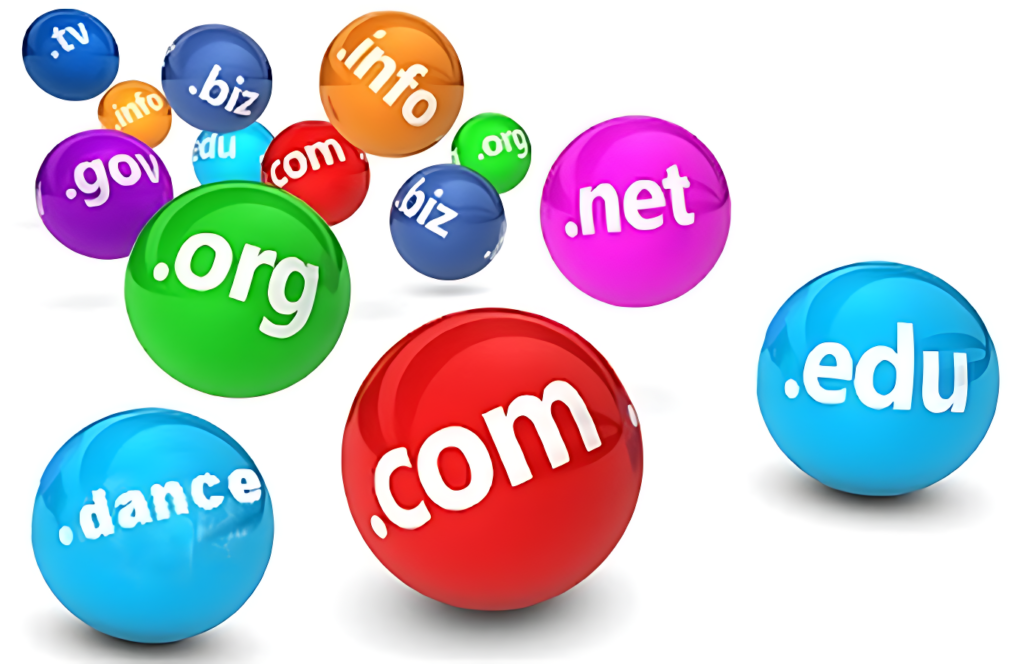
.com → Commercial
.org → Organization
.gov → Government
.edu → Educational
.net → Network-related
.mil → Military
.info → Information
.co → Company/Corporation
🌎 Country-Specific Domain Codes
.in → India
.uk → United Kingdom
.us → United States
.au → Australia
.fr → France
.nz → New Zealand
(6) Domain Name System (DNS) – What is DNS?
The Domain Name System (DNS) is a fundamental internet service that translates human-readable domain names into machine-readable IP addresses.
Instead of remembering complex numeric IP addresses, users can simply enter a domain name.
👉 Example:
When you type www.example.com�, DNS converts it into an IP address like 198.15.45.18 so the browser can locate the correct server.
In Simple meaning:
Domain name → Converted into IP address = DNS
(7) IP Address (Internet Protocol Address)
An IP Address is a unique numerical identifier assigned to every device connected to the internet.
It helps identify the device and its network location so data can be sent and received correctly.
👉 Key Features:
Each device has a unique IP address
Used for communication between devices over the internet
Indicates network and location details (approximate)
Best Format:
IPv4 example: 192.168.1.1 (four parts separated by dots)
Each part ranges from 0 to 255
👉 Note:
No two devices on the same network can have the same IP address at the same time.
(8) HTTP (Hypertext Transfer Protocol)
HTTP is a protocol used for transferring data over the internet.
It defines the rules for communication between a web browser (client) and a web server.
👉 How it works:
The browser sends a request to the server
The server responds with the requested webpage or data
Concept:
HTTP works on the Client-Server Model
👉 Updated Important Note:
Modern websites mostly use HTTPS (secure version of HTTP) for encrypted and safe communication.
(9) Web Server
A Web Server is a system (software + hardware) that stores, processes, and delivers web pages to users using HTTP/HTTPS protocols.
👉 How it works:
User requests a webpage via browser
Web server processes the request
Sends back the webpage as a response
📌 Example:
When you open a website, the web server delivers its content to your device.
(10) ISP (Internet Service Provider)
An Internet Service Provider (ISP) is a company or organization that provides internet access to individuals, businesses, and institutions.
👉 Functions of ISP:
Provides internet connectivity
Offers services like broadband, fiber, mobile data
Maintains network infrastructure
📌 Client-Server Concept:
User’s device = Client
ISP’s system = Server/Network Provider
Examples of ISPs (Global)
Microsoft Network
AOL
Yahoo
Major ISPs in India
BSNL
MTNL
Reliance Jio
Airtel
Vodafone Idea
Hathway
Excitel
(11) What is Online?
Online refers to a state where a computer, smartphone, or any digital device is connected to the internet or a network.
When a person is actively using the internet—such as browsing websites, using social media, or sending emails—they are considered online.
👉 Examples:
Watching videos, chatting on apps, or searching on Google are all online activities.
(12) What is Offline?
Offline means that a device is not connected to the internet or any network.
In this state, users can only access data or applications that are already stored on their device.
👉 Examples:
Playing offline games or watching downloaded videos without internet access.
(13) What is Download?
Download is the process of receiving data or files from the internet or a network and saving them to your device (mobile or computer).
👉 Common downloadable content includes:
Images
Videos
Audio files (songs)
Documents (PDF, Word files)
(14) What is Upload?
Upload is the opposite of download.
It refers to sending data or files from your device to the internet or a server.
👉 Examples:
Posting photos on social media
Sending email attachments
Uploading files to cloud storage like Google Drive
(15) What is Sign Up?
Sign Up is the process of creating a new account on a website, app, or online platform.
It registers you as a new user so you can access services.
👉 Examples:
Creating a new account on Facebook, Instagram, or any website.
(16) What is Log In?
Log In refers to accessing an existing account by entering your credentials such as email/phone number and password.
👉 Examples:
Signing into your Gmail, Instagram, or any registered account.
(17) What is Log Out?
Log Out means exiting your account after completing your work.
It is especially important for security, particularly on shared or public devices.
👉 Examples:
Signing out of your account after use.
🛒 Online Shopping / E-Commerce – Complete Guide (2026)
Online Shopping, also known as E-Commerce (Electronic Commerce), refers to the buying and selling of products or services over the internet.
It allows users to shop anytime, anywhere using digital devices like smartphones, tablets, or computers.
👉 In simple Definition:
Buying or selling goods online = E-Commerce
📈 Evolution or History of E-Commerce
E-commerce started gaining popularity in the 1990s and has rapidly grown into a global industry.
Today, millions of users prefer online shopping due to convenience, variety, and competitive pricing.
🌍 Popular E-Commerce Companies
Some of the most well-known online shopping platforms include:
Amazon
Flipkart
Meesho
Jiomart
IndiaMART
Alibaba Group
Snapdeal
Myntra
Paytm Mall
ShopClues
BigBasket
Pepperfry
AJIO
Lenskart
MakeMyTrip
🔑 Types of E-Commerce Models
E-commerce is mainly divided into four major categories:
(1) Business to Consumer (B2C)
This is the most common type of e-commerce.
In this model, businesses sell products or services directly to customers.
👉 Example:
Buying clothes or electronics from Amazon or Flipkart.
(2) Business to Business (B2B)
In this model, transactions occur between two businesses or companies.
👉 Example:
A manufacturer selling raw materials or products to another company using platforms like IndiaMART.
(3) Consumer to Consumer (C2C)
In this model, customers sell products or services directly to other customers through online platforms.
👉 Example:
Selling used items or products on online marketplaces.
(4) Intra-Organizational E-Commerce
This model involves internal online transactions within a single organization.
A company manages production, supply, and sales using its own internal systems without relying on external vendors.
✅ Benefits of Online Shopping
24/7 shopping convenience
Wide range of products
Easy price comparison
Home delivery
Multiple payment options
⚠️ Challenges of E-Commerce
Security and privacy concerns
Product quality mismatch
Delivery delays
Return/refund issues
⚡ Quick Commerce (Q-Commerce):
What is Quick Commerce?
Quick Commerce (Q-Commerce) is a type of e-commerce where products are delivered to customers very quickly, usually within 10–30 minutes.
👉 In simple definition:
Super-fast online delivery service = Quick Commerce
🛒 Examples of Quick Commerce –
Blinkit
BigBasket
Zepto
Flipkart
JioMart
Swiggy Instamart
👉 Example –
You order groceries, milk or snacks, and it gets delivered to your home in 10 to 15 minutes.
⚙️ Key Features of Quick Commerce :
⚡ Ultra-fast delivery (10–30 minutes)
🏪 Uses nearby dark stores or local warehouses📍 Hyperlocal delivery (within a small area)
📱 Easy ordering via mobile apps
🕐 Available almost 24/7 in many cities
✅ Benefits of Quick Commerce –
⏱️ Saves time (instant delivery)
🛍️ Perfect for urgent needs (groceries, medicines, milk or daily items)
🏠 Convenience of home delivery
📦 Small order friendly (no need for bulk buying)🚀 Faster than traditional e-commerce
Important Note:
❌ Why Amazon is NOT a Top Q-Commerce Player in India?
⏱️ Delivery is usually hours or same-day, not 10 minutes
🏪 Less dependency on dark stores compared to Blinkit/Zepto/Instamart/Bigbasket
🎯 Focus is on wide product range, not instant grocery delivery
📱 Mobile Internet Generation (G) – Complete Guide (1G to 5G)
Mobile Internet Generation, also known as “G” (Generation), refers to the different stages of wireless mobile network technology.
Each new generation brings faster speed, better connectivity, and advanced features.
👉 In simple definition:
The higher the “G”, the faster and more advanced your mobile internet experience.
📊 Evolution of Mobile Network Generations –
🔹 1G (First Generation – 1979)
Launched by NTT in Japan
Analog communication technology
Only supported voice calls (no data services)
Poor call quality and security
🔹 2G (Second Generation – 1991)
Introduced in Finland
Shift from analog to digital communication
Enabled SMS (text messaging) and basic data services
Better voice quality and security than 1G
🔹 3G (Third Generation – Early 2000s)
Introduced globally in the early 2000s
Enabled mobile internet browsing
Supported video calls, emails, and multimedia services
Faster than 2G
🔹 4G (Fourth Generation – Around 2010)
High-speed internet technology
Supports HD video streaming, online gaming, and fast downloads
Uses LTE (Long Term Evolution) technology
Widely used in India for high-speed connectivity
🔹 5G (Fifth Generation – 2020 onwards)
Latest and fastest mobile network generation
Ultra-high speed, low latency, and massive connectivity
👉 Key Features of 5G:
⚡ Extremely fast internet (up to multi-Gbps speeds)
📶 Low latency (real-time response)
🤖 Supports IoT (Internet of Things)
🚗 Enables smart cities, connected cars, smart homes
🔗 Supports Machine-to-Machine (M2M) communication
Important Note :
🇮🇳 In India, 5G was officially launched on 1 October 2022.
🚀 Why Mobile Generations Matter?
💫Faster downloads & uploads
💫Better video streaming quality
💫Improved online gaming experience
💫Enables future technologies like AI, IoT, and automation
🌐 Popular Websites You Use in Daily Life (Updated List ) :
The internet offers a wide range of websites for communication, jobs, travel, information, and government services. Below is a categorized list of popular and useful websites used in everyday life.
📱 Popular Social Media Platforms
These platforms are widely used for communication, entertainment, and networking:
Facebook
YouTube
WhatsApp
Facebook Messenger
Instagram
WeChat
QQ
Tumblr
Qzone
TikTok (Banned in India since 2020)
X (Twitter)
Reddit
LinkedIn
Snapchat
Pinterest
Telegram
Medium
💼 Popular Job Search Websites
These websites help users find jobs, internships, and career opportunities:
Naukri.com
Indeed
LinkedIn
Monster India
CareerBuilder
College Recruiter
✈️ Popular Travel & Reservation Websites –
Used for booking flights, hotels, trains, and travel packages:
www.irctc.com
www.yatra.com
www.makemytrip.com
www.cleartrip.com
www.easemytrip.com
www.goibibo.com
www.oyorooms.com
www.thomascook.com
www.expedia.com
www.musafir.com
www.booking.com
🔎 Popular Search Engines –
Search engines help users find information on the internet:
Google
Bing
Yahoo
Baidu
DuckDuckGo
Yandex
Qwant
🏛️ Popular Government Websites (India) –
These official portals provide important public services:
www.uidai.gov.in
www.utiitsl.in (Pan Card)
www.eci.nic.in (Ration card / Voter ID) www.passportIndia.gov.in
www.mylpg.in6. www.nic.in
www.bescom.org
www.rtionline.gov.in
www.incometaxindiaefiling.gov.in
www.indiapost.gov.in
www.epfindia.gov.in
www.upsc.gov.in
www.india.gov.in
www.nvsp.in
www.makeinindia.com
🌐 Uses of the Internet –
The Internet is an essential part of daily life, used for communication, learning, business, and entertainment.
📱 Social Networking – Facebook, Instagram
📧 Email – Gmail
💬 Chatting – WhatsApp
🎓 Education (Online Learning)
🎬 Entertainment – YouTube
🛒 Online Shopping – Amazon
💳 Online Banking
📰 News & Information
🔎 Search Engines – Google
🎥 Video Conferencing
🎟️ Online Booking – IRCTC
💼 Freelancing & Work
🔄 Data Sharing
MCQ Questions (With Answers) – Objective Questions for Practice
(1) What is the full form of Internet?
(a) International Networking
(b) Internet Next
(c) Immediate
(d) All of the above
(e) None of these
✅ Correct Answer: (e) None of these
📌 Explanation: “Internet” is not officially an acronym; it refers to a global network of interconnected computers.
(2) When was the Internet first introduced in the world?
(a) 1855
(b) 1944
(c) 1947
(d) 1969
(e) 1960
✅ Correct Answer: (d) 1969
📌 Explanation: The internet originated with ARPANET in 1969.
(3) In the URL “http://www.example.com”�, what does “http” represent?
(a) Domain Name
(b) Domain Address
(c) Protocol
(d) Host
(e) All of the above
✅ Correct Answer: (c) Protocol
📌 Explanation: HTTP (HyperText Transfer Protocol) defines rules for data transfer.
(4) What is the standard protocol used on the Internet?
(a) JAVA
(b) HTML
(c) HTTP
(d) TCP/IP
(e) FTP
✅ Correct Answer: (d) TCP/IP
📌 Explanation: TCP/IP is the fundamental communication protocol suite of the internet.
(5) What is known as the “Information Highway”?
(a) Mobile
(b) E-mail
(c) Internet
(d) Pager
(e) Software
✅ Correct Answer: (c) Internet
📌 Explanation: Internet is commonly referred to as the Information Highway.
(6) An IP Address is divided into how many parts (IPv4)?
(a) 4 parts
(b) 3 parts
(c) 6 parts
(d) 2 parts
(e) None of these
✅ Correct Answer: (a) 4 parts
📌 Explanation: IPv4 addresses consist of four octets (e.g., 192.168.1.1).
(7) What is the process of receiving data from a server to your computer called?
(a) Transfer
(b) Pushing
(c) Pulling
(d) Downloading
(e) All of the above
✅ Correct Answer: (d) Downloading
📌 Explanation: Downloading means receiving data from the internet.
(8) Where can you find the list of websites/pages you have visited?
(a) Toolbar
(b) Taskbar
(c) History List
(d) Status Bar
(e) None of these
✅ Correct Answer: (c) History List
📌 Explanation: Browsers store visited pages in the history section.
(9) What identifies a specific computer and the main page of a website on the web?
(a) Hyperlink
(b) URL
(c) Domain Name
(d) Website Address
(e) None of these
✅ Correct Answer: (b) URL
📌 Explanation: A URL uniquely identifies a resource on the internet.
(10) The term “Blog” is a combination of which two words?
(a) Wab Log
(b) Web Log
(c) Wave Log
(d) Wed Log
(e) None of these
✅ Correct Answer: (b) Web Log
📌 Explanation: “Blog” comes from “Web Log”.
(11) What is the function of an ISP (Internet Service Provider)?
(a) Broadcasting
(b) Data Transfer
(c) Providing internet connectivity to users
(d) Registering users
(e) None of these
✅ Correct Answer: (c) Providing internet connectivity to users
📌 Explanation: An ISP connects users to the internet and provides access services.
(12) What is another name for an Internet Address?
(a) WAN Number
(b) LAN Number
(c) Internet Label
(d) Internet Protocol Address
(e) All of the above
✅ Correct Answer: (d) Internet Protocol Address
📌 Explanation: An internet address is commonly known as an IP Address.
(13) What is a Server?
(a) Donation amount
(b) Lab software
(c) Software/system that provides services to other computers
(d) Domain name
(e) All of the above
✅ Correct Answer: (c) Software/system that provides services to other computers
📌 Explanation: A server delivers data and services to client devices over a network.
(14) Which software allows users to view web pages?
(a) Interpreter
(b) Website
(c) Browser
(d) Operating System
(e) None of these
✅ Correct Answer: (c) Browser
📌 Explanation: A web browser is used to access and display web pages.
👉 Examples of browsers:
Google Chrome
Mozilla Firefox
Microsoft Edge
(15) Which topology is most suitable for large networks?
(a) Mesh
(b) Ring
(c) Bus
(d) Star
(e) None of these
✅ Correct Answer: (a) Mesh
📌 Explanation: Mesh topology is highly reliable and suitable for large networks due to multiple connections between nodes.
(16) Gmail service belongs to which company?
(a) Apple
(b) Twitter
(c) Facebook
(d) Microsoft
(e) Google
✅ Correct Answer: (e) Google
📌 Explanation: Gmail is an email service provided by Google.
(17) What is the last part after the dot (.) in a domain name called?
(a) DNA
(b) Spam
(c) Domain Codes
(d) E-mail Target
(e) Codes Only
✅ Correct Answer: (c) Domain Codes
📌 Explanation: The last part of a domain (like .com, .org, .in) is called a domain extension or top-level domain (TLD).
(18) What does IM stand for?
(a) Internal Messaging
(b) Instant Messaging
(c) Instant Making
(d) Semi-Messaging
(e) All of the above
✅ Correct Answer: (b) Instant Messaging
📌 Explanation: IM refers to real-time text communication over the internet.
(19) What is a popular chatting service called?
(a) Internet Relay Chat
(b) Internet Request Chat
(c) Internet Release Chat
(d) Internet Resource Chat
(e) None of these
✅ Correct Answer: (a) Internet Relay Chat
📌 Explanation: Internet Relay Chat (IRC) is one of the earliest and popular online chat systems.
(20) Which scripting/markup language is used to design web pages?
(a) HTMV
(b) HTML
(c) HLML
(d) HORP
(e) None of these
✅ Correct Answer: (b) HTML
📌 Explanation: HTML (HyperText Markup Language) is the standard language used to create and design web pages.

Mujtaba Ansari is a Software Engineer, Founder & CEO of The Tech Earth. He writes about technology, AI, software, cybersecurity, blogging, Health tech, Agri Tech and digital trends to help readers stay updated with the latest innovations.