


What is Microsoft Office ? – Features, Benefits and Uses
Introduction to Microsoft Office
Microsoft Office is one of the most popular and widely used office productivity software suites in the world. It was developed by Microsoft in 1989 and is used by millions of people globally for personal, educational, and professional work.
Microsoft Office is available in many languages and is designed to help users complete everyday tasks quickly and efficiently. It is a general-purpose software used at home, in schools, colleges, offices, and large organizations.
Main Features of Microsoft Office
Microsoft Office includes many useful applications such as:
- Microsoft Word – used to create documents, letters, resumes, and reports
- Microsoft Excel – used for spreadsheets, calculations, tables, and data analysis
- Microsoft PowerPoint – used to create presentations and slideshows
- Microsoft Access – used for database management
- Microsoft Outlook – used for email communication and scheduling
- OneNote – used for note-taking and organizing information
Benefits of Microsoft Office
Easy to Use
Microsoft Office has a simple and user-friendly interface, making it suitable for beginners as well as professionals.
Improves Productivity
It helps users work faster by providing ready-made tools, templates, and smart features.
Professional Quality Work
Users can create professional documents, presentations, reports, and spreadsheets easily.
Useful for Everyone
Microsoft Office is useful for students, teachers, business owners, employees, and organizations.
Better Organization
It helps organize documents, records, data, emails, and office work in one place.
Uses of Microsoft Office
Microsoft Office is commonly used for:
- Creating documents and reports
- Making presentations
- Preparing spreadsheets and calculations
- Managing databases
- Writing letters and resumes
- Data entry and record keeping
- Office and business-related Work
History of Microsoft Office –
Microsoft Office was first introduced in 1989 for the Mac Operating System. A year later, in 1990, Microsoft released the first version for Windows. Since then, it has continued to grow with new versions, improved tools, and advanced features.
Early Versions of Microsoft Office
In the beginning, Microsoft Office was simple and included only a few core applications:
- Microsoft Word – for creating documents
- Microsoft Excel – for spreadsheets and calculations
- Microsoft PowerPoint – for presentations
These early versions had limited features compared to today’s modern Office apps.
Journey of Microsoft Office or Evolution Over Time :
As technology improved, Microsoft Office evolved with every new release. Microsoft regularly added better design, improved performance, cloud storage, collaboration tools, and smarter productivity features.
Over the years, new apps such as:
- Outlook
- OneNote
- Access
- Teams
were added to the Office ecosystem.
Microsoft Office in 2026
By 2026, Microsoft Office has become more advanced than ever. Today it is widely available through Microsoft 365, which combines classic Office apps with cloud-based services and AI-powered tools.
Modern Microsoft Office includes:
- Word
- Excel
- PowerPoint
- Outlook
- OneNote
- Teams
- OneDrive integration
- AI features like Microsoft Copilot
Users can now create, edit, save, and share files in real time across multiple devices.
Available on Multiple Devices
Microsoft Office is no longer limited to desktop computers. In 2026 it is available on:
- Windows PCs
- Mac computers
- Smartphones
- Tablets
- Web browsers
This allows users to create, edit, save, and share files from anywhere.
Components of Microsoft Office
Microsoft Office is a powerful productivity software suite developed by Microsoft. It comes as a bundle package that includes several useful applications for creating documents, spreadsheets, presentations, managing email, databases, and notes.
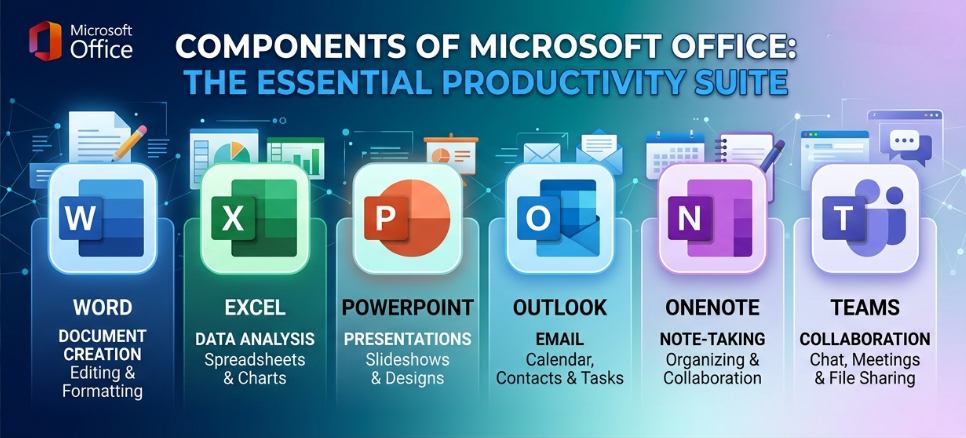
The main components of Microsoft Office are:
Microsoft Excel
Microsoft PowerPoint
Microsoft Access
Microsoft Word
Microsoft Publisher
Microsoft Outlook
Microsoft OneNote
(1) Microsoft Excel –
Microsoft Excel is a spreadsheet application used for calculations, data entry, formulas, functions, charts, and graphs. It is commonly used to organize and analyze numerical data.
Excel consists of rows and columns, and where a row and column meet is called a cell. Data is entered into these cells for calculations and record keeping.
Common Uses of Excel:
Mathematical calculations
Creating tables and reports
Data analysis
Charts and graphs
Budget and expense tracking
(2) Microsoft PowerPoint –
Microsoft PowerPoint is a presentation software used to create slideshows and visual presentations. It is widely used in schools, colleges, offices, seminars, and business meetings.
Common Uses of PowerPoint:
School presentations
Business presentations
Project reports
Training slides
Visual storytelling
(3) Microsoft Access –
Microsoft Access is a database management application used to create and manage databases. It helps users store, organize, search, and manage large amounts of information.
Common Uses of Access:
Database creation
Form building
Record management
Data storage
Business information tracking
(4) Microsoft Word –
Microsoft Word is one of the most popular applications in Microsoft Office. It is used for typing, editing, formatting, and printing documents.
Users can create:
Notes
Letters
Applications
Resumes
Invitations
Reports
Notices
Common Word File Formats:
.docx
.doc
.pdf
.rtf
.txt
.odt
(5) Microsoft Publisher –
Microsoft Publisher is a desktop publishing application used to create professional print designs and marketing materials.
Common Uses of Publisher:
Business cards
Brochures
Newsletters
Flyers
Calendars
Posters
(6) Microsoft OneNote –
Microsoft OneNote is a digital notebook used for writing and organizing notes. It automatically saves data and syncs across multiple devices.
Common Uses of OneNote:
Writing notes
Saving ideas
Organizing study material
Creating to-do lists
Sharing notes across devices
(7) Microsoft Outlook –
Microsoft Outlook is an email and personal information management application. It helps users manage emails, contacts, calendars, meetings, and tasks from one place.
Common Uses of Outlook:
Sending and receiving emails
Calendar scheduling
Contact management
Task management
Meeting reminders
Updated Versions of Microsoft Office
Microsoft Office has evolved continuously since its first release. The first version, Microsoft Office 1.0, was launched in 1990. Since then, Microsoft has released many versions with new features, better performance, improved design, cloud integration, and productivity tools.
Today, Microsoft Office is available both as Microsoft Office 2024 (one-time purchase version) and Microsoft 365 (subscription version with regular updates).
List of Microsoft Office Versions
| Version | Release Year |
|---|---|
| Microsoft Office 1.0 | 1990 |
| Microsoft Office 3.0 | 1992 |
| Microsoft Office 95 | 1995 |
| Microsoft Office 97 | 1997 |
| Microsoft Office 2000 | 2000 |
| Microsoft Office XP | 2002 |
| Microsoft Office 2003 | 2003 |
| Microsoft Office 2007 | 2007 |
| Microsoft Office 2010 | 2010 |
| Microsoft Office 2013 | 2013 |
| Microsoft Office 2016 | 2016 |
| Microsoft Office 2019 | 2019 |
| Microsoft Office 2021 | 2021 |
| Microsoft Office 2024 | 2024 |
| Microsoft 365 | Ongoing Updates |
Microsoft Office in 2026
By 2026, Microsoft Office has become more advanced than ever. The latest one-time purchase version is Microsoft Office 2024, released in October 2024. Microsoft also continues to update Microsoft 365 regularly with new features, cloud services, security improvements, and AI tools like Microsoft Copilot.
Characteristics of Microsoft Office | Features of MS Office
Microsoft Office is one of the most widely used productivity software suites in the world. Developed by Microsoft, it provides a collection of powerful applications designed for creating documents, managing data, preparing presentations, handling emails, and improving workplace productivity. Due to its user-friendly interface and advanced features, Microsoft Office is commonly used in schools, businesses, government offices, and homes.
Key Characteristics of Microsoft Office
1. User-Friendly Interface
Microsoft Office offers a simple, clean, and easy-to-understand interface. Even beginners can quickly learn how to use its applications without requiring advanced technical knowledge.
2. Multiple Applications in One Package
MS Office includes several essential applications such as Microsoft Word, Excel, PowerPoint, Outlook, Access, and OneNote. Each application is designed to perform specific tasks efficiently.
3. Easy Installation and Setup
The installation process of Microsoft Office is straightforward and user-friendly. Users can easily install and configure the software within a few minutes.
4. Similar Features Across Applications
Most Office applications use similar menus, ribbons, and tools. Once users become familiar with one program, they can easily work with other Office applications.
5. Regular Updates and Security Enhancements
Microsoft regularly releases updates to improve software performance, fix bugs, add new features, and strengthen security against modern cyber threats.
6. Cloud Integration and Online Access
With Microsoft 365 and OneDrive integration, users can store files securely in the cloud and access them from anywhere using an internet connection.
7. Professional Document Creation
Microsoft Office provides advanced formatting tools, templates, charts, and design features that help users create professional-quality documents, spreadsheets, and presentations.
8. Widely Used and Easily Available
Microsoft Office is globally recognized and commonly available for both Windows and Mac operating systems. Many modern computers also come with MS Office pre-installed.
9. Improves Productivity and Efficiency
MS Office helps individuals and organizations complete tasks more quickly and efficiently, making it an essential productivity tool for education, business, and personal use.
10. Collaboration and Sharing Features
Modern versions of Microsoft Office allow multiple users to collaborate on documents in real time, making teamwork and file sharing easier than ever.
Uses of Microsoft Office
In today’s digital world, Microsoft Office is widely used in homes, schools, colleges, offices, and businesses. Microsoft Office tools help users perform various tasks quickly, efficiently, and professionally. These applications are designed to improve productivity, communication, and data management.
Main Uses of MS Office
1. Use in Education
Students use Microsoft Office for creating school assignments, class notes, project reports, presentations, and other academic work.
2. Document Creation and Editing
Microsoft Word helps users create and edit reports, resumes, letters, applications, notices, and other important documents professionally.
3. Creating Presentations
Microsoft PowerPoint is used for preparing presentations for conferences, seminars, office meetings, business projects, and classroom activities.
4. Finance and Accounting Work
Microsoft Excel is widely used for financial calculations, accounting, budgeting, data analysis, and creating charts and graphs.
5. Database Management
Microsoft Access helps organizations create and manage databases for employees, customers, business records, and other important data.
6. Online File Storage and Cloud Access
With Microsoft OneDrive and Microsoft 365 integration, users can store files online and access them anytime from anywhere using the internet.
7. Email and Communication
Microsoft Outlook is used for sending and receiving emails, managing contacts, scheduling meetings, and tracking daily tasks.
8. Office and Business Operations
MS Office tools are commonly used in offices and companies for preparing reports, maintaining records, managing data, and improving team collaboration.
9. Professional Work and Productivity
Microsoft Office helps professionals create high-quality documents, presentations, spreadsheets, and business reports, increasing overall work efficiency and productivity.
System Requirements for Microsoft Office
- Supported Operating System
- RAM Requirement
- Storage Space
- Processor Requirement
- Internet Connection for Online Features
Microsoft 365
Microsoft 365 is a subscription-based service provided by Microsoft that gives users access to Microsoft Office applications such as Word, Excel, PowerPoint, Outlook, One Drive, and other online services with regular updates and cloud storage support.
Microsoft 365 is an online productivity package that allows users to create, edit, save, and share files from anywhere using the internet.

Example
For example, if a student creates a project in Microsoft Word using Microsoft 365, the file can automatically be saved in One Drive cloud storage. The student can later open and edit the same file from a mobile phone, laptop, or tablet anytime and anywhere.
Advantages of Microsoft 365
- OneDrive cloud storage
- Real-time collaboration
- Automatic updates
- Multi-device accessibility
- Online backup and synchronization
Main Features of Microsoft 365
- Cloud Storage with OneDrive
- Online Access from Multiple Devices
- Regular Automatic Updates
- Real-Time Collaboration
- Latest Microsoft Office Applications
- Better Security and Backup
Difference Between MS Office and Microsoft 365
| MS Office | Microsoft 365 |
|---|---|
| One-time purchase | Subscription-based service |
| Limited updates | Regular automatic updates |
| Mostly offline use | Cloud-based integration |
| Fixed features | Latest features included |
Important Keyboard Shortcuts in MS Office
Keyboard shortcuts in Microsoft Office help users perform tasks quickly and improve productivity. These shortcuts save time and make working in applications like Microsoft Word, Excel, and PowerPoint easier and more efficient.
Common MS Office Shortcut Keys
| Shortcut Key | Function |
|---|---|
| Ctrl + C | Copy selected text or object |
| Ctrl + V | Paste copied content |
| Ctrl + X | Cut selected text or object |
| Ctrl + Z | Undo the last action |
| Ctrl + Y | Redo the last action |
| Ctrl + S | Save the current document |
| Ctrl + P | Print the document |
| Ctrl + N | Create a new document |
| Ctrl + O | Open an existing document |
| Ctrl + A | Select all content |
| Ctrl + B | Make selected text bold |
| Ctrl + I | Italicize selected text |
| Ctrl + U | Underline selected text |
| Ctrl + F | Find text in a document |
| Ctrl + H | Find and replace text |
| Ctrl + K | Insert hyperlink |
| Ctrl + L | Align text to the left |
| Ctrl + E | Center align text |
| Ctrl + R | Align text to the right |
| Ctrl + J | Justify paragraph |
| Ctrl + T | Create a hanging indent |
| Ctrl + Shift + > | Increase font size |
| Ctrl + Shift + < | Decrease font size |
| Alt + F4 | Close the current application |
| F7 | Check spelling and grammar |
| Shift + F3 | Change text case |
| Ctrl + Home | Move to the beginning of document |
| Ctrl + End | Move to the end of document |
Benefits of Keyboard Shortcuts
- Improve work speed and productivity
- Save time while working
- Reduce dependence on the mouse
- Make document editing easier
- Help users work more professionally
Top 20 MCQs (Objective Questions) with Answers
1. Who developed Microsoft Office?
A) Google
B) Apple
C) Microsoft
D) IBM
Answer: C) Microsoft
2. In which year was Microsoft Office first released?
A) 1985
B) 1989
C) 1995
D) 2000
Answer: B) 1989
3. Which application is used for creating documents?
A) Excel
B) PowerPoint
C) Word
D) Access
Answer: C) Word
4. Which MS Office application is mainly used for calculations and data analysis?
A) Outlook
B) Excel
C) Publisher
D) OneNote
Answer: B) Excel
5. Which software is used to create presentations?
A) Microsoft Word
B) Microsoft Access
C) Microsoft PowerPoint
D) Microsoft Outlook
Answer: C) Microsoft PowerPoint
6. Which MS Office application is used for database management?
A) Excel
B) Access
C) Word
D) Publisher
Answer: B) Access
7. Which shortcut key is used to save a document?
A) Ctrl + P
B) Ctrl + S
C) Ctrl + O
D) Ctrl + C
Answer: B) Ctrl + S
8. Which shortcut key is used to copy selected text?
A) Ctrl + V
B) Ctrl + X
C) Ctrl + C
D) Ctrl + A
Answer: C) Ctrl + C
9. What is the default file extension of Microsoft Word documents?
A) .xls
B) .ppt
C) .docx
D) .accdb
Answer: C) .docx
10. Which feature allows files to be stored online in Microsoft 365?
A) Outlook
B) OneDrive
C) Paint
D) Notepad
Answer: B) OneDrive
11. Which MS Office application is used for email management?
A) Outlook
B) Word
C) Excel
D) Access
Answer: A) Outlook
12. Which keyboard shortcut is used for Undo?
A) Ctrl + Y
B) Ctrl + U
C) Ctrl + Z
D) Ctrl + F
Answer: C) Ctrl + Z
13. What is Microsoft OneNote mainly used for?
A) Video Editing
B) Digital Note Taking
C) Web Browsing
D) Database Management
Answer: B) Digital Note Taking
14. Which application is used for creating brochures and business cards?
A) Publisher
B) Excel
C) Outlook
D) Access
Answer: A) Publisher
15. Which shortcut key is used to print a document?
A) Ctrl + S
B) Ctrl + P
C) Ctrl + N
D) Ctrl + H
Answer: B) Ctrl + P
16. Which MS Office tool is most useful for making charts and graphs?
A) Word
B) Excel
C) Outlook
D) OneNote
Answer: B) Excel
17. Microsoft Office is mainly categorized as:
A) Operating System
B) Utility Software
C) Application Software
D) Antivirus Software
Answer: C) Application Software
18. Which key is used to check spelling and grammar in MS Word?
A) F1
B) F5
C) F7
D) F12
Answer: C) F7
19. Which version of Microsoft Office was released in 2021?
A) MS Office 2016
B) MS Office 2019
C) MS Office 2021
D) MS Office XP
Answer: C) MS Office 2021
20. What is the main purpose of Microsoft Office?
A) Gaming
B) Video Streaming
C) Productivity and Office Work
D) Web Hosting
Answer: C) Productivity and Office Work

Mujtaba Ansari is a Software Engineer, Founder & CEO of The Tech Earth. He writes about technology, AI, software, cybersecurity, blogging, Health tech, Agri Tech and digital trends to help readers stay updated with the latest innovations.