

Chapter 8:
Input and Output Functions
Author: Er. Mujtaba Ansari
Input and Output Functions in C
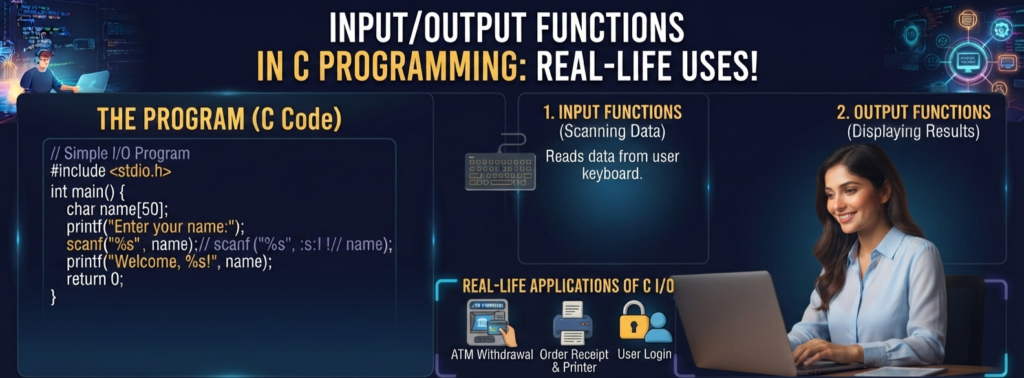
Input and Output (I/O) functions are an important part of C programming language. They allow a program to take data from the users and display information on the screen.
Example: when a program asks you to enter your name, you provide input. When the program displays "Hello, Mujtaba!", it produces output.
In this article, we will learn Input and Output Functions in C in simple language, with practical examples that are easy for beginners to understand.
📚 C Programming Complete Course Structure
🧑💻 Chapter 1: C Programming Fundamentals
📜 Chapter 2: History and Evolution of C Language
⚙️ Chapter 3: Installing a C Compiler
💻 Chapter 4: Writing Your First C Program
🏗️ Chapter 5: Structure of a C Program
📦 Chapter 6: Variables and Data Types
🔢 Chapter 7: Operators in C
⌨️ Chapter 8: Input and Output Functions (Current Chapter)
🔀 Chapter 9: Conditional Statements
🔄 Chapter 10: Loops in C
📊 Chapter 11: Arrays
🔤 Chapter 12: Strings
🛠️ Chapter 13: Functions
👉 Chapter 14: Pointers
🏛️ Chapter 15: Structures and Unions
📁 Chapter 16: File Handling
What are Input and Output Functions in C Programming Language?
Input and Output functions are used to communicate between the user and the program.
- Input means receiving data from the user.
- Output means displaying data or information to the user.

Simple Example
#include <stdio.h>

int main()
{
    int age;
printf("Enter your age: ");
scanf("%d", &age);

printf("Your age is %d", age);

return 0;
}printf()displays a message on the screen.scanf()takes input from the user.agestores the entered value.
The stdio.h Header File
Most standard input and output functions in C are available through the stdio.h header file.
We include it at the beginning of the program:
#include <stdio.h>
stdio.h stands for Standard Input Output Header.
It provides functions such as:
printf()scanf()getchar()putchar()fgets()puts()
Without including stdio.h, these functions may not work correctly in a standard C program.
Output Functions in C
Output functions are used to display information on the screen.
The most commonly used output functions are:
printf()putchar()puts()
printf() Function in C
The printf() function is one of the most commonly used functions in C.
It is used to display:
- Text
- Numbers
- Characters
- Decimal values
- Variable values
- Formatted output
Syntax
printf("format string", values);
Example
#include <stdio.h>

int main()
{
    printf("Hello World!");

    return 0;
}
Output
Hello World!
Printing Multiple Values Using printf()
We can use printf() to display multiple values.
#include <stdio.h>

int main()
{
    int age = 25;
    float salary = 25000.50;

    printf("Age: %d\n", age);
    printf("Salary: %.2f\n", salary);

    return 0;
}
Output
Age: 25
Salary: 25000.50
Here:
%dis used for an integer.%.2fis used to display a floating-point value with two decimal places.\nmoves the cursor to the next line.
Common Format Specifiers in C
Format specifiers tell printf() and scanf() what type of data is being used.
| Data Type | Format Specifier | Example |
|---|---|---|
int | %d | 25 |
float | %f | 25.50 |
double | %lf | 25.123456 |
char | %c | A |
| String | %s | Hello |
unsigned int | %u | 100 |
| Hexadecimal | %x | ff |
| Octal | %o | 17 |
Example
#include <stdio.h>

int main()
{
    int number = 10;
    float price = 99.50;
    char grade = 'A';
    char name[] = "Mahi";

    printf("Number: %d\n", number);
    printf("Price: %.2f\n", price);
    printf("Grade: %c\n", grade);
    printf("Name: %s\n", name);

    return 0;
}
Escape Sequences in Output
Escape sequences are special characters used inside strings.
Some commonly used escape sequences are:
| Escape Sequence | Meaning |
|---|---|
\n | New line |
\t | Horizontal tab |
\\ | Backslash |
\" | Double quotation mark |
\' | Single quotation mark |
\b | Backspace |
\r | Carriage return |
Example
#include <stdio.h>

int main()
{
    printf("Name:\tMujtaba\n");
    printf("Age:\t25\n");

    return 0;
}
Output
Name:   Mujtaba
Age:    25
putchar() Function in C
The putchar() function is used to display one character at a time.
Syntax
putchar(character);
Example
#include <stdio.h>

int main()
{
    putchar('A');

    return 0;
}
Output
A
We can also use a variable:
#include <stdio.h>

int main()
{
    char grade = 'A';

    putchar(grade);

    return 0;
}
Output
A
Important Point
putchar() is mainly used when you want to output a single character.
puts() Function in C
The puts() function is used to display a string.
Syntax
puts(string);
Example
#include <stdio.h>

int main()
{
    puts("Welcome to C Programming");

    return 0;
}
Output
Welcome to C Programming
Unlike printf(), puts() automatically adds a new line after displaying the string.
For example:
puts("Hello");
puts("World");
Output:
Hello
World
Input Functions in C
Input functions allow a program to receive data from the user.
Common input functions include:
scanf()getchar()fgets()
scanf() Function in C
The scanf() function is commonly used to take formatted input from the user.
Syntax
scanf("format specifier", &variable);
Example
#include <stdio.h>

int main()
{
    int age;

    printf("Enter your age: ");
    scanf("%d", &age);

    printf("Your age is %d", age);

    return 0;
}
If the user enters:
25
The output will be:
Your age is 25
Why Do We Use & with scanf()?
Beginners often wonder why we write:
scanf("%d", &age);
instead of:
scanf("%d", age);
The & operator gives the memory address of the variable.
scanf() needs to know where the entered value should be stored.
For example:
intage;scanf("%d", &age);
Here, &age tells scanf() where the value should be stored.
Note: For a character array (string) such as
char name[50], we normally usescanf("%49s", name)rather than&name.
Taking Different Types of Input
Integer Input
intage;scanf("%d", &age);
Float Input
floatprice;scanf("%f", &price);
Double Input
doublesalary;scanf("%lf", &salary);
Character Input
chargrade;scanf(" %c", &grade);
The space before %c helps skip leftover whitespace such as a newline.
String Input
charname[50];scanf("%49s", name);
However, scanf() with %s stops reading when it encounters whitespace. Therefore, it is not suitable for reading a full sentence or a name containing spaces.
Taking Multiple Inputs with scanf()
We can take multiple values using one scanf() statement.
#include <stdio.h>

int main()
{
    int age;
    float marks;

    printf("Enter your age and marks: ");
    scanf("%d %f", &age, &marks);

    printf("Age: %d\n", age);
    printf("Marks: %.2f\n", marks);

    return 0;
}
The user can enter:
20 85.5
Output:
Age: 20
Marks: 85.50
getchar() Function in C
The getchar() function is used to read one character from standard input.
Example
#include <stdio.h>

int main()
{
    char ch;

    printf("Enter a character: ");
    ch = getchar();

    printf("You entered: %c", ch);

    return 0;
}
If the user enters:
A
Output:
You entered: A
fgets() Function in C
The fgets() function is commonly used to read a line of text, including spaces.
Example
#include <stdio.h>

int main()
{
    char name[50];

    printf("Enter your full name: ");
    fgets(name, sizeof(name), stdin);

    printf("Your name is: %s", name);

    return 0;
}
The user can enter:
Mahe Noor
Unlike scanf("%s", name), fgets() can read the space between "Mahe" and "Noor".
Why is fgets() useful?
It is generally safer than older functions such as gets(), which was removed from the C standard because it could cause buffer overflows.
printf() vs puts()
Both functions can display text, but they are used differently.
printf() | puts() |
|---|---|
| Can display formatted output | Mainly displays strings |
| Supports format specifiers | Does not use format specifiers |
| Can print numbers and variables | Designed for strings |
| Does not automatically add a new line | Automatically adds a new line |
Example:
printf("Age = %d\n", age);
Whereas:
puts("Welcome");
scanf() vs fgets()
Both can be used for input, but they have different purposes.
scanf() | fgets() |
|---|---|
| Useful for formatted input | Useful for reading a line of text |
| Works well with numbers | Can read spaces |
%d, %f, %c, etc. are commonly used | Reads characters into a character array |
%s stops at whitespace | Can read an entire line |
For example:
scanf("%s", name);
may read only:
Mahe
from:
Mahe Noor
But:
fgets(name, sizeof(name), stdin);
can read:
Mahe Noor
Example: Taking Student Information
Write a program for Taking Student Information
#include <stdio.h>

int main()
{
    char name[50];
    int age;
    float marks;

    printf("Enter your name: ");
    fgets(name, sizeof(name), stdin);

    printf("Enter your age: ");
    scanf("%d", &age);

    printf("Enter your marks: ");
    scanf("%f", &marks);

    printf("\n--- Student Information ---\n");
    printf("Name: %s", name);
    printf("Age: %d\n", age);
    printf("Marks: %.2f\n", marks);

    return 0;
}
This program demonstrates both input and output functions.
Example: Simple Calculator Using Input and Output
Write a program for Simple Calculator Using Input and Output
#include <stdio.h>

int main()
 {
    float a, b, sum;

    printf("Enter first number: ");
    scanf("%f", &a);

    printf("Enter second number: ");
    scanf("%f", &b);

    sum = a + b;

    printf("Sum = %.2f\n", sum);

    return 0;
}
If the user enters:
1020
Output:
Sum = 30.00
Standard Input and Standard Output
C provides standard streams for input and output.
Standard Input — stdin
stdin is normally connected to the keyboard.
For example:
scanf("%d", &number);
takes input from standard input.
Standard Output — stdout
stdout is normally connected to the screen.
For example:
printf("Hello");
sends output to standard output.
Standard Error — stderr
stderr is used for error messages.
Example:
fprintf(stderr, "An error occurred.\n");
Common Mistakes in Input and Output
Beginners often make some common mistakes while using I/O functions.
Mistake 1: Forgetting & in scanf()
Incorrect:
intage;scanf("%d", age);
Correct:
intage;scanf("%d", &age);
Mistake 2: Using the Wrong Format Specifier
Incorrect:
floatprice;scanf("%d", &price);
Correct:
floatprice;scanf("%f", &price);
Always use the correct format specifier for the data type.
Mistake 3: Using %s for a Full Sentence
scanf("%s", name);
%s stops at whitespace.
For a full line, prefer:
fgets(name, sizeof(name), stdin);
Mistake 4: Forgetting #include <stdio.h>
Functions such as printf(), scanf(), getchar(), putchar(), and fgets() are declared in stdio.h.
Therefore, include:
#include <stdio.h>
Difference Between Input and Output Functions
| Function | Purpose |
|---|---|
printf() | Formatted output |
puts() | Display a string |
putchar() | Display one character |
scanf() | Formatted input |
getchar() | Read one character |
fgets() | Read a line of text |
Input and Output Functions Example
Here is a small program using several I/O functions together:
#include <stdio.h>

int main()
{
    char name[50];
    int age;
    char grade;

    printf("Enter your name: ");
    fgets(name, sizeof(name), stdin);

    printf("Enter your age: ");
    scanf("%d", &age);

    printf("Enter your grade: ");
    scanf(" %c", &grade);

    printf("\nStudent Details\n");
    puts("----------------");

    printf("Name: %s", name);
    printf("Age: %d\n", age);
    printf("Grade: %c\n", grade);

    return 0;
}
This example shows how C programs can take information from the user, store it in variables, and display the results.
Why Are Input and Output Functions Important?
Input and output functions are important because they make programs interactive.
Without input functions, a program would generally have to work with fixed data.
Without output functions, the user would have no easy way to see the result.
For example, consider a calculator:
Enter first number: 50
Enter second number: 20
Result: 70
Here:
scanf()receives the numbers.- Variables store the numbers.
- The calculation is performed.
printf()displays the result.
Therefore, I/O functions are used in almost every beginner-level C program.
Main Points to Remember
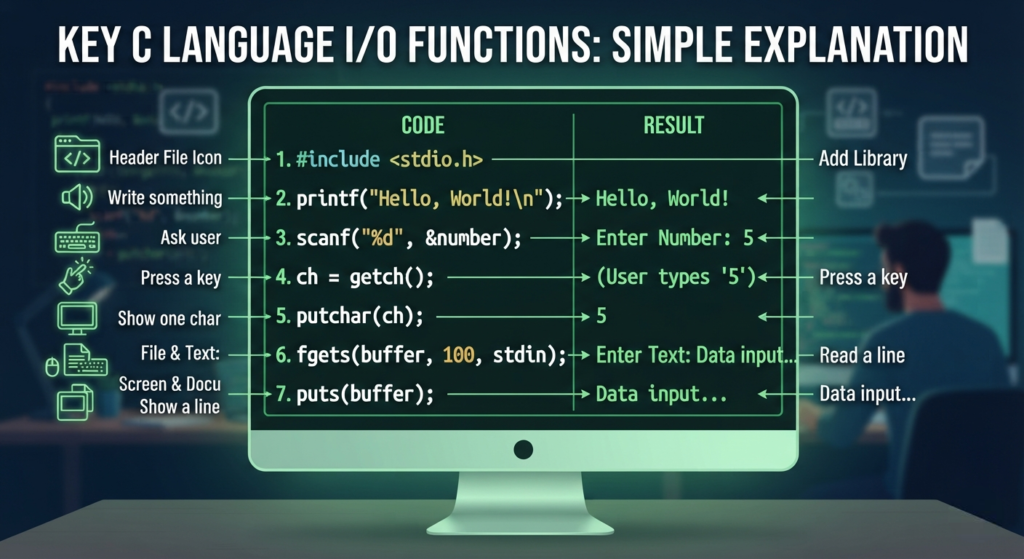
stdio.hprovides standard input/output functions.printf()is mainly used for formatted output.scanf()is mainly used for formatted input.putchar()outputs one character.getchar()reads one character.puts()outputs a string and adds a newline.fgets()is useful for reading a line of text.- Use the correct format specifier for each data type.
&is normally required with scalar variables inscanf().- Avoid the obsolete
gets()function. - Input and output functions make C programs interactive.
Important FAQs (Frequently Asked Questions)
What are Input and Output Functions in C?
They are functions used to receive data from the user and display information on the screen.
Which header file is used for I/O functions in C?
stdio.h is the standard header file for input and output functions.
What is the use of printf()?
printf() is used to display formatted output on the screen.
What is the use of scanf()?
scanf() is used to take formatted input from the user.
Why is & used with scanf()?
It provides the memory address where the input value should be stored.
What is the use of getchar()?
getchar() reads a single character from the input.
What is the use of putchar()?
putchar() displays a single character on the screen.
What is the use of puts()?
puts() displays a string and automatically adds a new line.
What is the use of fgets()?
fgets() reads a line of text, including spaces.
What is the difference between printf() and scanf()?
printf() is used for output, while scanf() is used for input.

Mujtaba Ansari is a Software Engineer, Founder & CEO of The Tech Earth. He writes about technology, AI, software, cybersecurity, blogging, Health tech, Agri Tech and digital trends to help readers stay updated with the latest innovations.