

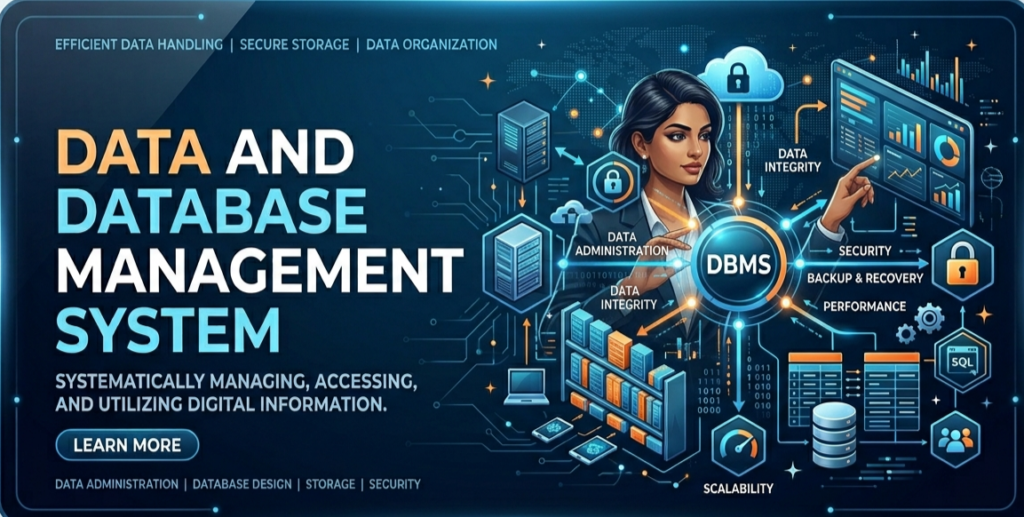
What is Data? (Updated or Latest Definition – 2026) –
Data is a collection of raw facts and information that has no meaning on its own.
It can be in the form of numbers, text, images, audio, or video.
Data refers to a collection of raw facts, figures, and unprocessed information that, by itself, may not have a clear meaning. It is the basic input used by computers and digital systems to generate meaningful insights after processing.
Data can exist in many forms, including characters, numbers, text, images, audio, and video. In today’s digital era, data is generated continuously from sources like apps, websites, sensors, and devices, making it a fundamental asset for decision-making, analytics, and modern technologies such as AI and cloud computing.
Types of Data (Computer Data Types) –
Data stored in a computer can be classified into the following types:
Numeric Data – Data in the form of numbers
Example: 10, 25.5, 100
Alphanumeric Data – Combination of letters, numbers, and symbols
Example: A123, Hello2026
Symbolic Data – Special characters and symbols
Example: @, #, %, &
Graphics Data – Images, drawings, and visual content
Example: photos, charts, diagrams
Audio Data – Sound or voice data
Example: music files, recordings
Video Data – Moving visual data with sound
Example: movies, video clips
History of Database Management System (DBMS) –
In 1960, Charles Bachman designed one of the first Database Management Systems.
In 1970, Edgar F. Codd introduced the Relational Model while working at IBM, which became the foundation of modern databases.
In 1976, Peter Chen developed the Entity-Relationship (ER) Model for designing databases.
By the 1980s, DBMS became widely used, and SQL (Structured Query Language) was standardized by ISO and ANSI.
In 1985, Object-Oriented DBMS (OODBMS) was developed to handle complex data.
In 1991, Microsoft introduced Microsoft Access as a personal DBMS for Windows users.
In 1995, the first internet-based database applications started being used.
In 1997, XML (Extensible Markup Language) began to be used in databases, and many companies started integrating it into DBMS products.
👉 Today, DBMS has evolved further with cloud databases, big data, and AI technologies.
What is Information? (Definition, Meaning & Examples) –
Information is the meaningful and useful result obtained after processing, organizing, and analyzing data. In simple terms, data is raw and unorganized, while information is structured, processed, and valuable for decision-making.
When data is properly arranged and given context, it becomes information that users can easily understand and use in real-life situations such as business decisions, education, and technology systems.
Example:
Raw Data → “50, 60, 70”
Information → “The average marks of students is 60”
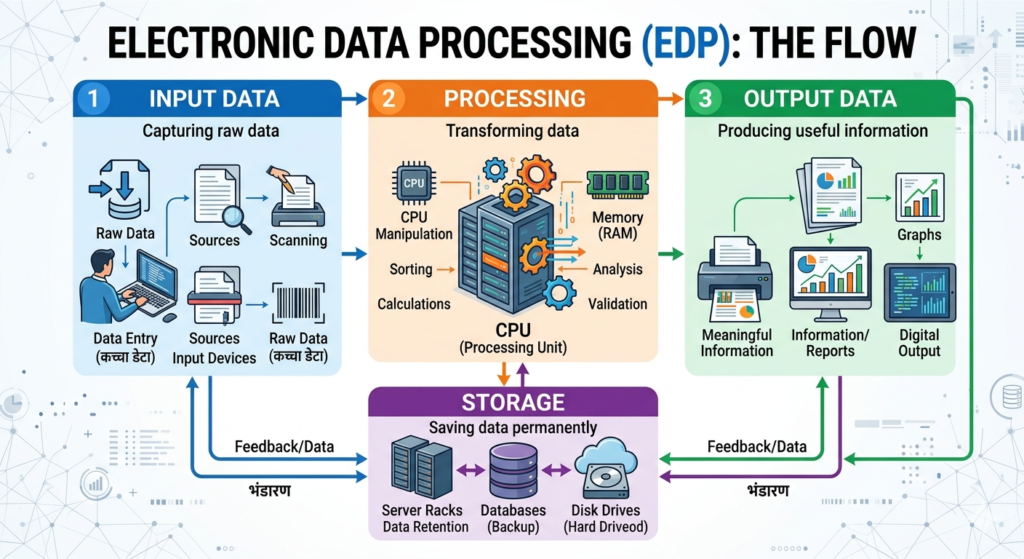
👉 In today’s digital world, information plays a key role in data analytics, artificial intelligence, and business intelligence systems, making it essential for smart decision-making and growth.
Database (Definition, Structure & Examples – 2026 Guide)
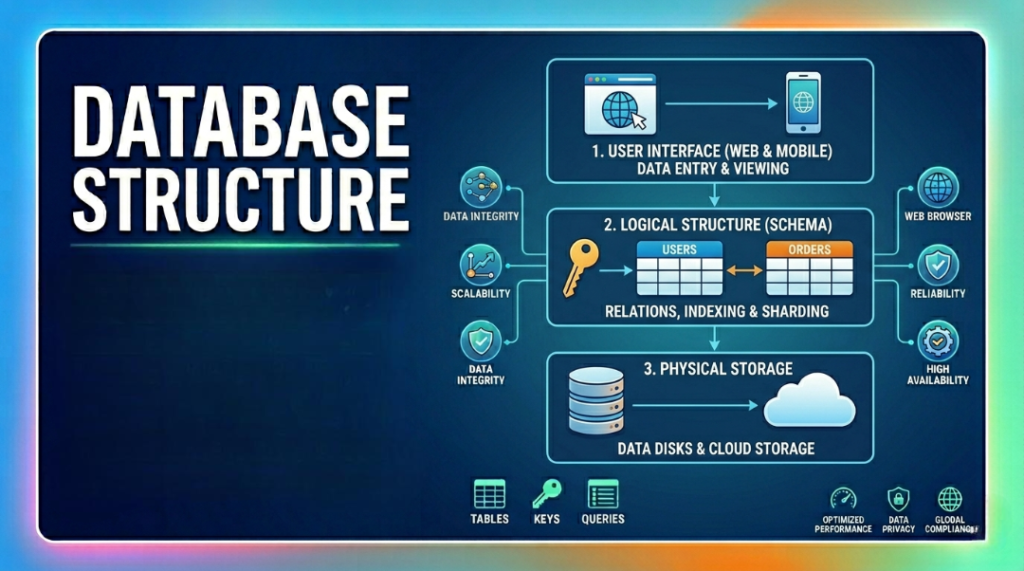
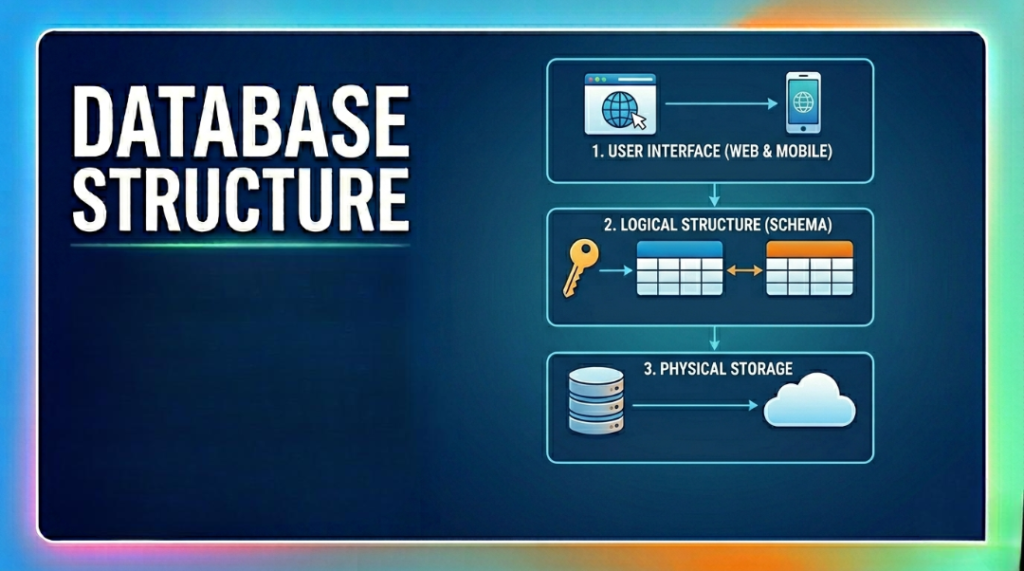
A database is a collection of organized information that is stored in a structured way so that it can be easily accessed, managed, and updated. A single database can be used for multiple purposes such as storing user details, business records, or application data.
Example:
A telephone directory is a simple database that stores information like name, phone number, and address.
A database is mainly organized into three components:
(1) Fields
A field is the smallest unit of data and represents a single piece of information.
Example:
Name
Mobile Number
Address
Each of these is a separate field.
(2) Records
A record is a complete set of related fields that describe one entity (one person or item).
Example:
Name: Rahul
Mobile: 9876543210
Address: New Delhi
All these fields together form one record.
(3) Files
A file is a collection of multiple records stored together.
Example:
A list of many people with their names, phone numbers, and addresses forms a file.
Database Management System (DBMS): Definition, Examples, Advantages & Disadvantages (2026 Guide) –
A Database Management System (DBMS) is software that helps users create, manage, store, update, and control data in a database. It allows multiple users to access, edit, share, and organize data efficiently, making data handling easier and more secure.
🔹 Popular Examples of DBMS
Some widely used DBMS software include:
MySQL
Microsoft Access
Oracle Database
PostgreSQL
Microsoft SQL Server
IBM Db2
SQLite
MariaDB
NoSQL Databases (modern non-relational systems)
✅ Advantages of DBMS –
Data Security – Protects data from unauthorized access
Data Sharing – Allows multiple users to access data
Data Consistency – Maintains accuracy and uniformity
Reduced Data Redundancy – Minimizes duplicate data
Data Integration – Combines data from different sources
Data Independence – Changes in structure don’t affect applications
Data Privacy – Keeps sensitive data confidential
❌ Disadvantages of DBMS –
Risk of Failure – Database crash can affect entire system
High Cost – Setup and maintenance can be expensive
Complexity – Requires skilled professionals to manage
Data Transfer Effort – Migrating data can be time-consuming
👉 Note : In 2026, DBMS plays a crucial role in cloud computing, big data, AI systems, and modern applications, making it an essential technology in today’s digital world.
Database Language: Types, Functions & Examples –
Database languages are used to create, manage, and maintain databases in any system. They help users define the structure of data, manipulate it, and retrieve useful information efficiently.
The main types of database languages are:
(1) DDL – Data Definition Language
DDL is used to define and structure the database. It specifies data types, tables, and relationships between data.
Common Commands:
CREATE
ALTER
DROP
👉 It is mainly used for designing and modifying database structure.
(2) DML – Data Manipulation Language
DML is used to manage and manipulate data inside the database. It allows users to add, modify, and remove data.
Common Commands:
INSERT (add data)
UPDATE (modify data)
DELETE (remove data)
👉 It is mainly used for handling actual data stored in the database.
(3) Query Language
Query Language is used to retrieve and display data from the database in a meaningful way.
Example:
SELECT command (to fetch data)
👉 It helps users search, filter, and present data as required.
💡 Main Note : In modern systems, all these languages are commonly used through SQL (Structured Query Language), which is the standard language for working with databases.
👉 In 2026, database languages are widely used in web development, apps, cloud databases, and AI-based systems for efficient data management.
DBMS Basic Concepts: Complete & Full Updated Guide :
DBMS (Database Management System) works on some fundamental concepts that help in designing, storing, and managing data efficiently. Below are the core and updated DBMS concepts explained in a simple way:
(1) Enterprise
An enterprise is any organization or institution where data is used and managed.
Examples: School, College, Company, Bank, Hospital
(2) Entity
An entity is any real-world object or thing about which data is stored.
Examples: Person, Place, Event, Product
(3) Attribute
An attribute is a property or characteristic of an entity.
It is also known as a column in a table.
Example:
For a Student → Name, Age, Address, Class
(4) Value
A value is the actual data stored in an attribute.
Example: Name = Rahul, Age = 20
(5) Domain
A domain is the set of all possible values that an attribute can have.
Example: Age (0–100), Gender (Male/Female)
(6) Relation (Table)
A relation is a table that stores data in the form of rows and columns.
(7) Tuple (Row)
A tuple is a single row in a table representing one record.
(8) Degree
The degree of a table is the number of attributes (columns) it contains.
(9) Cardinality
The cardinality of a table is the number of tuples (rows) in it.
(10) View
A view is a virtual table created from one or more tables.
It does not store data itself but shows data from other tables.
🔥 Newly Added Important Concepts (2026 Update)
(11) Primary Key
A primary key is a unique identifier for each record in a table.
Example: Student ID
(12) Foreign Key
A foreign key is used to link two tables together.
It refers to the primary key of another table.
(13) Schema
A schema is the overall structure or design of a database.
(14) Instance
An instance is the actual data stored in the database at a particular time.
(15) Normalization
Normalization is the process of organizing data to reduce redundancy and improve efficiency.
(16) Index
An index improves the speed of data retrieval in a database.
(17) Transaction
A transaction is a set of operations performed as a single unit (e.g., money transfer).
(18) ACID Properties
These ensure reliable transactions:
Atomicity – All or nothing
Consistency – Valid data state
Isolation – Transactions don’t interfere
Durability – Data is permanently saved
E-R Diagram (Entity Relationship Diagram): Definition & Basic Notations :
An E-R Diagram (Entity Relationship Diagram), also known as the E-R Model, is a graphical representation used to design and visualize a database. It shows entities (objects), their attributes, and the relationships between them in a clear and structured way.
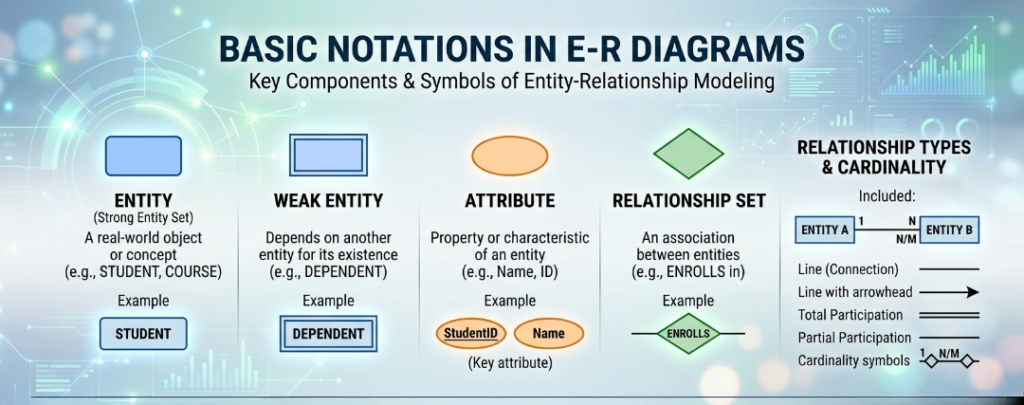
E-R diagrams help in understanding database structure, planning system design, and improving data organization before actual implementation.
Flowchart: Definition, Symbols & Uses :
A Flowchart is a graphical representation of a process or algorithm. It uses standard symbols and arrows to show the step-by-step flow of instructions, making complex processes easy to understand and analyze.
Flowcharts are widely used in programming, system design, business processes, and problem-solving to plan and visualize workflows before implementation.
🔹 Common Flowchart Symbols –
Oval (Start/End)
Represents the beginning or end of a process
Rectangle (Process)
Shows a task or operation
Example: Calculation, data processing
Parallelogram (Input/Output)
Used for taking input or displaying output
Diamond (Decision)
Represents a condition or decision (Yes/No)
Arrow (Flow Line)
Shows the direction of flow
Circle (Connector)
Connects different parts of a flowchart
🔹 Advantages of Flowcharts
Easy to understand and visualize logic
Helps in debugging and error detection
Improves communication and planning
Useful for both technical and non-technical users.
👉Note : In 2026, flowcharts are essential tools in software development, AI workflows, automation systems, and business process management.
What is Key in DBMS? (Types, Definition & Examples –
A Key in DBMS is an attribute or a set of attributes used to uniquely identify records (rows) in a table.
An attribute used as a key is called a Key Attribute, while all other attributes are known as Non-Key Attributes.
Keys play a crucial role in data identification, relationships, and maintaining data integrity in modern databases.
🔹 Types of Keys in DBMS
(1) Super Key
A Super Key is a set of one or more attributes that can uniquely identify a record in a table.
There can be multiple super keys in a table.
Example: ID, Email, (ID + Name)
(2) Candidate Key
A Candidate Key is the minimal super key (no extra attributes).
It uniquely identifies records with the least number of attributes.
Example: ID, Registration Number
(3) Primary Key
A Primary Key is the selected candidate key used to uniquely identify each record.
It cannot be NULL or duplicate.
Example: Student ID
(4) Secondary Key (Non-Unique Key)
A Secondary Key is an attribute that does not uniquely identify records and is mainly used for searching or sorting.
Example: Name, Department
(5) Foreign Key
A Foreign Key is an attribute in one table that refers to the Primary Key of another table.
It is used to create relationships between tables.
Example:
Student Table → StudentID (Primary Key)
Fees Table → StudentID (Foreign Key)
🔥 Additional Important Keys (2026 Update)
(6) Composite Key
A Composite Key is a combination of two or more attributes used together to uniquely identify a record.
(7) Alternate Key
An Alternate Key is a candidate key that is not selected as the primary key.
(8) Unique Key
A Unique Key ensures all values are unique, but it may allow one NULL value (depending on DBMS).
👉Note : In modern DBMS (2026), keys are essential for database design, normalization, relationships, and high-performance data management systems.
Transaction in DBMS: Definition, Examples & ACID Properties –
A Transaction in DBMS is a set of operations executed as a single unit of work. These operations are treated as one logical task, meaning they either complete fully or not at all.
In simple terms, a transaction ensures that database operations are reliable, accurate, and consistent during execution.
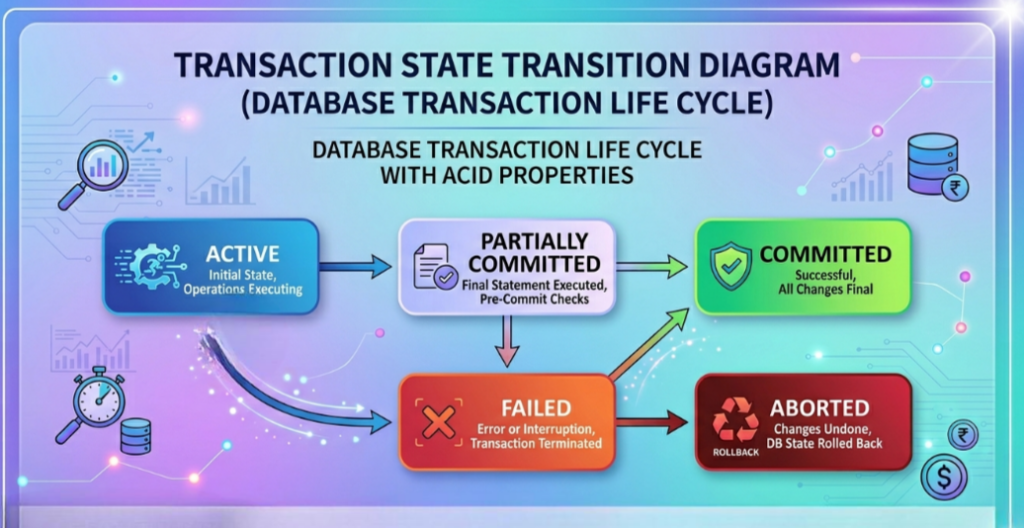
Example:
When you withdraw or deposit money from a bank account or ATM, multiple steps happen (checking balance, updating records). All these steps together form a single transaction.
🔹 ACID Properties of Transaction1
Every transaction follows four important properties called ACID:
(1) Atomicity
Atomicity means “all or nothing”.
If any part of the transaction fails, the entire transaction is rolled back (cancelled).
(2) Consistency
Consistency ensures that the database remains in a valid and correct state before and after the transaction.
(3) Isolation
Isolation means that multiple transactions can run simultaneously without affecting each other.
(4) Durability
Durability ensures that once a transaction is completed, the changes are permanently stored in the system, even if there is a system failure.
👉Note : In modern DBMS (2026), transactions and ACID properties are essential for banking systems, e-commerce, cloud databases, and real-time applications to ensure data integrity and reliability.
Online Transactions Guide: RTGS, NEFT, IMPS & UPI Explained (2026 Update) –
In today’s digital world, sending money online has become fast, secure, and convenient. Over the years, India’s banking system has introduced multiple methods for instant and reliable fund transfers. Before making any transaction, it’s important to understand the differences between RTGS, NEFT, IMPS, and UPI.
🔹 RTGS (Real Time Gross Settlement) –
RTGS is the fastest method for transferring large amounts of money.
Transfers are processed in real-time (immediately)
Mainly used for high-value transactions
Minimum amount: ₹2,00,000
Available during banking hours (now largely 24×7 in India)
No waiting or batching – funds are settled instantly
👉 Best for: Business payments, large transfers
🔹 NEFT (National Electronic Funds Transfer)
NEFT is a widely used and reliable method for transferring money.
Works on a batch processing system (processed in intervals)
Now available 24×7 in India
No minimum transfer limit
Usually low or zero charges (depends on bank)
Requires details like Account Number, IFSC, Name
👉 Best for: Regular transfers of any amount
🔹 IMPS (Immediate Payment Service) –
IMPS allows instant money transfer anytime.
Available 24×7, even on holidays
Instant fund transfer
Can be done via mobile number + MMID, account number, or IFSC
Generally small service charges (bank-dependent)
👉 Best for: Urgent transfers anytime
🔹 UPI (Unified Payments Interface)
UPI is the most popular and easiest way to transfer money in India.
Works 24×7 instantly
Transfer using UPI ID, mobile number, or QR code
No need to enter full bank details
Usually free of cost
Supported by apps like Google Pay, PhonePe, and Paytm
👉 Best for: Daily payments, shopping, bill payments
Uses of DBMS: Applications & Real-World Examples (2026 Guide)
A Database Management System (DBMS) is used almost everywhere in today’s digital world. From small apps to large organizations, DBMS helps in storing, managing, and retrieving data efficiently. It plays a key role in making systems fast, secure, and reliable.
🔹 Major Uses of DBMS
Banking Systems
Used for managing customer accounts, transactions, loans, and security
Railway & Ticket Reservation Systems
Stores passenger data, bookings, schedules, and availability
Library Management Systems
Manages books, issue/return records, and member details
Airlines Industry
Handles flight schedules, bookings, passenger records, and ticketing
Education Sector (Schools, Colleges, Universities)
Stores student records, results, attendance, and staff data
Social Media Platforms
Manages user profiles, posts, messages, and interactions
Telecommunication
Stores call records, billing information, and user data
E-commerce & Online Shopping
Handles product data, orders, payments, and customer information
Military & Defense
Used for secure data storage, tracking, and strategic operations
Manufacturing Industry
Manages production data, inventory, and supply chain
HR Management Systems
Stores employee records, payroll, attendance, and performance data
🔥 Modern Uses (2026 Update)
Cloud Databases & SaaS Applications
Artificial Intelligence & Machine Learning Systems
Big Data Analytics
Healthcare Systems (Patient Records, Reports)
Mobile Apps & Web Applications
👉 Note:
DBMS is a backbone of modern technology, used in almost every industry to handle large volumes of data efficiently and securely.
Objective Questions
(1) What is Data?
(a) Pen Drive
(b) Raw Facts
(c) Hardware
(d) Processed Facts
(e) None of the above
(2) What is the full form of DBMS?
(a) Database Management System
(b) Databar Management System
(c) Database Manager System
(d) Database Maintain System
(e) All of the above
(3) What is Oracle?
(a) A Hardware Device
(b) An Operating System
(c) A Database Software
(d) A PageMaker Software
(e) A System
(4) When was the E–R (Entity–Relationship) Diagram proposed?
(a) 1955
(b) 1970
(c) 1990
(d) 1975
(e) 1976
(5) In a database, what stores information about a single entity such as a person, place, event, or thing?
(a) Record
(b) Table
(c) Query
(d) Philosophical Site
(e) Form
(6) What is the full form of DFD?
(a) Destroy Flow Diagram
(b) Data Flow Disk
(c) Data Flow Diagram
(d) Data Flow Dictionary
(e) None of the above
(7) What is the purpose of a Primary Key in a database?
(a) To uniquely identify each record
(b) To impose restrictions on database operations
(c) To improve the database
(d) To delete the database
(e) All of the above
(8) What does ACID stand for in DBMS?
(a) A type of alcohol
(b) A medicine
(c) Properties of transactions
(d) A spray
(e) None of the above
(9) What is it called when the same data is stored in multiple places?
(a) Redundancy
(b) Concurrency
(c) Intersection
(d) Relation
(e) None of the above
(10) What is a Transaction?
(a) A group of operations
(b) A group of hardware components
(c) A group of papers
(d) All of the above
(e) None of the above
(11) Which key is used to represent the relationship between tables?
(a) Primary Key
(b) Secondary Key
(c) Foreign Key
(d) Super Key
(e) None of the above
(12) What is the E–R Model?
(a) Network
(b) Entity–Relationship
(c) Internal
(d) Relational
(e) Organization
(13) Who developed the concept of Normalization?
(a) F. E. Codd
(b) Peter Chen
(c) Scieman
(d) E. F. Cod
(e) All of the above
(14) How many forms (categories) of SQL are there?
(a) 5
(b) 6
(c) 3
(d) 4
(e) 2
(15) How many Normal Forms are there in DBMS?
(a) 6
(b) 5
(c) 1
(d) 4
(e) None of the above
(16) In the E–R model, how is a Weak Entity Set represented?
(a) Rectangle
(b) Diamond
(c) Double-lined Rectangle
(d) Circle
(e) All of the above
(17) What is the full form of DBA?
(a) Database Administration
(b) Database Action
(c) Database Access
(d) Data Bank Administration
(e) None of the above
(18) Which of the following is a function of a Database Administrator (DBA)?
(a) Performance monitoring
(b) Database backup
(c) Database design
(d) All of the above
(e) None of the above
(19) Adding, modifying, and deleting records in a file from time to time is called __.
(a) Renewing
(b) Updating
(c) Upgrading
(d) Restructuring
(e) None of the above
(20) What is important for designing a database?
(a) Number of tables
(b) Row and column order
(c) Functional dependency
(d) Normalization
(e) All of the above
ANSWERS
 (1)-b  (2)-a   (3)-c   (4)-e
 (5)-a   (6)-c   (7)-a (8)-c
 (9)-a   (10)-a  (11)-c (12)-b
 (13)-d (14)-e   (15)-a (16)-c
 (17)-a  (18)-d  (19)-b  (20)-c

Mujtaba Ansari is a Software Engineer, Founder & CEO of The Tech Earth. He writes about technology, AI, software, cybersecurity, blogging, Health tech, Agri Tech and digital trends to help readers stay updated with the latest innovations.