


How to Write a Blog Article and Earn Passive Income: A Step-by-Step Guide for Beginners
Blogging has become a great opportunity to share knowledge, help people, build a personal brand, and earn money online. The best part is that you can work on your blog from almost anywhere and write about topics you genuinely understand and enjoy.
Blogging is more than just writing articles. It is a way to teach people new things, answer their questions, solve their problems, and share your experience with the world.
Over time, a successful blog can become a valuable online business. You can earn money through advertising, affiliate marketing, sponsored content, digital products, and other income sources. Your articles can continue attracting readers and generating revenue long after you publish them, which is one reason blogging can become a source of passive income.
However, blogging success does not happen overnight. It takes useful content, consistent effort, patience, and a good understanding of your audience.
The good news is that you do not need perfect English or professional writing experience to start blogging. If you have knowledge of a subject and can explain it in simple words, you already have a good starting point.
You can start a blog about almost any field, including technology, education, agriculture, farming, cooking, sports, healthcare, fitness, business, or personal development.
For example, if you understand computers, you can teach people computer fundamentals. If you know cooking, you can share recipes and practical kitchen tips. If you have experience selling products online, you can explain how platforms such as Amazon, Flipkart, and Meesho etc. work.
The important thing is to share original, accurate, and useful information.
In this guide or article, you will learn how to write a helpful, original, and SEO – friendly blog article, publish it online, attract readers, build your personal brand, and create opportunities to earn money through blogging.
Step 1: Choose a Topic You Know Well
The first step in writing a blog article is choosing the right topic.
Select a topic that you understand well and that people want to learn about. Your knowledge and experience should be the foundation of your blog.
You do not always need to follow every trending topic. Trends can help you discover what people are interested in, but you should not abandon your area of expertise just because another subject is popular.
Instead, look for ways to connect your knowledge with the questions people are asking.
For example, if you want to start a technology blog, you can write about:
- Coding and programming languages
- Online earning and freelancing
- Website development
- E-commerce platforms such as Amazon, Flipkart, and Meesho
- Computer fundamentals
- Artificial intelligence (AI) and AI tools
- Software and mobile applications
- Cybersecurity
- Technology news and updates
- Social media technology
- Robotics
- Smartphone technology
- Emerging technologies, including quantum computing, advanced chips, and 6G
- Future technology skills and career opportunities
Technology blogging can offer several monetization opportunities, but earnings depend on factors such as audience location, content quality, competition, search traffic, and the monetization methods you use. No blogging niche guarantees the highest income.
Practical tip: Choose a topic that combines three things: your knowledge, your interest, and your readers’ needs.
When you write about something you understand, it becomes easier to create helpful content consistently.
Step 2: Research Before Writing Your Article
Good research is essential for writing a reliable blog article.
Before you start writing, collect information from trustworthy sources. Read official websites, product documentation, research papers, and other credible resources relevant to your topic.
For example, if you are writing about an AI tool, visit its official website to understand its features, pricing, limitations, and practical uses. Try the tool yourself whenever possible.
Do not depend on a single source if your topic requires detailed research. Compare information and check important facts before including them in your article.
Learning from other websites is perfectly acceptable. However, copying their content and publishing it as your own can damage your credibility and create copyright or duplicate-content problems.
Instead, understand the information first and explain it in your own words.
Add your own examples, observations, practical tips, and experience wherever possible. This makes your article more useful and gives readers a reason to visit your website again.
Remember: Research helps you understand a topic. Your job is to turn that information into an original, helpful explanation for your audience.
Step 3: Understand What Your Readers Really Want
Before writing any blog article, ask yourself one important question:
Why would someone want to read this article?
Understanding your audience helps you create content that answers real questions instead of simply filling a page with information.
Ask yourself these questions:
- Why am I writing this article?
- Who is most likely to read it?
- What do readers want to learn about this topic?
- What problem can I help them solve?
- What practical information can I provide?
- Why would readers want to visit my website again?
The last question is especially important.
When readers find your articles useful, they are more likely to remember your website, explore related articles, and return when they need more information. Over time, this can help you build a loyal audience and a recognizable brand.
For example, if you are writing about artificial intelligence, do not simply provide a definition of AI.
Explain what AI is, how it works at a basic level, where people use it in everyday life, and how beginners can start using AI tools.
You can also include practical examples, advantages, limitations, and safety tips.
Remember that some readers may already understand the topic, while others may be complete beginners. Explain the basics clearly and then gradually introduce more advanced information.
Your goal should be to make the article useful for as many relevant readers as possible.
Step 4: Write a Clear and Attractive Title and Introduction
Your title and introduction are the first things readers notice.
A good title should tell readers what the article is about and why it may be useful to them. It should be clear, relevant, and interesting without making unrealistic promises.
For example, instead of writing:
“Blogging Information”
You could write:
“How to Start Blogging and Earn Money: A Beginner’s Guide”
The second title gives readers a clearer idea of what they will learn.
After the title, write a short introduction that explains why the topic matters and what readers can expect from the article.
Your introduction should encourage people to continue reading.
For example:
“Starting a blog can feel difficult when you have no writing experience. You may wonder what to write about, how to publish your articles, and how to attract readers. The good news is that you can learn blogging step by step. In this guide, you will discover how to choose a topic, write useful content, improve your SEO, and explore ways to earn money from your blog.”
This introduction identifies the reader’s concerns and explains how the article can help.
Avoid making the introduction unnecessarily long. Get to the point and focus on the reader’s needs.
Step 5: Create Headings and Subheadings Before Writing
Before writing the complete article, prepare a simple outline of your main points.
Think of this outline as a roadmap. It helps you organize your ideas and prevents you from missing important information.
Use clear headings and subheadings to divide your article into logical sections.
For example, if you are writing an article about computer memory, your outline could look like this:
- Introduction: Why Computer Memory Matters
- What Is Computer Memory?
- How Does Computer Memory Work?
- What Are the Different Types of Memory?
- Real-Life Uses of Computer Memory
- Advantages of Computer Memory
- Limitations and Common Misunderstandings
- Practical Examples
- Frequently Asked Questions
- Conclusion
You can also begin with two to four engaging sentences that highlight a real-life problem, a useful fact, or an important benefit.
This helps readers understand why the topic matters.
Well-organized headings make an article easier to read, especially for people who prefer scanning a page before deciding which sections to explore.
They also help search engines understand the structure and subject of your content. However, headings alone do not guarantee better Google rankings. The quality, relevance, and usefulness of the entire article matter.
Step 6: Write in Simple, Natural Language
You do not need complicated English to become a successful blogger.
In fact, simple language often makes technical information easier to understand.
Write as if you are explaining the topic to a friend. Use short, clear sentences and avoid unnecessary jargon. If you need to use a technical term, explain what it means.
For example, instead of writing:
“The internet facilitates global communication through interconnected digital infrastructure.”
You could write:
“The internet connects computers and mobile devices around the world, allowing people to communicate, share information, and use online services.”
The second explanation is easier for most beginners to understand.
While writing, keep these points in mind:
- Use simple and natural sentences.
- Avoid repeating the same idea unnecessarily.
- Explain difficult terms in easy words.
- Use examples wherever they help.
- Add relevant images or diagrams when they make a topic clearer.
- Keep paragraphs short enough to read comfortably.
- Focus on helping readers rather than trying to impress them with difficult words.
Your writing does not need to be perfect from the beginning. You can improve your grammar, vocabulary, and sentence structure through regular practice.
Step 7: Explain Your Topic with Real-Life Examples
Examples help readers connect information with situations they already understand.
Whenever possible, explain how a concept works in everyday life.
For example, suppose you are writing about the internet.
You could explain it like this:
“The internet is a global network that connects computers, smartphones, servers, and other devices. We use it to send emails, make video calls, browse websites, watch videos, shop online, and access banking services.
For example, when you send a message through an online messaging application, the internet helps deliver that message to another person. When you purchase something online, the internet connects you with the shopping website and allows you to complete the transaction.
The internet has become an important part of communication, education, business, and entertainment. However, some services can also work offline, and traditional phone calls do not always require an internet connection.”
This type of explanation is practical and easy to understand.
You can use the same approach when writing about programming, AI tools, software, mobile applications, or business topics.
Whenever you explain a concept, think about how a reader might use that information in real life.
Step 8: Make Your Article Practical and Useful
A blog article should do more than explain a concept. It should help readers understand what to do with the information.
Depending on your topic, you can include:
- Step-by-step instructions
- Practical tips
- Real-world examples
- Screenshots and diagrams
- Advantages and disadvantages
- Common mistakes and their solutions
- Useful tools and resources
- Beginner-friendly exercises
- Frequently asked questions
- Future applications and career opportunities
For example, if you are writing about website development, explain what website development means, what tools beginners can use, how to create a simple website, and what skills they should learn next.
This gives readers a clear path forward instead of leaving them with only theoretical knowledge.
When readers can apply what they learn, your content becomes more valuable.
Step 9: Create Original Content and Share Your Knowledge
Original content is one of the most important parts of building a successful blog.
Do not simply copy articles from other websites, search results, or AI tools and publish them without meaningful review or improvement.
Readers are looking for useful information, clear explanations, practical examples, and insights they may not find elsewhere.
You can make your article more original by adding:
- Your own explanation of the topic
- Your personal experience, where relevant
- Examples from real-life situations
- Practical tips based on your knowledge
- Common mistakes beginners make
- Step-by-step guidance
- Your own observations and useful recommendations
- Answers to questions that other articles may overlook
For example, many websites may explain what C programming is. You can make your article more helpful by explaining how a beginner can write their first C program, what common errors they may face, and how to fix those errors.
You can use AI tools or Google to improve grammar, check spelling, understand unfamiliar concepts, or organize your ideas. However, always verify the information and make sure the final article reflects your own editorial judgment.
Simply copying AI-generated content is not a reliable strategy. It may contain errors, generic explanations, or repeated information that does not meet your readers’ needs.
AI-assisted content is not automatically disqualified from Google Search. What matters is whether your content is accurate, original in its value, helpful to readers, and created with a clear purpose rather than primarily to manipulate search rankings.
Important: Your long-term goal should be to earn readers’ trust by publishing content that genuinely helps them.
That is the foundation of a strong blogging career and a recognizable personal brand.
Step 10: Add Frequently Asked Questions (FAQs)
Frequently Asked Questions are a useful way to answer common questions related to your topic.
Think about what a beginner might ask after reading your article. You can also review questions that appear in search results, relevant forums, and discussions within your niche.
For example, if your article is about C programming, you might include questions such as:
- What is C programming used for?
- Is C programming suitable for beginners?
- What software is needed to write C programs?
- What is the difference between a compiler and an interpreter?
- How can beginners practise C programming?
Provide short, direct, and accurate answers.
Depending on your topic, FAQs can also cover interview questions, examination preparation, troubleshooting, or practical applications.
Only include questions that are relevant to the article. Avoid adding unrelated questions simply to make the page longer.
FAQs can improve the reader experience by answering additional questions in one place. However, adding FAQs does not guarantee special search-result features or higher rankings.
Step 11: Use AI Tools to Improve Your Writing
AI tools can make blogging easier, especially for beginners.
You can use tools such as ChatGPT and Google Gemini to assist with different parts of the writing process.
For example, AI tools can help you:
- Correct grammar and spelling mistakes.
- Improve sentence structure.
- Simplify difficult explanations.
- Generate topic ideas and article outlines.
- Suggest relevant subheadings.
- Identify questions readers may ask.
- Suggest related keywords.
- Review an article for repetition or unclear sections.
- Brainstorm practical examples.
However, AI tools can sometimes provide incorrect information, outdated details, or explanations that sound convincing but are not accurate.
Therefore, never publish an article without reviewing it carefully.
Check important facts against reliable sources, remove unnecessary repetition, improve generic sections, and make sure the article meets your readers’ needs.
You should remain responsible for the accuracy, quality, and usefulness of your content.
Think of AI as a writing assistant, not a replacement for your own knowledge and judgment.
Step 12: Use SEO to Help Readers Discover Your Article
SEO stands for Search Engine Optimization. It involves improving your website and content so that search engines can understand your pages and help relevant readers discover them.
SEO is important because people often search Google when they want to learn something, compare products, or solve a problem.
Start by identifying the main keyword for your article.
For example, if you are writing about file handling in C programming, your main keyword might be:
File Handling in C
Related search phrases could include:
- File handling in C programming
- Reading files in C
- Writing files in C
- C file handling examples
- How to open a file in C
- File handling functions in C
Use these phrases naturally wherever they fit. Do not repeat the same keyword excessively or force it into every paragraph.
For basic on-page SEO, follow these practices:
1. Write a clear SEO title. Make the topic easy to understand and include your main keyword when appropriate.
2. Create a readable URL. Keep the URL short, descriptive, and relevant to the article.
3. Write a useful meta description. Briefly explain what readers will learn from the page.
4. Use headings correctly. Organize your content with a clear main heading and descriptive subheadings.
5. Add internal links. Link to related articles on your website when they provide additional value.
For example, an article about file handling in C could link to your articles about C programming fundamentals, functions, arrays, and pointers.
6. Use relevant images. Add screenshots, diagrams, or illustrations that genuinely help explain the topic.
7. Write descriptive image alt text. Describe the image accurately for accessibility and search-engine understanding.
8. Make your website mobile-friendly. Readers should be able to navigate and read your article comfortably on smartphones and tablets.
9. Check your page performance. Use Google Search Console to understand which queries bring impressions and clicks to your website.
10. Keep your content accurate and updated. Review older articles when information, software features, or recommendations change.
Remember that SEO is not just about inserting keywords. It is about creating useful content, organizing your website properly, and helping readers find the information they need.
Good SEO can improve your chances of attracting organic traffic, but no technique guarantees a top position in Google.
Step 13: Review Your Article Before Publishing
Before publishing an article, read it from beginning to end.
Imagine that you are a reader who is visiting your website for the first time. Would the article answer your questions? Is the information easy to understand? Are there any mistakes or missing details?
Use this checklist:
- Is the information accurate and up to date?
- Is the content original and useful?
- Is the language simple and natural?
- Is the title clear and relevant?
- Are the headings organized properly?
- Are there any spelling or grammar mistakes?
- Have I repeated the same point unnecessarily?
- Are the examples helpful?
- Are the internal and external links working?
- Are the images clear and relevant?
- Does the article display correctly on mobile devices?
- Have I written a suitable meta description?
- Have I checked important facts using reliable sources?
You can use a grammar checker or an AI tool for an additional review, but make the final decisions yourself.
Taking a few extra minutes to review your work can significantly improve the reader experience.
Step 14: Choose a Platform to Publish Your Blog
After writing your article, the next step is to publish it on a blogging platform.
Two popular options for beginners are WordPress and Blogger.
1. WordPress
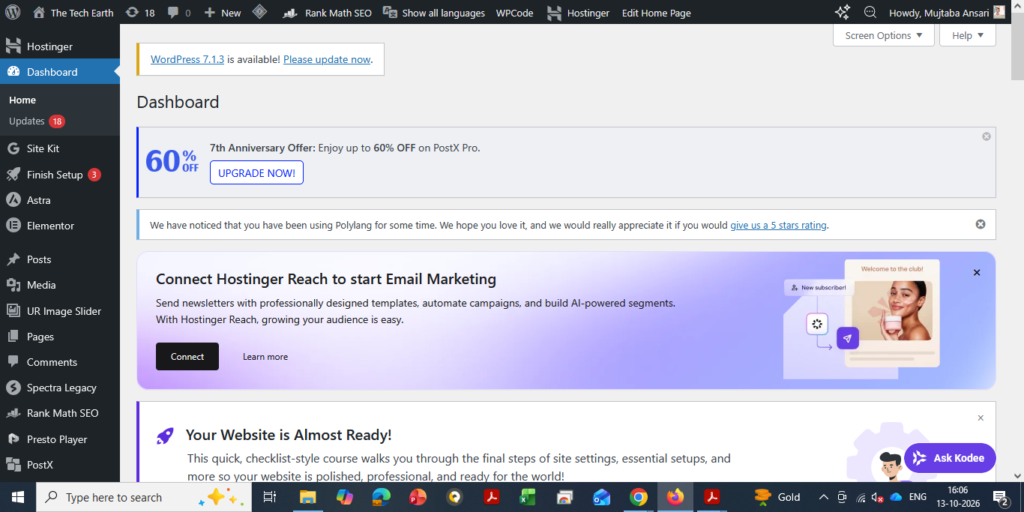
WordPress is a widely used platform for creating blogs and websites. It offers extensive customization options, themes, plugins, and SEO tools.
With WordPress, you can create a professional blogging website and expand it as your audience grows.
For example, you can create different categories, add author information, organize related articles, customize your homepage, and use SEO plugins to manage important settings.
If you choose self-hosted WordPress, you will generally need:
- A domain name, such as
example.com - Web hosting
- A WordPress installation
- A suitable theme and any necessary plugins
Domain registration and hosting usually involve paid plans, although prices vary by provider and plan. WordPress software itself is open-source and free to use.
For beginners who want to build a long-term blogging brand, self-hosted WordPress is a strong option because it offers considerable flexibility and control over the website.
You can explore hosting options through Hostinger, but compare pricing, renewal costs, performance, support, and included features before purchasing a plan.
Remember that WordPress does not automatically make articles rank faster. Your content quality, competition, website performance, and SEO practices all matter.
WordPresss – Dashboard
2. Blogger
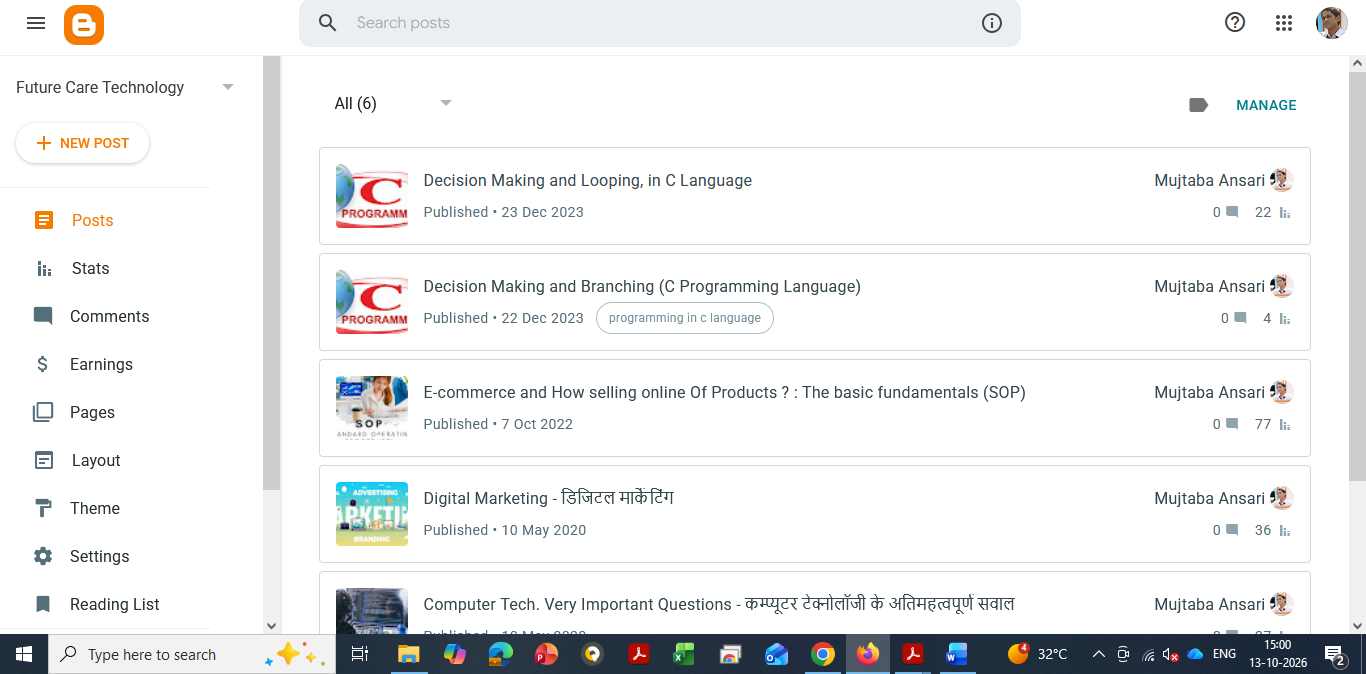
Blogger is a blogging service provided by Google.
It allows beginners to create and publish blog posts without purchasing web hosting separately. You can start with a free Blogger address and connect a custom domain if you want to use one later.
Blogger is a reasonable choice if you want to learn the basics of blogging without making an initial hosting investment.
However, it generally offers less flexibility than a self-hosted WordPress website for advanced customization and certain website features.
Blogger – Dashboard
Which Platform Should You Choose?
If you want to experiment with blogging at no initial hosting cost, Blogger can be a good starting point.
If your goal is to build a professional website, develop a recognizable brand, and expand your content business over time, self-hosted WordPress is worth considering.
Choose a platform that suits your budget, technical comfort, and long-term goals.
Step 15: Publish Your Article and Bring Readers to Your Website
Publishing an article is only the beginning. You also need to help the right readers discover it.
Here are practical ways to promote your blog.
1. Set Up Google Search Console
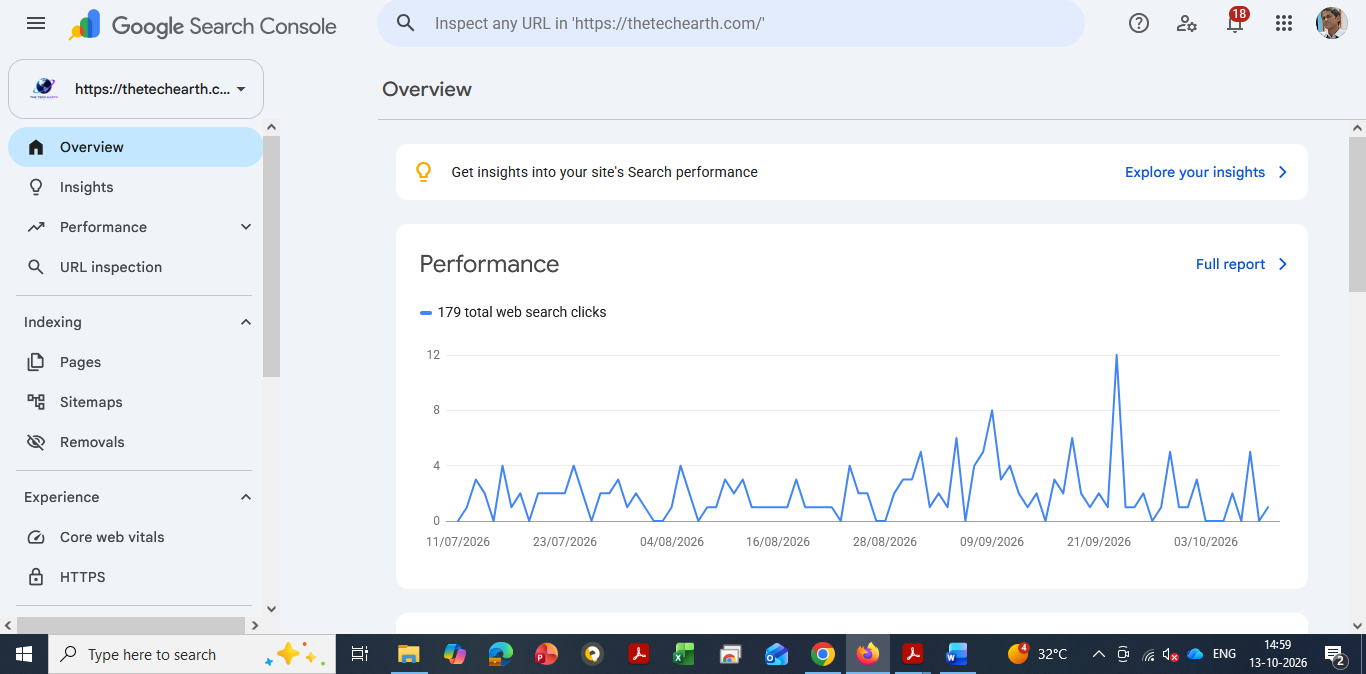
Google Search Console helps you understand how your website performs in Google Search.
After publishing a new article, you can use the URL Inspection tool to check its indexing status and request indexing when appropriate.
Requesting indexing does not guarantee that Google will index or immediately rank your article.
You can learn how to set up Google Search Console in a separate beginner-friendly guide.
Google Search Console – Dashboard
2. Share Your Article on Social Media
Share your published articles on platforms where your target audience is active.
Depending on your topic, useful platforms may include:
- YouTube
- X (formerly Twitter)
- Telegram
- Medium
You do not need to post the same message everywhere. Adapt your promotion to each platform.
For example, you can share a short tip from your article on Instagram, a professional summary on LinkedIn, a relevant discussion on Reddit, or a short explanatory video on YouTube.
Always follow each platform’s rules and community guidelines. On discussion-based platforms, contribute genuinely rather than repeatedly posting promotional links.
3. Add Internal Links
Whenever you publish a new article, look for older articles that are related to the same subject.
Link between these articles where it makes sense.
For example, a blog about AI tools could link to related articles about AI applications, AI career skills, and productivity software.
Internal links help readers discover more of your content and help search engines understand the relationships between your pages.
4. Organize Your Articles into Categories
Use clear and relevant categories to organize your website.
For a technology blog, categories might include AI, Computer Fundamentals, Programming, Software and Apps, Cybersecurity, and Technology News.
A clear structure makes it easier for readers to find related information.
5. Update Older Articles
Do not focus only on publishing new content.
Review your existing articles and update them when information becomes outdated, important details are missing, or readers would benefit from clearer explanations.
For example, if an AI tool changes its features or pricing, update the relevant section and verify the new information.
Avoid changing content unnecessarily just to make it appear fresh. Updates should improve accuracy, usefulness, or the reader experience.
6. Monitor Your Results
Use Google Search Console to check impressions, clicks, search queries, and indexing information.
Look for articles that are attracting attention and identify opportunities to improve pages that are not performing as expected.
You can also review which topics attract readers and use those insights when planning future content.
Remember that organic traffic takes time to develop. A newly published article may take days, weeks, or longer to gain visibility, and some articles may never receive significant search traffic.
Stay consistent, learn from your results, and continue improving your website.
Step 16: How to Build Your Brand and Earn Passive Income Through Blogging
One of the biggest advantages of blogging is that it can become more than a place to publish articles. Over time, it can help you build a recognizable personal brand and create different sources of income.
However, passive income is not automatic. You must first create valuable content, attract an audience, and build a sustainable way to earn revenue.
Here are some common ways bloggers make money.
1. Display Advertising
You can apply to advertising programs such as Google AdSense once your website is ready and meets the relevant eligibility requirements.
If approved, ads may appear on your website, and you may earn revenue from eligible ad impressions or interactions, depending on the program.
Your earnings depend on several factors, including traffic volume, audience location, topic, advertiser demand, and ad performance.
Approval and income are not guaranteed.
2. Affiliate Marketing
Affiliate marketing allows you to earn a commission when readers purchase products or services through your affiliate links, subject to the program’s terms.
For example, a technology blogger might review software, website hosting services, computer accessories, or useful online tools.
Your recommendations should be honest and relevant. Disclose affiliate relationships clearly and follow applicable advertising rules.
3. Sponsored Articles
Companies may pay you to publish sponsored content or collaborate on relevant campaigns once your website has developed an audience and established credibility.
Only work with brands that fit your niche and audience. Clearly identify sponsored content and maintain editorial transparency.
4. Sell Digital Products
You can create and sell digital products related to your expertise, such as:
- E-books
- Programming notes
- Practical guides
- Templates
- Checklists
- Online courses
- Downloadable learning materials
For example, a C programming blogger could create a beginner’s guide containing explanations, code examples, exercises, and practice questions.
Once a digital product is created, it can be sold repeatedly. However, you may still need to handle marketing, customer support, updates, and other ongoing work.
5. Offer Services
A blog can also help you attract clients who need your professional skills.
Depending on your expertise, you could offer website development, consulting, writing, training, software support, or other services.
Useful articles demonstrate your knowledge and give potential customers a reason to trust your work.
How Does Blogging Become Passive Income?
Imagine that you publish a helpful article explaining how to choose website hosting.
Several months later, people may still discover that article through Google. Some may click relevant affiliate links or explore other articles on your website.
If the article continues attracting readers and generating eligible revenue, it may keep earning without requiring you to rewrite it every day.
That is the basic idea behind blogging-related passive income.
However, articles may lose traffic, affiliate programs may change their terms, and advertising revenue can fluctuate. You may need to update content, maintain your website, and continue promoting your work.
The best long-term approach is to create a collection of useful articles that attract the right audience and support several relevant income streams.
Start with helping people. Build trust through your content. Then choose monetization methods that genuinely fit your audience.
Conclusion: How to Write a Good Blog Article and Build a Successful Blogging Career
Writing a good blog article does not require perfect English or years of professional writing experience.
You can start with the knowledge you already have and improve your writing through regular practice.
Choose a useful topic, research it carefully, understand your readers, and explain the information in simple language. Organize your article with clear headings, include practical examples, and make sure your content provides genuine value.
Before publishing, review your article for accuracy, originality, readability, and basic SEO. After publishing, share it with the right audience, monitor its performance, and update it when necessary.
Most importantly, do not focus only on getting visitors. Focus on creating content that readers find useful enough to remember and revisit.
Over time, consistent effort can help you build an audience, develop a personal brand, and explore different ways to earn money online.
Your first article may not be perfect, and your website may not receive much traffic immediately. That is normal.
Start with one useful article. Learn from the experience. Publish more helpful content and improve your website step by step.
Your blogging journey begins when you stop waiting for the perfect moment and start sharing what you know.
Frequently Asked Questions (FAQs)
1. How long should a blog article be?
There is no fixed word count for every blog article. Write enough to explain the topic clearly and answer the reader’s main questions. Focus on usefulness rather than adding unnecessary words.
2. Can I write a blog in simple English?
Yes. Simple English is suitable for blogging and can help readers understand your content more easily. Clear explanations are more important than complicated vocabulary.
3. Can I use AI to write blog articles?
Yes, you can use AI tools to brainstorm ideas, prepare outlines, improve grammar, and review your writing. However, verify facts, add meaningful value, and ensure that the final article is accurate and useful.
4. How many blog articles should I publish each week?
You can begin with two or three well-researched articles per week if your schedule allows. If you have less time, publishing one high-quality article consistently is also a reasonable approach.
5. How can I increase traffic to my blog?
Create useful content, follow good SEO practices, link related articles, share your work on relevant platforms, and monitor performance through Google Search Console. Traffic growth takes time and is not guaranteed.
6. Should every blog article have a featured image?
A relevant featured image can make your article more attractive and help readers understand the topic. Use clear, appropriate images and make sure you have permission to use them.
7. What is the most important rule of blogging?
Provide accurate, original, and useful information. Understand your readers’ needs, answer their questions, and work consistently to earn their trust.
8. Can blogging become a full-time career?
Yes, blogging can become a full-time business for some people. However, success depends on factors such as audience growth, content quality, monetization, competition, and consistent work. Income is not guaranteed.
9. How long does it take to earn money from blogging?
There is no fixed timeline. Some blogs begin earning relatively early, while others take many months or longer to develop meaningful traffic and revenue. Your results depend on your niche, content, audience, monetization strategy, and competition.
10. Is WordPress better than Blogger for beginners?
Both platforms can work for beginners. Blogger is useful for learning blogging without paying for hosting, while self-hosted WordPress offers greater flexibility for building and expanding a professional website. The best choice depends on your goals and budget.

Mujtaba Ansari is a Software Engineer, Founder & CEO of The Tech Earth. He writes about technology, AI, software, cybersecurity, blogging, Health tech, Agri Tech and digital trends to help readers stay updated with the latest innovations.