

What is Computer Memory ?
Memory is an important component of any computer. It is used to store data and programs either permanently or temporarily.
It is the place where a computer stores all its data and instructions so that it can use them anytime whenever needed.
A simple example for you: Just like humans have memory to remember things, computers also have memory to store data.
Types Of Memory –
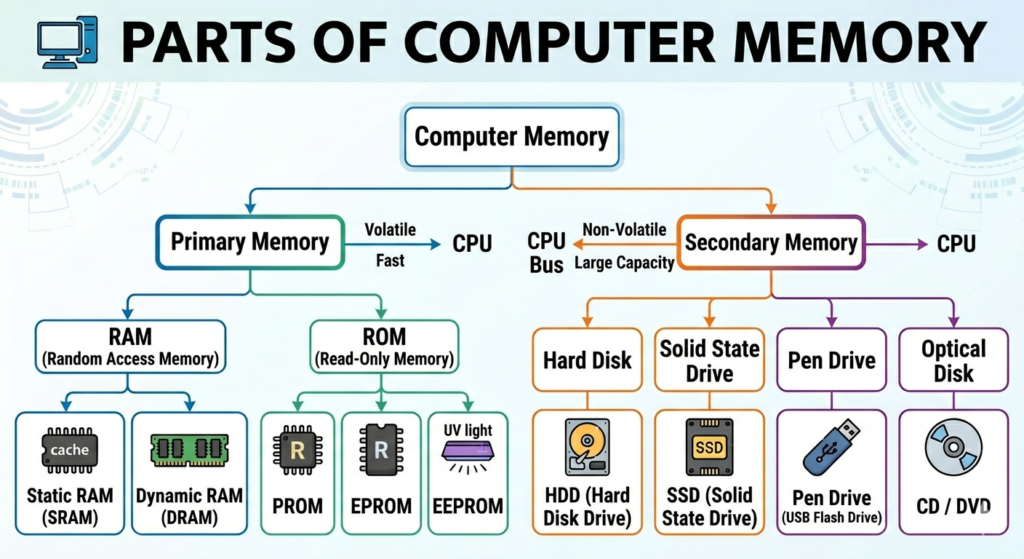
Computer memory is mainly divided into two parts, which are as follows :
(1) Primary Memory ( Main Memory) –
Primary memory is also called main memory. It is the most important part of a computer where data, information, and programs are stored during processing.
Primary memory is inside the computer and works directly with the CPU. It communicates with the CPU very fast and is always connected to the system.
Its storage capacity is limited. It is usually temporary (volatile), which means data is lost when the computer is turned off.
Examples: Registers, Cache Memory, RAM, and ROM
👉 Note: ROM is an exception because it is permanent memory. Data stored in ROM does not get deleted even when the computer is turned off.
RAM (Random Access Memory) –
RAM is a temporary (volatile) memory, also called temporary memory.
It is the most commonly used memory in a computer.
When you give input, the data is first stored in RAM before processing.
CPU takes data from RAM as needed.
Data in RAM is temporary and gets deleted when the computer is turned off.
👉 When you turn on the computer, the Operating System (OS) loads first into RAM.
👉 More RAM = Better performance of computer or mobile.
Types of RAM:
SRAM (Static RAM) –
Does not need to refresh data
Faster than DRAM
Stores data for a longer time
DRAM (Dynamic RAM) –
Needs to refresh data again and again
Refreshes thousands of times per second
Slower than SRAM
Cache Memory –
Cache memory is located between the CPU and primary memory.
It stores frequently used data and instructions
Helps increase speed by reducing delay between CPU and memory
It is very fast, small, and expensive
👉 Speed order: Registers > Cache > RAM
ROM (Read Only Memory) –
ROM is a permanent (non-volatile) memory.
Used to store data permanently
Data is not deleted even when the computer is turned off
Stores important programs like BIOS (Basic Input-Output System)
Types of ROM:
PROM (Programmable ROM)
Data can be written only once
Cannot be changed or deleted
EPROM (Erasable PROM)
Data can be erased using ultraviolet rays
Can be reprogrammed
EEPROM (Electrically Erasable PROM) –
Data can be erased using electricity
Can be updated easily
👉 EEPROM is widely used today and is also known as Flash Memory
👉 Example: Pen Drive
Secondary (Auxiliary Memory ) –
This memory is not a built-in part of the computer. It is added separately.
The data and instructions stored in this memory are permanent, which means the data does not get deleted even when the computer is turned off.
Saved files and folders can be opened and used anytime in the future when needed.
👉 This memory is portable, meaning it can be easily carried from one place to another.
Examples of Secondary Memory:
Hard Disk
Floppy Disk
CD (Compact Disc)
DVD (Digital Versatile Disc)
Optical Disk
Pen Drive / Thumb Drive
Flash Memory (e.g., Memory Card, Pen Drive)
Note:
These are also semiconductor memories.
Data in computer memory is represented in the following ways:
1 Bit = Smallest unit of data
1 Nibble = 4 Bits
1 Byte = 8 Bits (2 Nibbles)
1024 Bytes = 1 KB (Kilobyte)
1024 KB = 1 MB (Megabyte)
1024 MB = 1 GB (Gigabyte)
1024 GB = 1 TB (Terabyte)
1024 TB = 1 PB (Petabyte)
1024 PB = 1 EB (Exabyte)
1024 EB = 1 ZB (Zettabyte)
1024 ZB = 1 YB (Yottabyte)
1024 YB = 1 Brontobyte
1024 Brontobytes = 1 Geopbyte
Some Important Points For You :
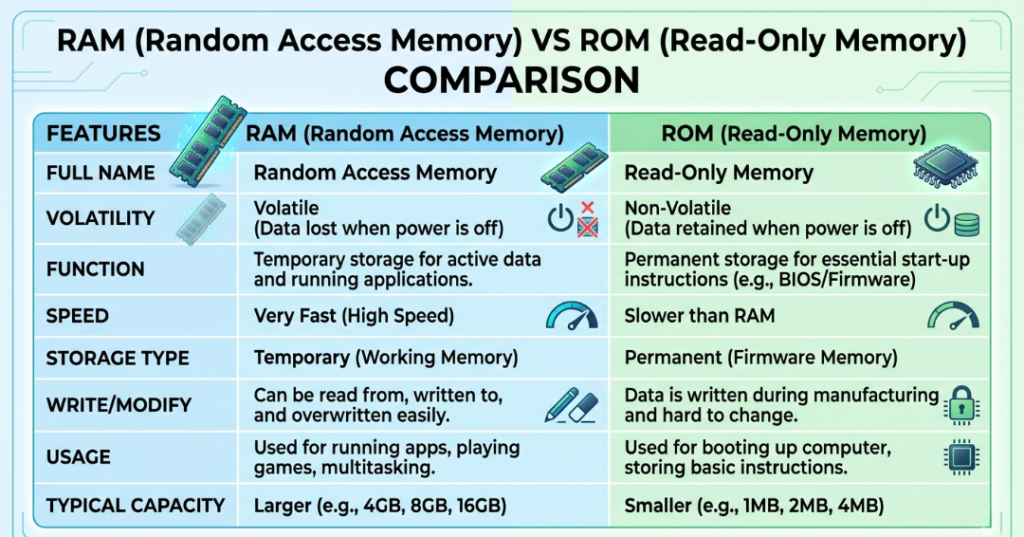
(1) RAM vs ROM –
(2) Volatile memory vs Non-Volatile memory –
Volatile Memory: RAM (power off = data delete)
Non-Volatile Memory: ROM, Hard Disk (data safe)
(3) Memory Hierarchy –
Registers → Cache → RAM → Secondary Memory
(4) What is Virtual Memory ?
When RAM becomes full, the hard disk is used as temporary memory like RAM; this is called virtual memory.
(5) Cache Memory Levels –
CPU performance me role
L1, L2, L3 Cache
(6) Memory Units in Series –
Bit → Byte → KB → MB → GB etc.
(7) Real-Life Examples :
🔹 RAM (Temporary Storage Memory) –
👉 Example: Study Table / Working Desk
You keep only the books you are currently using
Fast access, but limited space
When work is done, you remove things
✔️ Same like RAM:
Stores data temporarily while working
🔹 Hard Disk (Permanent Storage Memory) –
👉 Example: Cupboard / Almirah
You store books, clothes, files for long time
Not used all the time, but safe storage
Data remains even when not in use
✔️ Same like Hard Disk:
Stores data permanently
(8) What is Registers ?
Registers are very small memory units located inside the CPU. They are the fastest type of memory and are used to store data and instructions temporarily for quick processing.
(9) Types of Secondary Storage Memory –
Solid State (SSD, Pen Drive)
Magnetic (Hard Disk)
Optical (CD, DVD)
(10) What is Memory Leak ?
A memory leak happens when a program uses memory but does not release it after use.
Just like water keeps flowing out of a tank and is not stored back, memory keeps getting wasted.
Why Important:
Affects system performance
Common issue in poorly written programs
Objective Questions
(1) How many types of memory are mainly found in a computer?
(a) 16 (b) 6 (c) 2 (d) 9 (e) 5
👉 Answer: (c) 2
(2) The term “memory” is related to:
(a) Storage (b) Control (c) Input (d) Output (e) Logic
👉 Answer: (a) Storage
(3) What is the full form of RAM?
(a) Read Access Memory
(b) Risk Access Model
(c) Random Access Memory
(d) Random Access Model
(e) None of these
👉 Answer: (c) Random Access Memory
(4) Which is the fastest memory?
(a) Registers (b) Cache (c) RAM (d) CD (e) None
👉 Answer: (a) Registers
(5) Which is the main memory of a computer?
(a) Hardware (b) Software (c) External (d) Internal (e) All
👉 Answer: (d) Internal
(6) What is the full form of CD-RW?
(a) Cost Disk – Read Write
(b) Compact Drum Rewritable
(c) Compact Disc – Rewritable
(d) Compact Diskette – Read Write
(e) None
👉 Answer: (c) Compact Disc – Rewritable
(7) DVD is an example of:
(a) Output device (b) Optical disk (c) Hard disk (d) Input device (e) All
👉 Answer: (b) Optical disk
(8) With a CD, you can:
(a) Write (b) Delete (c) Read (d) Read and Write (e) Either Read or Write
👉 Answer: (e) Either Read or Write (depends on CD type)
(9) USB is what type of storage device?
(a) Secondary (b) Tertiary (c) Disk (d) Cache (e) Auxiliary
👉 Answer: (a) Secondary
(10) Which of the following is NOT a storage device?
(a) Printer (b) DVD (c) RAM (d) ROM (e) Floppy Disk
👉 Answer: (a) Printer
(11) Which device distinguishes between data and programs?
(a) Memory (b) Input Device (c) Microprocessor (d) Output Device (e) All
👉 Answer: (c) Microprocessor
(12) In what form is information stored in a computer?
(a) Matter (b) File (c) Floppy (d) Directories (e) Webcam
👉 Answer: (b) File
(13) The maximum amount of data that can be stored in a storage medium is called:
(a) CD Storage (b) Magnetic Storage (c) Optical Storage (d) Storage Capacity (e) None
👉 Answer: (d) Storage Capacity
(14) Which statement is correct for Static RAM?
(a) It is called ROM
(b) Data remains stable without refresh
(c) CD
(d) Floppy Disk
(e) All
👉 Answer: (b)
(15) What does the Memory Data Register (MDR) hold?
(a) Segment Number
(b) Memory Location
(c) Data/Instructions
(d) DVD Area
(e) Virtual Location
👉 Answer: (c) Data/Instructions
(16) Where is user input data stored?
(a) Floppy Disk
(b) Memory Data Register
(c) Memory Address Register
(d) Memory Access Register
(e) Arithmetic Register
👉 Answer: (b)
(17) What does program memory store?
(a) Data (b) Program (c) Result (d) All (e) None
👉 Answer: (b) Program
(18) Which storage device is stored in the form of a reel?
(a) CD-ROM (b) Floppy Disk (c) Magnetic Tape (d) Hard Disk (e) DVD
👉 Answer: (c) Magnetic Tape
(19) How many write cycles can RAM perform?
(a) 100 (b) 10 (c) 1000 (d) 1010 (e) Unlimited
👉 Answer: (e) Unlimited (practically very large)
(20) CD-ROM is an example of:
(a) Magnetic Disk (b) Optical Memory (c) Magnetic Tape (d) Winchester Disk (e) None
👉 Answer: (b) Optical Memory
ANSWERS  (1)-c
 (2)-a
 (3)-c
 (4)-a
 (5)-d
 (6)-c
 (7)-b (8)-d
 (9)-a
 (10)-a
 (11)-c (12)-b
 (13)-d
 (14)-b
 (15)-c
 (16)-b
 (17)-d
 (18)-c
 (19)-e
 (20)-b

Mujtaba Ansari is a Software Engineer, Founder & CEO of The Tech Earth. He writes about technology, AI, software, cybersecurity, blogging, Health tech, Agri Tech and digital trends to help readers stay updated with the latest innovations.