


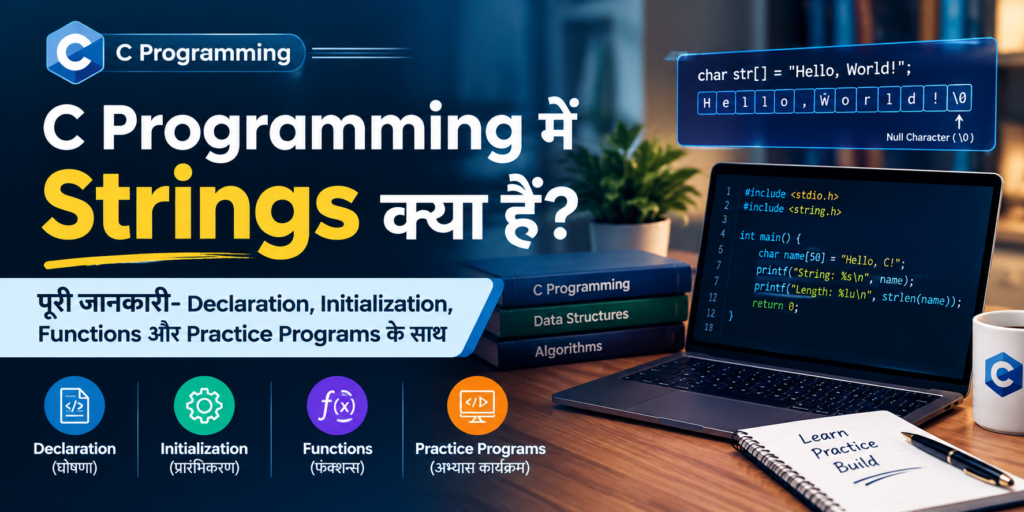
Chapter 12:
Strings
Author: Er. Mujtaba Ansari
C में Strings को समझना सीखिए और अपने programs को ज्यादा practical और powerful बनाइए।
नाम, पता, ईमेल, password, messages जैसे text data को C में कैसे store और process किया जाता है—यह सब आसान examples के साथ जानें।
इस chapter के बाद आप String Functions का इस्तेमाल करके real-world text problems को आसानी से solve कर पाएंगे।
🎯 इस Topic को पढ़ने के बाद मुख्य फायदे
- 📝 Text Data Handle करना — Name, email, address और messages जैसे text को आसानी से manage कर पाएंगे।
- 🔍 Search & Compare करना — दो strings को compare और किसी text को search करना सीखेंगे।
- ✏️ Text को Modify करना — String को copy, join, edit और manipulate कर पाएंगे।
- 💻 Real-World Programs बनाना — Login system, registration form, username checking और text-based applications में strings का उपयोग समझेंगे।
- 🎯 Exam & Interview Preparation — String-related common questions और programming problems को बेहतर तरीके से solve कर पाएंगे।
- 🚀 Advanced C सीखने की Foundation — आगे Pointers, Structures और File Handling जैसे topics समझने में मदद मिलेगी।
📚 C Programming का पूरा Course
🧑💻 Chapter 1: C Programming की मूल बातें
📜 Chapter 2: C Language का इतिहास और विकास
⚙️ Chapter 3: C Compiler को Install करना
💻 Chapter 4: अपना पहला C Program लिखना
🏗️ Chapter 5: C Program का Structure
📦 Chapter 6: Variables और Data Types
🔢 Chapter 7: C में Operators
⌨️ Chapter 8: Input और Output Functions
🔀 Chapter 9: Decision Making और Conditional Statements
🔄 Chapter 10: C में Loops और बार-बार चलने वाले Statements
📊 Chapter 11: Arrays
🔤 Chapter 12: Strings – वर्तमान Chapter
🛠️ Chapter 13: Functions
👉 Chapter 14: Pointers
🏛️ Chapter 15: Structures और Unions
📁 Chapter 16: File Handling
C Programming में Strings: Declaration, Initialization, Input, Functions और Examples
Introduction
C Programming में String का उपयोग किसी भी प्रकार के text को store करने के लिए किया जाता है, जैसे:
- Name
- City
- Address
- Message
- Password
- Product Name
- Sentence
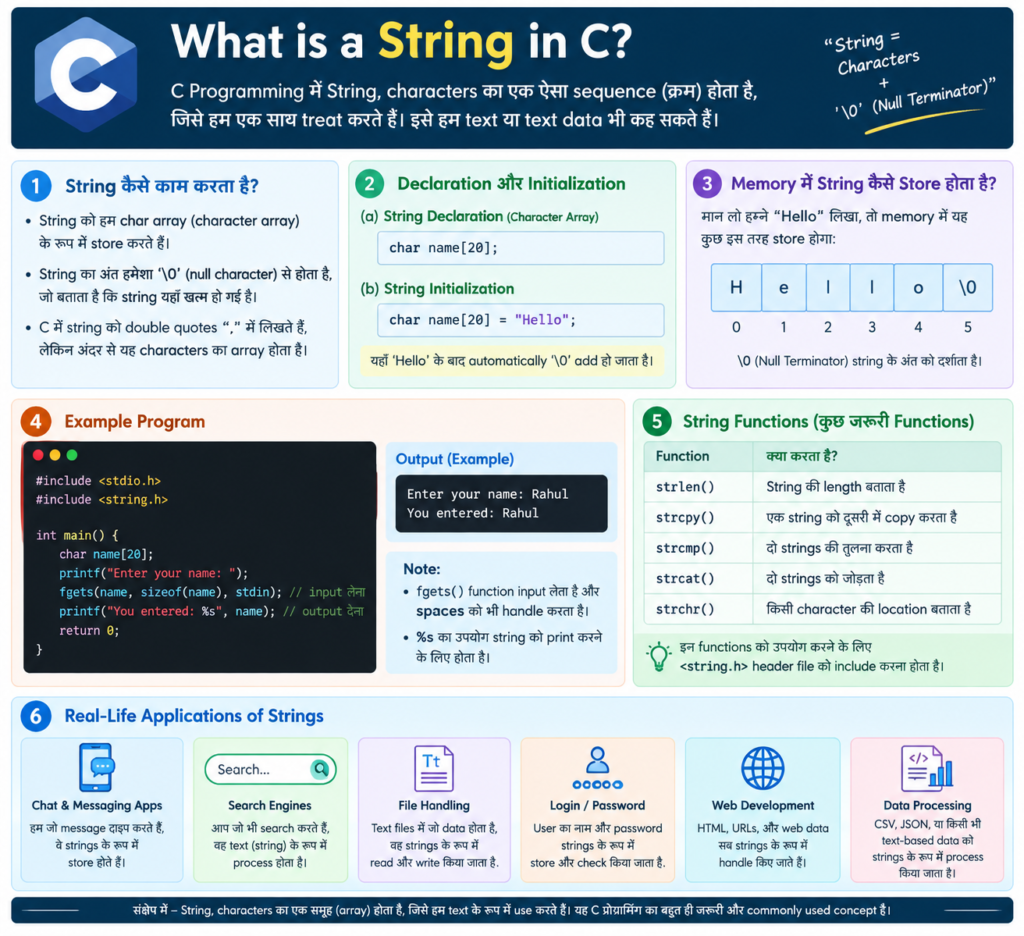
C में string नाम का कोई अलग data type नहीं होता। C में String को Character Array (char array) की मदद से store किया जाता है।
हर C String के अंत में एक special character होता है:
'\0'इसे Null Character कहा जाता है। यह C को बताता है कि String कहाँ समाप्त हो रही है।
Example
char name[] = "Mujtaba";Memory में यह लगभग इस तरह store होता है:
M u j t a b a \0यहाँ '\0' String का end बताता है।
What is a String in C?
C में String characters का ऐसा sequence है जो '\0' Null Character से समाप्त होता है।
Example
char city[] = "Delhi";यह memory में इस तरह store होगा:
D e l h i \0यहाँ Delhi में 5 characters हैं, लेकिन String को store करने के लिए 6 positions चाहिए।
क्योंकि:
5 characters + 1 null character = 6आपके लिए Important Point
'\0' और '0' एक जैसे नहीं हैं।
'\0'→ Null Character'0'→ Number zero का character
जब हम String को इस तरह initialize करते हैं:
char city[] = "Delhi";तो compiler अपने आप अंत में '\0' जोड़ देता है।
String Declaration in C
C में String को सामान्यतः char array की मदद से declare किया जाता है।
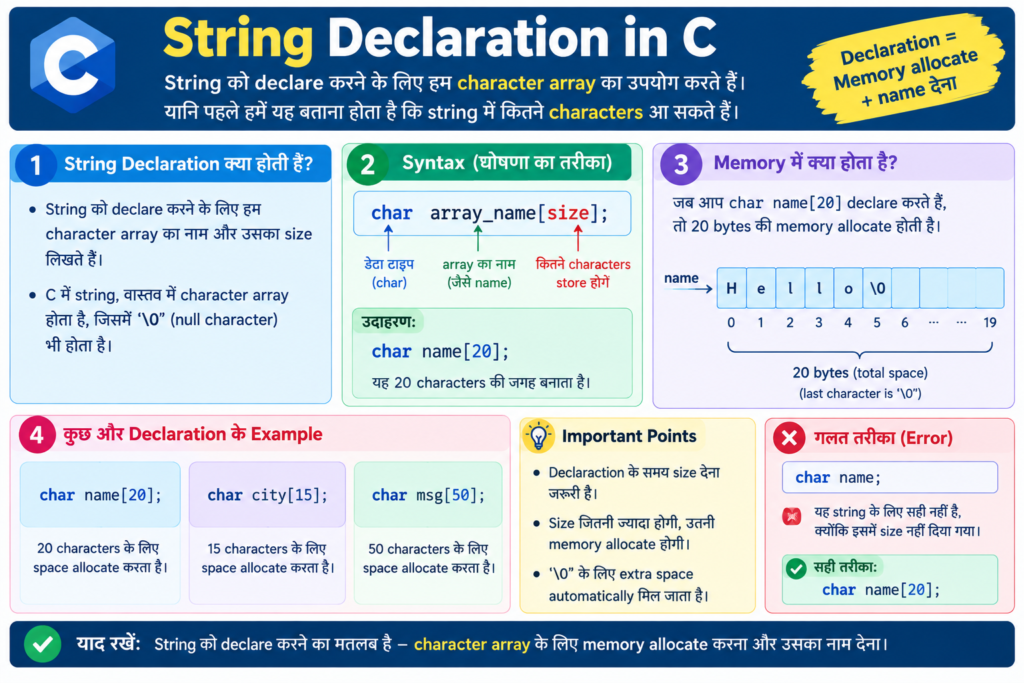
Syntax
char string_name[size];Example
char name[20];इसमें String के लिए कुल 20 characters की जगह है।
अगर इसे C String के रूप में इस्तेमाल किया जाए, तो एक position '\0' के लिए चाहिए।
इसलिए इसमें अधिकतम:
19 characters + '\0'store किए जा सकते हैं।
Another Example
char message[100];Character Array क्या है?
Character Array एक ऐसा array है जिसमें char type के characters store किए जाते हैं।
Example
char city[10];इसके indexes होंगे:
city[0]
city[1]
city[2]
...
city[9]
हर position में एक character store किया जा सकता है।
उदाहरण:
D e l h i \0बाकी positions अभी खाली रह सकती हैं।
Character Array और String में अंतर
Character Array और String एक-दूसरे से जुड़े हुए हैं, लेकिन दोनों बिल्कुल समान नहीं हैं।
Character Array
यह केवल characters का array होता है।
char a[4] = {'C', 'o', 'd', 'e'};यह एक Character Array है, लेकिन इसमें '\0' नहीं है। इसलिए यह एक valid C String नहीं है।
Valid String
char a[5] = {'C', 'o', 'd', 'e', '\0'};अब यह एक valid C String है।
आसान भाषा में
हर String एक Character Array हो सकती है, लेकिन हर Character Array String नहीं होती।
Character Array की Declaration
Syntax
char array_name[size];Example
char city[10];यहाँ:
char→ Data Typecity→ Array का नाम10→ Array का Size
इसके indexes होंगे:
0 से 9याद रखें कि C में Array Index हमेशा 0 से शुरू होता है।
String को Initialize कैसे करें?
C में String को initialize करने के कई तरीके हैं।
Method 1: String Literal का उपयोग
char c[] = "abcd";Compiler automatically '\0' जोड़ देता है।
Memory में:
a b c d \0इसलिए array का size 5 हो जाएगा।
Method 2: Array Size देकर
char c[50] = "abcd";यहाँ array में कुल 50 characters की जगह है।
Actual String है:
a b c d \0बाकी positions zero से initialize हो जाती हैं।
Method 3: Character-by-Character
char c[] = {'a', 'b', 'c', 'd', '\0'};यहाँ हमने '\0' खुद लिखा है।
Method 4: Size के साथ Characters
char c[5] = {'a', 'b', 'c', 'd', '\0'};यह भी एक valid String है।
आपके लिए Important Point
अगर हम String Literal का इस्तेमाल करते हैं:
char c[] = "abcd";तो हमें खुद '\0' लिखने की जरूरत नहीं होती।
Compiler इसे automatically add कर देता है।
Compile-Time Initialization
जब हम Character Array को declare करते समय ही उसकी value देते हैं, तो इसे Compile-Time Initialization कहा जाता है।
Example
char city[10] = "Delhi";हम इसे characters की मदद से भी लिख सकते हैं:
char city[10] = {'D', 'e', 'l', 'h', 'i', '\0'};पहला तरीका ज्यादा आसान और commonly used है।
Practice Program:
एक C Program लिखिए जो String को initialize करके display करे।
#include <stdio.h>

int main(void)
{
    char city[10] = "Delhi";

    printf("City: %s\n", city);

    return 0;
}
Output
City: DelhiRun-Time Initialization of String
कई बार हमें पहले से पता नहीं होता कि user कौन-सी String enter करेगा।
उदाहरण:
Enter your name:User कोई भी नाम enter कर सकता है।
ऐसी स्थिति में String को Run Time पर input किया जाता है।
Example
char name[50];

printf("Enter your name: ");
scanf("%49s", name);

printf("Name: %s\n", name);
scanf() में String के साथ & क्यों नहीं लगाते?
Normal variable में हम अक्सर & लगाते हैं।
Example
scanf("%d", &age);लेकिन Character Array के साथ:
scanf("%49s", name);हम & नहीं लगाते।
क्योंकि इस context में Array का नाम उसके पहले element का address represent करता है।
सही तरीका
scanf("%49s", name);गलत तरीका
scanf("%49s", &name);%s की Limitation
scanf() में %s whitespace तक ही input पढ़ता है।
अगर user enter करता है:
Mujtaba Ansariतो:
scanf("%49s", name);केवल:
Mujtabaपढ़ेगा।
क्योंकि %s space के बाद पढ़ना बंद कर देता है।
अगर हमें spaces सहित पूरी line पढ़नी हो, तो fgets() का उपयोग करना बेहतर है।
fgets() से पूरी String Input करना
पुराने C programs में gets() का इस्तेमाल किया जाता था:
gets(name);लेकिन gets() unsafe है और modern C standards में इसे हटा दिया गया है।
इसलिए String input के लिए fgets() का इस्तेमाल करना चाहिए।
Example Program: C में fgets() का उपयोग करके String Input लेना
#include <stdio.h>

int main(void)
{
    char name[50];

    printf("Enter your name: ");
    fgets(name, sizeof(name), stdin);

    printf("Name: %s", name);

    return 0;
}
fgets() का फायदा
fgets() Character Array की size जानता है, इसलिए यह input को निर्धारित सीमा के अंदर पढ़ता है।
String के Individual Characters को Access करना
क्योंकि String Character Array में store होती है, इसलिए हम उसके प्रत्येक character को index की मदद से access कर सकते हैं।
Example
char city[] = "Delhi";Memory:
D   e   l   h   i   \0
0   1   2   3   4    5
First Character
printf("%c", city[0]);Output:
DLast Visible Character
printf("%c", city[4]);Output:
iLoop की मदद से String के सभी Characters पढ़ना
हम loop की मदद से String के हर character को एक-एक करके access कर सकते हैं।
#include <stdio.h>

int main(void)
{
    char city[] = "Delhi";
    int i;

    for (i = 0; city[i] != '\0'; i++)
    {
        printf("%c\n", city[i]);
    }

    return 0;
}
Output
D
e
l
h
i
यहाँ:
city[i] != '\0'का मतलब है:
जब तक String खत्म नहीं होती, loop चलता रहेगा।
String Functions in C
C में String के साथ काम करने के लिए कई useful functions उपलब्ध हैं।
इनमें से अधिकांश standard String functions के लिए:
#include <string.h>include किया जाता है।
Important String Functions:
| Function | काम |
|---|---|
strlen() | String की length पता करना |
strcpy() | एक String को दूसरी String में copy करना |
strcat() | दो Strings को जोड़ना |
strcmp() | दो Strings को compare करना |
strcat() – दो Strings को जोड़ना
strcat() का उपयोग दो Strings को जोड़ने के लिए किया जाता है।
सरल भाषा में:
एक String को दूसरी String के अंत में जोड़ना।
Syntax
strcat(destination, source);Example
अगर:
x = "Hello "
y = "World"
तो:
strcat(x, y);के बाद:
Hello Worldहो जाएगा।
आपके लिए Important Point
Destination array में combined String और '\0' को store करने के लिए पर्याप्त जगह होनी चाहिए।
Practice Program – strcat()
Program: C में strcat() से दो Strings को जोड़ना
#include <stdio.h>
#include <string.h>

int main(void)
{
    char x[30];
    char y[20];

    printf("Enter first string: ");
    fgets(x, sizeof(x), stdin);

    printf("Enter second string: ");
    fgets(y, sizeof(y), stdin);

    x[strcspn(x, "\n")] = '\0';
    y[strcspn(y, "\n")] = '\0';

    strcat(x, y);

    printf("After concatenation: %s\n", x);

    return 0;
}
Output
Enter first string: Hello
Enter second string: World
After concatenation: HelloWorld
strcspn() यहाँ क्यों लगाया?
fgets() input के साथ newline \n भी store कर सकता है।
इसलिए:
x[strcspn(x, "\n")] = '\0';newline को remove कर देता है।
strcpy() – String को Copy करना
strcpy() का उपयोग एक String को दूसरी String में copy करने के लिए किया जाता है।
Syntax
strcpy(destination, source);Example
strcpy(y, x);इसका मतलब है:
x की String को y में copy करो।
अगर:
x = "New"
y = "Mumbai"
तो:
strcpy(y, x);के बाद:
y = "New"हो जाएगा।
यानी y की पुरानी value replace हो जाएगी।
👉 आपके लिए Important Point
Destination Array इतना बड़ा होना चाहिए कि उसमें पूरी source String और '\0' store हो सके।
Practice Program – strcpy()
#include <stdio.h>
#include <string.h>

int main(void)
{
    char x[20];
    char y[20];

    printf("Enter a string: ");
    fgets(x, sizeof(x), stdin);

    x[strcspn(x, "\n")] = '\0';

    printf("Before copying:\n");
    printf("String 1 = %s\n", x);
    printf("String 2 = %s\n", y);

    strcpy(y, x);

    printf("\nAfter copying:\n");
    printf("String 1 = %s\n", x);
    printf("String 2 = %s\n", y);

    return 0;
}
Output
Enter a string: New

Before copying:
String 1 = New
String 2 =

After copying:
String 1 = New
String 2 = New
String को Index की मदद से Access करना
मान लीजिए:
char x[] = "Mumbai";तो:
M   u   m   b   a   i   \0
0   1   2   3   4   5    6
अगर हम लिखते हैं:
printf("%c", x[4]);Output:
aऔर:
printf("%c", x[5]);Output:
iयाद रखें
x[4]का मतलब है index 4 वाला character।
क्योंकि indexing 0 से शुरू होती है, इसलिए यह counting के हिसाब से पाँचवाँ character है।
strlen() – String की Length पता करना
strlen() function का उपयोग String की length पता करने के लिए किया जाता है।
Syntax
strlen(string);Example
char x[] = "Future";String:
F   u   t   u   r   e   \0
0   1   2   3   4   5    6
इस String की length:
6है।
👉 आपके लिए Important Point:
strlen() '\0' को length में count नहीं करता।
Practice Program – strlen()
#include <stdio.h>
#include <string.h>

int main(void)
{
    char x[] = "Future";

    printf("Length = %zu\n", strlen(x));

    return 0;
}
Output
Length = 6strcmp() – दो Strings को Compare करना
strcmp() का उपयोग दो Strings की तुलना करने के लिए किया जाता है।
Syntax
strcmp(string1, string2);यह तीन प्रकार के result दे सकता है:
0→ दोनों Strings बराबर हैं0से कम value → पहली String comparison में छोटी है0से ज्यादा value → पहली String comparison में बड़ी है
दो Strings बराबर हैं या नहीं, यह check करने का सबसे important तरीका है:
strcmp(x, y) == 0Example
int result;

result = strcmp(x, y);

if (result == 0)
{
    printf("Strings are equal");
}
else
{
    printf("Strings are not equal");
}
Important Point आपके लिए:
strcmp() के result की exact numeric value पर depend नहीं करना चाहिए। हमें मुख्य रूप से यह देखना चाहिए कि result:
less than 0
equal to 0
greater than 0
Practice Program – strcmp()
#include <stdio.h>
#include <string.h>

int main(void)
{
    char x[50];
    char y[50];

    printf("Enter first string: ");
    fgets(x, sizeof(x), stdin);

    printf("Enter second string: ");
    fgets(y, sizeof(y), stdin);

    x[strcspn(x, "\n")] = '\0';
    y[strcspn(y, "\n")] = '\0';

    if (strcmp(x, y) == 0)
    {
        printf("Strings are equal.\n");
    }
    else
    {
        printf("Strings are not equal.\n");
    }

    return 0;
}
String को Reverse करना
String Reverse करने का मतलब है String के characters को उल्टे क्रम में arrange करना।
Example
Original: Future
Reversed: erutuF
हम String को reverse करने के लिए दो indexes का उपयोग कर सकते हैं:
i→ शुरुआत से चलता हैj→ अंत से चलता है
Example
F   u   t   u   r   e
0   1   2   3   4   5
इसमें:
i = 0
j = 5
फिर characters को swap किया जाता है।
F ↔ e
u ↔ r
t ↔ u
Palindrome String क्या है?
Palindrome ऐसी String होती है जो आगे और पीछे दोनों तरफ से पढ़ने पर समान दिखाई देती है।
Examples
madam
level
radar
Example
Original: madam
Reverse:  madam
दोनों समान हैं, इसलिए madam एक Palindrome String है।
Practice Program – Reverse और Palindrome Check
#include <stdio.h>
#include <string.h>

int main(void)
{
    char x[100];
    char y[100];
    char temp;
    size_t i, j, length;

    printf("Enter the string: ");
    fgets(x, sizeof(x), stdin);

    x[strcspn(x, "\n")] = '\0';

    strcpy(y, x);

    length = strlen(y);

    if (length > 0)
    {
        i = 0;
        j = length - 1;

        while (i < j)
        {
            temp = y[i];
            y[i] = y[j];
            y[j] = temp;

            i++;
            j--;
        }
    }

    printf("Original string: %s\n", x);
    printf("Reversed string: %s\n", y);

    if (strcmp(x, y) == 0)
    {
        printf("Palindrome string\n");
    }
    else
    {
        printf("Not a palindrome string\n");
    }

    return 0;
}
Input
madamOutput
Original string: madam
Reversed string: madam
Palindrome string
अगर input हो:
Futureतो:
Original string: Future
Reversed string: erutuF
Not a palindrome string
String Reverse कैसे काम करता है?
मान लीजिए indexes हैं:
0 1 2 3 4 5तो दो indexes इस तरह काम करते हैं:
i →             ← j
0                 5

   i →        ← j
   1            4

       i    j
       2    3
हर step में दोनों characters को swap किया जाता है।
जब i और j एक-दूसरे के पास पहुँच जाते हैं, तो reversing complete हो जाती है।
Uppercase, Lowercase और Digits Count करना
एक String में अलग-अलग प्रकार के characters हो सकते हैं:
Uppercase
A-ZLowercase
a-zDigits
0-9Example
Hello123इसमें:
- Uppercase = 1
- Lowercase = 4
- Digits = 3
हम प्रत्येक character को check करके count कर सकते हैं।
ctype.h Header File
Character से जुड़े कामों के लिए C Programming Language में <ctype.h> header file का उपयोग किया जा सकता है।
इसमें useful functions हैं:
isupper()
islower()
isdigit()
toupper()
tolower()
Practice Program – Uppercase, Lowercase और Digits Count
#include <stdio.h>
#include <ctype.h>

int main(void)
{
    char x[100];
    int i;
    int upper = 0;
    int lower = 0;
    int digit = 0;

    printf("Enter the string: ");
    fgets(x, sizeof(x), stdin);

    for (i = 0; x[i] != '\0'; i++)
    {
        if (isupper((unsigned char)x[i]))
        {
            upper++;
        }
        else if (islower((unsigned char)x[i]))
        {
            lower++;
        }
        else if (isdigit((unsigned char)x[i]))
        {
            digit++;
        }
    }

    printf("Total uppercase letters = %d\n", upper);
    printf("Total lowercase letters = %d\n", lower);
    printf("Total digits = %d\n", digit);

    return 0;
}
Example
Input:
Hello123WORLDOutput:
Total uppercase letters = 6
Total lowercase letters = 4
Total digits = 3
Uppercase और Lowercase को Convert करना
हम String के characters को Uppercase से Lowercase और Lowercase से Uppercase में convert कर सकते हैं।
Example
Hello Worldको:
hELLO wORLDमें बदला जा सकता है।
इसके लिए:
toupper()
tolower()
functions का उपयोग किया जाता है।
Practice Program – Case Conversion
#include <stdio.h>
#include <ctype.h>

int main(void)
{
    char x[100];
    int i;

    printf("Enter the string: ");
    fgets(x, sizeof(x), stdin);

    printf("Original string: %s", x);

    for (i = 0; x[i] != '\0'; i++)
    {
        if (isupper((unsigned char)x[i]))
        {
            x[i] = (char)tolower((unsigned char)x[i]);
        }
        else if (islower((unsigned char)x[i]))
        {
            x[i] = (char)toupper((unsigned char)x[i]);
        }
    }

    printf("Modified string: %s", x);

    return 0;
}
Output
Enter the string: Hello World
Original string: Hello World
Modified string: hELLO wORLD
String में Vowels Count करना
English alphabet में पाँच मुख्य vowels होते हैं:
A, E, I, O, Uऔर उनके lowercase forms:
a, e, i, o, uहम String के प्रत्येक character को check करके vowels की संख्या निकाल सकते हैं।
इसके लिए switch statement का उपयोग किया जा सकता है।
Practice Program – Vowels Count करना
#include <stdio.h>

int main(void)
{
    char x[100];
    int i;
    int vowels = 0;

    printf("Enter the string: ");
    fgets(x, sizeof(x), stdin);

    for (i = 0; x[i] != '\0'; i++)
    {
        switch (x[i])
        {
            case 'A':
            case 'a':
            case 'E':
            case 'e':
            case 'I':
            case 'i':
            case 'O':
            case 'o':
            case 'U':
            case 'u':
                vowels++;
                break;
        }
    }

    printf("Total vowels present = %d\n", vowels);

    return 0;
}
Output
Enter the string: Programming
Total vowels present = 3
Strings के साथ काम करते समय होने वाले Common Mistakes
Mistake 1: '\0' भूल जाना
गलत:
char x[4] = {'C', 'o', 'd', 'e'};यह Character Array है लेकिन valid C String नहीं है।
सही:
char x[5] = {'C', 'o', 'd', 'e', '\0'};Mistake 2: scanf() में & लगाना
गलत:
scanf("%s", &name);सही:
scanf("%49s", name);Mistake 3: gets() का उपयोग करना
पुराने programs में:
gets(name);मिल सकता है।
लेकिन gets() unsafe है।
इसकी जगह:
fgets(name, sizeof(name), stdin);का उपयोग करें।
Mistake 4: == से Strings Compare करना
यह तरीका String contents compare करने के लिए सही नहीं है:
if (x == y)Strings compare करने के लिए:
if (strcmp(x, y) == 0)का उपयोग करें।
Mistake 5: Array Size कम रखना
उदाहरण:
char name[5] = "Mujtaba";यह सही नहीं है क्योंकि Array इतना बड़ा नहीं है।
String को store करने के लिए:
Characters + '\0'के लिए पर्याप्त space चाहिए।
👉 Character Array और String में अंतर
| Character Array | String |
|---|---|
| Characters का array | '\0' से समाप्त होने वाला character sequence |
इसमें '\0' हो भी सकता है और नहीं भी | इसमें '\0' होना जरूरी है |
| Individual characters store कर सकता है | Text को represent करता है |
Example: {'A','B','C'} | Example: "ABC" |
सबसे आसान अंतर
Character Array → Characters का collection

String → Characters + '\0'
String के जरूरी Functions (Important String Functions)
| Function | काम | Example |
|---|---|---|
strlen() | String की length पता करना | strlen(x) |
strcpy() | String copy करना | strcpy(y, x) |
strcat() | Strings को जोड़ना | strcat(x, y) |
strcmp() | Strings compare करना | strcmp(x, y) |
इन functions के लिए:
#include <string.h>include करें।
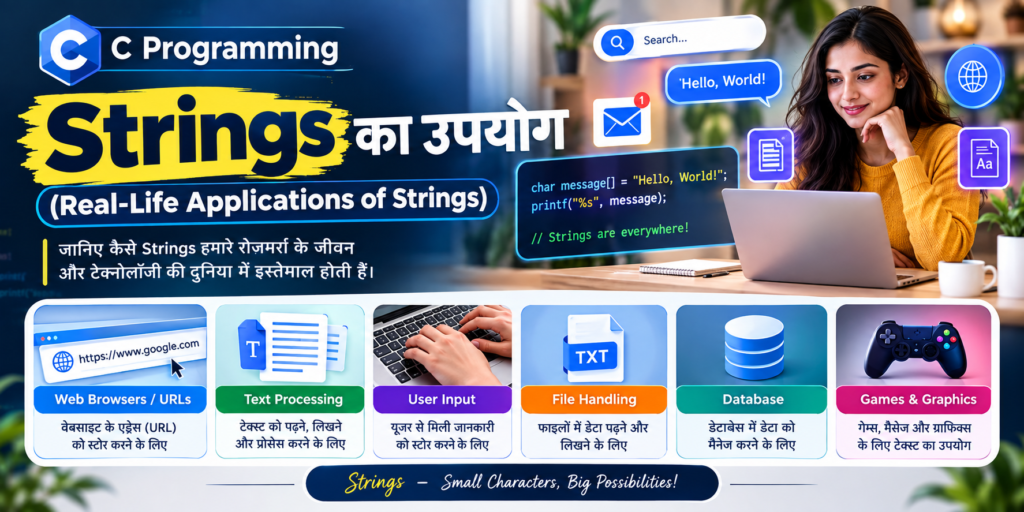
👉 Strings का उपयोग (Real-Life Applications of Strings)
Strings का उपयोग लगभग हर प्रकार के software में होता है।
1. Login System
Username जैसे:
admin123String के रूप में store किया जा सकता है।
2. Contact Applications
Contact apps में:
- Name
- Address
- City
जैसी information को Strings के रूप में handle किया जाता है।
3. Messaging Applications
WhatsApp या अन्य messaging applications में:
Hello, how are you?जैसे messages text data होते हैं।
4. Search Features
जब हम किसी website या app में search करते हैं:
C Programmingतो यह एक String होती है।
5. E-Commerce Applications
E-commerce websites में:
- Product Name
- Product Category
- Product Description
- Search Keyword
- Customer Name
जैसी कई चीजें Strings से जुड़ी होती हैं।
6. File Processing
Text files में मौजूद information को program read और process कर सकता है।
इसमें Strings का महत्वपूर्ण role होता है।
7. Authentication Systems
Username, identifiers और अन्य text-based information को process करने में Strings का उपयोग होता है।
8. User Input
जब user:
- Name
- City
- Message
- Command
- Address
जैसी information enter करता है, तो program उसे String के रूप में handle कर सकता है।
Strings सीखने के बाद आपको क्या फायदा होगा?
Strings केवल exam का topic नहीं है। Programming में इसका practical use बहुत ज्यादा है।
Strings अच्छी तरह समझने के बाद आप:
- User का Name और अन्य text input ले सकेंगे।
- Text को search और compare कर सकेंगे।
- दो या अधिक Strings को जोड़ सकेंगे।
- Text को copy और modify कर सकेंगे।
- String की length पता कर सकेंगे।
- Password और username जैसे text data को handle करना समझेंगे।
- Text को reverse और palindrome check कर सकेंगे।
- Uppercase, lowercase और digits को पहचान सकेंगे।
- Real-world applications में text data को process करने की basic logic समझ सकेंगे।
👉 Strings Chapter के Practice Programs
इस Strings, Chapter को अच्छी तरह समझने के लिए नीचे दिए गए programs की practice करें।
Basic String Programs
- Character Array declare करना।
- String initialize करना।
- String input लेना।
- String display करना।
- String के सभी characters को display करना।
- String की length पता करना।
String Function Programs
strcat()से दो Strings जोड़ना।strcpy()से String copy करना।strcmp()से दो Strings compare करना।strlen()से String की length निकालना।
String Logic Programs
- String reverse करना।
- Palindrome String check करना।
- Uppercase letters count करना।
- Lowercase letters count करना।
- Digits count करना।
- Vowels count करना।
- Uppercase को Lowercase में बदलना।
- Lowercase को Uppercase में बदलना।
- Vowels और consonants count करना।
- String में spaces count करना।
इन programs की practice करने से आपकी String की basic understanding के साथ problem-solving ability भी मजबूत होगी।
Important Points – एक नजर में
Strings Chapter के ये points जरूर याद रखें:
- C में String का कोई अलग
stringdata type नहीं होता। - C में String को Character Array में store किया जाता है।
- हर valid C String के अंत में
'\0'होता है। '\0'को Null Character कहा जाता है।- String Literal को double quotes में लिखा जाता है।
- Character को single quotes में लिखा जाता है।
- Array indexing
0से शुरू होती है। - String के लिए
'\0'के लिए extra space चाहिए। strlen()String की length निकालता है।strcpy()String copy करता है।strcat()Strings को जोड़ता है।strcmp()Strings को compare करता है।- String functions के लिए
<string.h>उपयोग किया जाता है। - Character checking और conversion के लिए
<ctype.h>उपयोगी है। fgets()पूरी line input करने के लिए उपयोगी है।gets()unsafe है और इसका उपयोग नहीं करना चाहिए।%sसामान्यतः whitespace तक input पढ़ता है।- Strings को
==से compare नहीं करना चाहिए। - String की memory में
'\0'बहुत महत्वपूर्ण है। - String Programming real-world applications में बहुत उपयोगी है।
अक्सर पूछे जाने वाले सवाल (FAQs)
1. C Programming में String क्या है?
C में String characters का एक sequence है जो '\0' Null Character से समाप्त होता है।
2. C में String कैसे declare करते हैं?
char name[50];3. C में String कैसे initialize करते हैं?
char name[] = "Future";4. '\0' का क्या काम है?
'\0' String के end को बताता है।
5. C में String input कैसे लेते हैं?
पूरी line पढ़ने के लिए:
fgets(name, sizeof(name), stdin);का उपयोग किया जा सकता है।
6. strlen() का क्या उपयोग है?
strlen() String में '\0' से पहले मौजूद characters की संख्या बताता है।
7. strcpy() का क्या उपयोग है?
एक String को दूसरी String में copy करने के लिए:
strcpy(destination, source);8. strcat() का क्या उपयोग है?
दो Strings को जोड़ने के लिए:
strcat(destination, source);9. strcmp() का क्या उपयोग है?
दो Strings को compare करने के लिए:
strcmp(x, y);अगर result 0 है, तो दोनों Strings बराबर हैं।
10. Character Array और String में क्या अंतर है?
Character Array characters का array है, जबकि C String एक ऐसा character sequence है जो '\0' से समाप्त होता है।
11. क्या C में String का अलग Data Type होता है?
नहीं। C में String को सामान्यतः char array की मदद से represent किया जाता है।
12. '\0' क्या है?
'\0' Null Character है और C String के अंत को दर्शाता है।
13. String की length पता करने के लिए कौन-सा function उपयोग होता है?
strlen()14. दो Strings को compare करने के लिए कौन-सा function उपयोग होता है?
strcmp()15. String copy करने के लिए कौन-सा function उपयोग होता है?
strcpy()16. दो Strings को जोड़ने के लिए कौन-सा function उपयोग होता है?
strcat()17. Spaces वाली String कैसे input करें?
fgets() का उपयोग करें:
fgets(name, sizeof(name), stdin);18. scanf() और fgets() में क्या अंतर है?
scanf("%s", ...) सामान्यतः whitespace तक input पढ़ता है, जबकि fgets() पूरी line पढ़ सकता है, जिसमें spaces भी हो सकते हैं।
19. क्या Strings को == से compare कर सकते हैं?
String contents compare करने के लिए == का उपयोग नहीं करना चाहिए।
इसके बजाय:
strcmp(x, y) == 0का उपयोग करें।
20. String Functions के लिए कौन-सी Header File उपयोग होती है?
#include <string.h>⭐ Exams और Interviews के लिए Most Important Questions
- C में String क्या है?
- Character Array और String में क्या अंतर है?
'\0'का क्या महत्व है?- C में String कैसे declare और initialize करते हैं?
- String memory में कैसे store होती है?
scanf()से String input कैसे लेते हैं?scanf()औरfgets()में क्या अंतर है?- String को print कैसे करते हैं?
%sformat specifier क्या है?strlen()क्या है और कैसे काम करता है?strlen()औरsizeof()में क्या अंतर है?strcpy()का क्या उपयोग है?strcat()का क्या उपयोग है?strcmp()कैसे काम करता है?- Strings को
==से compare क्यों नहीं करना चाहिए? - C में String को reverse कैसे करते हैं?
- Palindrome String क्या है और इसे कैसे check करते हैं?
- String में vowels, consonants, digits और spaces कैसे count करते हैं?
- Array of Strings क्या होता है?
- C में commonly used String-handling functions कौन-कौन से हैं?
मुजतबा अंसारी एक सॉफ्टवेयर इंजीनियर तथा The Tech Earth के संस्थापक (Founder) और CEO हैं। वे तकनीक, आर्टिफिशियल इंटेलिजेंस (AI), सॉफ्टवेयर, साइबर सुरक्षा, ब्लॉगिंग, हेल्थ टेक, एग्री टेक और डिजिटल ट्रेंड्स से जुड़े विषयों पर लेख लिखते हैं। उनका उद्देश्य पाठकों को नई तकनीकों और डिजिटल दुनिया की नवीनतम जानकारियों से अपडेट रखना है।
Was this article helpful?
Your feedback helps us improve The Tech Earth.
Helpful: 0 Not helpful: 0