

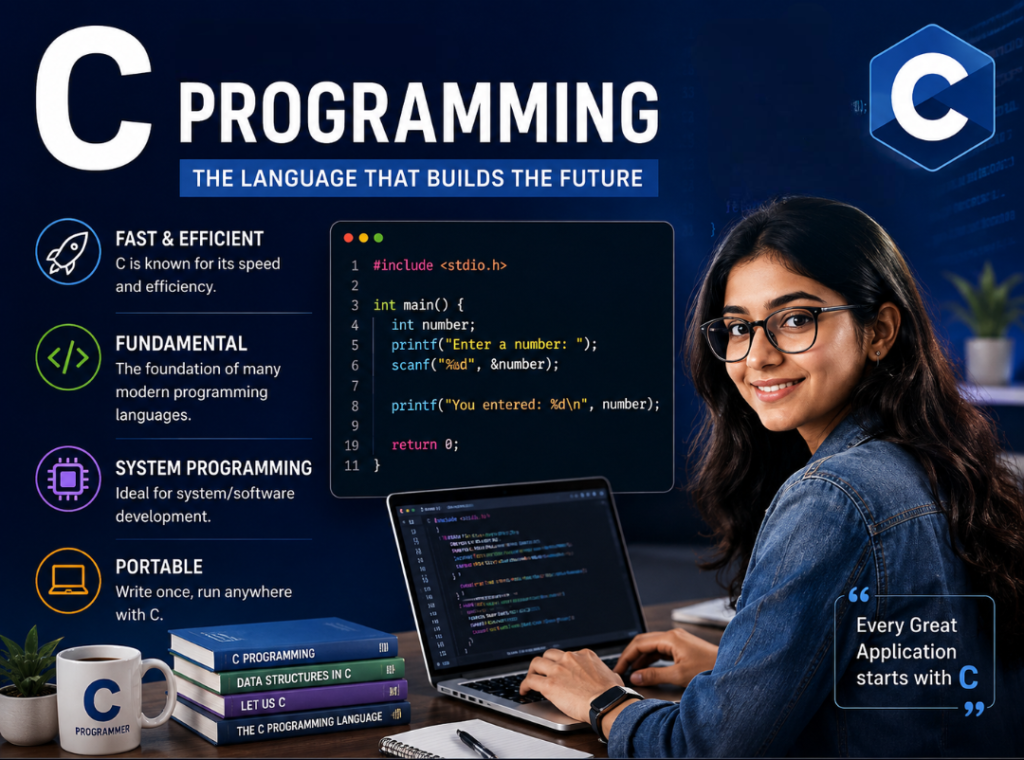
CHAPTER- 01:
C Programming Fundamentals – Complete Beginner’s Guide
Introduction
C Programming is one of the most popular and influential programming languages in the world. Developed by Dennis Ritchie at Bell Labs in 1972, C has played a major role in the development of operating systems, embedded systems, databases, compilers, and many modern programming languages.
Even today, C Programming is widely used because of its speed, efficiency, portability, and low-level memory access capabilities. Languages such as C++, Java, C#, and many others have been influenced by C, which is why it is often referred to as the “Mother of Programming Languages.”
In this chapter, you will learn the fundamental concepts of C Programming, including its definition, applications, program structure, character set, tokens, data types, variables, operators, and type conversions.
📚 C Programming Complete Course Roadmap
✅ Chapter 1: C Programming Fundamentals (Current Chapter)
🔜 Chapter 2: History and Evolution of C Language
🔜 Chapter 3: Installing a C Compiler
🔜 Chapter 4: Writing Your First C Program
🔜 Chapter 5: Structure of a C Program
🔜 Chapter 6: Variables and Data Types
🔜 Chapter 7: Operators in C
🔜 Chapter 8: Input and Output Functions
🔜 Chapter 9: Conditional Statements
🔜 Chapter 10: Loops in C
🔜 Chapter 11: Arrays
🔜 Chapter 12: Strings
🔜 Chapter 13: Functions
🔜 Chapter 14: Pointers
🔜 Chapter 15: Structures and Unions
🔜 Chapter 16: File Handling
What is C Programming Language? Definition, Features and Applications
What is C Programming?
C Programming language is one of the most popular and powerful programming languages used in software development. Developed by Dennis Ritchie in 1972 at Bell Labs, and quickly became one of the most widely used programming languages in the world. C serves as the foundation for many modern programming languages, including C++, Java, and C#. Due to its speed, efficiency, and portability, C is widely used for operating systems, embedded systems, compilers, and application development. In this guide, you will learn the basic fundamentals of C Programming, including its definition, features, applications, and program structure.
Key Features of C Programming
- Simple and efficient syntax
- Fast execution speed
- Portable across different platforms
- Structured and modular programming
- Rich set of built-in operators
- Direct memory access through pointers
- Easy integration with hardware
- Foundation for learning advanced programming languages
Why Learn C Programming?
- Helps build strong programming fundamentals
- Used in operating system development
- Essential for embedded systems and IoT devices
- Improves problem-solving skills
- Forms the foundation for C++, Java, and many other languages
- Frequently asked in technical interviews and competitive programming
Applications of C Programming
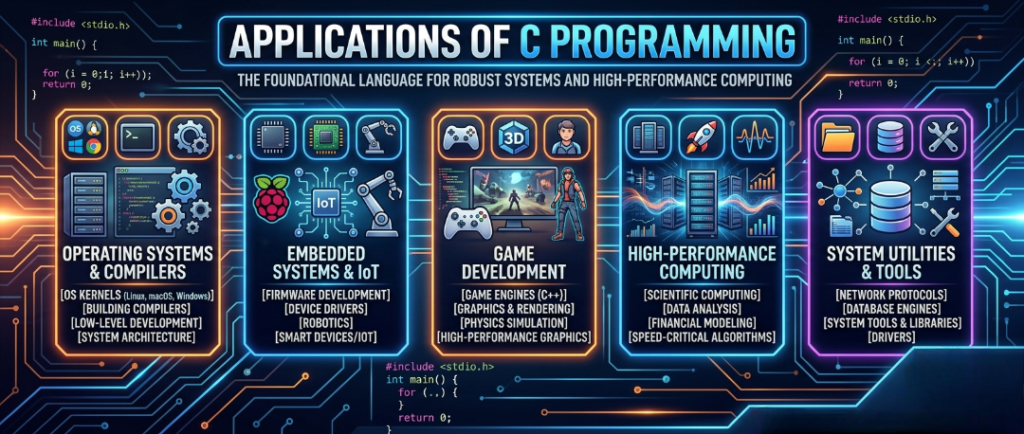
- Operating Systems
- Embedded Systems
- Device Drivers
- Database Systems
- Compilers and Interpreters
- Networking Applications
- Game Development
- Scientific and Engineering Software
Types of C Programming Language
C can be categorized as:
- General-Purpose Programming Language
- Procedural Programming Language
- Structured Programming Language
- System Programming Language
- Mid-Level Programming Language
Basic Structure of a C Program
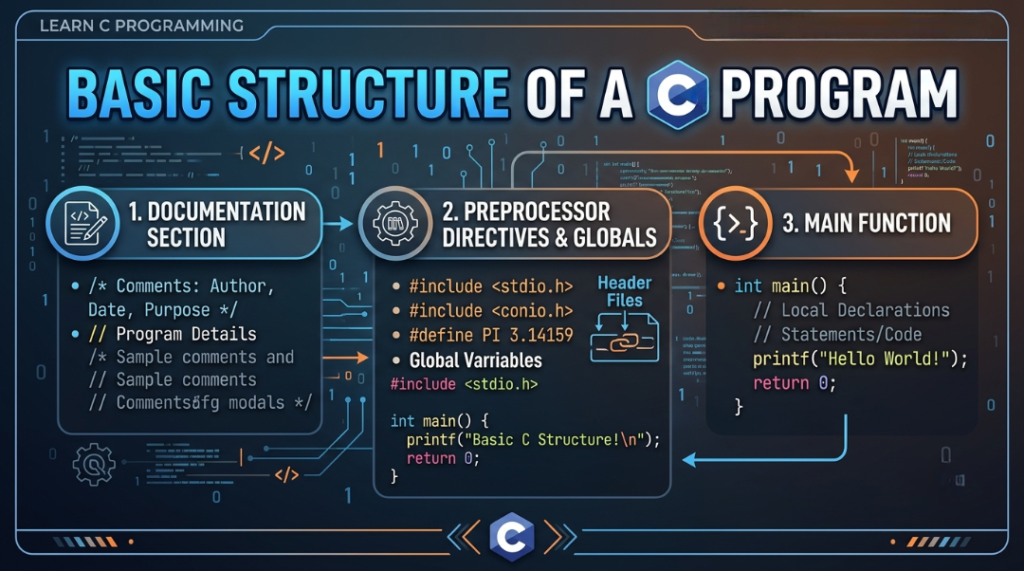
C is a structured and modular programming language in which a program is divided into different sections or modules. Each module performs a specific task, making the program easier to understand, maintain, and debug.
A typical C program consists of the following sections:
1. Documentation Section
This section contains comments that describe the purpose of the program. Comments are ignored by the compiler and are used only for documentation.
Example:
/* Program to add two numbers */
2. Link Section
The link section includes the header files required by the program.
Example:
#include <stdio.h>
3. Definition Section
This section is used to define symbolic constants using the #define directive.
Example:
#define PI 3.14
4. Global Declaration Section
Variables and function prototypes declared outside the main() function are called global declarations.
Example:
int num;
5. Main() Function Section
The main() function is the starting point of every C program. Program execution begins from this function.
int main()
{
    int a = 25, b = 6;    // Declaration Part

    int s = a + b;        // Executable Part

    return 0;
}
The main() function generally contains:
- Declaration Part – Variables are declared.
- Executable Part – Program statements are executed.
6. User-Defined Function Section
Functions created by the programmer to perform specific tasks are known as user-defined functions.
void function1()
{
    // Function code
}

void function2()
{
    // Function code
}
Structure of a C Program Diagram
Documentation Section
        ↓
Link Section
        ↓
Definition Section
        ↓
Global Declaration Section
        ↓
Main() Function
   ├── Declaration Part
   └── Executable Part
        ↓
User-Defined Functions
Why is the Structure of a C Program Important?
- Improves code readability.
- Makes debugging easier.
- Supports modular programming.
- Enhances code reusability.
- Simplifies program maintenance.
Understanding the basic structure of a C program is essential for beginners because every C application follows this fundamental layout. This knowledge helps developers write organized, efficient, and maintainable code.
Program
A Program is a set of instructions written to perform a specific task on a computer. These instructions tell the computer what actions to perform and how to process data to produce the desired output.
In simple terms, a program is a collection of commands that enables a computer to solve a problem or perform a particular operation.
Example of a Program
- Calculator Program
- Student Management System
- Banking Software
- Inventory Management System
Programming Language
A Programming Language is a medium used to write programs and communicate instructions to a computer.
In other words, a programming language is a formal language that allows programmers to create software, applications, and computer programs by writing instructions that the computer can understand and execute.
Examples of Programming Languages
- C
- C++
- Java
- Python
- JavaScript
- C#
C Program to Add Two Numbers
The following program demonstrates how to add two numbers in C Programming and display the result.
#include <stdio.h>

int main()
{
    int a, b, sum;

    printf("Enter two numbers: ");
    scanf("%d %d", &a, &b);

    sum = a + b;

    printf("Sum = %d", sum);

    return 0;
}
Explanation of the Program
| Statement | Description |
|---|---|
#include <stdio.h> | Includes the standard input/output header file. |
int main() | The main function where program execution starts. |
int a, b, sum; | Declares integer variables. |
printf() | Displays output on the screen. |
scanf() | Accepts input from the user. |
sum = a + b; | Adds two numbers and stores the result. |
return 0; | Terminates the program successfully. |
Important Symbols Used
| Symbol | Meaning |
|---|---|
\n | New Line |
; | End of Statement |
%d | Integer Format Specifier |
& | Address Operator |
Sample Input
Enter two numbers:
5 7
Sample Output
Sum = 12
This simple program helps beginners understand variables, input/output functions, arithmetic operations, and the basic structure of a C program.
Character Set and Tokens in C Programming
Introduction
Before writing any C program, it is important to understand the basic building blocks of the language. Just as words are formed using alphabets in English, C programs are created using characters and tokens. These elements form the foundation of every C program and help the compiler understand the instructions written by the programmer.
In this chapter, you will learn about character sets, characters, tokens, and their classifications in C Programming.
What is a Character in C Programming?
A Character is the smallest individual unit of a C program. Characters are combined together to form meaningful units known as tokens.
For example:
i
n
t
The above three characters combine to form the token:
int
Here, i, n, and t are characters, while int is a token.
Character Set in C Programming
A Character Set is a collection of all valid characters that can be used to write a C program. Every keyword, identifier, constant, and operator is formed using characters from the character set.
Types of Character Sets in C
1. Letters (Alphabets)
Both uppercase and lowercase letters can be used in C programs.
A-Z
a-z
Examples:
A
B
C
a
b
c
2. Digits
Digits are used to represent numeric values.
0 1 2 3 4 5 6 7 8 9
Examples:
25
100
2026
3. Special Symbols
Special symbols are used to perform various operations in a C program.
Examples:
+ - * / % = < > ! & |
These symbols are used for arithmetic calculations, comparisons, assignments, and logical operations.
4. White Spaces
White spaces improve the readability of a program and separate different program elements.
Examples:
- Space
- Tab
- New Line
Although white spaces are ignored by the compiler in most situations, they make the code easier to read and maintain.
What are Tokens in C Programming?
A Token is the smallest meaningful unit of a C program. Tokens are considered the building blocks of C Programming because every statement is made up of one or more tokens.
Example
int sum = 10;
The tokens in the above statement are:
int
sum
=
10
;
Each token has a specific meaning and role in the program.
Classification of Tokens in C
C Programming tokens are classified into the following categories:
- Keywords
- Identifiers
- Constants (Literals)
- Punctuators (Separators)
- Operators
These categories help the compiler understand the structure and meaning of a program.
Data Types, Variables and Type Conversion in C Programming
What are Data Types in C Programming?
A Data Type specifies the type of data that a variable can store and the operations that can be performed on that data. In simple terms, a data type tells the compiler how much memory to allocate for a variable and what kind of values it can hold.
Formula
Data Type = Data Value + Allowed Operations
For example, an integer data type can store whole numbers and supports arithmetic operations such as addition, subtraction, multiplication, and division.
Classification of Data Types in C
Data types in C are broadly classified into two categories:
1. Primitive (Basic) Data Types
These are built-in data types provided by the C language.
| Data Type | Size (Typical) | Description |
|---|---|---|
| char | 1 Byte | Stores a single character |
| int | 2 or 4 Bytes | Stores integer values |
| float | 4 Bytes | Stores decimal numbers |
| double | 8 Bytes | Stores large decimal numbers |
| long | 4 or 8 Bytes | Stores larger integer values |
| void | No Storage | Represents no value |
2. Non-Primitive (Derived) Data Types
These data types are created using basic data types.
- Array
- Pointer
- Structure
- Union
- Enumeration (enum)
- typedef
These are often referred to as User-Defined or Derived Data Types.
Variables in C Programming
A Variable is a named memory location used to store data during program execution. The value stored in a variable can change while the program is running.
Syntax
data_type variable_name;
Examples
int x;
float y, z;
char grade;
Example Program
#include <stdio.h>

int main()
{
    int age = 25;

    printf("Age = %d", age);

    return 0;
}
Data Type Conversion in C
Type Conversion is the process of converting one data type into another data type.
Types of Type Conversion
- Implicit (Automatic) Type Conversion
- Explicit (Manual) Type Conversion
1. Implicit Type Conversion
Implicit conversion is performed automatically by the compiler whenever required.
Example 1
#include <stdio.h>

int main()
{
    int x;

    x = 'A';

    printf("%d", x);

    return 0;
}
Output
65
Explanation:
The character 'A' is automatically converted into its ASCII value 65.
Example 2
float z;

z = 'B' + 9 + 2.9;

printf("%f", z);
Output
77.900000
Explanation:
ASCII value of ‘B’ is 66.
66 + 9 + 2.9 = 77.9
2. Explicit Type Conversion (Type Casting)
Explicit conversion is performed manually by the programmer using type casting.
Syntax
(data_type) expression
Example 1
#include <stdio.h>

int main()
{
    int A = 7, B = 4;
    float C;

    C = (float)A / (float)B;

    printf("%f", C);

    return 0;
}
Output
1.750000
Without type casting, the result would be 1 because integer division discards the decimal part.
Example 2
int x = 65;

printf("%c", (char)x);
Output
A
Explanation:
The integer value 65 is converted into its corresponding ASCII character ‘A’.
Data Type Modifiers (Qualifiers)
Data type modifiers are used to modify the size or range of basic data types.
Common Modifiers
- short
- long
- signed
- unsigned
Examples
short int a;
long int b;
signed int c;
unsigned int d;
Signed Data Type Range
A signed data type can store both positive and negative values.
Formula
-2^{n-1}\ \text{to}\ (2^{n-1}-1)
Where:
- n = Number of bits
Example
For a 16-bit signed integer:
-2^{15}\ \text{to}\ (2^{15}-1)
Range:
-32768 to 32767
Unsigned Data Type Range
An unsigned data type stores only positive values.
Formula
0\ \text{to}\ (2^n-1)
Where:
- n = Number of bits
Example
For a 16-bit unsigned integer:
0 to 65535
Important Note :
By default, an integer is considered:
signed short int
For a 16-bit integer:
- Size = 2 Bytes
- Total Bits = 16
- Range = -32768 to 32767
FAQs: Fundamentals of C Programming
1. What is C Programming?
C is a general-purpose, procedural programming language developed by Dennis Ritchie in 1972. It is widely used for software development, system programming, and embedded systems.
2. Why is C Called the Mother of Programming Languages?
C is known as the Mother Language because many modern programming languages are based on its concepts and syntax.
3. What are the Main Features of C Programming?
- Simple and efficient
- Portable
- Fast execution
- Structured programming
- Rich standard library
- Supports low-level programming
4. What is a Program in C?
A program is a set of instructions written to perform a specific task on a computer.
5. What is a Programming Language?
A programming language is a medium used to communicate instructions to a computer.
6. What is the Basic Structure of a C Program?
A C program consists of:
- Documentation Section
- Header Files
- Global Declarations
- main() Function
- User-Defined Functions
7. What is the Purpose of the main() Function in C?
The main() function is the starting point of every C program. Execution begins from this function.
8. What is a Character Set in C Programming?
A character set is the collection of valid letters, digits, symbols, and white spaces used to write C programs.
9. What are Tokens in C Programming?
Tokens are the smallest meaningful units of a C program such as keywords, identifiers, constants, operators, and punctuators.
10. What are Keywords in C?
Keywords are reserved words with predefined meanings.
Examples:
- int
- char
- float
- if
- else
- return
11. What are Identifiers in C?
Identifiers are user-defined names used for variables, functions, arrays, and structures.
12. What are Constants in C Programming?
Constants are fixed values that cannot be changed during program execution.
13. What is the Difference Between Variables and Constants?
Variables can change their values during execution, whereas constants remain fixed.
14. What are Data Types in C?
Data types define the type of data a variable can store.
Examples:
- int
- char
- float
- double
- void
15. What is a Variable in C Programming?
A variable is a named memory location used to store data during program execution.
16. What is Type Conversion in C?
Type conversion is the process of converting one data type into another.
17. What are Operators in C Programming?
Operators are symbols used to perform mathematical, logical, relational, and bitwise operations.
18. What are Escape Sequences in C?
Escape sequences are special character combinations used within strings.
Examples:
\n(New Line)\t(Tab)\\(Backslash)
19. What are the Applications of C Programming?
C is used in:
- Operating Systems
- Embedded Systems
- Device Drivers
- Database Systems
- Networking Applications
- IoT Devices
20. Why Should Beginners Learn C Programming?
C helps beginners understand programming fundamentals such as variables, data types, operators, functions, memory management, and problem-solving, making it an excellent foundation for learning advanced programming languages.

Mujtaba Ansari is a Software Engineer, Founder & CEO of The Tech Earth. He writes about technology, AI, software, cybersecurity, blogging, Health tech, Agri Tech and digital trends to help readers stay updated with the latest innovations.