
What is Multimedia? Uses, Features and Main Components:
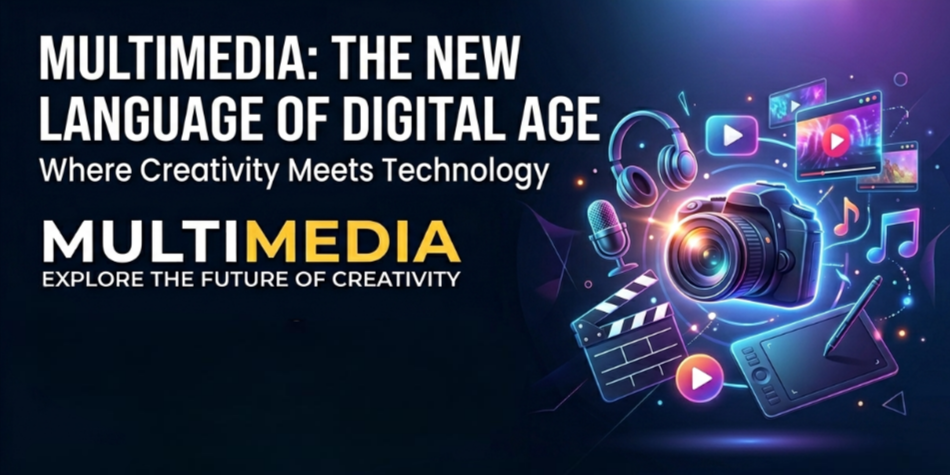
Multimedia is a modern digital communication technology that combines multiple forms of media to present information in a more interactive, attractive, and understandable way. The word Multimedia is derived from two English words — Multi meaning “many” and Media meaning “medium” or “method of communication.”
In simple words – multimedia refers to the integration of different types of content such as Text, Audio, Video, Graphics, Images, Animation, and Interactive Elements into a single platform or presentation to improve user experience and communication.
Multimedia plays a major role in today’s digital world because it helps people understand information more quickly and effectively compared to traditional text-only methods. It is widely used in various fields including Education, Entertainment, Advertising, Business, Web Design, Social Media, Gaming, Digital Marketing, Journalism, Healthcare, and Online Learning Platforms.
Main Components or Elements of Multimedia –
The major elements of multimedia are:
Text: Used for providing written information, titles, descriptions, and instructions.
Audio: Includes music, voice recordings, sound effects, and narration to improve engagement.
Video: Helps in visual storytelling, demonstrations, tutorials, and entertainment.
Graphics & Images: Used to make content visually appealing and easier to understand.
Animation: Adds motion effects to objects and visuals for better presentation and interaction.
Interactive Content: Allows users to interact with the system through buttons, menus, quizzes, or clickable elements.
Importance of Multimedia :
Multimedia has become an essential part of modern communication because it makes content more engaging, informative, and user-friendly. It improves learning efficiency, attracts audience attention, and enhances digital experiences across different platforms. Businesses use multimedia for marketing and branding, while educational institutions use it for smart learning and online classes.
Advantages of Multimedia:
🌎 Makes communication more effective and attractive
👩💻 Improves learning and understanding capability
👩💻 Enhances user engagement and interaction
💻 Useful for presentations, advertising, and training
👩💻 Supports creative and visual storytelling
👩💻 Saves time by explaining complex topics easily
Applications of Multimedia:
Multimedia is used in many real-life applications, such as:
Education: Smart classes, e-learning apps, educational videos
Entertainment: Movies, music, OTT platforms, gaming
Business: Digital presentations, product advertisements, online meetings
Healthcare: Medical training simulations and patient education
Web Development: Interactive websites and user interfaces
Social Media: Reels, animations, video content, and digital campaigns
Research: Used for analyzing and presenting information.
Advertising: Used for promotions and product marketing.
What is the History of Multimedia
The history of multimedia is closely connected with the development of communication and technology. In the early days, newspapers were considered one of the first powerful mass communication mediums, where text and images were used together to deliver information to people. This was the basic foundation of multimedia communication.
In 1895, Guglielmo Marconi successfully transmitted the first wireless radio signal, which brought a revolutionary change in the field of communication. Later, in 1901, telegraph messages were transmitted through radio waves, marking the beginning of modern audio broadcasting technology.
With the advancement of technology, devices such as radio, television, computers, and the internet transformed multimedia into a more advanced and interactive system. Today, multimedia combines various elements including text, audio, video, graphics, animation, and interactive content to share information more effectively.
In the modern digital era, multimedia plays a vital role in education, entertainment, digital marketing, online media, gaming, business presentations, social media, and e-learning platforms. It has become an essential part of modern communication and information technology.
Elements of Multimedia
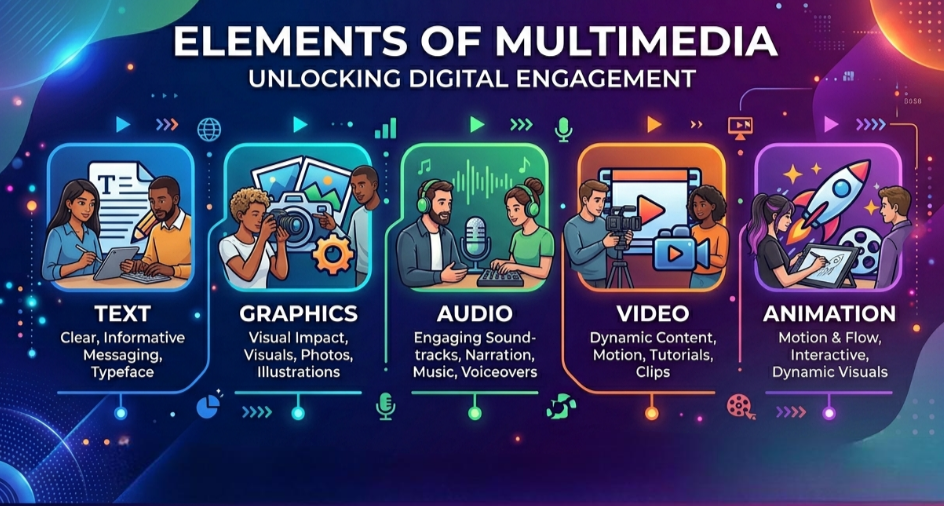
Multimedia is a combination of different digital media elements used to present information in an interactive, attractive, and effective manner. The main elements of multimedia are Text, Graphics, Audio, Video, and Animation. These elements work together to improve communication and user experience in the digital world.
(1) Text:
Text is one of the most basic and important elements of multimedia. It is used to present information through letters, numbers, symbols, and special characters.
Text helps in providing titles, descriptions, instructions, messages, and detailed information. It can also be combined with graphics, images, audio, video, and animation to make content more engaging and understandable.
Today, text is widely used in websites, blogs, e-books, mobile applications, social media platforms, and digital presentations.
(2) Pictures and Graphics:
Pictures and graphics are used to make multimedia content visually attractive and easy to understand. In computers, images and graphics are stored in the form of digital data.
Graphics are mainly divided into two types:
(i) Bitmap Graphics:
Bitmap graphics store images using tiny dots called pixels and bits. Images captured through digital cameras and scanners are commonly stored in bitmap format.
Popular Bitmap Formats:
GIF (Graphics Interchange Format) – Supports 8-bit color images.
JPEG (Joint Photographic Experts Group) – Supports 24-bit true color images.
BMP (Bitmap Image Format) – Common Windows image format.
Popular Graphics Software (Latest 2026)
Adobe Photoshop – Best for photo editing and graphic design.
Adobe Illustrator – Used for logos and vector illustrations.
CorelDRAW – Popular for professional graphic designing.
Canva – Easy online graphic design tool with AI features.
Figma – Used for UI/UX and web design.
Blender – Used for 3D graphics and animation.
Krita – Popular for digital painting and illustration.
Inkscape – Free and open-source vector graphics software.
Autodesk Maya – Professional 3D modeling and graphics software.
Cinema 4D – Used for motion graphics and 3D design.
(ii) Vector Graphics
Vector graphics are created using mathematical formulas and lines, making them easy to resize and edit without losing quality.
Vector graphics are commonly used in:
Logo Designing
Animation
Cartoon Creation
CAD (Computer Aided Design)
CAM (Computer Aided Manufacturing)
(3) Audio:
Audio refers to sound or voice that can be heard by humans. In multimedia, audio is used to make content more interactive and realistic.
Audio signals are originally analog signals, which are converted into electrical signals through microphones and then stored as digital data in computers.
Humans can generally hear sound frequencies between 20 Hz and 20 KHz.
Popular Audio File Formats:
MP3 (MPEG Audio Layer-3)
MIDI (Musical Instrument Digital Interface)
RIFF (Resource Interchange File Format)
WAV (Waveform Audio File Format)
Audio is widely used in music, podcasts, online learning, gaming, movies, and digital communication.
(4) Video
Video is an important multimedia element that combines moving images and sound to present information effectively
Videos can be recorded, edited, stored, played, and streamed using digital devices such as computers, smartphones, and televisions. A graphics card or video card is generally required for smooth video processing and display.
Popular Video File Formats:
MPEG (Moving Picture Experts Group)
MJPEG (Motion JPEG)
MP4 (MPEG-4 Part 14)
AVI (Audio Video Interleave)
Today, videos are extensively used in online streaming, YouTube, digital marketing, video conferencing, social media, and entertainment industries.
(5) Animation
Animation is the process of displaying a sequence of still images rapidly to create the illusion of motion. It helps make multimedia content more engaging, interactive, and visually appealing.
Animation is commonly used in:
Cartoon Movies
Video Games
Advertisements
Educational Videos
Web Designing
3D Modeling
Popular Animation Software:
Blender – Free 2D & 3D animation software.
Autodesk Maya – Professional 3D animation and VFX software.
Adobe After Effects – Used for motion graphics and video effects.
Cinema 4D – Popular for 3D animation and motion design.
Toon Boom Harmony – Widely used for cartoon animation.
Houdini – Advanced VFX and simulation software.
OpenToonz – Free software for 2D animation.
Krita – Used for digital art and animation.
Animated videos are commonly stored in digital formats such as MPEG and MP4.
AI-Based Animation Tools (2026)
Runway – AI video and animation generation.
Adobe Firefly – AI-powered visual and animation effects.
Kaiber – Creates animated videos using AI prompts.
Pika – AI motion and video animation creator.
Canva – Includes AI animation and motion features.
Traditional Animation Software
Blender
Autodesk Maya
Adobe After Effects
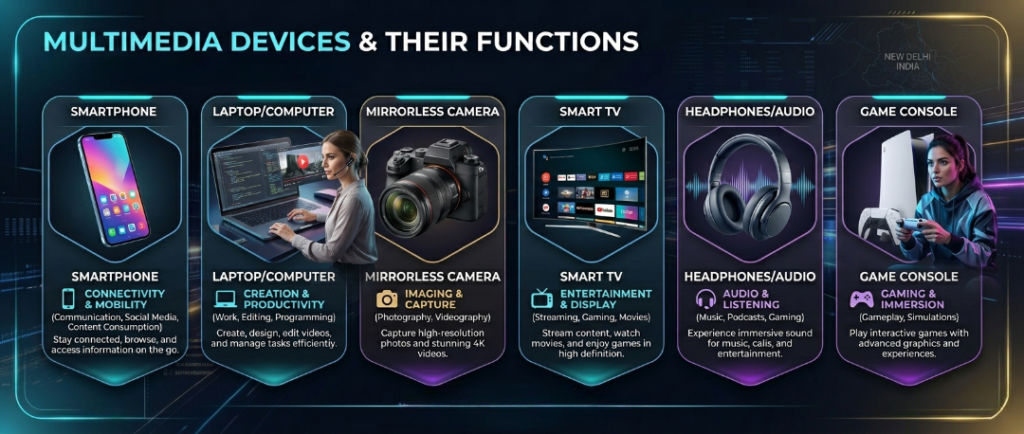
Multimedia Devices and Their Functions
Multimedia devices are hardware components used to create, record, store, process, and display multimedia content such as audio, video, graphics, and animations. These devices help users interact with multimedia systems effectively.
- Microphone
A microphone is an input device used to record sound or voice into a computer.
Functions:
Voice recording
Online communication
Podcast creation
Audio input for videos - Speakers
Speakers are output devices that produce sound from a computer or multimedia system.
Functions:
Playing music
Listening to videos
Gaming audio output
Video conferencing - Webcam
A webcam is a digital camera connected to a computer for capturing live video.
Functions:
Video calling
Online classes
Live streaming
Video recording - Scanner
A scanner converts printed documents and images into digital format.
Functions:
Image scanning
Document storage
Photo digitization
PDF creation - Digital Camera
A digital camera captures photos and videos electronically.
Functions:
Photography
Video recording
Multimedia content creation
Social media content production - Projector
A projector displays images and videos on a large screen.
Functions:
Classroom presentations
Business meetings
Home theater systems
Multimedia presentations - Headphones
Headphones are audio output devices worn on the ears.
Functions:
Private listening
Gaming communication
Online meetings
Music enjoyment - Graphic Tablet
A graphic tablet allows users to draw images digitally.
Functions:
Digital drawing
Animation design
Graphic designing
Photo editing - Touchscreen
A touchscreen is both an input and output device that responds to touch.
Functions:
User interaction
Mobile device operation
ATM systems
Interactive learning - Multimedia Projector
A multimedia projector displays computer-generated multimedia content.
Functions:
Video presentations
Educational demonstrations
Conference displays
Cinema projection
Importance of Multimedia Devices :
Improve communication
Enhance learning experience
Support entertainment
Help in professional presentations
Enable digital content creation
Multimedia MCQ Questions and Answers in English | Important Objective Questions for all Exams
(1) What is another name for Graphics?
(a) Picture Points
(b) Drawings made with lines
(c) Box
(d) Line
(e) All of the above
Answer: (b) Drawings made with lines
(2) What is the full form of GIF?
(a) General Image Format
(b) Graphical Interchange Format
(c) Graphic Internet File
(d) Global Interface Format
(e) None of these
Answer: (b) Graphical Interchange Format
(3) What can be sent through video mail?
(a) Video messages
(b) Video clips
(c) Graphics
(d) All of the above
(e) None of these
Answer: (d) All of the above
(4) What is the common file extension of a Text File?
(a) .jpg
(b) .gif
(c) .txt
(d) .bmp
(e) .png
Answer: (c) .txt
(5) What is the full form of CAD?
(a) Computer Aided Design
(b) Computer Added Design
(c) Computer Aided Data
(d) Computer Auto Design
(e) None of these
Answer: (a) Computer Aided Design
(6) Which type of software is used to edit motion picture clips?
(a) Video Editing Software
(b) Drawing Software
(c) Painting Software
(d) Spreadsheet Software
(e) None of these
Answer: (a) Video Editing Software
(7) What is the normal frequency range of audio signals?
(a) 100 Hz – 200 Hz
(b) 200 Hz – 3200 Hz
(c) 500 Hz – 600 Hz
(d) 3500 Hz – 5000 Hz
(e) None of these
Answer: (b) 200 Hz – 3200 Hz
(8) The use of more than one medium at the same time in a computer is called —
(a) Multimedia
(b) Macro Media
(c) Interactive Media
(d) Nano Media
(e) None of these
Answer: (a) Multimedia
(9) What is the common file extension of JPEG images?
(a) .jpeg
(b) .jpg
(c) Both a and b
(d) .gif
(e) .png
Answer: (c) Both a and b
(10) Digital photos and scanned images are stored as which type of graphics?
(a) Vector Graphics
(b) Bitmap Graphics
(c) Animation Graphics
(d) 3D Graphics
(e) None of these
Answer: (b) Bitmap Graphics
(11) Which of the following is a feature of a multimedia system?
(a) High Storage Capacity
(b) High Data Transfer Rate
(c) Both a and b
(d) Low Processing
(e) None of these
Answer: (c) Both a and b
(12) How many image formats are commonly used?
(a) 2
(b) 3
(c) 4
(d) 6
(e) 8
Answer: (d) 6
(13) What is the full form of MMS?
(a) Multimedia Messaging Service
(b) Multimedia Mail Service
(c) Multimedia Management System
(d) Multimedia Message Server
(e) None of these
Answer: (a) Multimedia Messaging Service
(14) When frames are displayed quickly, the video appears —
(a) Rough
(b) Smooth
(c) Blurry
(d) Interrupted
(e) None of these
Answer: (b) Smooth
(15) What is the delay during stream playback called?
(a) Playback Delay
(b) Stream Delay
(c) Jitter
(d) Event Delay
(e) None of these
Answer: (c) Jitter
(16) What can be sent through video mail?
(a) Graphics
(b) Video Clips
(c) Video Messages
(d) All of the above
(e) None of these
Answer: (d) All of the above
(17) Which of the following is NOT used in Media Access Control?
(a) Ethernet
(b) Fiber Distributed Data Interface
(c) Digital Subscriber Line
(d) All of the above
(e) None of these
Answer: (c) Digital Subscriber Line
(18) The technique of using more than one medium simultaneously in a computer is called —
(a) Multimedia
(b) Macromedia
(c) Interactivity
(d) Hypermedia
(e) None of these
Answer: (a) Multimedia
(19) Video Compression is mainly of how many types?
(a) 1
(b) 2
(c) 3
(d) 4
(e) 5
Answer: (b) 2
(20) The technique of combining two or more images to create a new image is called —
(a) Modeling
(b) Morphing
(c) Animating
(d) Warping
(e) None of these
Answer: (b) Morphing
इस पोस्ट को हिंदी में पढ़ने के लिए यहाँ क्लिक करें।
👉 Click here to read this post in Hindi.

Mujtaba Ansari is a Software Engineer, Founder & CEO of The Tech Earth. He writes about technology, AI, software, cybersecurity, blogging, Health tech, Agri Tech and digital trends to help readers stay updated with the latest innovations.