


Chapter 6:
Variables and Data Types
Author: Er. Mujtaba Ansari
Data Types and Variables are the basic building blocks of C Programming. They help us store and use different types of data in a program. In this article, you will learn the simple meaning, types, syntax, and examples of Data Types and Variables in an easy-to-understand way.
📚 C Programming Complete Course Structure
📘 Chapter 1: C Programming Fundamentals
📖 Chapter 2: History and Evolution of C Language
⚙️ Chapter 3: Installing a C Compiler
💻 Chapter 4: Writing Your First C Program
🧩 Chapter 5: Structure of a C Program
🔹 Chapter 6: Variables and Data Types (Current Chapter)
➗ Chapter 7: Operators in C
⌨️ Chapter 8: Input and Output Functions
🔀 Chapter 9: Conditional Statements
🔄 Chapter 10: Loops in C
📊 Chapter 11: Arrays
🔤 Chapter 12: Strings
🛠️ Chapter 13: Functions
👉 Chapter 14: Pointers
🧱 Chapter 15: Structures and Unions
📁 Chapter 16: File Handling
What are Variables in C?
A variable is like a box or container in which we store a value or some data.
For example, suppose you want to store a student’s age.
int age = 20;
Here:
intis the data type.ageis the variable name.20is the value stored in the variable.
Simple Example:
age → 20
Simple Example of a Variable
#include <stdio.h>

int main()
{
    int age = 20;

    printf("Age = %d", age);

    return 0;
}
Output:
Age = 20
Here, the variable age stores the value 20.
Why Do We Use Variables in C?
Variables are used to store data and use that data later in the program.
For example, we can use variables to store:
- Student age
- Student marks
- Product price
- Number of items
- Temperature
- Salary
- Grade
- Total amount
Example:
int marks = 85;
Here, the variable marks stores the value 85.
What are Data Types in C?
A Data Type tells the compiler what type of data a variable will store.
In simple words:
Data Type tells us what kind of value we want to store in a variable.
For example:
int age = 20;
float price = 99.50;
char grade = 'A';
Here:
int→ stores whole numbersfloat→ stores decimal numberschar→ stores one character
So, Variable stores the value, while Data Type tells what kind of value it is.
Variable and Data Type Together
Variables and Data Types are normally used together in C to store and manage data. A data type tells the compiler what kind of data a variable can store, while the variable is used to store that data.
Example:
int age = 20;Here, int is the data type, age is the variable, and 20 is the value.
Syntax:
data_type variable_name;
Example:
int age;
Here:
int→ Data Typeage→ Variable
Another example:
float price;
Here:
float→ Data Typeprice→ Variable
Types of – Data Types in C
C provides different types of data types.
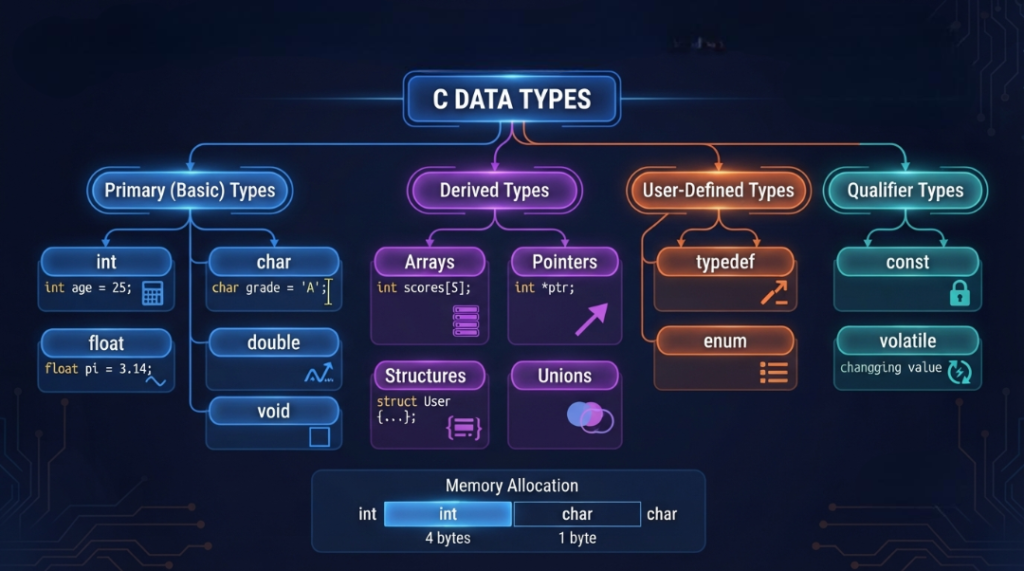
The commonly used data types are:
intcharfloatdoublevoidenum
C Language also has derived types such as:
- Array
- Pointer
- Function
Structures and unions are generally discussed as user-defined types.
Let’s understand them one by one in simple language.
1. int Data Type in C
The int data type is used to store whole numbers.
Whole numbers do not contain decimal points.
Examples:
int age = 20;
int marks = 85;
int number = 100;
Here, all values are whole numbers.
Simple Example:
#include <stdio.h>

int main()
{
    int age = 20;

    printf("My age is %d", age);

    return 0;
}
Output:
My age is 20
Where is int used?
int is commonly used for:
- Age
- Marks
- Number of students
- Quantity
- Counting numbers
2. char Data Type in C
The char data type is used to store one character.
A character is written inside single quotation marks.
Example:
char grade = 'A';
Here, A is a single character.
Another example:
char section = 'B';
Simple Program:
#include <stdio.h>

int main()
{
    char grade = 'A';

    printf("Grade = %c", grade);

    return 0;
}
Output:
Grade = A
Important:
A single character uses single quotes:
'A'
A string such as "Hello" is different and is handled using character arrays.
3. float Data Type in C
The float data type is used to store decimal numbers.
Example:
float price = 99.50f;
Here, 99.50 is a decimal value.
Other examples:
float height = 5.8f;
float weight = 60.5f;
float temperature = 36.5f;
Simple Program:
#include <stdio.h>

int main()
{
    float price = 99.50f;

    printf("Price = %.2f", price);

    return 0;
}
Output:
Price = 99.50
Where is float used?
It can be used for:
- Price
- Height
- Weight
- Temperature
- Percentage
4. double Data Type in C
The double data type is also used to store decimal numbers.
It normally provides more precision than float.
Example:
double distance = 12345.6789;
Simple program:
#include <stdio.h>

int main()
{
    double number = 123.456789;

    printf("%f", number);

    return 0;
}
Simple Difference Between float and double
| float | double |
|---|---|
| Decimal value | Decimal value |
| Normally less precision | Normally more precision |
| Uses less storage than double on many systems | Normally uses more storage than float |
The exact size and representation depend on the C implementation.
5. void Data Type in C
void means no value.
It is commonly used with functions that do not return a value.
Example:
void hello()
{
    printf("Hello");
}
Here, the function does not return any value, so void is used.
You will learn more about void when we study Functions in C.
6. enum Data Type in C
enum is used when we have a fixed group of named values.
For example, days of a week.
enum Day
{
    Monday,
    Tuesday,
    Wednesday
};
Instead of using numbers directly, we can use meaningful names.
This makes the program easier to understand.
📊 Data Type Visualization
Data Type Visualization means showing different data types in a simple visual or easy-to-understand format. It helps beginners quickly understand what type of data each data type can store.
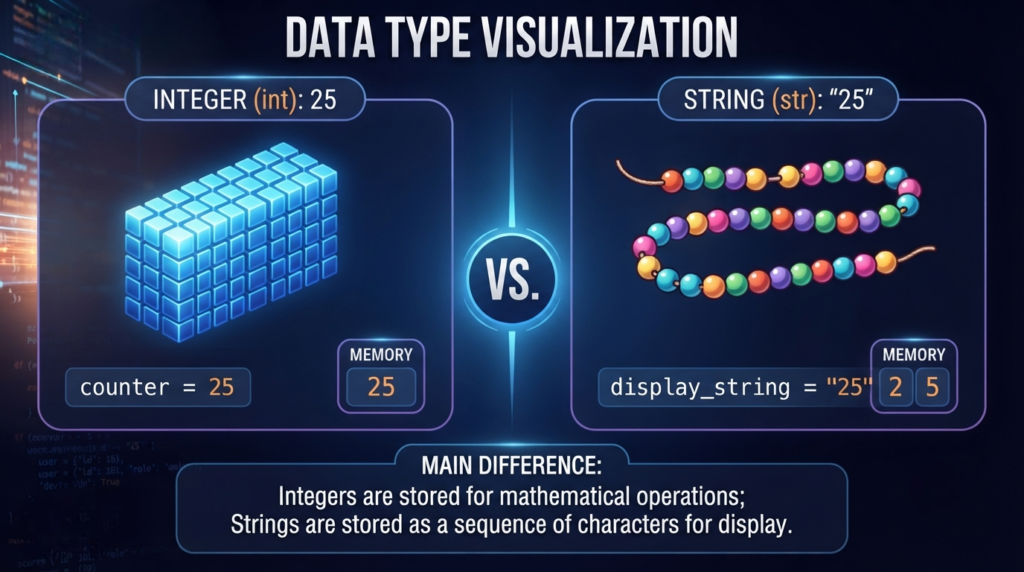
For example:
- 🔢 int → Whole Numbers →
10, 25, 100 - 🔤 char → Single Character →
'A', 'B' - 🔢 float → Decimal Numbers →
10.5, 25.75 - 🔢 double → More Precise Decimal Values
- 🚫 void → No Value
Simple definition:
Data Type Visualization is a visual representation of different data types, their uses, and examples, making them easier to understand and remember.
Basic Data Types in C – Quick Table
| Data Type | Used For | Example |
|---|---|---|
int | Whole numbers | 20 |
char | One character | 'A' |
float | Decimal numbers | 10.5f |
double | More precise decimal numbers | 10.56789 |
void | No value | void function() |
enum | Named set of values | Monday |
What is Variable Declaration in C?
Variable declaration means telling the compiler the name and type of a variable.
Syntax:
data_type variable_name;
Example:
int age;
Here, we have declared a variable named age of type int.
More examples:
int marks;
float price;
char grade;
double salary;
What is Variable Initialization?
Initialization means giving a value to a variable when it is declared.
Example:
int age = 20;
Here:
int→ Data Typeage→ Variable20→ Initial value
Another example:
float price = 99.50f;
Declaration vs Initialization
| Declaration | Initialization |
|---|---|
int age; | int age = 20; |
| Creates/declares the variable | Gives it an initial value |
| No value is explicitly assigned | Initial value is provided |
Assigning a Value to a Variable
We can also give a value to a variable after declaring it.
Example:
int age;

age = 20;
Here, age is first declared and then the value 20 is assigned.
We can also change the value later:
age = 25;
Now the value of age becomes 25.
Can a Variable Value Be Changed?
Yes.
This is one of the main differences between a variable and a constant.
Example:
int age = 20;

age = 25;
First, age contains 20.
Later, it contains 25.
Declaring Multiple Variables
You can declare multiple variables of the same data type in one line.
Example:
int a, b, c;
You can also assign values:
int a = 10, b = 20, c = 30;
This is useful when several variables have the same data type.
Rules for Naming Variables in C
There are some important rules for naming variables in C.
Rule 1: A variable name can contain letters
age
student
marks
Rule 2: It can contain numbers
student1
marks2
But a variable name cannot start with a number.
❌ Wrong:
1student
✅ Correct:
student1
Rule 3: Underscore _ can be used
student_name
total_marks
Rule 4: Spaces are not allowed
❌ Wrong:
student name
✅ Correct:
student_name
Rule 5: Special characters should not be used in variable names
For example, avoid:
student-name
Use:
student_name
Rule 6: C is Case-Sensitive
C treats uppercase and lowercase letters as different.
For example:
age
Age
AGE
These are three different identifiers.
Rule 7: Keywords Cannot Be Used
C has some reserved words called keywords.
Examples:
int
float
char
if
else
return
while
You cannot use these keywords as normal variable names.
Good Variable Naming Examples
Instead of:
int x;
Use:
int student_age;
Instead of:
float p;
Use:
float product_price;
Meaningful names make your program easier to read and understand.
What is a Constant in C?
A constant is a value that should not be changed after it has been defined as constant.
We can use the const keyword.
Example:
const int MAX = 100;
Here, MAX is a constant.
A normal variable can be changed:
int age = 20;
age = 25;
But a const object should not be assigned a new value after initialization.
Format Specifiers in C
Format specifiers are used with functions such as printf() and scanf().
They tell the function what type of data is being printed or read.
Common Format Specifiers
| Data Type | Common Format Specifier |
|---|---|
int | %d |
char | %c |
float | %f |
double in printf() | %f |
double in scanf() | %lf |
Example with int:
int age = 20;

printf("%d", age);
Output:
20
Example with char:
char grade = 'A';

printf("%c", grade);
Output:
A
Simple Program Using Different Data Types
Let’s use int, float, char, and double in one program.
#include <stdio.h>

int main()
{
    int age = 20;
    float height = 5.8f;
    char grade = 'A';
    double percentage = 87.65;

    printf("Age = %d\n", age);
    printf("Height = %.1f\n", height);
    printf("Grade = %c\n", grade);
    printf("Percentage = %.2f\n", percentage);

    return 0;
}
Output:
Age = 20
Height = 5.8
Grade = A
Percentage = 87.65
This example shows how different types of data can be stored in different variables.
What is sizeof in C?
sizeof is an operator used to find the size of a data type or variable in bytes.
Example:
#include <stdio.h>

int main()
{
    int age;

    printf("%zu", sizeof(age));

    return 0;
}
The output tells you the number of bytes used by age on your system.
You can also write:
sizeof(int)
sizeof(float)
sizeof(char)
sizeof(double)
Important For You:
The exact size of most C data types can depend on the compiler and computer system.
However:
sizeof(char)
is always 1.
Signed and Unsigned Data Types
C allows integer types to be signed or unsigned.
Signed
A signed integer can store both positive and negative values.
signed int number = -10;
Unsigned
An unsigned integer cannot store negative values.
unsigned int number = 10;
It is useful when you only need zero or positive values.
Short and Long Data Types
C also provides short and long modifiers.
Examples:
short int number;
long int population;
long long int large_number;
They are useful when you need different integer ranges.
The exact size depends on the system and compiler.
What is Type Conversion in C?
Sometimes we need to convert one data type into another.
This is called Type Conversion.
There are two common types:
- Implicit Type Conversion
- Explicit Type Conversion
1. Implicit Type Conversion
When C automatically converts one type to another in an expression, it is called implicit conversion.
Example:
int a = 10;
float b = 2.5f;

float result = a + b;
Here, C handles the conversion needed for the expression automatically.
2. Explicit Type Conversion
When the programmer manually converts a value into another type, it is called type casting.
Syntax:
(type) value
Example:
int a = 10;
int b = 3;

float result = (float)a / b;
Here:
(float)a
converts a to float.
This is useful when you want decimal division instead of integer division.
Local and Global Variables
Variables can also be understood based on where they are declared.
Local Variable
A variable declared inside a function or block is generally called a local variable.
Example:
int main()
{
    int age = 20;
}
Here, age is local to main().
Global Variable
A variable declared outside all functions is generally called a global variable.
Example:
int age = 20;

int main()
{
    printf("%d", age);

    return 0;
}
Here, age is declared outside main().
Scope of a Variable
Scope means the part of the program where a variable or identifier can be accessed.
For example:
int main()
{
    int age = 20;

    printf("%d", age);

    return 0;
}
The variable age is available within its scope.
Understanding scope becomes especially important when you start learning functions and larger programs.
Lifetime of a Variable
Lifetime means how long an object exists during program execution.
For example, a normal local variable generally exists while its block is executing.
A static object can remain in existence for the entire program execution.
You will understand lifetime more clearly when you learn storage classes in C.
Storage Classes in C
Storage classes help define certain properties of variables, such as their scope, linkage, and lifetime.
Common storage-class specifiers include:
autostaticexternregister
For example:
static int count = 0;
The static keyword can give a local variable a lifetime that continues across function calls.
This is an important topic for advanced C Programming.
Common Mistakes Beginners Make
1. Using an Uninitialized Local Variable
Example:
int age;

printf("%d", age);
A local automatic variable that has not been initialized does not have a reliable value. It should be initialized before use.
Better:
int age = 20;

printf("%d", age);
2. Starting a Variable Name With a Number
❌ Wrong:
int 1age;
✅ Correct:
int age1;
3. Using a Keyword as a Variable Name
❌ Wrong:
int return;
return is a C keyword.
4. Using Double Quotes for a Character
❌ Wrong:
char grade = "A";
✅ Correct:
char grade = 'A';
5. Using Spaces in Variable Names
❌ Wrong:
int student age;
✅ Correct:
int student_age;
Real-Life Example of Variables
Suppose we want to create a small program for a student.
We need to store:
- Student age
- Student marks
- Student grade
- Student percentage
We can write:
int age = 20;
int marks = 85;
char grade = 'A';
float percentage = 85.5f;
Here, each variable stores different information.
| Variable | Data Type | Value |
|---|---|---|
age | int | 20 |
marks | int | 85 |
grade | char | 'A' |
percentage | float | 85.5 |
This is how variables and data types are used in real programs.
Complete Easy Example
#include <stdio.h>

int main()
{
    int age = 20;
    int marks = 85;
    float percentage = 85.5f;
    char grade = 'A';

    printf("Age = %d\n", age);
    printf("Marks = %d\n", marks);
    printf("Percentage = %.1f\n", percentage);
    printf("Grade = %c\n", grade);

    return 0;
}
Output:
Age = 20
Marks = 85
Percentage = 85.5
Grade = A
This is a simple example that combines the most commonly used variables and data types in C.
Variables vs Data Types
This is a very common beginner question.
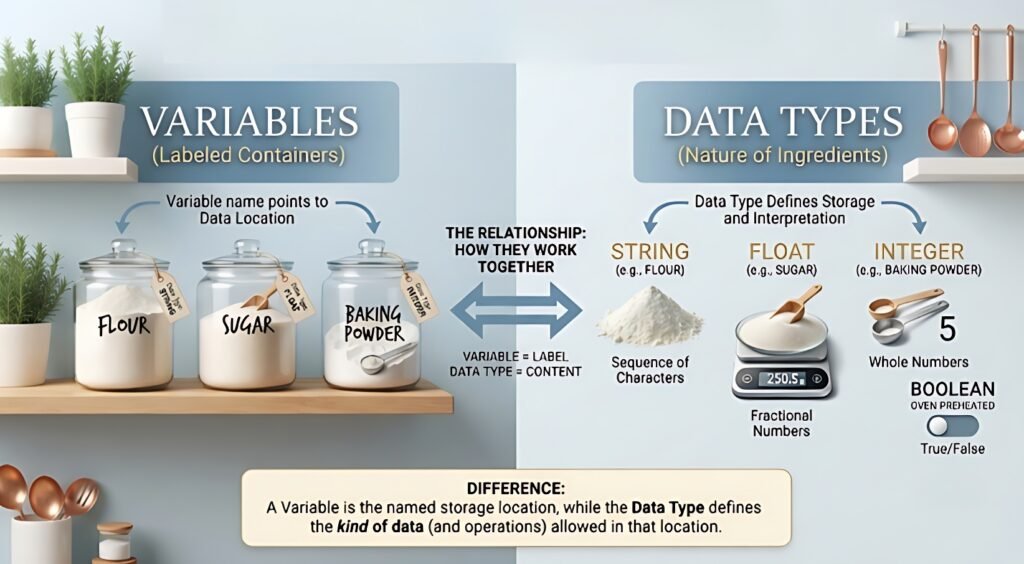
| Variable | Data Type |
|---|---|
| Stores a value | Defines the type of value |
| Has a name | Defines what kind of data is allowed |
Example: age | Example: int |
| Value can usually change | Determines how the value is represented |
Example:
int age = 20;
Here:
int = Data Type
age = Variable
20 = Value
Important Points for You
- A variable is a named place used to store data.
- A data type tells the compiler what type of data is being stored.
intis used for whole numbers.charis used for one character.floatis used for decimal values.doubleis used for decimal values with greater precision thanfloat.voidrepresents no value in relevant contexts.enumis used for named sets of integer constants.- Variable names cannot start with a number.
- Spaces are not allowed in variable names.
- C is case-sensitive.
- C keywords cannot be used as variable names.
sizeofis used to find the size in bytes.- Type casting is used for explicit type conversion.
- Local and global variables have different scopes.
constis used when a value should not be modified.- The exact size of many data types depends on the implementation.
📝 Things to Remember
Variable
A variable is a named place used to store a value.
Data Type
A data type tells the compiler what kind of data a variable can store.
Declaration
int age;
Initialization
int age = 20;
Character
char grade = 'A';
Decimal Number
float price = 99.50f;
Double
double distance = 12345.6789;
Type Casting
float result = (float)a / b;
Size
sizeof(int)
Frequently Asked Questions (FAQs)
1. What is a variable in C?
A variable is a named place used to store data in a C program.
2. What is a data type in C?
A data type tells the compiler what type of value a variable can store.
3. What are the main data types in C?
Common data types include int, char, float, double, void, and enum.
4. What is the difference between a variable and a data type?
A variable stores a value, while a data type tells what kind of value the variable can store.
5. What is variable declaration?
Variable declaration means defining the data type and name of a variable.
Example:
int age;
6. What is variable initialization?
Initialization means giving an initial value to a variable.
Example:
int age = 20;
7. Can the value of a variable be changed?
Yes. The value of a normal variable can usually be changed during program execution.
8. What is the use of int?
int is used to store whole numbers such as 10, 25, and 100.
9. What is the use of char?
char is used to store a single character such as 'A', 'B', or '5'.
10. What is the use of float?
float is used to store decimal numbers such as 10.5 or 25.75.
11. What is sizeof in C?
sizeof is an operator used to find the size of a type or object in bytes.
12. What is type casting?
Type casting means manually converting a value from one data type to another.
Example:
(float)a
13. Is C case-sensitive?
Yes. age, Age, and AGE are treated as different identifiers.
14. Can a variable name start with a number?
No. A variable name cannot start with a number.
❌ 1age
✅ age1
15. What is the difference between float and double?
Both are used for decimal values, but double normally provides more precision than float.

Mujtaba Ansari is a Software Engineer, Founder & CEO of The Tech Earth. He writes about technology, AI, software, cybersecurity, blogging, Health tech, Agri Tech and digital trends to help readers stay updated with the latest innovations.