
What is Number Systems and Computer Codes :
Computers do not understand human language directly. Instead, they operate using a binary language, which consists of only two digits: 0 and 1.
Whether it’s numbers, audio, images, videos, or documents—everything inside a computer is stored and processed in the form of binary data (digital format).
In our daily life, we use the Decimal Number System (base 10), which includes digits from 0 to 9. However, computers rely entirely on the Binary Number System (base 2) to represent and process all types of data.
To handle and represent this data efficiently, computers use various number systems and coding schemes.
Types of Number Systems in Computer Science –
There are mainly four types of number systems in a computer:
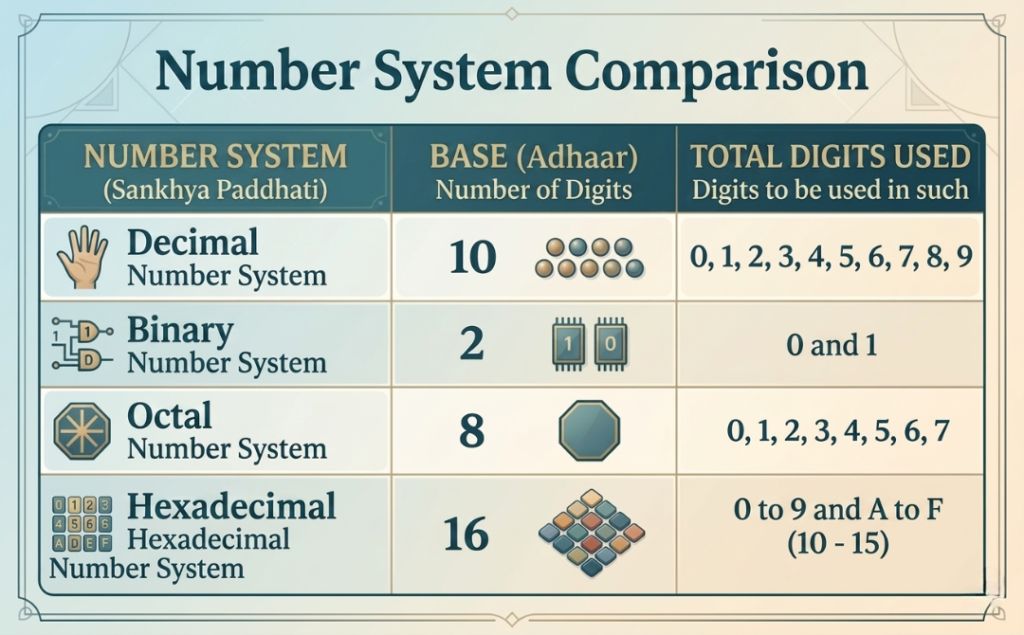
A number system defines how numbers are represented using digits and a base (radix).
Number System Base Digits Used
Decimal 10 : 0–9
Binary 2 : 0, 1
Octal 8 : 0–7
Hexadecimal 16 : 0–9, A–F
(1) Decimal Number System (Base 10)
The Decimal Number System is the most commonly used number system in everyday life. It is the standard system we use for daily calculations such as counting, pricing, and measurements.
This system uses a total of 10 digits, ranging from 0 to 9.
The base (or radix) of the decimal number system is 10.
All numbers in this system are formed by combining these ten digits in different ways, making it simple and widely understood.
Example:
A decimal number can be expanded as follows:
(6262.67)10= 6×10³+2×10²+6×101+2×100+6×10⁻¹+7×10⁻²
(2) Binary Number System (Base 2)
The Binary Number System is the most important number system used in computers. All digital operations and data processing are based on this system.
It uses only two digits: 0 and 1.
The base (or radix) of the binary number system is 2.
👉 What do 0 and 1 represent in computers?
In computer systems, binary digits represent electrical signals:
- 1 = ON (current is flowing)
- 0 = OFF (no current is flowing)
👉 This means all computer operations are based on electronic ON/OFF signals, also known as digital logic.
👉 What is a Bit?
A binary digit (0 or 1) is called a Bit.
- A bit is the smallest unit of data in a computer
- It is the basic building block of all digital information
👉 Uses of Binary System
The binary number system is widely used in:
- Data storage
- Data processing
- Computer programming
👉 Examples
- 1100110 → Binary number
- 1001001.1101 → Here “.” is called the binary point
(3) Octal Number System (Base 8)
The Octal Number System is used to represent binary numbers in a shorter and simpler form. It makes large binary values easier to read and manage.
It consists of 8 digits: from 0 to 7.
The base (or radix) of the octal number system is 8.
👉 Uses of Octal Number System
The octal system is commonly used in:
- Computer systems as a short notation of binary numbers
- Simplifying long binary data into a more readable form
- Digital electronics and computing applications
👉 Key Point
Octal numbers help in reducing the length of binary representation, making data handling easier and more efficient.
(4) Hexadecimal Number System (Base 16)
The Hexadecimal Number System is one of the most important and widely used number systems in computer science. It is commonly used in programming and digital systems to represent large binary values in a compact form.
This system consists of 16 values (alphanumeric digits):
0–9 and A–F
👉 Value Representation
In the hexadecimal system, letters represent values as follows:
- A = 10
- B = 11
- C = 12
- D = 13
- E = 14
- F = 15
The base (or radix) of the hexadecimal system is 16.
👉 Uses of Hexadecimal Number System
The hexadecimal system is widely used in:
- Memory addressing in computers
- Color codes in web design (HTML/CSS) such as
#FF5733 - Programming and software development
- Representing large binary numbers in a compact and readable form
👉 Key Point
Hexadecimal numbers make it easier to work with large binary data by converting it into a shorter and more human-readable format.
(1) EBCDIC – Extended Binary Coded Decimal Interchange Code
EBCDIC (Extended Binary Coded Decimal Interchange Code) is a character encoding system that was mainly used in older computer systems.
It represents each character using 8 bits (1 byte).
This encoding system was primarily developed and used by IBM (International Business Machines) in its mainframe computers.
EBCDIC and ASCII are both considered early and important character encoding standards used in computing history. However, in modern systems, the use of EBCDIC has become very limited.
👉 Key Points of EBCDIC
- Uses 8-bit character encoding
- Mainly used in IBM mainframe systems
- Older alternative to ASCII
- Now rarely used in modern computing systems
(2) Unicode – Universal Character Encoding Standard
Unicode is a modern and globally accepted character encoding system used in computer technology.
It has the capability to represent over 1 million characters, including letters, numbers, symbols, and emojis.
Unicode supports almost all languages in the world, making it a universal standard for text representation.
Its main purpose is to provide a single standard for all languages and symbols worldwide.
Unicode characters are stored in different formats such as:
- UTF-8
- UTF-16
- UTF-32
Among these, UTF-8 is the most widely used format in web development and modern applications.
Unicode is used in:
- Websites and web applications
- Mobile apps
- Software systems
- Operating systems and databases
👉 Key Points of Unicode
- Global character encoding standard
- Supports all world languages and symbols
- Stores characters in UTF formats (UTF-8 most common)
- Used in modern web, apps, and software systems
Types of Number System Conversions
Number system conversion refers to changing a number from one base to another (such as binary to decimal, decimal to binary, etc.). These conversions are very important in computer science and digital electronics.
(1) Binary to Decimal Conversion
Binary to decimal conversion means converting a number from Base 2 (binary) to Base 10 (decimal).
In this method, each binary digit is multiplied by powers of 2 based on its position.
👉 Example:
Convert (110110)₂ to decimal:
(110110)2 = 1×25+1×24+0×23+1×22+1×21+0×20
=32+16+0+4+2+0
=(54)10
✔️ Final Answer:
(110110)₂ = (54)₁₀
🔑 Key Point:
Binary to decimal conversion is based on positional value and powers of 2, where each bit contributes according to its position in the number.
(2) Decimal to Binary Conversion
Decimal to Binary Conversion is the process of converting a number from Base 10 (Decimal System) to Base 2 (Binary System).
This conversion is important in computer systems because computers understand and process data in binary form (0 and 1).
👉 Example:
Convert (54)₁₀ into binary:
(54)10 = ?
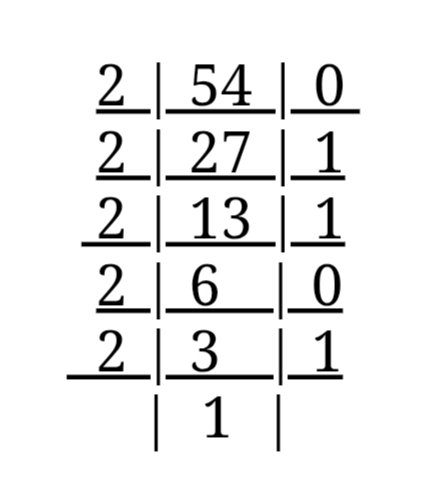
हमेंशा निचे से ऊपर लिखते हैं | (54)10 = (110110)2 Answer
Conversion Method :
(A) Method for Integer (Whole Number)
To convert a decimal integer into binary:
- Divide the given decimal number by 2.
- Record the remainder (0 or 1) each time.
- Divide the quotient again by 2.
- Repeat the process until the quotient becomes 0.
- Read all the remainders from bottom to top.
👉 This gives the final binary number.
(B) Method for Fractional Part
To convert the fractional part of a decimal number into binary:
- Multiply the fractional part by 2.
- Note the integer part (0 or 1) obtained.
- Repeat the process with the remaining fractional value.
- Continue until the fractional part becomes 0 or the required precision is achieved.
- Read the results from top to bottom to get the binary equivalent.
👉 Example:
Convert (0.625)₁₀ into binary:
- 0.625 × 2 = 1.25 → 1
- 0.25 × 2 = 0.5 → 0
- 0.5 × 2 = 1.0 → 1
✔️ Final Answer:
Reading from top to bottom:
(0.625)₁₀ = (0.101)₂
(3) Octal to decimal Conversion :-
(324)8 = 3×82 + 2×81+ 4×80
= 3×64 + 2×8 + 4×1
= 192 + 16 + 4
= (212)10 Answer
(4) Decimal to Octal Conversion :-
(248)10 = ?
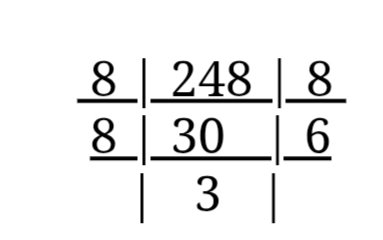
(248)10 = (368)8 l Answer
(5) Octal to Binary Conversion :-
(236)8 = ?
Octal Number —– 2 3 6 Binary ———– 010 011 110 (236)8 = (010011110)2 Answer
(6) Binary to Octal Conversion :-
(11011101)2 = ?
3-bit groups from LSB (Least Significant Bit).
011 011 101
3 3 5
(11011101)2 = (325)8 Answer
What is LSB (Least Significant Bit)?
LSB (Least Significant Bit) is the rightmost bit in a binary number. It represents the smallest value in the binary system.
👉 Example:
Given binary number:
(11011101)₂
- The rightmost bit = 1, which is the LSB (Least Significant Bit)
- The leftmost bit = 1, which is the MSB (Most Significant Bit)
🔑 Key Point:
- LSB = Rightmost bit (smallest value)
- MSB = Leftmost bit (largest value)
(7) Hexadecimal to Binary Conversion
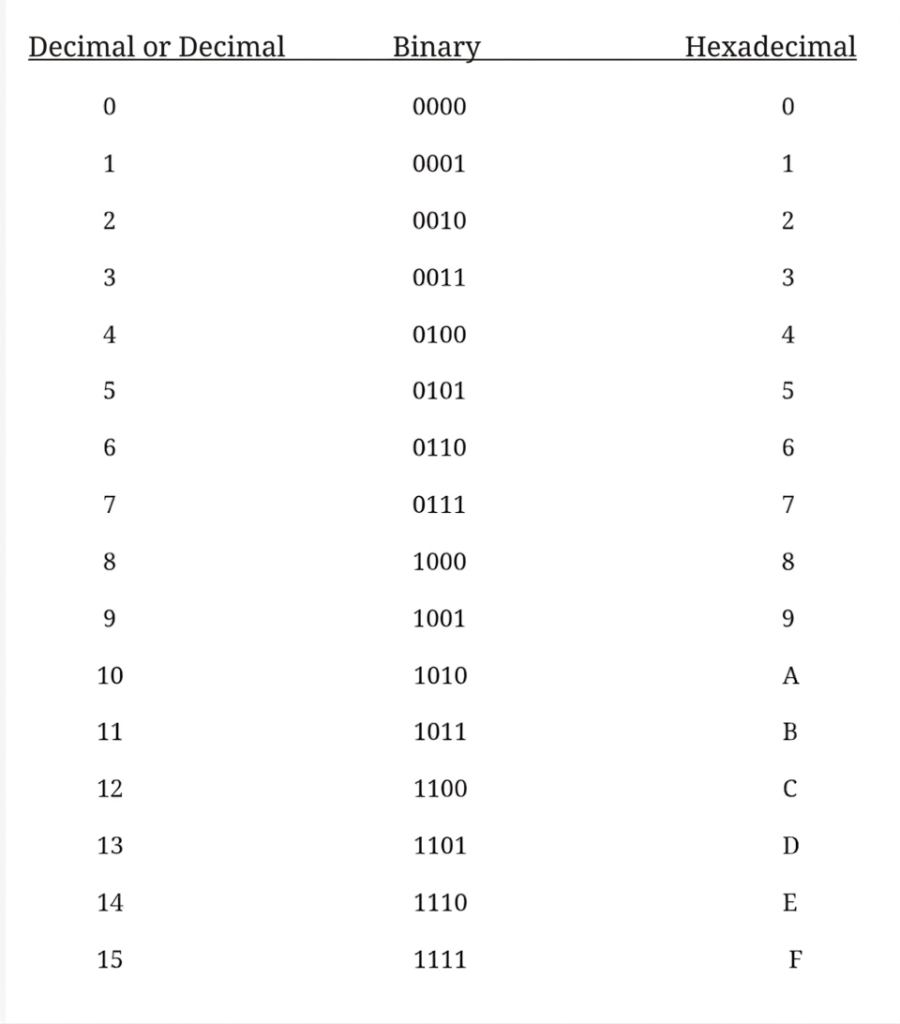
To convert a Hexadecimal (Base 16) number into a Binary (Base 2) number, each hexadecimal digit is converted into its equivalent 4-bit binary form.
👉 Example:
Convert (6AB3)₁₆ into binary:
Each hexadecimal digit is converted separately:
- 6 → 0110
- A → 1010
- B → 1011
- 3 → 0011
✔️ Final Answer:
(6AB3)₁₆ = (0110101010110011)₂
🌐 ASCII (American Standard Code for Information Interchange)
ASCII is a standard character encoding system developed by the American National Standards Institute (ANSI) in 1963.
It is used to represent letters, numbers, and special symbols in computer systems using binary (0 and 1).
🔑 Key Features of ASCII:
- Each character has a unique numeric code
- Originally a 7-bit system (0–127)
- Later expanded to 8-bit (Extended ASCII: 0–255)
- Each keyboard key has a specific ASCII value
- ASCII codes are represented in binary or hexadecimal form
👉 Examples:
- A → 65 (Decimal) → 01000001 (Binary)
- 1 → 49 (Decimal)
🔑 Key Point:
ASCII helps computers convert human-readable characters into machine-readable binary format (0s and 1s).
What is a Logic Gate? (Definition, Types, Truth Table) – Updated
What is a Logic Gate?
A Logic Gate is an electronic circuit that takes one or more input signals and produces a specific output based on a defined logical operation. It is one of the most important building blocks of digital electronics and computer systems.
👉 Where are Logic Gates Used?
Logic gates are used in computers, mobile phones, and all digital devices. Every digital circuit inside these devices is made using logic gates. In fact, logic gates form the foundation of all digital systems.
📊 What is a Truth Table?
A truth table shows the relationship between inputs and outputs of a logic gate.
👉 It explains:
- What output will be produced for different input combinations
- The complete behavior of a logic gate
🔧 Basic Logic Gates
All digital systems are mainly based on three basic logic gates:
- AND Gate
- OR Gate
- NOT Gate
🔄 Derived Logic Gates
Other logic gates are created by combining basic gates, such as:
- NAND Gate
- NOR Gate
- XOR Gate
🔑 Key Point:
Logic gates process binary inputs (0 and 1) and are the core of all digital computation and decision-making systems.
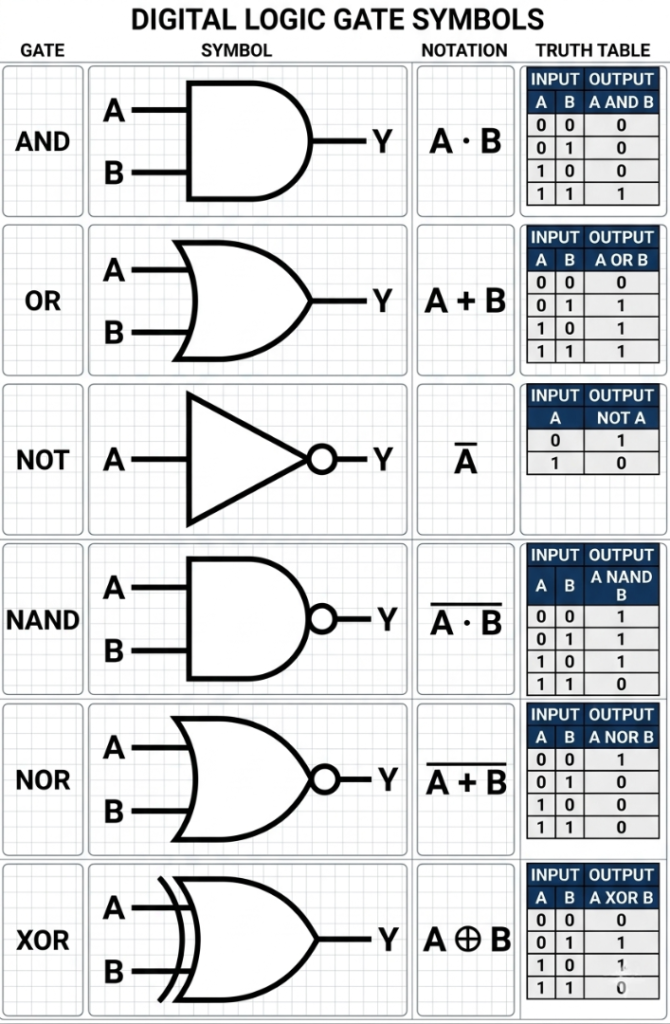
📝 Note:
The NAND gate and NOR gate are called Universal Gates because any digital circuit can be designed using only these gates.
Objective Questions
- Which of the following number systems is used in computers?
(a) Binary
(b) Octal
(c) Hexadecimal
(d) All of the above
(e) None of these
✅ Answer: (d) All of the above - Which of the following is the largest storage unit?
(a) KB
(b) MB
(c) TB
(d) GB
(e) All of these
✅ Answer: (c) TB - Computers use which number system to store data and perform calculations?
(a) Binary
(b) Decimal
(c) Octal
(d) Hexadecimal
(e) None of these
✅ Answer: (a) Binary - What does the term “Bit” stand for?
(a) A part of a computer
(b) Binary Digit
(c) Serial Number
(d) All of the above
(e) None of these
✅ Answer: (b) Binary Digit - How many characters can be represented in ASCII?
(a) 1024
(b) 128
(c) 256
(d) 120
(e) 526
✅ Answer: (b) 128 (Standard ASCII) - Which is the most commonly used coding system today?
(a) ASCII and EBCDIC
(b) ASCII
(c) EBCDIC
(d) C Coding
(e) None of these
✅ Answer: (a) ASCII and EBCDIC (Modern systems mainly use Unicode) - A byte consists of how many bits?
(a) 2 bits
(b) 8 bits
(c) 8 decimal digits
(d) 2 decimal digits
(e) None of these
✅ Answer: (b) 8 bits - How many options are there in a binary choice?
(a) One
(b) Two
(c) Three
(d) Eight
(e) None of these
✅ Answer: (b) Two - In which form is information stored in a computer?
(a) Modem
(b) Watts Data
(c) Analog Data
(d) Digital Data
(e) None of these
✅ Answer: (d) Digital Data - What is the full form of ASCII?
(a) American Score Code for Information Interchange
(b) American Standard Code for Information Interchange
(c) American Standard Code for Ink Inter
(d) All of the above
(e) None of these
✅ Answer: (b) American Standard Code for Information Interchange - Which of the following are number systems used in computers?
(a) Hexadecimal
(b) Octal
(c) Binary
(d) All of the above
(e) None of these
✅ Answer: (d) All of the above - What is the typical word length range in supercomputers?
(a) Up to 15 bits
(b) Up to 25 bits
(c) Up to 16 bits
(d) Up to 64 bits
(e) Up to 32 bits
✅ Answer: (d) Up to 64 bits - Which is the correct order from largest to smallest storage unit?
(a) TB → GB → MB → KB
(b) TB → GB → KB → MB
(c) GB → TB → MB → KB
(d) TB → MB → GB → KB
(e) MB → GB → TB → KB
✅ Answer: (a) TB → GB → MB → KB - Which code represents each character using an 8-bit code?
(a) Binary Number
(b) EBCDIC
(c) ASCII
(d) Unicode
(e) All of the above
✅ Answer: (c) ASCII (Extended ASCII uses 8 bits) - Computer word length is measured in:
(a) Meter
(b) Byte
(c) Kilogram
(d) Milligram
(e) None of these
✅ Answer: (b) Byte - How many bytes are there in 1 Megabyte (MB)?
(a) 1,048,576
(b) 1,024,000
(c) 1,000,000
(d) 100,000
(e) All of these
✅ Answer: (a) 1,048,576 - How many values can be represented by 1 byte?
(a) 64
(b) 25
(c) 256
(d) 41
(e) 16
✅ Answer: (c) 256 - One million (10⁶) bytes is approximately equal to:
(a) Terabyte
(b) Megabyte
(c) Gigabyte
(d) Kilobyte
(e) None of these
✅ Answer: (b) Megabyte - What is a Bit?
(a) An input device
(b) The smallest unit of computer memory
(c) A number system
(d) A milligram
(e) All of these
✅ Answer: (b) The smallest unit of memory - NOR Gate is a combination of which gates?
(a) NOT and OR
(b) OR and AND
(c) AND and OR
(d) NAND and NOT
(e) NOT and OR
✅ Answer: (a) NOT and OR
ANSWERS
 (1)- d
 (2)- c
 (3)- a
 (4)- b
 (5)- c
 (6)- a
 (7)-b (8)- b
 (9)- d
 (10)-b
 (11)-d (12)-d
 (13)-a
 (14)-d
 (15)-b
 (16)-a
 (17)-c
 (18)-b
 (19)-b
 (20)-a

Mujtaba Ansari is a Software Engineer, Founder & CEO of The Tech Earth. He writes about technology, AI, software, cybersecurity, blogging, Health tech, Agri Tech and digital trends to help readers stay updated with the latest innovations.