

Chapter 10:
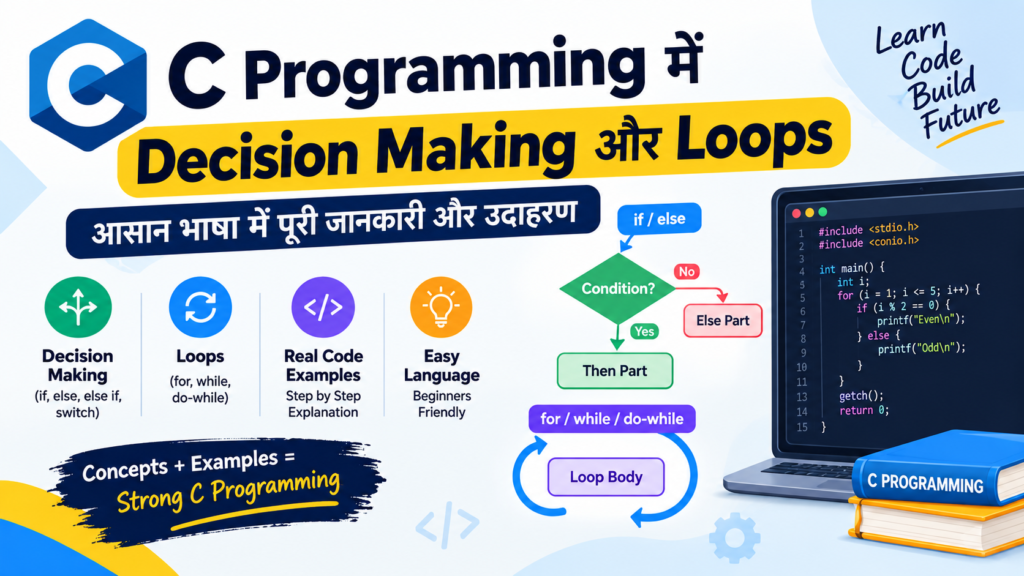
C Programming में Decision Making और Looping / Loops
लेखक: अभियंता मुजतबा अंसारी (Author: Er. Mujtaba Ansari)
क्या आप अपने C Programs और दूसरे Programs जैसे: C++, Java, Python को ज्यादा स्मार्ट और बेहतर बनाना चाहते हैं?
Decision Making आपके Program को यह तय करने में मदद करता है कि उसे क्या करना है, जबकि Loops एक ही काम को बार-बार आसानी से करने में मदद करते हैं।
इस लेख या Article में आप if, switch, for, while और do-while को आसान उदाहरणों के साथ समझेंगे।
इस Article को पढ़ने के बाद, C Program के Flow को Control करना आपके लिए काफी आसान हो जाएगा।
कुछ Extra Tips भी दिए गए हैं, जो आपको बेहतर और Efficient C Programs लिखने में मदद करेंगे।
इसके अलावा, Practice के लिए कुछ आसान Programs भी दिए गए हैं। अगर आप इन सभी Programs को अच्छी तरह समझकर और लगातार Practice करेंगे, तो आप बड़े से बड़े Programs को भी आसानी से समझ और बना सकेंगे।
📚 C Programming का पूरा Course Structure
🧑💻 Chapter 1: C Programming की मूल बातें
📜 Chapter 2: C Language का इतिहास और विकास
⚙️ Chapter 3: C Compiler Install करना
💻 Chapter 4: अपना पहला C Program लिखना
🏗️ Chapter 5: C Program की Structure
📦 Chapter 6: Variables और Data Types
🔢 Chapter 7: C में Operators
⌨️ Chapter 8: Input और Output Functions
🔀 Chapter 9: Decision Making और Branching – Conditional Statements
🔄 Chapter 10: C Programming में Decision Making और Loops – वर्तमान Chapter
📊 Chapter 11: Arrays
🔤 Chapter 12: Strings
🛠️ Chapter 13: Functions
👉 Chapter 14: Pointers
🏛️ Chapter 15: Structures और Unions
📁 Chapter 16: File Handling
C Programming में Loops क्या हैं?
Loop, C Programming का एक ऐसा control structure है, जिसकी मदद से हम किसी काम को बार-बार करवा सकते हैं, जब तक दी गई condition सही रहती है।
मान लीजिए आपको 1 से 100 तक के numbers print करने हैं।
अगर loop का इस्तेमाल न करें, तो आपको बहुत सारी printf() statements लिखनी पड़ेंगी:
printf("1");
printf("2");
printf("3");
और इसी तरह 100 तक लिखना पड़ेगा।
इससे program बहुत लंबा और मुश्किल हो जाएगा।
लेकिन loop की मदद से यही काम कुछ ही lines में किया जा सकता है:
for (int i = 1; i <= 100; i++) {
    printf("%d ", i);
}
इसलिए Loop का मुख्य उद्देश्य बार-बार होने वाले काम को आसान बनाना और program के code को छोटा, साफ और समझने में आसान बनाना है।
C Programming में मुख्य रूप से तीन प्रकार के loops होते हैं:
whilefordo-while
C Programming में Loops क्यों जरूरी हैं?
Loops Programming के बहुत महत्वपूर्ण concepts में से एक हैं।
जब किसी काम को बार-बार करना हो, तब loops का इस्तेमाल किया जाता है।
उदाहरण के लिए loops की मदद से हम:
- Numbers print कर सकते हैं।
- Factorial निकाल सकते हैं।
- Fibonacci series बना सकते हैं।
- Prime numbers खोज सकते हैं।
- Arrays को process कर सकते हैं।
- Multiplication table बना सकते हैं।
- Number को reverse कर सकते हैं।
- Palindrome number check कर सकते हैं।
- Armstrong number check कर सकते हैं।
- अलग-अलग patterns print कर सकते हैं।
- User से बार-बार input ले सकते हैं।
- किसी calculation को कई बार कर सकते हैं।
आसान उदाहरण
for (int i = 1; i <= 5; i++) {
    printf("Hello\n");
}
Output
Hello
Hello
Hello
Hello
Hello
अगर loop का इस्तेमाल नहीं करते, तो printf() को पाँच बार लिखना पड़ता।
Loop की मदद से हम केवल एक बार printf() लिखकर उसे पाँच बार चला सकते हैं।
C में Loops के प्रकार
Condition कब check होती है, इसके आधार पर loops को दो categories में बाँटा जाता है।
1. Entry-Controlled Loop
इसमें condition को loop शुरू होने से पहले check किया जाता है।
C में दो Entry-Controlled Loops हैं:
whilefor
2. Exit-Controlled Loop
इसमें loop का body पहले execute होता है और condition बाद में check होती है।
C में एक Exit-Controlled Loop है:
do-while
1. Entry-Controlled Loop (Pehle Condition Check Hone Wala Loop)
Entry-Controlled Loop में condition को loop body execute होने से पहले check किया जाता है।
अगर condition true है, तभी loop body execute होगी।
अगर condition शुरुआत में ही false है, तो loop body एक बार भी execute नहीं होगी।
Entry-Controlled Loops के उदाहरण
whilefor
उदाहरण
int i = 10;

while (i < 5) {
    printf("%d", i);
}
यहाँ condition है:
10 < 5यह condition false है।
इसलिए loop का body एक बार भी execute नहीं होगा।
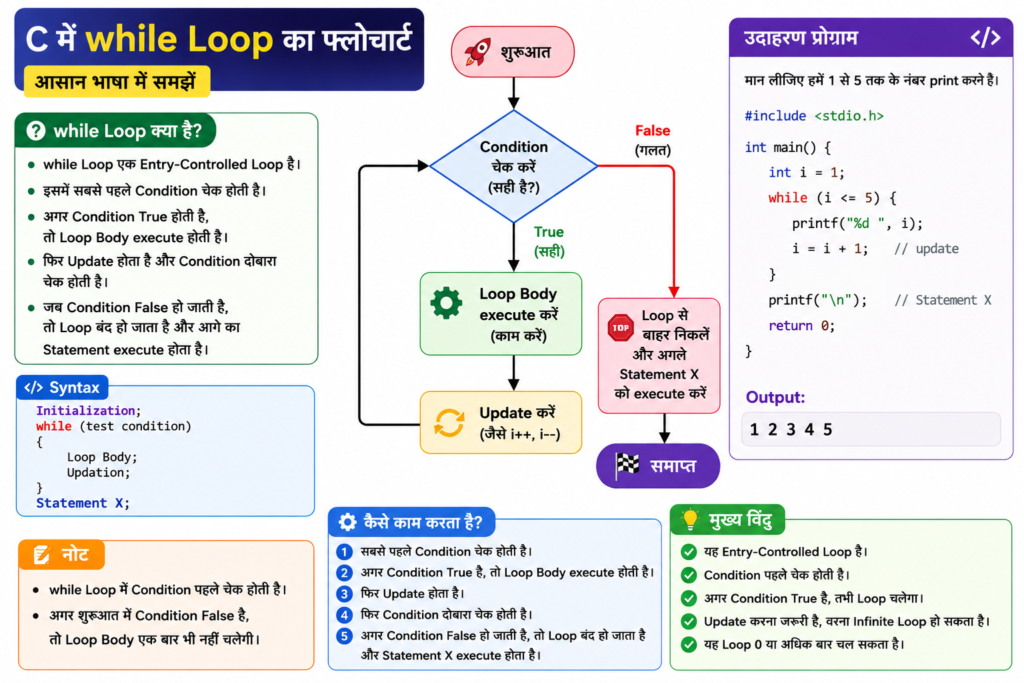
while Loop in C (Pehle Condition Check Hone Wala Loop)
while एक Entry-Controlled Loop है।
इसमें सबसे पहले condition check होती है। अगर condition true है, तभी loop body execute होती है।
जब तक condition true रहती है, loop बार-बार चलता रहता है।
जैसे ही condition false होती है, loop रुक जाता है।
Syntax
Initialization;

while (test condition)
{
    // Loop Body

    // Updation
}

Statement X;
ध्यान रखें
while loop में condition को loop body से पहले check किया जाता है।
इसलिए अगर condition शुरुआत में ही false है, तो loop body एक बार भी execute नहीं होगी।
Flow Chart:
while Loop कैसे काम करता है?
इस program को देखें:
int i = 1;

while (i <= 5) {
    printf("%d ", i);
    i++;
}
इसका execution इस प्रकार होगा।
Step 1
i = 1Condition:
1 <= 5 → trueइसलिए 1 print होगा।
Step 2
अब:
i = 2Condition:
2 <= 5 → trueइसलिए 2 print होगा।
इसी तरह process चलता रहेगा।
जब:
i = 6तब:
6 <= 5 → falseइसलिए loop रुक जाएगा।
First N Natural Numbers Print करने का Program
#include <stdio.h>

int main(void) {
    int n, i = 1;

    printf("Enter the value of N: ");
    scanf("%d", &n);

    while (i <= n) {
        printf("%d ", i);
        i++;
    }

    return 0;
}
Example
अगर input है:
5तो output होगा:
1 2 3 4 5Program की आसान Explanation
i = 1→ counting की शुरुआत करता है।i <= n→ condition check करता है।printf()→ number print करता है।i++→iकी value को 1 बढ़ाता है।- जब
i,nसे बड़ी हो जाती है, तो loop रुक जाता है।
while Loop से Multiplication Table
while loop की मदद से किसी भी number का multiplication table print किया जा सकता है।
#include <stdio.h>

int main(void) {
    int n, i = 1;

    printf("Enter the number: ");
    scanf("%d", &n);

    while (i <= 10) {
        printf("%d x %d = %d\n", n, i, n * i);
        i++;
    }

    return 0;
}
अगर input है:
8तो output होगा:
8 x 1 = 8
8 x 2 = 16
8 x 3 = 24
8 x 4 = 32
8 x 5 = 40
8 x 6 = 48
8 x 7 = 56
8 x 8 = 64
8 x 9 = 72
8 x 10 = 80
Nested while Loop
जब एक loop के अंदर दूसरा loop लिखा जाता है, तो उसे Nested Loop कहते हैं।
उदाहरण:
while (condition1) {

    while (condition2) {
        // Inner Loop
    }

}
यहाँ:
- बाहर वाला loop → Outer Loop
- अंदर वाला loop → Inner Loop
Nested loops का उपयोग अक्सर इन कामों में किया जाता है:
- Multiplication tables
- Patterns
- Matrices
- Rows और columns
- Two-dimensional data
Two-Dimensional Multiplication Table
#include <stdio.h>

int main(void) {
    int i = 1;

    while (i <= 10) {
        int j = 1;

        while (j <= 10) {
            printf("%5d", i * j);
            j++;
        }

        printf("\n");
        i++;
    }

    return 0;
}
यह कैसे काम करता है?
Outer loop:
1 से 10तक चलता है।
Inner loop भी:
1 से 10तक चलता है।
इसलिए program अलग-अलग multiplication करता है:
1 × 1
1 × 2
...
10 × 10
while Loop से Fibonacci Series
Fibonacci Series इस प्रकार होती है:
0 1 1 2 3 5 8 13 21 34 ...इस series में अगला number पिछले दो numbers को जोड़कर बनाया जाता है।
उदाहरण:
0 + 1 = 1
1 + 1 = 2
1 + 2 = 3
2 + 3 = 5
Program: एक प्रोग्राम लिखिए जो Fibonacci Series के पहले N नंबर स्क्रीन पर दिखाए।
#include <stdio.h>

int main(void) {
    int n;
    int i = 3;
    long long a = 0, b = 1, c;

    printf("Enter the number of terms: ");
    scanf("%d", &n);

    if (n <= 0) {
        printf("Please enter a positive number.");
    } else if (n == 1) {
        printf("0");
    } else {
        printf("0 1");

        while (i <= n) {
            c = a + b;
            printf(" %lld", c);

            a = b;
            b = c;
            i++;
        }
    }

    return 0;
}
अगर input है:
7तो output होगा:
0 1 1 2 3 5 8for Loop in C (Pehle Initialization, Phir Condition Check aur Update Hone Wala Loop)
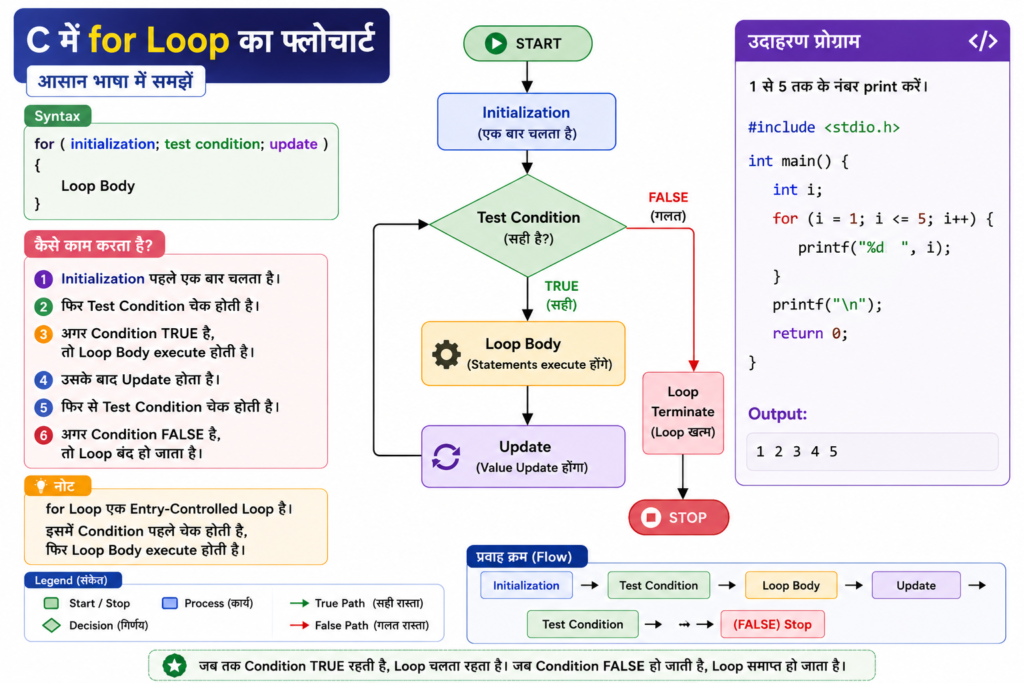
for loop भी एक Entry-Controlled Loop है।
इसमें सामान्यतः तीन चीजें एक साथ लिखी जाती हैं:
- Initialization
- Condition
- Updation
सबसे पहले initialization होता है।
इसके बाद condition check होती है।
अगर condition true है, तो loop body execute होती है।
फिर update होता है और condition दोबारा check होती है।
Syntax
for (initialization; test condition; updation)
{
    // Loop Body
}
Flow Chart:
for Loop के तीन मुख्य भाग
इस program को देखें:
for (int i = 1; i <= 5; i++) {
    printf("%d ", i);
}
1. Initialization
int i = 1यह केवल शुरुआत में एक बार execute होता है।
2. Condition
i <= 5यह हर iteration से पहले check होती है।
3. Update
i++यह हर iteration के बाद execute होता है।
for Loop का आसान उदाहरण
#include <stdio.h>

int main(void) {

    for (int i = 1; i <= 5; i++) {
        printf("%d ", i);
    }

    return 0;
}
Output
1 2 3 4 5for Loop से Factorial निकालना
किसी positive number से लेकर 1 तक सभी numbers को multiply करने पर factorial मिलता है।
उदाहरण:
5! = 5 × 4 × 3 × 2 × 1
   = 120
Program: एक C प्रोग्राम लिखिए जो for loop की मदद से किसी संख्या का Factorial निकाले।
#include <stdio.h>

int main(void) {
    int n;
    unsigned long long fact = 1;

    printf("Enter a non-negative integer: ");
    scanf("%d", &n);

    if (n < 0) {
        printf("Factorial is not defined for negative numbers.");
        return 0;
    }

    for (int i = 1; i <= n; i++) {
        fact *= i;
    }

    printf("Factorial = %llu", fact);

    return 0;
}
अगर input:
5तो output:
Factorial = 120महत्वपूर्ण बात (Important for You)
Mathematics के अनुसार:
0! = 1इसलिए program 0 के लिए भी 1 result देता है।
for Loop से Prime Number Check करना
Prime Number वह number है जो 1 से बड़ा हो और जिसके केवल दो positive divisors हों:
1- वही number
उदाहरण:
2, 3, 5, 7, 11, 13, 17...Program: एक C प्रोग्राम लिखिए जो यह पता लगाए कि दिया गया नंबर Prime Number है या नहीं।
#include <stdio.h>

int main(void) {
    int n;
    int isPrime = 1;

    printf("Enter the number: ");
    scanf("%d", &n);

    if (n <= 1) {
        isPrime = 0;
    }

    for (int i = 2; i * i <= n && isPrime; i++) {
        if (n % i == 0) {
            isPrime = 0;
        }
    }

    if (isPrime) {
        printf("%d is a prime number.", n);
    } else {
        printf("%d is not a prime number.", n);
    }

    return 0;
}
अगर input:
17तो output:
17 is a prime number.एक C प्रोग्राम लिखिए जो 11 से 100 तक के सभी Prime Numbers को स्क्रीन पर दिखाए।
#include <stdio.h>

int main(void)
{
    int N, i, flag;

    for (N = 11; N <= 100; N++)
    {
        flag = 0;

        for (i = 2; i <= N / 2; i++)
        {
            if (N % i == 0)
            {
                flag = 1;
                break;
            }
        }

        if (flag == 0)
        {
            printf("%5d", N);
        }
    }

    return 0;
}
Output
11   13   17   19   23   29   31   37   41   43
47   53   59   61   67   71   73   79   83   89
97
आसान Explanation
- Outer
forloop →11से100तक numbers check करता है। - हर number के लिए
flag = 0किया जाता है। - Inner
forloop → number के factors check करता है। - अगर कोई factor मिल जाता है, तो
flag = 1हो जाता है। breakinner loop को रोक देता है।- अगर
flagअभी भी0है, तो number prime है।
एक C प्रोग्राम लिखिए जो सीरीज़ का योग (Sum) ज्ञात करे।
इस तरह की series का sum भी loop की मदद से निकाला जाता है।
#include <stdio.h>
#include <math.h>

int main(void)
{
    int N, x, i;
    int s = 0;

    printf("Enter the value of N and x: ");
    scanf("%d %d", &N, &x);

    for (i = 1; i <= N; i++)
    {
        s = s + (int)pow(x, i);
    }

    printf("Sum = %d", s);

    return 0;
}अगर:
N = 3
x = 5
तो:
S = 5¹ + 5² + 5³
  = 5 + 25 + 125
  = 155
Output
Enter the value of N and x: 3 5
Sum = 155
दिए गए श्रेणी (Series) का योग निकालने के लिए एक C प्रोग्राम लिखिए:
#include <stdio.h>
#include <math.h>

int main(void)
{
    int N, x, i, j, fact;
    float s = 0;

    printf("Enter the value of N and x: ");
    scanf("%d %d", &N, &x);

    for (i = 1; i <= N; i++)
    {
        fact = 1;

        for (j = 1; j <= 2 * i - 1; j++)
        {
            fact = fact * j;
        }

        s = s + pow(-1, i) * pow(x, 2 * i) / fact;
    }

    printf("Sum = %f", s);

    return 0;
}
उदाहरण
मान लीजिए:
N = 3
x = 2
तब:
अब मान निकालते हैं:
अतः Series का योग = -1.866667
दिए गए निम्नलिखित श्रेणी (Series) का योग ज्ञात करने के लिए एक C प्रोग्राम लिखिए:
S=(1)+(1+2)+(1+2+3)+⋯
#include <stdio.h>

int main(void)
{
    int N, i, j, s = 0, R;

    printf("Enter the value of N: ");
    scanf("%d", &N);

    for (i = 1; i <= N; i++)
    {
        R = 0;

        for (j = 1; j <= i; j++)
        {
            R = R + j;
        }

        s = s + R;
    }

    printf("Result = %d", s);

    return 0;
}
उदाहरण
यदि N = 3 है:
पहले प्रत्येक bracket का योग निकालते हैं:
अतः परिणाम = 10
आउटपुट
Enter the value of N: 3
Result = 10
नोट: i * i <= n क्यों जाँचते हैं?
मान लीजिए कोई संख्या Composite Number (भाज्य संख्या) है।
अगर उस संख्या का कोई factor उसके वर्गमूल (Square Root) से बड़ा है, तो उसका एक दूसरा factor वर्गमूल से छोटा या बराबर जरूर होगा।
इसलिए किसी संख्या के Prime Number होने की जाँच करने के लिए उसके वर्गमूल तक के factors को जाँचना ही पर्याप्त होता है।
इससे प्रोग्राम अधिक तेज़ और efficient हो जाता है, क्योंकि हमें n तक के सभी numbers को check नहीं करना पड़ता।
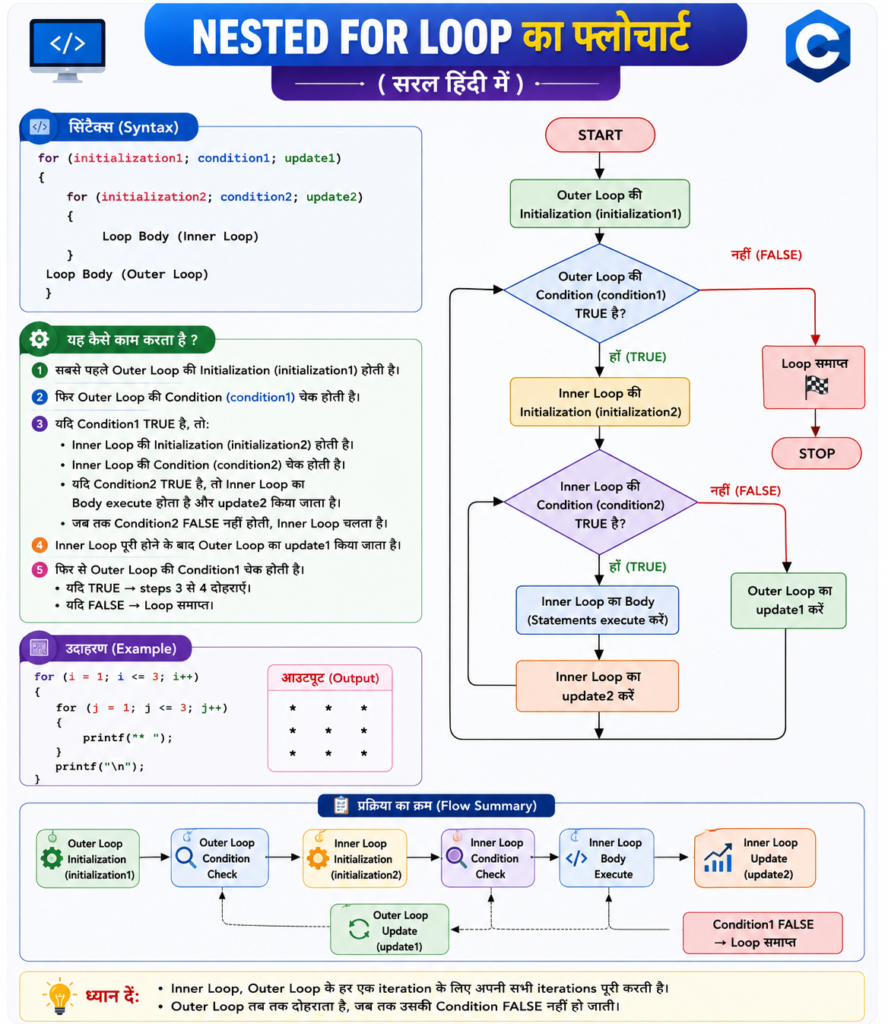
Nested for Loop
जब एक for loop के अंदर दूसरा for loop होता है, उसे Nested for Loop कहते हैं।
Syntax
for (initialization; condition; update) {

    for (initialization; condition; update) {
        // Inner Loop
    }

}
Nested for loops का उपयोग मुख्य रूप से:
- Patterns
- Multiplication tables
- Matrices
- Rows और columns
- Multidimensional data
में किया जाता है।
Flow Chart:
Nested for Loop से Pattern Print करना
Program: Nested for loops का उपयोग करके निम्नलिखित Pattern को प्रिंट करने के लिए एक C प्रोग्राम लिखिए।
हमें यह pattern print करना है:
1 2 3
1 2 3
1 2 3
Program:
#include <stdio.h>

int main(void)
{
    int i, j;

    for (i = 1; i <= 3; i++)
    {
        for (j = 1; j <= 3; j++)
        {
            printf("%d ", j);
        }

        printf("\n");
    }

    return 0;
}
Output
1 2 3
1 2 3
1 2 3
यह कैसे काम करता है?
- Outer
forloop → rows को control करता है। - Inner
forloop → हर row में numbers print करता है। - Outer loop की हर एक iteration में inner loop 3 बार चलता है।
2. Exit-Controlled Loop (Pehle Loop chalega, phir Condition Check hogi)
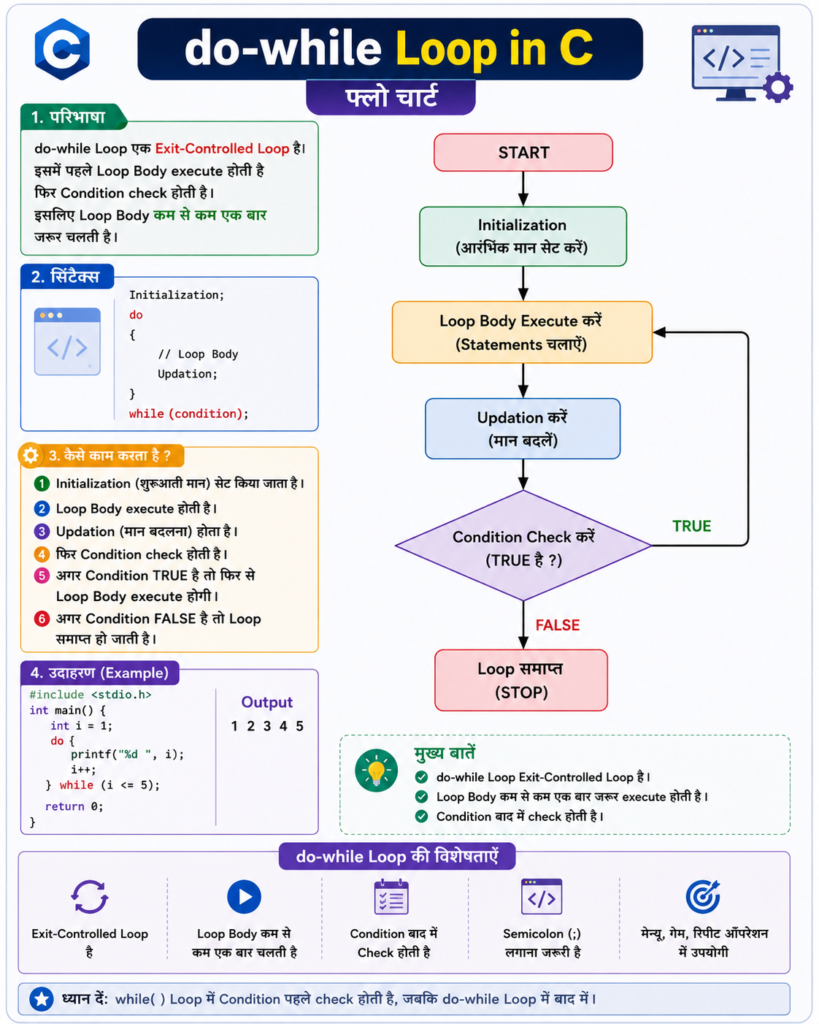
Exit-Controlled Loop में सबसे पहले loop body execute होती है।
इसके बाद condition check की जाती है।
इसलिए इसका body कम से कम एक बार जरूर execute होता है।
C में do-while एक Exit-Controlled Loop है।
do-while Loop in C (Pehle Loop chalega, phir Condition check hogi)
do-while loop एक ऐसा loop है जिसमें पहले statements को execute किया जाता है और बाद में condition check की जाती है। इसलिए यह loop कम से कम एक बार जरूर चलता है।
Syntax
Initialization;

do
{
    // Loop Body

    // Updation

}
while (test condition);

Statement X;
ध्यान रखें
do-while में condition body execute होने के बाद check होती है।
इसलिए body कम से कम एक बार execute होती है।
Flow Chart:
do-while Loop का उदाहरण
#include <stdio.h>

int main(void) {
    int i = 1;

    do {
        printf("%d ", i);
        i++;
    } while (i <= 5);

    return 0;
}
Output
1 2 3 4 5do-while कम से कम एक बार क्यों चलता है?
इस program को देखें:
int i = 10;

do {
    printf("%d", i);
} while (i < 5);
Condition है:
10 < 5जो false है।
फिर भी output मिलेगा:
10क्योंकि do-while में पहले body execute होती है और बाद में condition check होती है।
यही while और do-while के बीच सबसे बड़ा difference है।
do-while से Number Reverse करना
किसी number को reverse करने के लिए हम उसका last digit निकालते हैं।
Last digit निकालने के लिए:
digit = number % 10;और last digit हटाने के लिए:
number = number / 10;Program: दिए गए नंबर के अंकों को उल्टा करने के लिए एक C प्रोग्राम लिखिए।
#include <stdio.h>

int main(void) {
    int num, n;
    int digit;
    int reverse = 0;

    printf("Enter the number: ");
    scanf("%d", &num);

    n = num;

    do {
        digit = n % 10;
        reverse = reverse * 10 + digit;
        n /= 10;
    } while (n > 0);

    printf("Original number = %d\n", num);
    printf("Reversed number = %d", reverse);

    return 0;
}
Explanation:
numमें user से number लिया जाता है।n = numकरके number की copy बनाई जाती है।n % 10से last digit निकाला जाता है।reverse = reverse * 10 + digitसे digits को उल्टा करके जोड़ा जाता है।n /= 10से last digit हटाई जाती है।do-whileloop तब तक चलता है जब तकn > 0रहता है।- अंत में original और reversed number को print किया जाता है।
उदाहरण: 1234 → 4321
Palindrome Number
अगर किसी number को reverse करने के बाद भी वही number मिले, तो उसे Palindrome Number कहते हैं।
उदाहरण:
121
131
111
Program: दिए गए नंबर के Palindrome है या नहीं, यह जाँचने के लिए एक C प्रोग्राम लिखिए।
#include <stdio.h>

int main(void) {
    int num, n;
    int digit;
    int reverse = 0;

    printf("Enter the number: ");
    scanf("%d", &num);

    n = num;

    do {
        digit = n % 10;
        reverse = reverse * 10 + digit;
        n /= 10;
    } while (n > 0);

    if (num == reverse) {
        printf("%d is a palindrome number.", num);
    } else {
        printf("%d is not a palindrome number.", num);
    }

    return 0;
}
अगर input:
121तो output:
121 is a palindrome number.Armstrong Number
तीन-digit के Armstrong Number में उसके सभी digits के cubes का sum उसी original number के बराबर होता है।
उदाहरण:
153 = 1³ + 5³ + 3³
    = 1 + 125 + 27
    = 153
इसलिए 153 एक Armstrong Number है।
कुछ Armstrong numbers जैसे:
1, 153, 370, 371, 407Program: दिए गए नंबर Armstrong Number है या नहीं, यह जाँचने के लिए एक C प्रोग्राम लिखिए।
#include <stdio.h>

int main(void) {
    int num, n;
    int digit;
    int sum = 0;

    printf("Enter a three-digit number: ");
    scanf("%d", &num);

    n = num;

    do {
        digit = n % 10;
        sum += digit * digit * digit;
        n /= 10;
    } while (n > 0);

    if (num == sum) {
        printf("%d is an Armstrong number.", num);
    } else {
        printf("%d is not an Armstrong number.", num);
    }

    return 0;
}
अगर input:
153तो output:
153 is an Armstrong number.1 से 1000 तक Armstrong Numbers Print करना
Program: 1 से 1000 के बीच सभी Armstrong Numbers को प्रिंट करने के लिए एक C प्रोग्राम लिखिए।
#include <stdio.h>

int main(void) {

    for (int num = 1; num <= 1000; num++) {

        int n = num;
        int sum = 0;

        do {
            int digit = n % 10;
            sum += digit * digit * digit;
            n /= 10;
        } while (n > 0);

        if (num == sum) {
            printf("%d ", num);
        }
    }

    return 0;
}
Output
1 153 370 371 407Nested Loops से Pattern Printing
Nested loops का उपयोग अलग-अलग patterns बनाने के लिए बहुत किया जाता है।
Increasing Star Pattern
Output
*
* *
* * *
* * * *
* * * * *
Program: दिए गए Pattern को प्रिंट करने के लिए एक C प्रोग्राम लिखिए।
#include <stdio.h>

int main(void) {

    for (int i = 1; i <= 5; i++) {

        for (int j = 1; j <= i; j++) {
            printf("* ");
        }

        printf("\n");
    }

    return 0;
}
आसान Logic
- Outer loop → rows की संख्या बताता है।
- Inner loop → हर row में stars की संख्या बताता है।
जैसे:
Row 1 → 1 star
Row 2 → 2 stars
Row 3 → 3 stars
Decreasing Star Pattern
Output
* * * * *
* * * *
* * *
* *
*
Program: दिए गए Pattern को प्रिंट करने के लिए एक C प्रोग्राम लिखिए।
#include <stdio.h>

int main(void) {

    for (int i = 5; i >= 1; i--) {

        for (int j = 1; j <= i; j++) {
            printf("* ");
        }

        printf("\n");
    }

    return 0;
}
Pyramid Pattern
Output
    *
   ***
  *****
 *******
*********
Program: दिए गए Pattern को प्रिंट करने के लिए एक C प्रोग्राम लिखिए।
#include <stdio.h>

int main(void) {
    int n;

    printf("Enter the number of rows: ");
    scanf("%d", &n);

    for (int i = 1; i <= n; i++) {

        for (int j = 1; j <= n - i; j++) {
            printf(" ");
        }

        for (int j = 1; j <= 2 * i - 1; j++) {
            printf("*");
        }

        printf("\n");
    }

    return 0;
}
Logic
हर row में दो चीजें होती हैं:
- Stars से पहले spaces।
- उसके बाद stars।
C में Jump Statements
Jump Statements का उपयोग program के एक हिस्से से दूसरे हिस्से में control transfer करने के लिए किया जाता है।
C में चार मुख्य Jump Statements हैं:
breakcontinuegotoreturn
1. break Statement
break statement का उपयोग loop को तुरंत रोकने के लिए किया जाता है।
यह nearest loop या switch को terminate कर देता है।
Syntax
break;Example
#include <stdio.h>

int main(void) {

    for (int i = 1; i <= 5; i++) {

        if (i == 3) {
            break;
        }

        printf("%d ", i);
    }

    return 0;
}
Output
1 2जब i की value 3 हुई, break ने loop को रोक दिया।
याद रखने का आसान तरीका
break = Loop को रोक दो
2. continue Statement
continue statement current iteration के बाकी statements को छोड़ देता है और अगली iteration पर चला जाता है।
Syntax
continue;Example
#include <stdio.h>

int main(void) {

    for (int i = 1; i <= 5; i++) {

        if (i == 3) {
            continue;
        }

        printf("%d ", i);
    }

    return 0;
}
Output
1 2 4 5जब i = 3 हुआ, continue ने उस iteration को skip कर दिया।
याद रखने का आसान तरीका
continue = Current iteration को छोड़ दो
break और continue में अंतर
break | continue |
|---|---|
| पूरे loop को रोक देता है | केवल current iteration को skip करता है |
| Control loop के बाहर चला जाता है | Control अगली iteration पर जाता है |
| आगे की iterations नहीं चलतीं | आगे की iterations चलती रहती हैं |
Loop और switch में उपयोग हो सकता है | Loops में उपयोग होता है |
break और continue का Practical Program
यह program maximum 20 numbers लेता है।
0आने पर program loop को रोक देता है।- Positive number की counting करता है।
- Positive number का square root दिखाता है।
- Negative number की counting करता है।
- Negative number के लिए
continueका उपयोग करता है।
यह एक practical program है जिसमें अधिकतम 20 numbers input लिए जाते हैं। यह program positive और negative numbers की गिनती करता है। यदि user 0 enter करता है, तो program रुक जाता है। साथ ही, positive numbers का square root भी दिखाया जाता है।
#include <stdio.h>
#include <math.h>

int main(void) {
    int n;
    int positive = 0;
    int negative = 0;

    for (int i = 1; i <= 20; i++) {

        printf("Enter a number (0 to exit): ");
        scanf("%d", &n);

        if (n == 0) {
            break;
        }

        if (n > 0) {
            positive++;

            printf("Square root of %d = %.2f\n",
                   n, sqrt((double)n));
        } else {
            negative++;
            continue;
        }
    }

    printf("\nTotal positive numbers = %d\n", positive);
    printf("Total negative numbers = %d\n", negative);

    return 0;
}
यहाँ क्या होगा?
0→breakloop को रोक देगा।- Positive number → positive count बढ़ेगा और square root दिखाई देगा।
- Negative number → negative count बढ़ेगा और
continueअगली iteration पर चला जाएगा।
3. goto Statement
goto statement का उपयोग program के control को एक labeled statement पर भेजने के लिए किया जाता है।
Syntax
goto label;

label:
    // statements
Label के बाद : लगाया जाता है।
OR
goto Statement का Syntax
goto statement का उपयोग program में control को किसी label वाली जगह पर भेजने के लिए किया जाता है।
1. आगे जाना (Forward Jump)
label:
    --------------
    --------------
    goto label;
2. पीछे जाना (Backward Jump)
goto label;

    ---------------
    ---------------

label:
    ------------
    ------------
आसान भाषा में:
- Forward Jump → Program आगे की ओर jump करता है।
- Backward Jump → Program पीछे की ओर jump करता है।
Example: goto statement का उपयोग करके पहली N प्राकृतिक संख्याओं के वर्गों का योग निकालने के लिए एक C प्रोग्राम लिखिए।
#include <stdio.h>

int main(void) {
    int n;
    int i = 1;
    int sum = 0;

    printf("Enter the value of N: ");
    scanf("%d", &n);

sum_loop:

    sum += i * i;
    i++;

    if (i <= n) {
        goto sum_loop;
    }

    printf("Result = %d", sum);

    return 0;
}
अगर:
N = 3तो:
1² + 2² + 3²
= 1 + 4 + 9
= 14
क्या goto का ज्यादा इस्तेमाल करना चाहिए?
आमतौर पर नहीं।
goto C में valid statement है, लेकिन सामान्य loops और structured programming code को ज्यादा आसान और readable बनाते हैं।
4. return Statement
return statement current function को समाप्त करता है।
यह calling function को value भी वापस भेज सकता है।
Syntax
return expression;Example: Function का उपयोग करके किसी दिए गए नंबर का Square निकालने के लिए एक C प्रोग्राम लिखिए।
#include <stdio.h>

int square(int n) {
    return n * n;
}

int main(void) {
    int result = square(5);

    printf("Square = %d", result);

    return 0;
}
Output
Square = 25यहाँ square() function 25 value वापस करता है।
for, while और do-while में अंतर
| Feature | for | while | do-while |
| Type | Entry-controlled | Entry-controlled | Exit-controlled |
| Condition | पहले check होती है | पहले check होती है | बाद में check होती है |
| Minimum execution | 0 | 0 | 1 |
| उपयोग | जब iterations का अंदाजा हो | जब condition के आधार पर loop चलाना हो | जब body कम से कम एक बार चलानी हो |
| Initialization | अक्सर loop में | आमतौर पर पहले | आमतौर पर पहले |
| Update | आमतौर पर loop में | body में | body में |
सबसे महत्वपूर्ण बात
for और while में condition पहले check होती है।
do-while में condition बाद में check होती है।
for और while में अंतर
दोनों Entry-Controlled Loops हैं।
for Loop
जब हमें पता हो कि loop लगभग कितनी बार चलना है, तब for loop उपयोगी होता है।
for (int i = 1; i <= 10; i++) {
    printf("%d ", i);
}
while Loop
जब loop किसी condition के आधार पर चलता हो, तब while ज्यादा convenient हो सकता है।
while (number != 0) {
    // statements
}
while और do-while में अंतर
while
Condition पहले check होती है:
while (condition) {
    // body
}
इसलिए body 0 बार भी execute हो सकती है।
do-while
Body पहले execute होती है:
do {
    // body
} while (condition);
इसलिए body कम से कम 1 बार execute होती है।
Infinite Loop की Common Mistake
Beginners अक्सर loop variable को update करना भूल जाते हैं।
गलत Program (Incorrect)
int i = 1;

while (i <= 5) {
    printf("%d ", i);
}
यहाँ i की value कभी change नहीं हो रही।
इसलिए:
i <= 5हमेशा true रहेगा और loop normal तरीके से बंद नहीं होगा।
सही Program (Correct)
int i = 1;

while (i <= 5) {
    printf("%d ", i);
    i++;
}
इसमें i++ की वजह से i की value बढ़ती रहती है और आखिर में condition false हो जाती है।
याद रखें (Remember)
हर loop में यह देखना जरूरी है कि loop किस तरह खत्म होगा।
गलत Condition की Common Mistake
इस program को देखें:
for (int i = 1; i >= 5; i++) {
    printf("%d", i);
}
शुरुआत में condition है:
1 >= 5यह false है।
इसलिए loop एक बार भी execute नहीं होगा।
सही Condition
for (int i = 1; i <= 5; i++) {
    printf("%d ", i);
}
do-while में Common Mistake
do-while के अंत में condition के बाद semicolon ; लगाना जरूरी है।
सही (Correct)
do {
    printf("Hello");
} while (condition);
गलत (Not Correct:)
do {
    printf("Hello");
} while (condition)
Nested Loops का Important Concept
जब एक loop के अंदर दूसरा loop होता है, तो inner loop सामान्यतः outer loop की हर iteration में पूरा चलता है।
उदाहरण:
for (int i = 1; i <= 3; i++) {

    for (int j = 1; j <= 3; j++) {
        printf("%d %d\n", i, j);
    }

}
Outer loop 3 बार चलता है।
हर बार inner loop भी 3 बार चलता है।
इसलिए inner loop कुल:
3 × 3 = 9बार execute होगा।
यह concept आगे Arrays और Matrices में बहुत उपयोगी होगा।
Loop Control Statements
Loops को control करने के लिए मुख्य रूप से:
break
continue
का उपयोग किया जाता है।
break
Loop को पूरी तरह रोक देता है।
continue
Current iteration को skip करता है।
goto
Control को किसी label पर भेजता है।
return
Current function को समाप्त करता है।
Loops का इस्तेमाल करते समय Best Practices
1. सही Loop चुनें
for→ जब iterations की संख्या पता हो।while→ जब condition के आधार पर repetition हो।do-while→ जब body को कम से कम एक बार चलाना हो।
2. Meaningful Variable Names रखें
इसकी जगह:
int x;अगर variable counting के लिए है, तो:
int count;ज्यादा अच्छा है।
3. Loop Variable को Update करें
खासकर while loop में यह बहुत जरूरी है।
4. Condition को आसान रखें
बहुत complicated conditions लिखने से बचें।
5. Braces का इस्तेमाल करें
एक statement होने पर भी braces लगाने से code ज्यादा साफ दिखाई देता है।
while (i <= 10) {
    printf("%d", i);
}
6. अनावश्यक goto से बचें
Normal loops code को समझना आसान बनाते हैं।
7. अलग-अलग Values से Test करें
Program को इन values से भी check करें:
0
1
Negative values
Maximum expected values
Interview और Exam के लिए Important Programs
इस chapter को पूरा करने के बाद इन programs की practice जरूर करें।
Basic Loop Programs
- First N natural numbers print करना।
1से100तक numbers print करना।- Even numbers print करना।
- Odd numbers print करना।
- Multiplication table print करना।
- Natural numbers का sum निकालना।
- Factorial निकालना।
Number Programs
- Range में prime numbers print करना।
- Fibonacci series बनाना।
- Prime number check करना।
- Number reverse करना।
- Palindrome number check करना।
- Armstrong number check करना।
- Range में Armstrong numbers print करना।
Series Programs
x + x² + x³ + ... + xⁿका sum निकालना।- Factorial वाली mathematical series का sum निकालना।
(1) + (1+2) + (1+2+3) + ...जैसी series का sum निकालना।
Nested Loop Programs
- Multiplication table।
- Increasing star pattern।
- Decreasing star pattern।
- Pyramid pattern।
- Matrix-style programs।
Jump Statement Programs
breakकी practice।continueकी practice।gotoको समझना।- Functions के साथ
returnका उपयोग करना।
Quick Revision—आपके लिए खास तौर पर
C में Loops
1. while
2. for
3. do-while
Entry-Controlled Loops
while
for
Exit-Controlled Loop
do-whileJump Statements
break
continue
goto
return
Important Loop Concepts
Initialization
Condition
Loop Body
Updation
Iteration
Nested Loop
Infinite Loop
अक्सर पूछे जाने वाले प्रश्न (FAQs)
C में Loop क्या है?
Loop एक ऐसा control structure है जिसकी मदद से किसी statement या statements के group को बार-बार execute किया जाता है, जब तक दी गई condition सही रहती है।
C में कितने प्रकार के Loops होते हैं?
C में तीन मुख्य loops होते हैं:
forwhiledo-while
कौन से Loops Entry-Controlled हैं?
for और while Entry-Controlled Loops हैं।
कौन सा Loop Exit-Controlled है?
do-while Exit-Controlled Loop है।
कौन सा Loop कम से कम एक बार जरूर चलता है?
do-while loop का body कम से कम एक बार जरूर execute होता है, क्योंकि condition बाद में check होती है।
for और while में क्या अंतर है?
दोनों Entry-Controlled Loops हैं।
for loop तब सुविधाजनक होता है जब initialization, condition और update को एक साथ लिखना हो।
while loop तब उपयोगी होता है जब loop मुख्य रूप से किसी condition के आधार पर चलता हो।
Nested Loop क्या है?
जब एक loop के अंदर दूसरा loop लिखा जाता है, तो उसे Nested Loop कहते हैं।
Infinite Loop क्या है?
ऐसा loop जो समाप्त नहीं होता, उसे Infinite Loop कहते हैं।
उदाहरण:
while (1) {
    printf("Running...");
}
इस तरह के loop का उपयोग केवल जानबूझकर करना चाहिए।
C में break क्या करता है?
break nearest loop या switch को तुरंत समाप्त कर देता है।
C में continue क्या करता है?
continue current iteration के बाकी हिस्से को छोड़कर अगली iteration पर चला जाता है।
goto का क्या उपयोग है?
goto program का control किसी labeled statement पर भेजता है। इसका इस्तेमाल सामान्यतः कम करना बेहतर होता है।
return का क्या उपयोग है?
return current function को समाप्त करता है और जरूरत पड़ने पर calling function को कोई value वापस कर सकता है।

मुजतबा अंसारी एक सॉफ्टवेयर इंजीनियर तथा The Tech Earth के संस्थापक (Founder) और CEO हैं। वे तकनीक, आर्टिफिशियल इंटेलिजेंस (AI), सॉफ्टवेयर, साइबर सुरक्षा, ब्लॉगिंग, हेल्थ टेक, एग्री टेक और डिजिटल ट्रेंड्स से जुड़े विषयों पर लेख लिखते हैं। उनका उद्देश्य पाठकों को नई तकनीकों और डिजिटल दुनिया की नवीनतम जानकारियों से अपडेट रखना है।