


What is Computer Security? – Types, Threats, Features & Protection Methods –
Introduction to Computer Security :
Computer Security refers to the protection of computer systems, networks, software, and digital data from unauthorized access, cyber attacks, hacking, malware, viruses, and data theft.
In today’s digital world, people use the internet for online banking, social media, cloud storage, business operations, and communication. Because of this, protecting personal and professional information has become more important than ever.
The main goal of computer security is to keep data safe, protect systems from damage, and allow access only to authorized users. It also helps maintain the privacy, integrity, and availability of information.
Objectives of Computer Security –
Protect data from theft and unauthorized access
Prevent hacking, malware, and cyber attacks
Keep computer systems and networks secure
Ensure safe transfer of data over networks
Maintain system performance and reliability
Protect users’ personal and financial information.
Common Threats to Computer Security –
https://thetechearth.com/computer-software-explained-types-examples-latest-trends-2026-uses-of-computer-software-in-real-life-with-practical-examples/Without proper computer security, several cyber threats can affect a system, including:
Data loss or deletion
Unauthorized modification of data
Identity theft and information leakage
Hacking of social media or banking accounts
Virus, spyware, and ransomware attacks
Software malfunction caused by malicious programs
Network breaches and online fraud
Four Main Areas of Computer Security :
- Privacy
Privacy ensures that only authorized users can access confidential information and digital resources. It protects personal and sensitive data from unauthorized access. - Availability
Availability means that data and services should be accessible whenever users need them without interruptions or downtime. - Integrity
Integrity ensures that data remains accurate, complete, and unchanged unless modified by authorized users. - Authentication
Authentication verifies the identity of users before granting access to a system. Common authentication methods include passwords, OTPs, fingerprints, and facial recognition.
Types of Computer Security –
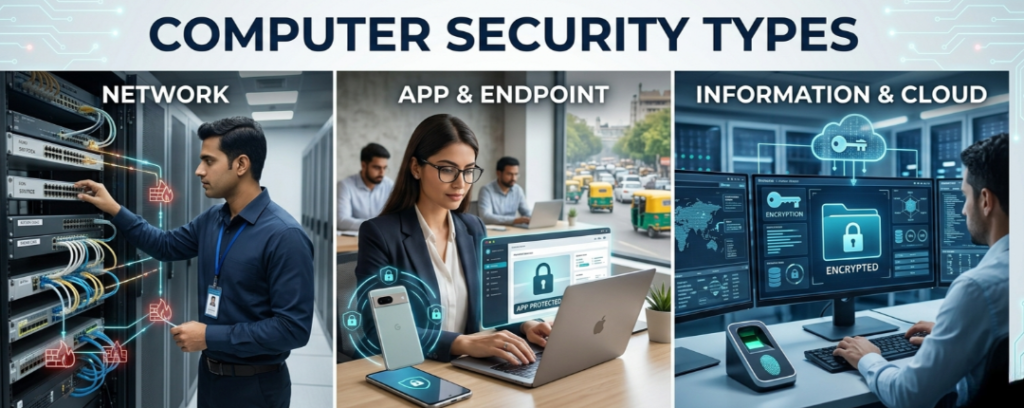
1. Network Security :
Network security protects computer networks from hackers, malware, and cyber attacks.
2. Information Security :
Information security focuses on protecting important data from unauthorized access, misuse, or destruction.
3. Application Security :
Application security protects software and applications from cyber threats and vulnerabilities.
4. Internet Security –
Internet security helps users stay safe while browsing websites, using email services, and performing online activities.
Best Computer Security Practices –
👩💻 Use strong and unique passwords
👩💻 Install trusted antivirus software
👩💻 Enable Two-Factor Authentication (2FA)
👩💻 Regularly update software and operating systems
👩💻 Avoid clicking suspicious links or emails
🛜 Do not share sensitive data on public Wi-Fi
👩💻 Take regular backups of important files
🌐 Use secure and trusted websites only
Why is Computer Security Important?
Cyber crime is increasing rapidly across the world. Hackers continuously develop new methods to steal personal information, banking details, and business data. Computer security helps individuals, businesses, and organizations protect their digital assets and maintain online safety.Strong computer security not only protects information but also improves trust, productivity, and business continuity in the digital age.
Cyber Crime: Explain, Types, Examples & Prevention Methods:
What is Cyber Crime?
Cyber Crime refers to any illegal activity performed using computers, digital devices, networks, or the internet. It includes stealing personal information, hacking systems, spreading malware, online fraud, identity theft, and unauthorized access to confidential data.

In today’s digital era, cyber crime has become one of the fastest-growing threats worldwide. Cyber criminals and hackers use advanced technologies to exploit weaknesses in computer systems, banking platforms, websites, and social media accounts for illegal purposes.
Cyber crime can target individuals, businesses, organizations, and even governments, causing financial losses, privacy breaches, and data theft.
Common Examples of Cyber Crime –
Some major examples of cyber crime include:
🌐 Hacking websites, systems, or networks
👩💻 Stealing personal or financial information
💳 Online banking and credit card fraud
💻 Spreading viruses, malware, and ransomware
📱 Identity theft and fake social media accounts
📧 Sending spam emails and phishing messages
👩💻 Uploading illegal or harmful content online
👩💻 Unauthorized access to confidential business data
🌐 Cyber bullying and online harassment
What are the Types of Cyber Crime ?
Some main types are following:
- Hacking
Hacking is one of the most common cyber crimes. In hacking, cyber criminals gain unauthorized access to websites, computer systems, or online accounts. Hackers may modify, steal, or delete important data and can even take complete control of a system. - Credit Card Fraud
Credit card fraud occurs when hackers steal debit or credit card details and use them for unauthorized online transactions. Cyber criminals often steal card information through fake websites, phishing emails, or insecure payment systems. - Phishing
Phishing is a cyber attack technique used to trick users into revealing sensitive information such as usernames, passwords, OTPs, or banking details. Attackers usually send fake emails, SMS messages, or websites that appear genuine. - Email Spoofing
Email spoofing is a cyber crime in which attackers send fake emails using another person’s identity or email address. It is often used for fraud, spreading malware, or damaging someone’s reputation. - Computer Forgery
Computer forgery involves manipulating or stealing digital documents, certificates, records, or online data for illegal purposes. Weak security in cloud storage or digital lockers can increase the risk of document theft. - Virus and Malware Attacks
Viruses, spyware, trojans, and ransomware are malicious programs designed to damage computers, steal information, or block access to files. These threats often enter systems through unsafe downloads, infected websites, or suspicious email attachments. - Denial of Service (DoS) Attack
A Denial of Service (DoS) attack occurs when attackers overload a server or network with excessive traffic, making services unavailable to legitimate users. Large-scale attacks are commonly called DDoS (Distributed Denial of Service) attacks.
Categories of Cyber Crime –
Cyber crimes are generally divided into three major categories:
- Crime Against Individuals –
Crimes targeting personal information, privacy, or identity, such as phishing, cyberbullying, and identity theft. - Crime Against Property –
Crimes involving theft or damage of digital assets, software, databases, or intellectual property. - Crime Against Government –
Cyber attacks targeting government websites, defense systems, or confidential national information.
Effects of Cyber Crime –
Cyber crime can create serious problems for both individuals and organizations, including:
💫 Financial losses
💫 Data breaches and privacy violations
💫 Reputation damage
💫 Loss of confidential business information
💫 Mental stress and online harassment
💫 Disruption of online services and operations
Best Ways to Prevent Cyber Crime –
🔑 Use Strong Passwords –
Create strong and unique passwords using letters, numbers, and symbols. Change passwords regularly.
🔒 Enable Two-Factor Authentication (2FA) –
Add an extra layer of security to online accounts using OTP or authentication apps.
🛡️ Install Antivirus Software –
Use trusted antivirus and anti-malware software to protect systems from threats.
💽 Keep Software Updated –
Regularly update operating systems, browsers, and applications to fix security vulnerabilities.
🔗 Avoid Suspicious Links and Emails –
Never click unknown links or download files from untrusted sources.
👩💻 Protect Banking Information –
Do not share ATM PINs, CVV numbers, OTPs, or banking passwords with anyone.
🌐 Use Secure Websites –
Always use websites with HTTPS security while making online payments or sharing personal information.
💻 Backup Important Data –
Keep regular backups of important files and documents in secure storage.
◀️ Be Careful on Social Media –
Avoid sharing excessive personal information, private photos, or sensitive details online.
👩💻 Monitor Children’s Internet Usage –
Guide children about online safety and monitor their use of social media and gaming platforms.
Why Cyber Security is Important in 2026:
As technology continues to grow, cyber attacks are becoming more advanced and dangerous. Artificial Intelligence (AI), cloud computing, digital banking, and smart devices have increased both convenience and cyber risks.
In 2026, cyber security is essential for protecting personal data, business operations, financial transactions, and online privacy. Individuals and organizations must stay aware of modern cyber threats and follow proper security practices to remain safe in the digital world.
What Are Computer Security Threats? Types, Risks & Protection Methods Explained
Computer security threats are harmful activities, programs, or attacks that can damage a computer system, steal sensitive information, slow down performance, or disrupt normal operations. With the rapid growth of technology and internet usage, cyber threats have become more advanced and dangerous than ever before.
(1) Computer Virus –
A Computer Virus is a malicious software program designed to enter a computer system without permission and damage files, software, or system performance. The term virus is commonly expanded as Vital Information Resources Under Siege.
A virus can replicate itself automatically and spread from one device to another through infected files, software downloads, email attachments, USB drives, or internet connections. It can delete important data, corrupt files, and interrupt normal computer operations.
Signs of Virus Infection –
Some common symptoms of a virus-infected computer include:
Frequent computer hanging or crashing
Automatic restart of the system
Slow system performance
Software or applications not working properly
Files and icons automatically converting into shortcuts
Missing or deleted files and folders
Unusual pop-up messages or unknown programs appearing
Famous Computer Viruses in History –
Several dangerous viruses and cyber attacks have affected computer systems worldwide over the years, including:
Creeper (1971)
Elk Cloner (1982)
Melissa (1999)
ILOVEYOU (2000)
Code Red (2001)
Nimda (2001)
SQL Slammer (2003)
Blaster (2003)
Sasser (2004)
Conficker (2008)
Most Dangerous Modern Cyber Threats –
Some of the most dangerous modern malware and cyber attacks include:
Emotet
TrickBot
Ryuk Ransomware
Maze Ransomware
Clop Ransomware
DDoS (Distributed Denial of Service) Attacks
Business Email Compromise (BEC)
Router Attacks
Fileless Malware
AI-Based Cyber Attacks and Advanced Malware
Types of Computer Viruses –
Computer viruses are mainly classified into the following categories:
(1) Boot Sector Virus
A Boot Sector Virus attacks the boot sector or BIOS of a computer. It can prevent the system from starting properly and may damage system startup files.
(2) Program Virus
A Program Virus infects executable program files and spreads when the infected application is opened or executed.
(3) Multipartite Virus
A Multipartite Virus attacks both the boot sector and program files simultaneously, making it highly dangerous and difficult to remove.
(2) Worms –
A Worm is a self-replicating type of malware that spreads automatically across systems and networks without user interaction.
Unlike traditional viruses, worms do not always need a host file to spread. They create multiple copies of themselves, consume system resources, and significantly slow down computer performance.
(3) Trojan Horse –
A Trojan Horse is a highly dangerous malicious program that disguises itself as legitimate software, games, videos, or online downloads.
When a user clicks or installs the infected file, the Trojan secretly enters the system and allows attackers to steal data, monitor activities, or damage the entire computer system.
(4) Spyware –
Spyware is malicious software designed to secretly monitor a user’s activities without their knowledge.
It collects sensitive information such as:
Usernames
Passwords
Email details
Browsing history
Banking information
Personal data
A common example of spyware is a Key Logger.
Some organizations may also use monitoring software to track employee activities for security and productivity purposes.
(5) Key Logger –
A Key Logger is a type of spyware that records every key pressed on a keyboard.
Cyber criminals use key loggers to steal confidential information such as passwords, login credentials, banking details, and personal messages without the user’s permission.
(6) Malware –
Malware stands for Malicious Software. It is a broad term used for any software intentionally designed to damage, disrupt, or gain unauthorized access to a computer system.
Examples of malware include:
Viruses
Worms
Trojan Horses
Spyware
Ransomware
Keyloggers
How to Protect Your Computer from Security Threats
To keep your computer and personal data safe, follow these cybersecurity best practices:
💽 Install trusted antivirus software
💻 Keep your operating system and software updated
🔗 Avoid clicking unknown links or email attachments
🔒 Use strong passwords and two-factor authentication
💻 Regularly back up important data
🌐 Download software only from trusted websites
🛜 Use a firewall and secure internet connection
👩💻 Scan USB drives and external devices before use
What is Anti-Virus Software? Best Anti-Virus Software for Complete Computer and Internet Security
Anti-virus software is a security program designed to protect computers and other digital devices from harmful cyber threats such as viruses, malware, worms, spyware, ransomware, and Trojan horses.
It scans the system regularly, detects malicious programs, blocks suspicious activities, and removes harmful files to keep the device secure and running smoothly. Modern antivirus software also provides real-time protection against online threats, phishing attacks, unsafe websites, and data theft.
With the increasing number of cyber attacks and internet-based threats, antivirus software has become an essential tool for maintaining computer security, protecting personal information, and improving overall system performance.
Some important Features of Anti-Virus Software
Modern antivirus programs offer several advanced security features, including:
🛡️ Real-time virus and malware protection
🛡️ Detection and removal of harmful files
🛡️ Protection against spyware and ransomware
🛡️ Safe web browsing and phishing protection
🛡️ Firewall and network security
🛡️ Email and attachment scanning
🛡️ USB and external device protection
🛡️ Automatic security updates
🛡️ Performance optimization and system cleanup
Importance of Anti-Virus Software –
Anti-virus software plays an important role in cyber security by:
Protecting sensitive personal and business data
Preventing unauthorized access to systems
Reducing the risk of cyber attacks
Keeping devices fast and stable
Securing online transactions and internet browsing
Preventing data loss and file corruption
Popular Anti-Virus Software –
Some of the most popular and trusted antivirus software programs are:
Norton AntiVirus
Kaspersky Anti-Virus
McAfee Total Protection
Quick Heal Antivirus
Symantec Endpoint Protection
Avast Antivirus
Bitdefender Antivirus
AVG AntiVirus
Avira Security
K7 Total Security
Trend Micro Antivirus
Sophos Home
ESET NOD32 Antivirus
Max Secure Antivirus
Webroot SecureAnywhere
eScan Internet Security
BullGuard Antivirus
Tips for Choosing the Best Anti-Virus Software –
Before selecting antivirus software, consider the following factors:
Real-time protection features
Malware detection accuracy
System performance impact
Internet and ransomware protection
User-friendly interface
Regular software updates
Customer support and reliability
Compatibility with your operating system
Internet Security: Importance, Types, Threats & Best Protection Methods :
What is Internet Security?
Internet Security refers to the protection of computer networks, online data, digital information, and software from unauthorized access, cyber attacks, hacking, malware, and data theft. It ensures that only authorized and trusted users can access sensitive information and online services safely.
In today’s digital world, internet security plays a vital role in protecting personal data, online transactions, social media accounts, emails, banking information, and business networks from cyber criminals and online threats.
Importance of Internet Security –
Internet security is important because it helps:
Protect sensitive personal and business data
Prevent hacking and cyber attacks
Secure online banking and digital payments
Protect social media and email accounts
Prevent unauthorized access to systems
Keep networks and devices safe from malware and viruses
Maintain user privacy and data confidentiality
Some Main Components of Internet Security –
Internet security is mainly based on the following three important principles:
- Authentication
Authentication is the process of verifying the identity of a user before granting access to a system, website, or network.
Users are commonly authenticated through:
Login ID and Password
OTP (One-Time Password)
Fingerprint Scanning
Face Recognition
Two-Factor Authentication (2FA)
Authentication helps ensure that only authorized users can access confidential data and online services. - Access Control
Access Control is a security method used to limit access to specific data, systems, or resources only to authorized users.
It helps organizations manage who can view, edit, or use certain information.
Common examples of access control include:
Fingerprint Recognition
Voice Recognition
Smart Cards and Electronic Cards
Biometric Security Systems
Role-Based User Permissions
Access control improves security by preventing unauthorized users from accessing sensitive information. - Cryptography
Cryptography is the technique of protecting data and information by converting it into a secure format that cannot be easily understood by unauthorized users.
It is often called “The Art of Protecting Data.”
Cryptography is widely used in:
WhatsApp Messaging
Emails
Online Banking
Credit and Debit Card Transactions
Social Media Platforms
E-commerce Websites
Cloud Storage Services
It helps maintain data privacy, confidentiality, and secure communication over the internet.
Processes of Cryptography :
Cryptography mainly consists of two important processes:
(1) Encryption –
Encryption is the process of converting normal data or readable information into coded or secret data to protect it from unauthorized access.
Encrypted data can only be accessed by users who have the correct decryption key or password.
Example:
When you send a message on WhatsApp, the message is encrypted before being transmitted over the internet.
(2) Decryption –
Decryption is the process of converting encrypted or coded data back into its original readable format.
Authorized users can decrypt the information using the correct password, security key, or authentication method.
Common Internet Security Threats –
Some major internet security threats include:
Computer Viruses
Malware
Spyware
Phishing Attacks
Ransomware
Trojan Horses
Data Breaches
Identity Theft
Password Hacking
Fake Websites and Online Scams
Tips to Improve Internet Security –
Follow these best practices to stay safe online:
Use strong and unique passwords
Enable two-factor authentication (2FA)
Install trusted antivirus software
Keep software and devices updated
Avoid clicking suspicious links or emails
Use secure and trusted websites (HTTPS)
Never share personal information publicly
Regularly back up important data
Some Important Points Related to Computer Security:
(1) What are Cookies in Internet Browsing –
Cookies are small text files stored by websites in a user’s web browser on a computer, laptop, or mobile device. These files help websites remember information about users, their browsing activities, login details, preferences, and previously visited pages.
The main purpose of cookies is to improve the user experience by allowing websites to recognize returning visitors and provide faster, more personalized browsing.
When a user revisits a website, cookies help the server identify that the user has previously accessed the site. This allows websites to automatically load saved preferences, login sessions, language settings, shopping cart items, and search history.
How Cookies Work –
Whenever a user visits a website, the web server sends a small cookie file to the browser. The browser stores this file on the device and sends it back to the website during future visits.
For example,
if you previously visited a website and start typing its name in the browser search bar, the browser may automatically suggest or complete the website name using stored cookies and browsing history.
Cookies help websites:
Remember login information
Save user preferences
Improve website performance
Provide personalized content and advertisements
Reduce loading time for returning users
Enhance overall browsing experience
Types of Cookies –
- Session Cookies –
These cookies are temporary and are deleted automatically when the browser is closed. They help websites manage user sessions during browsing. - Persistent Cookies –
Persistent cookies remain stored on the device for a specific period and help websites remember users for future visits. - Third-Party Cookies –
These cookies are created by external services such as advertisers, analytics providers, or social media platforms to track user behavior and display targeted ads. - Secure Cookies –
Secure cookies are encrypted cookies used mainly on secure HTTPS websites to protect sensitive user information.
Advantages of Cookies –
Cookies offer several benefits for internet users and websites, including:
Faster website access
Personalized user experience
Automatic login and saved settings
Improved website functionality
Better online shopping experience
Time-saving during browsing
Privacy and Security Concerns of Cookies –
Although cookies improve browsing convenience, some cookies may track user activities and collect browsing data for advertising or analytics purposes.
To maintain online privacy, users should:
Clear browser cookies regularly
Use trusted websites only
Adjust browser privacy settings
Block unnecessary third-party cookies
Use secure and updated web browsers
(2) What is Firewall ?
A Firewall is a computer and network security system that protects devices from hackers, malware, viruses, and unauthorized access. It acts as a security barrier between a trusted network and the internet.
A firewall monitors incoming and outgoing internet traffic and blocks suspicious or harmful activities based on security rules. It helps keep computers, servers, and networks safe from cyber attacks and data theft.
Firewalls can be hardware-based or software-based and are widely used in homes, businesses, and organizations to improve cybersecurity and online safety.
Advantages of Firewall –
Protects against hackers and malware
Blocks unauthorized access
Improves network security
Monitors internet traffic
Helps protect sensitive data
(3) What is Spam ?
Spam refers to unwanted or unsolicited messages, emails, advertisements, or notifications sent repeatedly over the internet without the user’s permission. These messages are commonly used for advertising, promotions, scams, or spreading malicious links.
Spam is considered a misuse of internet services and network resources because it wastes users’ time, consumes storage space, and may create security risks.
Common examples of spam include:
Unwanted promotional emails
Fake lottery or prize messages
Repeated advertisements
Fraud or phishing messages
Unwanted social media links
Spam messages may also contain malware, viruses, or harmful links that can compromise personal data and online security.
How to Prevent Spam –
Avoid sharing email addresses publicly
Use spam filters in email services
Do not click suspicious links or attachments
Block unknown senders
Use trusted antivirus and internet security software.
(4) What is Proxy Server ?
A Proxy Server is a security system that acts as an intermediary or filter between users and the main server or the internet. It helps protect networks from unauthorized users and improves online security.
When a user sends a request to access a website or online service, the request first goes through the proxy server. The proxy server then forwards the request to the main server and returns the response to the user. This process helps hide the user’s identity and provides an additional layer of security.
Proxy servers are widely used in organizations, schools, and businesses to monitor internet usage, improve privacy, and control network traffic.
Functions of a Proxy Server –
Protects networks from unauthorized access
Hides users’ IP addresses and identity
Improves internet privacy and security
Increases data transfer speed through caching
Helps block malicious websites and harmful content
Controls malware and virus-related threats
Maintains the privacy of the main server
Advantages of Proxy Server –
Better network security
Faster internet access through cached data
Improved online privacy
Reduced bandwidth usage
Protection against cyber threats
(5) What is Security Measures ?
Security Measures are methods used to protect computer systems, networks, and data from cyber threats such as viruses, malware, hacking, worms, and unauthorized access.
Types of Security Measures –
(a) Physical Security
Protects computer systems and devices from physical damage, theft, and unauthorized persons.
(b) Operating System Security
Keeps the operating system safe from malware, software vulnerabilities, and security breaches through updates, antivirus, and firewalls.
(c) Human Security
Allows system access only to authorized users and helps prevent phishing, password theft, and social engineering attacks.
(d) Network Security
Protects networks and shared data from hackers, malware, and cyber attacks using firewalls, encryption, and secure connections.
(6) What is Cyber Law ?
Cyber Law refers to the legal rules and regulations related to the use of computers, the internet, digital communication, and online activities. It helps control cyber crimes, protect digital data, and ensure safe electronic transactions.
In India, Cyber Law was implemented under the Information Technology Act, 2000 (IT Act 2000) on 17 October 2000. It is the first major law in India designed to deal with cyber crimes, electronic commerce (E-Commerce), digital signatures, online fraud, hacking, and internet-related offenses.
Cyber Law helps protect individuals, businesses, and organizations from cyber threats and promotes secure online communication and digital transactions.
Objectives of Cyber Law –
Prevent cyber crimes and hacking
Protect online data and privacy
Support safe electronic transactions
Provide legal recognition to digital signatures
Ensure cybersecurity and internet safety
(7) What is Digital Signature ?
A Digital Signature is an electronic signature technology used to sign digital documents electronically without printing them. It helps verify the authenticity, identity, and integrity of electronic documents and online transactions.
Digital signatures are widely used in e-commerce, online banking, government services, business agreements, and secure digital communications.
They provide a secure and legally valid way to sign documents stored on computers or shared over the internet.
Benefits of Digital Signature –
Secure and paperless document signing
Saves time and printing costs
Verifies document authenticity
Prevents data tampering and fraud
Supports safe online transactions
(8) What is User Identification ?
User Identification is the process of identifying authorized users on a computer system, digital device, or network. It helps ensure that only verified and trusted users can access data, systems, and online services.
The process of verifying a user’s identity is called Authentication. Authentication plays an important role in cybersecurity and network security by protecting systems from unauthorized access.
Methods of User Identification –
- Username and Password –
Username and Password authentication is the most common method used to verify users.
In this method, only authorized or trusted users with the correct login credentials are allowed to access computer systems, data, and networks.
Advantages
Easy to use
Provides basic security
Widely used in websites and applications - Biometric Techniques –
Biometric Authentication uses unique physical or behavioral characteristics of a user to verify identity.
Common biometric methods include:
Fingerprint Recognition
Retina and Iris Scanning
Face Recognition
Voice Recognition
Biometric technology provides higher security because biometric data is unique to each individual and difficult to duplicate.
Importance of User Identification –
User Identification helps:
Prevent unauthorized access
Protect sensitive information
Improve cybersecurity and privacy
Secure online accounts and networks
Ensure safe digital communication
Objective Questions
- What is the confidential code used to restrict access to programs called?
(a) Passport
(b) Password
(c) Access Code
(d) Entry Code
(e) None of These
Answer: (b) Password - If your computer restarts automatically, it may indicate that:
(a) The printer is missing
(b) The system has a virus
(c) There is an electrical issue
(d) All of the above
(e) None of These
Answer: (b) The system has a virus - By using passwords, users can:
(a) Simplify structures
(b) Memorize data
(c) Use the system
(d) Save time
(e) Maintain confidentiality
Answer: (e) Maintain confidentiality - A computer virus is a:
(a) Bacteria
(b) Fungus
(c) Software Program
(d) Serum
(e) All of the Above
Answer: (c) Software Program - A Proxy Server is mainly used for:
(a) Accessing databases
(b) Providing TCP/IP
(c) Displaying web pages
(d) Protecting against unauthorized users
(e) None of These
Answer: (d) Protecting against unauthorized users - What is the main function of a Firewall?
(a) Moving files
(b) Deleting files
(c) Copying files
(d) Monitoring network traffic
(e) Cutting files
Answer: (d) Monitoring network traffic - Which virus commonly spreads through infected floppy disks left in the drive?
(a) Script Virus
(b) Boot Sector Virus
(c) Trojan Horse
(d) Logic Bomb
(e) None of These
Answer: (b) Boot Sector Virus - In Cyber Law terminology, what does DOS stand for?
(a) Denial of Service
(b) Operating System
(c) Disk Operating System
(d) All of the Above
(e) None of These
Answer: (a) Denial of Service - Software available on the internet to repair known software bugs is called:
(a) FAQ
(b) Patch
(c) Version
(d) Tutorial
(e) All of the Above
Answer: (b) Patch - Junk E-mail is commonly known as:
(a) Script
(b) Spoof
(c) Scrap
(d) Non-Stop
(e) Spam
Answer: (e) Spam
- Which of the following is least likely to be a symptom of a computer virus?
(a) CD-ROM stops working
(b) Existing program files or icons get changed
(c) Unusual messages or images appear on the screen
(d) Web browser opens an unusual homepage
(e) None of These
Answer: (a) CD-ROM stops working - Viruses that activate after a certain time or on a specific date are called:
(a) Time Bomb
(b) Corona Virus
(c) Macro Virus
(d) Boot Sector Virus
(e) Worm
Answer: (a) Time Bomb - What was the first computer virus?
(a) Creeper
(b) ILOVEYOU
(c) Code Red
(d) Nimda
(e) None of These
Answer: (a) Creeper - The term “Spam” is related to:
(a) Literature
(b) Dance
(c) Computer
(d) Music
(e) Sports
Answer: (c) Computer - In which type of cyber attack are users asked to provide information such as passwords, names, PINs, and birth dates?
(a) Phishing
(b) Password Attack
(c) Chat Attack
(d) Malware Engine
(e) Denial of Service
Answer: (a) Phishing - Which type of cyber attack redirects users from the intended website to a fake or different website?
(a) Corona Attack
(b) Phishing
(c) Session Hijacking
(d) DNS Poisoning
(e) All of the Above
Answer: (d) DNS Poisoning - A secure password should contain:
(a) Numbers
(b) Special Symbols (|@#%&)
(c) Uppercase and Lowercase Letters
(d) All of the Above
(e) None of These
Answer: (d) All of the Above - Which is the international standard for Cyber Security Management?
(a) ISO 27002
(b) ISO 27003
(c) ISO 27001
(d) ISO 2700
(e) None of These
Answer: (c) ISO 27001 - Which law in India deals with Cyber Crime and Electronic Commerce?
(a) IT Act, 2005
(b) IT Act, 2018
(c) IT Act, 2019
(d) IT Act, 2002
(e) IT Act, 2000
Answer: (e) IT Act, 2000 - Tampering with Computer Source Code comes under which section of the IT Act?
(a) Section 63
(b) Section 65
(c) Section 43
(d) Section 99
(e) Section 73
Answer: (b) Section 65

Mujtaba Ansari is a Software Engineer, Founder & CEO of The Tech Earth. He writes about technology, AI, software, cybersecurity, blogging, Health tech, Agri Tech and digital trends to help readers stay updated with the latest innovations.