
What is Software ?
Software is a collection of programs, procedures, rules, and related documentation that control how a computer system operates. It acts as the brain of the computer, giving instructions to the hardware.
Software tells the hardware what to do, when to do it, and how to do it. Without software, a computer cannot perform any task and becomes completely non-functional.
Unlike hardware, software is intangible, meaning we cannot touch or physically see it. Its primary purpose is to convert raw data into meaningful information that users can understand and use.
To understand this better, consider a simple real-life example:
Think of the human body as a computer system. The physical body that we can see and touch is like hardware. Inside the body, the soul or mind acts like software, guiding actions, making decisions, and controlling all functions.
If the soul leaves the body, the body becomes lifeless and cannot function. In the same way, without software, a computer system is useless and cannot operate.
Types of Software :
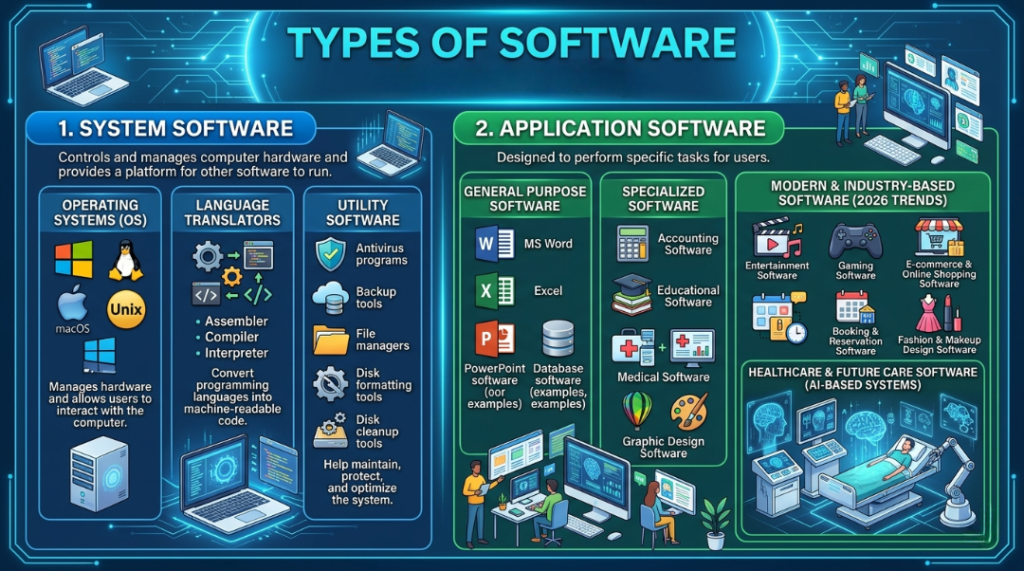
Software can be broadly classified into two main categories:
- System Software –
System software controls and manages the computer hardware and provides a platform for other software to run.
Main Types of System Software:
Operating Systems (OS):
Examples: Windows, Linux, macOS, Unix
→ Manages hardware and allows users to interact with the computer.
Language Translators:
Assembler
Compiler
Interpreter
→ Convert programming languages into machine-readable code.
Utility Software:
Antivirus programs
Backup tools
File managers
Disk formatting tools
Disk cleanup tools
→ Help maintain, protect, and optimize the system. - Application Software –
Application software is designed to perform specific tasks for users.
Types of Application Software:
General Purpose Software:
Word Processors (e.g., MS Word)
Spreadsheets (e.g., Excel)
Presentation Tools (e.g., PowerPoint)
Database Software
Specialized Software:
Accounting Software
Educational Software
Medical Software
Graphic Design Software (e.g., CorelDRAW)
Modern & Industry-Based Software (2026 Trends):
Entertainment Software
Gaming Software
E-commerce & Online Shopping Software
Booking & Reservation Software
Fashion & Makeup Design Software
Healthcare & Future Care Software (AI-based systems)
System Software :-
System software refers to the set of programs designed to run and manage a computer system efficiently. It controls and coordinates the computer hardware, ensures smooth functioning, and helps utilize all system resources effectively.
This type of software acts as a bridge between the hardware and the user, handling tasks such as system operations, resource management, and overall maintenance of the computer.
A primary and most common example of system software is the Operating System (OS), which manages all basic functions of a computer.
Examples of System Software:
Operating Systems (Windows, Linux, macOS)
Data Communication Software
Database Management Systems (DBMS)
System software is essential for the smooth functioning of a computer system. It acts as a bridge between hardware and users, ensuring that all components work efficiently.
System software is broadly classified into three main categories:
- Operating System (OS) –
An Operating System (OS) is a collection of programs that manages and controls the overall operations of a computer system and its resources. It acts as an interface between the user and the hardware.
Key Functions of an Operating System:
Manages programs and processes
Handles memory management
Controls input and output devices
Ensures smooth communication between hardware and software
Popular Examples of Operating Systems:
Microsoft Windows (Windows 95, 98, 2000, XP, Vista, 7, 8, 10, 11)
MS-DOS
Apple macOS
Google Chrome OS
Unix, Linux, Xenix
Mobile Operating Systems:
Android OS (Android 10, 11, 12, 13, etc.)
Apple iOS
Windows Phone OS
BlackBerry OS
Bada OS, Palm OS
(2) Language Translator (Language Processor) –
A Language Translator, also known as a language processor, is system software that converts programming languages (high-level or assembly language) into machine code that a computer can understand.
Types of Language Translators:
(a) Assembler
An assembler converts assembly language (low-level language) into machine language. It translates the entire program into executable machine code, making it ready to run on a computer.
(b) Compiler
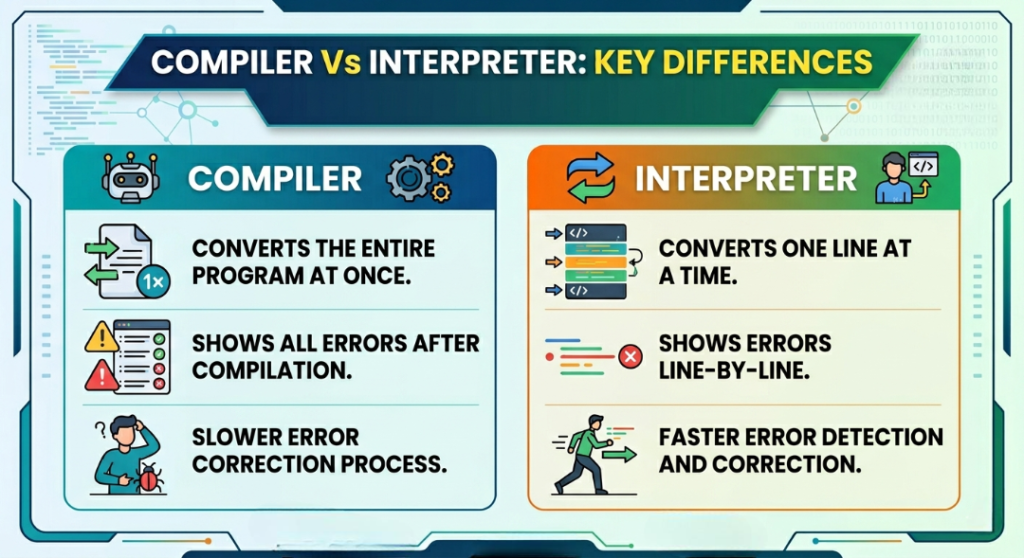
A compiler translates the entire program at once into machine code before execution.
(c) Interpreter
An interpreter translates and executes the program line-by-line.
👩💻 Assembler: Definition, Function & Role in System Software –
An Assembler is a type of system software that converts programs written in assembly language (low-level language) into machine code that a computer can understand and execute.
It works by translating symbolic instructions into binary instructions and assembling them into a complete executable program. This process ensures that the code is properly organized, converted, and ready to run on the computer system.
Key Functions of an Assembler:
Translates assembly language into machine language
Converts symbolic instructions into binary code
Organizes and assembles machine code into a final executable program
Prepares the program for execution (run) by the computer
Difference Between Compiler and Interpreter –
(3) Utility Software: Definition, Functions & Examples –
Utility Software, also known as service programs, is a type of system software designed to enhance the performance, security, and efficiency of a computer system. It works alongside the operating system to keep the system running smoothly and reliably.
Utility software helps simplify computer operations, detect and fix errors, protect against threats, and optimize overall system performance. It is widely used across various applications to maintain system health and improve user experience.
Key Functions of Utility Software:
Improves system performance and speed
Detects, prevents, and fixes system errors
Provides security against viruses, malware, and cyber threats
Manages files, storage, and disk operations
Supports system maintenance and optimization.
Examples of Utility Software:
Antivirus and anti-malware tools
Backup and recovery software
File management systems
Disk formatting and partitioning tools
Disk cleanup and optimization utilities
Application Software: Types, Features & Examples :
Application Software refers to programs designed to help users perform specific tasks efficiently. These applications run on top of the operating system and act as a bridge between the user and system software.
Unlike system software, application software is developed to meet user-specific needs such as creating documents, browsing the internet, managing data, or controlling specialized systems. It can be developed by organizations, developers, or companies based on particular requirements.
Types of Application Software –
Based on usability and purpose, application software is mainly divided into two categories:
(1) Special Application Software (Customized Software) :
Special application software is designed for a specific task or a particular organization. It is tailored to meet unique user requirements and cannot be used for general purposes.
Key Features:
Developed for a specific function or industry
Customized according to user or organizational needs
Limited to specialized tasks
Examples:
Weather forecasting systems
Railway reservation systems
Air traffic control systems
Banking and hospital management systems
(2) General Application Software :
General application software is designed for a wide range of users and can perform common tasks. These programs are widely used in daily life and business environments.
Key Features:
Suitable for multiple users
Performs general-purpose tasks
Easy to use and widely available
Examples of General Application Software:
Word processing software (e.g., Microsoft Word)
Spreadsheet software (e.g., Microsoft Excel)
Presentation tools (e.g., PowerPoint)
Web browsers (e.g., Chrome, Edge)
Media players
Database management software
Accounting software
CAD/CAM software (for design and manufacturing)
Graphics and multimedia software
Key Takeaways :
Application software plays a vital role in modern computing by enabling users to perform specific tasks with ease and efficiency. From customized industry solutions to everyday productivity tools, it enhances both personal and professional productivity.
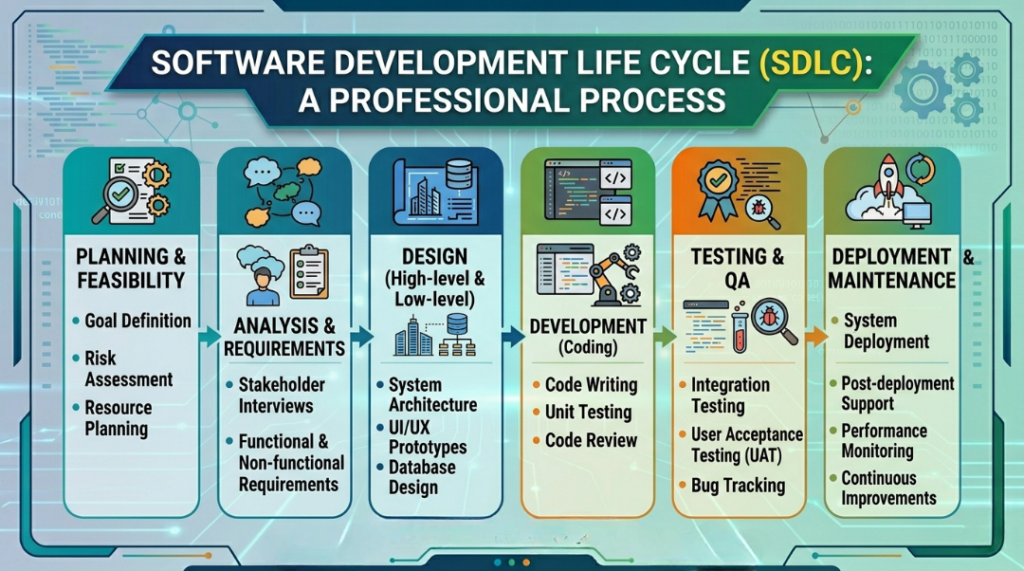
Software Development Life Cycle (SDLC): Definition & Overview –
The Software Development Life Cycle (SDLC), also known as the System Development Life Cycle, is a structured process that defines how software is planned, developed, tested, and deployed.
SDLC explains the complete journey a software product goes through—from initial idea to final delivery. It outlines the various stages involved in development and helps identify potential challenges that developers or clients may face during the process.
This lifecycle also provides appropriate methods, tools, and solutions to handle different situations during software development, ensuring better quality, efficiency, and reliability.
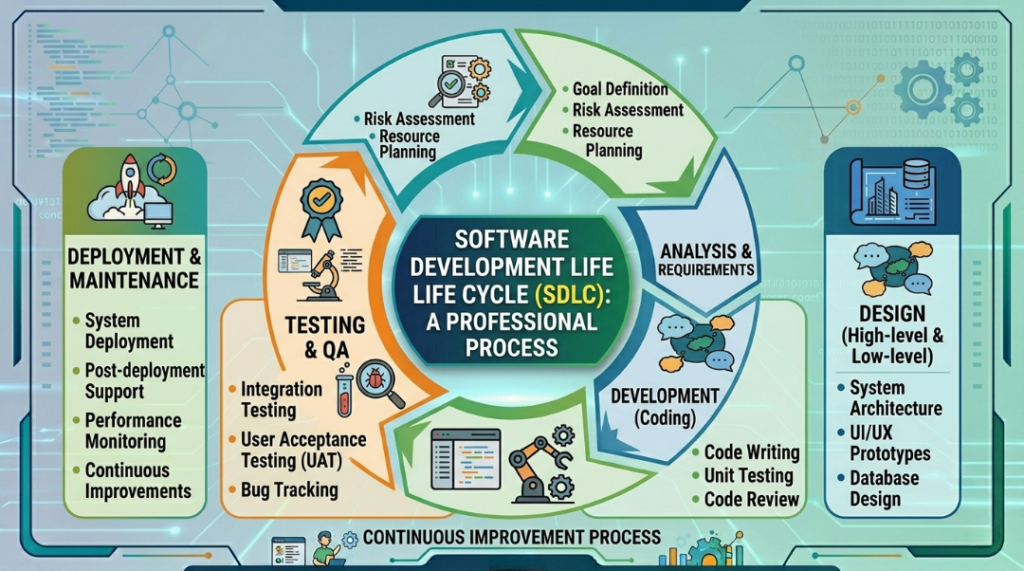
👉 In simple terms, SDLC is a step-by-step process used to build high-quality software systems in an organized and effective way.
Why SDLC is Important:
Ensures systematic and structured development
Helps manage risks and challenges effectively
Improves software quality and performance
Provides clear communication between developers and clients
Windows Application: Definition, Features & Examples :
A Windows Application is a user-developed software program designed to run on the Microsoft Windows operating system. These applications are built specifically for the Windows platform and provide an interactive and user-friendly experience.
Most Windows applications use a Graphical User Interface (GUI), which allows users to interact with the software through visual elements instead of command-line instructions.
Key Features of Windows Applications:
Built to run on Windows OS
Provides an intuitive Graphical User Interface (GUI)
Developed using frameworks like Windows Forms (WinForms) or modern technologies such as .NET (WPF, UWP)
Easy interaction through visual controls
Common GUI Controls in Windows Applications:
Buttons (for actions)
Text Boxes (for user input)
Radio Buttons (for selecting one option)
Check Boxes (for multiple selections)
Data controls and database connection components
These controls are typically provided by Windows Forms, which offers a wide range of tools to design and manage application interfaces efficiently.
👉 In simple terms – A Windows Application is a GUI-based software program that runs on Windows and allows users to interact easily using visual elements.
✨ Top Hindi Typing Software & Tools (Latest 2026 List) ✨
Want to type in Hindi faster and smarter on mobile or PC? Here are the best and latest Hindi typing software & tools you should try 👇
🔹 Google Input Tools – Type in English, get Hindi instantly (smart & easy)
🔹 Indic Input 3 – Official tool for Indian languages typing
🔹 InScript Keyboard – Standard layout for professional typing
🔹 Hindi Indic IME – Smooth and reliable typing experience
🔹 India Typing Software – Best for beginners & practice
Latest & Trending Hindi Typing Tools (2026):
🔥 Microsoft Indic Language Input Tool – Advanced phonetic typing for Windows
🔥 Indic Keyboard (Android App) – Multi-language typing with smart suggestions
🔥 Easy Hindi Typing (Online Tool) – Fast browser-based Hindi typing tool.
💡 These tools use transliteration technology (type “india” → इंडिया | Mujtaba →मुजतबा) making Hindi typing super easy and fast
👉 Start typing in Hindi like a pro & boost your productivity today!
Top Trends of Artificial Intelligence (AI) in 2026
Artificial Intelligence (AI) is evolving rapidly and transforming how businesses, governments, and individuals use technology. Below are the latest and most important AI trends shaping the future:
- Facial Recognition & Computer Vision –
AI-powered facial recognition and computer vision systems are widely used in security, smartphones, retail, and smart cities. These technologies can identify faces, detect objects, and analyze visual data in real time. - Deep Learning & Advanced Neural Networks–
Deep learning, a subset of AI, uses neural networks to process large amounts of data. It powers applications like speech recognition, image processing, and self-driving systems with high accuracy. - Cloud AI & AI-as-a-Service (AIaaS) –
Cloud platforms now provide AI tools and services, making it easier for businesses to use AI without heavy infrastructure. This trend allows scalable, cost-effective AI deployment. - AI-Enabled Chips & Edge AI –
Modern devices use AI-powered chips to process data faster and locally. Edge AI reduces latency by performing computations directly on devices like smartphones, cameras, and IoT systems. - Data Privacy, Ethics & AI Regulations –
With the growth of AI, there is increased focus on data privacy, ethical AI usage, and government regulations. Ensuring transparency and responsible AI is now a top priority.
Latest Emerging AI Trends (2026 Update) – - Generative AI –
AI models can now create content like text, images, videos, and code, revolutionizing industries such as marketing, education, and design. - AI Automation & Robotics –
AI-driven automation is improving productivity in industries like manufacturing, logistics, and customer service. - Natural Language Processing (NLP) –
AI systems are becoming better at understanding and communicating in human language, powering chatbots, virtual assistants, and translation tools.
Objective Questions (Computer Fundamentals MCQs)
(1) Which is the largest software company in India?
(a) Wipro
(b) HCL
(c) TCS
(d) Infosys
(e) None of the above
(2) When was Microsoft Windows developed?
(a) 1990
(b) 1999
(c) 1989
(d) 1993
(e) 1985
(3) CorelDRAW software is an example of which type of software?
(a) System Software
(b) Application Software
(c) Both (a) and (b)
(d) None of the above
(e) Only (a)
(4) In the context of computers, what does “software” mean?
(a) Computer Screen
(b) Printer Screen
(c) Computer Programs
(d) Human Brain
(e) Hard Disk
(5) The part of a computer system that includes programs or instructions is called:
(a) Icon
(b) Information
(c) Hardware
(d) Software
(e) None of the above
(6) What type of software is Linux?
(a) Open Source
(b) Shareware
(c) Freeware
(d) Firmware
(e) None of the above
(7) The term CAD in computers is related to:
(a) Geography
(b) Arts
(c) Science
(d) Design
(e) Accounts
(8) Which software controls the hardware of a computer?
(a) System Software
(b) Program
(c) Memory
(d) Application Software
(e) All of the above
(9) Who is the creator of Unix?
(a) Ken Thompson
(b) Johnson
(c) Nikki Hallo
(d) Rodd Fenson
(e) None of the above
(10) Instructions that are easy to understand are called:
(a) Word Processing
(b) Icon
(c) Information
(d) User-Friendly
(e) All of the above
(11) What is the main circuit board of a computer called?
(a) Mouse
(b) Keyboard
(c) Printer
(d) Motherboard
(e) None of the above
(12) What are the three main components of a computer?
(a) Tape, Monitor, Printer
(b) RAM, Input/Output Devices, CPU
(c) CPU, Monitor, Printer
(d) CD, Pen Drive, Scanner
(e) None of the above
(13) Where are expansion cards inserted in a computer?
(a) Slot
(b) CPU
(c) Keyboard
(d) Back side of the computer
(e) All of the above
(14) What is the box called that contains the most important parts of a computer system?
(a) System Unit
(b) Software
(c) Hardware
(d) Output Device
(e) None of the above
(15) Who is credited with the development of the Personal Computer (PC)?
(a) HCL
(b) IBM
(c) Wipro
(d) HP
(e) Dell
(16) Which port connects special musical instruments to a sound card?
(a) CPU
(b) Bus
(c) MIDI
(d) USB
(e) All of the above
(17) Information travels between motherboard components through . (a) Pen Drive (b) Buses (c) Adapter (d) Cable (e) All of the above (18) Which part of a computer helps store information? (a) Keyboard (b) Disk Drive (c) Monitor (d) Printer (e) None of the above
(19) The speed of a computer clock is measured in .
(a) Bit
(b) Gigabyte
(c) Megabyte
(d) Gigahertz
(e) None of the above
(20) What connects the CPU to other components on the motherboard?
(a) System Bus
(b) ALU
(c) Primary Memory
(d) Input Unit
(e) None of the above
ANSWERS
(1)-c (2)-a (3)b (4)c (5)-d (6)-a (7)-d (8)-a (9) a (10)d (11)-d (12)-b (13)-a (14)-a (15)-b
(16)-c (17)-b (18)-b (19)-a (20)-a

Mujtaba Ansari is a Software Engineer, Founder & CEO of The Tech Earth. He writes about technology, AI, software, cybersecurity, blogging, Health tech, Agri Tech and digital trends to help readers stay updated with the latest innovations.